Projectreunion: Question: .NET 5 UWP apps are already possible, so when will official support arrive?
Question: .NET 5 UWP apps are already possible, so when will official support arrive?
When it comes to .NET 5 support for UWP apps, we don't really have a clear answer yet to how that will look like and when it will come. UWP developers shouldn't have to be stuck on an old .NET version while Win32 developers are seemingly way ahead and can also use the new C#/WinRT language projection.
How to create a .NET 5 UWP app
What I found is that despite Microsoft telling us developers that creating UWP apps running on .NET 5 is not supported yet, it is actually quite easy to do today with minimal setup and it even works with WinUI 3. You can start off with the regular .NET 5 console app template and modify it from there. This process involves three steps: Modifying the project file, adding a package manifest file and generating a PRI file. Be sure to have the latest .NET 5 preview SDK and Visual Studio Preview installed. I have provided samples in this repository.
Project file
You need to add a few properties, NuGet packages and targets. I tried to make it as independent of Visual Studio and the Windows 10 SDK as possible.
<Project Sdk="Microsoft.NET.Sdk">
<PropertyGroup>
<!--If this property is set to WinExe, the app will not spawn a console window.-->
<OutputType>WinExe</OutputType>
<TargetFramework>net5.0</TargetFramework>
<Nullable>enable</Nullable>
<TargetPlatformVersion>10.0.19041.0</TargetPlatformVersion>
<TargetPlatformMinVersion>10.0.18362.0</TargetPlatformMinVersion>
<!--Platforms are only necessary for WinUI 3 and only x86 and x64 are supported at this time.-->
<Platforms>AnyCPU;x86;x64;ARM;ARM64</Platforms>
<!--The Main method needs to be defined manually to avoid an exception.-->
<DefineConstants>$(DefineConstants);DISABLE_XAML_GENERATED_MAIN</DefineConstants>
</PropertyGroup>
<ItemGroup>
<Content Include="AppxManifest.xml" CopyToOutputDirectory="PreserveNewest" />
<Content Include="Assets\**" CopyToOutputDirectory="PreserveNewest" />
</ItemGroup>
<!--The C#/WinRT language projection and WinUI 3 is used in this project.-->
<ItemGroup>
<PackageReference Include="Microsoft.Windows.CsWinRT" Version="0.1.0-prerelease.200623.5" />
<PackageReference Include="Microsoft.Windows.SDK.NET" Version="10.0.18362.3-preview" />
<PackageReference Include="Microsoft.WinUI" Version="3.0.0-preview1.200515.3" />
</ItemGroup>
<!--Any XAML files that have a code-behind file need to be listed here.-->
<ItemGroup>
<Page Update="App.xaml">
<Generator>MSBuild:Compile</Generator>
</Page>
<Page Update="MainPage.xaml">
<Generator>MSBuild:Compile</Generator>
</Page>
</ItemGroup>
<!--This target generates a resource file for your app based on the priconfig.xml file and the files in the output directory.-->
<Target Name="MakePri" AfterTargets="Build">
<Exec Command=""$(MSBuildProgramFiles32)\Windows Kits\10\bin\$(TargetPlatformVersion)\x86\MakePri.exe" new /pr $(OutputPath) /cf priconfig.xml /of $(OutputPath)resources.pri /o" />
</Target>
<!--The manifest needs to be registered with the OS and after doing this, your app will appear in the app list.-->
<Target Name="RegisterManifest" AfterTargets="MakePri">
<Exec Command="PowerShell Add-AppxPackage -Register $(OutputPath)AppxManifest.xml" />
</Target>
</Project>
Package manifest
The package manifest named AppxManifest.xml is needed to register your app with the OS, but notice that it's not the regular Package.appxmanifest file you find in old UWP projects, which would generate the final AppxManifest.xml for you. If you use an existing one, be sure to remove the package dependency for UWP .NET Core and use the release version of VCLibs.
<Dependencies>
  <TargetDeviceFamily Name="Windows.Universal" MinVersion="10.0.18362.0" MaxVersionTested="10.0.19041.0" />
  <PackageDependency Name="Microsoft.VCLibs.140.00" MinVersion="14.0.27810.0" Publisher="CN=Microsoft Corporation, O=Microsoft Corporation, L=Redmond, S=Washington, C=US" />
</Dependencies>
For WinUI 3 you also need to add any types you use from it to your manifest. This also needs to be done for WinUI Desktop.
<Extension Category="windows.activatableClass.inProcessServer">
  <InProcessServer>
    <Path>Microsoft.UI.Xaml.Controls.dll</Path>
    <ActivatableClass ActivatableClassId="Microsoft.UI.Xaml.Controls.TreeView" ThreadingModel="both" />
    <ActivatableClass ActivatableClassId="Microsoft.UI.Xaml.Controls.TreeViewItem" ThreadingModel="both" />
  </InProcessServer>
</Extension>
Resources
It is necessary to have a file called resources.pri in your app for any assets, including XAML files, to be accessible by your app. This can be generated using MakePri.exe. It takes a configuration file called priconfig.xml as an input. You can create a new configuration file with the command makepri createconfig /cf priconfig.xml /dq en-US. Be sure to remove the following two tags if you want to only create a single resources.pri file.
<packaging>
  <autoResourcePackage qualifier="Language"/>
  <autoResourcePackage qualifier="Scale"/>
</packaging>
Entry point for WinUI 3
A custom entry point needs to be defined for WinUI 3 apps because the automatically generated one applies the STAThreadAttribute to the Main method, which causes a wrong thread exception.
public class Program
{
    private static void Main(string[] args)
    {
        ComWrappersSupport.InitializeComWrappers();

        Application.Start(p =>
        {
            DispatcherQueueSyncContext.SetForCurrentThread();
            new App();
        });
    }
}
Building and debugging
The project can be built either on the command line using dotnet build or in Visual Studio, though for WinUI 3 it currently needs to be done in Visual Studio. Do not start the app from Visual Studio, this would execute the .exe file directly and essentially be a Win32 launch. The app needs to be launched by clicking on the app list entry in the Start menu or the icon on the taskbar. A debugger can be attached from Visual Studio after the app has been started.
Issues
The biggest issues with this approach are:
- It requires more manual setup.
- The whole .NET runtime needs to be shipped with the app if it is self-contained.
- There is no AOT compilation.
- Launching an app of this type directly from Visual Studio is not supported.
- A generator for the package manifest is not included in the .NET SDK or a NuGet package.
MakePri.exeis not included in the .NET SDK or a NuGet package.- WinUI 3 depends on targets from Visual Studio.
- WinUI 3 generates a faulty entry point.
Conclusions
I have been using .NET 5 and WinUI 3 in my own UWP projects for a few weeks now and it has been working quite well and I was able to take advantage of new .NET APIs that I didn't have access to before. The main issues come from WinUI 3 still being in preview, so there are still many missing pieces, which is why I wouldn't recommend it for production use just yet.
Through this process I also came to understand what the main difference between a UWP and a Win32 app is and it all has to do with how the app is launched. It is the EntryPoint on the Application element in the package manifest that determines if it will be a UWP or a Win32 launch. For UWP it will be YourProject.App and for Win32 it will always be Windows.FullTrustApplication.
It is also unclear if this type of app will be accepted in the Microsoft Store, so I would like to know more information about that. The other question remaining is the one I stated at the beginning: Since it is possible to build UWP apps running on .NET 5 today, what is the holdup on supporting it officially? It would be great if Microsoft provided additional tooling to make the process easier for developers. I would like to see a rough timetable on when we can see the issues I mentioned resolved. Hopefully we can see it officially supported whenever WinUI 3 is ready for production, so that UWP developers that make the switch can also take advantage of .NET 5 immediately.
 Aminator
All 168 comments
Does that work like a UWP app,
I mean have CoreWindow, support xbox & etc.
What you did sounds like how a packages win32 app work but hacked to look like a UWP app
 ShankarBUS
on 10 Jul 2020
ShankarBUS
on 10 Jul 2020
@ShankarBUS This method does create an actual UWP app and it's using CoreWindow. Just look at the repository I provided, which contains a project that just uses CoreApplication and the other uses the WinUI 3 Application.
Aminator
on 10 Jul 2020
I'm so with you here, I wanted to move to .net standard 2.1 a long time ago in my cross platform solution where I want to use gRPC but this beautiful UWP beast is holding me back ;)) plse MS tag and bag this thing !!
 Pinox
on 10 Jul 2020
Pinox
on 10 Jul 2020
When it comes to .NET 5 support for UWP apps, we don't really have a clear answer yet to how that will look like and when it will come. UWP developers shouldn't have to be stuck on an old .NET version while Win32 developers are seemingly way ahead and can also use the new C#/WinRT language projection.
Can't stress this enough. .NET 5 support for UWP has been the number 1 question from the UWP developer community for months now (see for example the recent 3-4 WinUI Community Calls). The messaging from the MS teams on this very important topic for UWP developers has been absolutely catastrophic:
First, while the .NET team in its initial .NET 5 introduction blog post mentioned UWP, it has been silent on this topic very much ever since. If you read the blog posts for the different .NET 5 previews...do you see any official comment on the UWP .NET 5 situation? Nope, not at all. It feels like the .NET team has no interest in this topic any longer. For example, see this issue where in May this year, the community explicitly asks for a UWP roadmap for .NET. Do you see any reply by the .NET team there? Did the .NET team assign anyone to this this issue? The answer is: NOPE. Apparently, the .NET team just doesn't care about UWP.
Secondly, in the absence of other MS teams to ask or give us answers, the UWP developer community turned to the WinUI team. Now, the WinUI team arguably is the wrong team to ask on this matter here so they get a pass for not knowing the exact status of .NET 5 on UWP. Yet, the answers we do receive month after month of constant asking are incredibly disappointing. Here they are:
- .NET 5 support for UWP could arrive with Project Reunion or it could not
- We don't know when support will arrive. You perhaps have to wait until the .NET 6 timeframe (which is more than an entire year away)
So, why are these answers we are getting time and time again really disappointing here? They tell me two things: MS doesn't know how .NET 5 support for UWP will arrive and it doesn't know when. The resulting optics paint a pretty bleak picture of the importance of UWP at MS. .NET 5 is one of the biggest stories for Windows developers out there and communication with the UWP community on this topic has been absolutely abysmal.
Lastly, the UWP developer community then went to Project Reunion to ask for clarification and details on the UWP on .NET 5 story. See this issue for example. A community member came - in that thread - to the following conclusion:
It sounds like Reunion enabling .NET 5 or not isn't the decision of the project -- where should I redirect my feedback?
To which a Project Reunion team member at MS, @jonwis, replied with the following:
Please file issues about .NET and the support you need in their GitHub repo ... We intend for Project Reunion to be usable by .NET applications through the C#/WinRT projection, but Project Reunion is additive functionality to any existing application, not an application model in itself. (At least not yet.)
Remember the first point in my post? That the community went to the repo of the .NET team and asked for a ".NET roadmap for UWP"? Remember that that issue received zero care by the .NET team?
Remember the second point, where the WinUI team has been telling us that ".NET 5/6/... support might come via Project Reunion"?
What I am seeing here is this: No team at MS wants to be responsible for UWP on .NET 5:
The .NET team -> Absolute silence in both Preview blog posts and on their repo
The WinUI team -> Project Reunion might be used here to bring .NET 5 support to UWP
The Project Reunion team -> Ask the .NET team.
Is the state of the UWP really so pitiful internally at MS that more than a year after the intial introduction of .NET 5 the UWP developer community has zero clue at all how and when support for .NET 5 will arrive? Are we UWP developers that unimportant to MS that seemingly no one wants to step up, lead that project and have a respectful and constructive interaction with the community?
I will leave with this picture from the official .NET 5 introduction blog post:
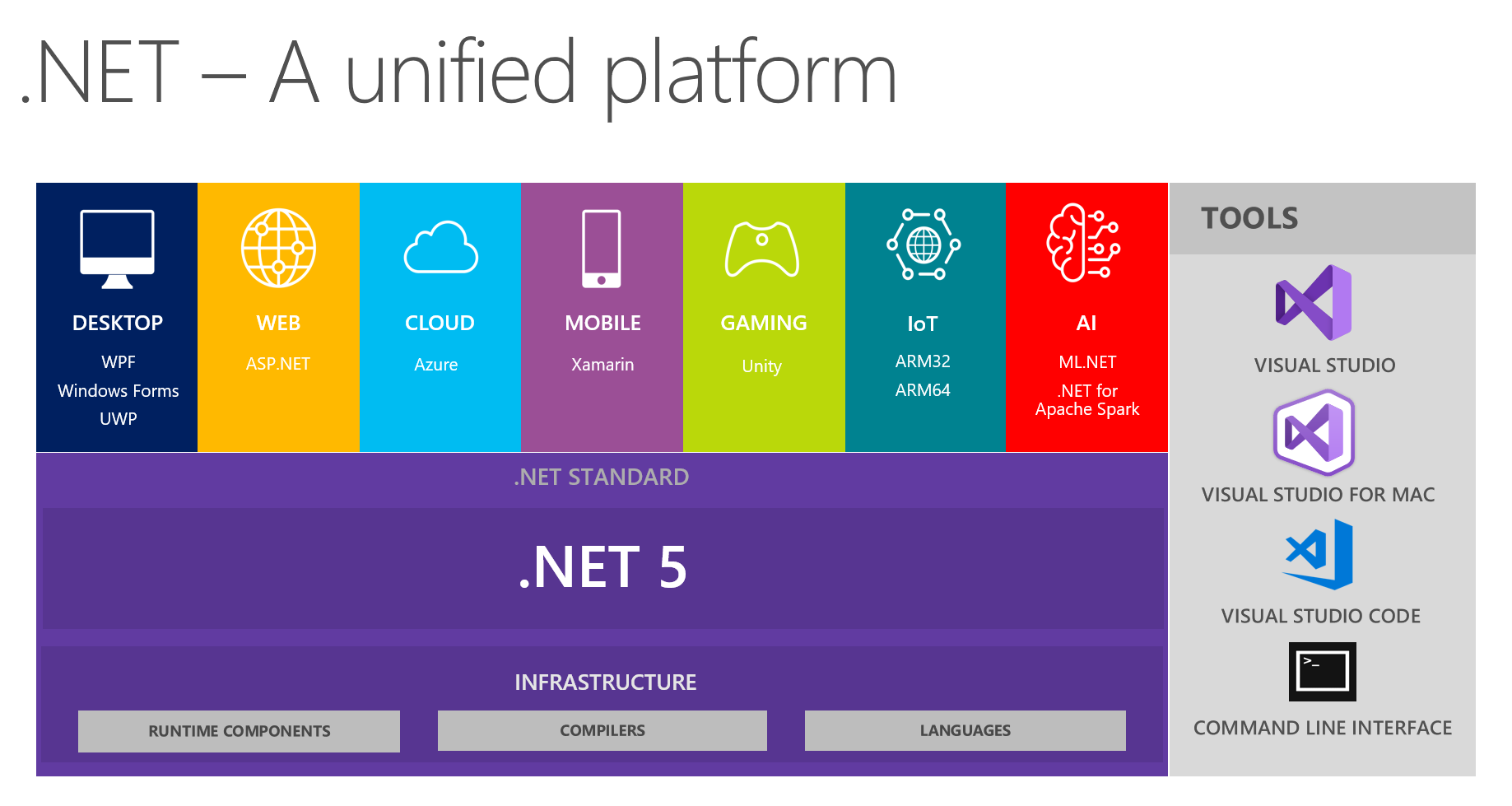
It has been downhill ever since then for the UWP developer community....
 Felix-Dev
on 10 Jul 2020
Felix-Dev
on 10 Jul 2020
It seems to all available resources Microsoft spending to Project Reunion and MAUI. And UWP'll die in a few years.
 LeftTwixWand
on 10 Jul 2020
LeftTwixWand
on 10 Jul 2020
If it means we can build UWPs without Visual Studio and Windows SDK, that would be great news. Looks like it is basically there.
 driver1998
on 10 Jul 2020
driver1998
on 10 Jul 2020
On the issue about UWP and .NET 5, I feel since UWP is basically a Windows-targeted solution, it would only make sense for it to evolve with Windows (currently Windows 10). So, since Windows 10 is still taking some shape (e.g. Start menu revamping, etc.), UWP may have to wait.
 olugt
on 10 Jul 2020
olugt
on 10 Jul 2020
@olugt I think the revamping and Windows 10X are being done using UWP? At least the Windows and .NET teams should give the community a concrete answer. If they would not support it, let the community and the customers know.
@Aminator Thank you for this wonderful effort. All I am asking the Windows/ .NET teams is to give us a concrete response.
 saint4eva
on 10 Jul 2020
saint4eva
on 10 Jul 2020
@Felix-Dev , I'll add some more points that makes UWP future questionable.
MS announced the Winget package manager at build. So now we are going to have the MS Store + Winget which I assume has it's own "store" ( source packages).
So now we are going to have 2 "sources" for apps that makes no sense whatsoever except if there is a plan to create a new "source" that winget and Windows Store will feed from.
MS announced that the Ad platform on MS Store is ending.
The fact that UWP uses .net native for compilation and there is no .net native toolchain in .NET 5 that I'm aware of really brings UWP to it's end of life as we know it.
Perhaps there are plans next year to hop onto the AOT bandwagon that will give UWP a new direction therefor the lack of response from MS regarding this.
I just wish the leadership at MS can address this issue, because it's clear the individual teams are skirting this issue because they themselves probably also don't know.
As a developer that uses UWP this is important issue for me , because I have made an investment already in UWP and I don't want to write off that investment. If I need to go the win32 route to prolong my investment I will do that. To me the ideal solution at this moment looks like win32 with AOT as you can do so much more and you still have access to UWP contracts plus an added performance benefit of no sandbox.
So MS let there be a fallout in your announcement then at least we can all move forward.
@Aminator Thanks for your effort. You have shown more commitment and hope for UWP's future than MS themselves.
Pinox
on 10 Jul 2020
@Aminator on the original question re: Microsoft Store, you should run the WACK (appcertui.exe from the SDK) on your package locally and see if it gives any errors. If you are submitting a partial-trust package ("UWP" / AppContainer) then it will potentially fail due to unsupported API calls from the .NET Runtime. If you are submitting a full-trust package (Desktop Bridge / Centennial) then the API check is skipped.
Although you have the entire .NET Core runtime bundled with your app (which makes it larger and can increase the number of WACK failures), you can reduce the number of DLLs in your package quite significantly; it just takes a lot of trial and error to remove the ones you don't need.
 ptorr-msft
on 10 Jul 2020
ptorr-msft
on 10 Jul 2020
you can reduce the number of DLLs in your package quite significantly; it just takes a lot of trial and error to remove the ones you don't need.
You should be able to set PublishTrimmed in your .csproj and that will strip out the .net core assemblies that aren't used
 stevenbrix
on 10 Jul 2020
stevenbrix
on 10 Jul 2020
I added this issue thinking our only option would be .NET 5 in a desktop bridge MSIX. Operating from the UWP container is even more exciting since the upgrade path is incredibly clear. If we get Framework Packaging then there shouldn't even be a change in size for the end user (except for their first .NET 5 app).
I assume there isn't support for lifecycle functions in this, right? That'll need at least the C#/WinRT projections.
 lmcdougald
on 10 Jul 2020
lmcdougald
on 10 Jul 2020
For me Project Reunion was the official statement of what was slowly started with XAML Islands and MSIX replacing APPX.
Basically the admission that WinRT was badly managed since the beggining, with incompatibile .NET variant and very constrained API, followed by the multiple reboots, Windows 8 WinRT with multiple projects, Windows 8.1 UAP with common logic , UWP, XAML Islands,...
So basically we are getting proper .NET, WinUI (now written in C++ to cater to MFC guys), and with Reunion it still isn't clear what is going to be.
What irks me is that for a while UWP looked like how .NET should have been from the get go (meaning .NET v1.0), and with C++/WinRT those of us that are forced for various reasons to use C++ alongside .NET have lost the nice Visual Studio tooling from C++/CX (apparently we have to wait that ISO C++23 adopts the missing features to improve C++/WinRT tooling story).
So with the past experiences of also having invested lost time into Silverlight and XNA, WPF looks like a more solid story for the time being really.
MS really needs to decide what message they want to send to the Windows development community.
 pjmlp
on 10 Jul 2020
pjmlp
on 10 Jul 2020
Message is pretty clear: "the no-appcontainer crowd from WPF days yelled louder, sorry guys"
lmcdougald
on 10 Jul 2020
On the issue about UWP and .NET 5, I feel since UWP is basically a Windows-targeted solution, it would only make sense for it to evolve with Windows (currently Windows 10). So, since Windows 10 is still taking some shape (e.g. Start menu revamping, etc.), UWP may have to wait.
I may have made a bit of oversight though. But it still seems to me that Microsoft is trying to not be distracted by UWP (because to me, the effect of any work done on UWP is only visible with a corresponding update to Windows 10) but to instead focus on Project Reunion (https://github.com/microsoft/ProjectReunion/blob/master/docs/README.md), which seems to be about bringing the best of UWP and others (e.g. WPF) together. But I bet it would be very much like UWP. Project Reunion seems to be what would make apps realise the best features and capabilities Windows 10X and its successors would offer, while making it easy for mostly all existing apps to easily come on board.
olugt
on 11 Jul 2020
@Felix-Dev On man, I'm so with you here! Was just gonna write a post "How/when will .Net 5 / UWP / WinUI" come together".
I am soooo dissapointed by MS. They keep on saying that UWP is the future, but nothing truly happens. I have a 110K+ LOC UWP app, and working on it is harder and harder:
- Compile times suck.
- If you run into any "Async" issues, you're f*ed - no stack trace, nothing
- If you run into performance issues, most of the performance tools from MS suck big time. And to make matters worse, because of the "great" UWP sandbox, pretty much no other tools work. So we're at the mercy of MS. I investigated a memory issue a few days ago, the "Performance Profiler" gave me mostly "Unknown code" calls. I literally had to test by commenting out code and seeing what happens - back to stone age.
Can't stress this enough. .NET 5 support for UWP has been the number 1 question from the UWP developer community for months now (see for example the recent 3-4 WinUI Community Calls). The messaging from the MS teams on this very important topic for UWP developers has been absolutely catastrophic:
Agreed, more than 100%
First, while the .NET team in its initial .NET 5 introduction blog post mentioned UWP, it has been silent on this topic very much ever since. If you read the blog posts for the different .NET 5 previews...do you see any official comment on the UWP .NET 5 situation? Nope, not at all. It feels like the .NET team has no interest in this topic any longer. For example, see this issue where in May this year, the community explicitly asks for a UWP roadmap for .NET. Do you see any reply by the .NET team there? Did the .NET team assign anyone to this this issue? The answer is: NOPE. Apparently, the .NET team just doesn't care about UWP.
I feel exactly the same way. My thinking is that WinRT is soooo complicated behind the scenes, that NO ONE wants to deal with it. They just throw keep throwing the ball to someone else, hopefully it will at some point get fixed.
I've been asking for compile time improvements for ages - nothing happened. Seems they will start after fixing Hot Reload, but who knows if/when that will happen.
The File/Folder API is a bad joke - it's been known FOR YEARS. We're simply down to workarounds.
There's already support for Async Call Stack (so that if you have async calls, they will be remembered in the Call Stack after the async call returns). And yes, they don't work for UWP.
Everyone is using .net core 3.1, but UWP is back to 2.2 - I've been asking this in several places. When will UWP use .net core 3.1? No answer.
And you know this yourself - we've been asking for improvements in WinRT - has any of them actually been implemented?
Even now, if you look at the UWP controls, pretty much all of them has been developed with the "mobile first" in mind. Like, the scrollbar, by default is very small, and you have to hover it and then it'll show up. So, I want the scroll bar to be visible at all times - the fact that this can't happen with just a line of code (in fact, you can do it, with about 1000 lines of XAML), speaks volumes.
The list could go on...
It simply feels that even inside MS, everyone would just want WinRT to simply go away, but no one does anything about it (side note for MS : everyone would love for WinRT to go away).
[...]
- We don't know when support will arrive. You perhaps have to wait until the .NET 6 timeframe (which is more than an entire year away)
This is what I'm talking about. No one wants to deal with UWP / WinRT, and they just throw the ball from one team to the next.
(my take, once again, is that the culprit is WinRT, because UWP itself is awesome!)
So, why are these answers we are getting time and time again really disappointing here? They tell me two things: MS doesn't know _how_ .NET 5 support for UWP will arrive and it doesn't know _when_. The resulting optics paint a pretty bleak picture of the importance of UWP at MS. .NET 5 is one of the biggest stories for Windows developers out there and communication with the UWP community on this topic has been absolutely abysmal.
I've been saying this again and again. It feels that MS is using us as guinea pigs, and whenever they feel like it, they may implement something.
They don't trust UWP (or more likely, WinRT) themselves. I've been asking: where is any UWP application developed from MS, that is decently complex (like, 50K+ LOC) ? I have yet to see one.
My app has 110K+ LOC, and it's a constant struggle to keep my sanity.
What I am seeing here is this: No team at MS wants to be responsible for UWP on .NET 5:
The .NET team -> Absolute silence in both Preview blog posts and on their repo
The WinUI team -> Project Reunion might be used here to bring .NET 5 support to UWP
The Project Reunion team -> Ask the .NET team.
Yes, it's beyond dissapointing.
Is the state of the UWP really so pitiful internally at MS that _more than a year_ after the intial introduction of .NET 5 the UWP developer community has zero clue at all how and when support for .NET 5 will arrive? Are we UWP developers that unimportant to MS that seemingly no one wants to step up, lead that project and have a respectful and constructive interaction with the community?
Not only that, but basically, they keep ignoring the two groups of developers that develop UI apps:
- UWP - we already know that
- WPF - they haven't done any improvement to WPF for ages (the reason I moved to UWP, after fighting it for so long, is that I've hit WPF's performance bottlenecks and there was nothing more I could do - and trust me, I've tried everything)
 jtorjo
on 14 Jul 2020
jtorjo
on 14 Jul 2020
@Aminator - Thank for your excellent post and for all the work that went into figuring out and documenting this solution for the community. You’re correct: it’s possible to build UWP apps using .NET 5 already today, as you’ve shown, with some gotchas and limitations as you also wrote. In addition to the way you show, there are other approaches that can work, eg. starting with the packaged desktop app templates we’ve been shipping with the WinUI 3 previews and modifying them to have the apps execute/run as UWP apps instead of desktop apps.
We’d like to figure out the right path to enable this end-to-end, including not just the core platform and runtime working but also the tooling, project templates, deployment, store, etc. We’d like to support this in a way that’s forward-looking, durable, and makes it reasonably easy for developers to build apps with the benefits of UWP and the benefits of the latest .NET.
In terms of being more open on the approach and roadmap here, we’ll aim to post a discussion topic in the next few weeks to share some thinking and collect the community’s feedback. We’re also open to working to understand ways to better support the community in the short term – given the interest in the solution you posted – while also designing and developing a longer-term solution.
I'll be on WinUI Community Call tomorrow (http://aka.ms/winuicall) to answer questions about this as well.
 pag3
on 15 Jul 2020
pag3
on 15 Jul 2020
Can you post back some of the Q&A here? I can't realistically make community calls.
lmcdougald
on 15 Jul 2020
Here are my questions related to this discussion: Just focused in a different way but nothing really new. I was going to create another issue but then found this one.
.NET Native : .NET Native was put on maintenance some time ago. There are many development issues surrounding this tech and various gotchas in production apps. It's quite painful to discover code that works fine on a dev computer in debug mode crashes on release after going through the .NET Native toolchain. This whole experience needs to be more like Xamarin.iOS. I thought after the full AOT compiler changes made for WebAssembly we would be hearing a story around the future of .NET Native. My expectation was it would be going away in favor of a different compiler altogether -- one shared with Xamarin.iOS and ASP.NET client-side Blazor (webassembly). Microsoft said as much various places a year or so ago but has been silent since.
UWP is stuck on version 7.x of C#. C# 9.0 is coming out soon and we need to start adopting a lot of the new features to keep code bases synced. When is UWP getting C# 8/9 support?
When is UWP going to run on top of .NET 5/6? (both 1 and 2 relate to this).
 robloo
on 23 Jul 2020
robloo
on 23 Jul 2020
@Felix-Dev I agree with your analysis.
What I am seeing here is this: No team at MS wants to be responsible for UWP on .NET 5:
The .NET team -> Absolute silence in both Preview blog posts and on their repo
The WinUI team -> Project Reunion might be used here to bring .NET 5 support to UWP
The Project Reunion team -> Ask the .NET team.Is the state of the UWP really so pitiful internally at MS that more than a year after the intial introduction of .NET 5 the UWP developer community has zero clue at all how and when support for .NET 5 will arrive? Are we UWP developers that unimportant to MS that seemingly no one wants to step up, lead that project and have a respectful and constructive interaction with the community?
There is a more optimistic interpretation -- athough unlikely I'll admit -- that the future of UWP relates to future versions of Windows such as 10X. If that's true, they may not be able to share what's coming quite yet. So instead of nothing, there is something, it's just confidential. I still see UWP apps are required for XBox, Hololens, et al. and Win32 isn't going to work there.
Unless the rumors about Windows 10X switching over to a web-first approach are true. Then all bets are off and I need to be switching to ASP.NET/React Native yesterday.
robloo
on 23 Jul 2020
@robloo
There is some new information about AOT in dotnet from MS. Check https://github.com/dotnet/corert/issues/8230 and https://github.com/dotnet/runtimelab/tree/NativeAOT . But it seems to be in .Net 6 or even 7.
You can use most of features from C# 8 and 9. But part of them will have limitation (when target UWP, you can't see nullability attributes in BCL) and another part could require adding some hack (like you need to add your own Range/Index/IAsyncEnumerable classes to make them works with new syntax). As far I know, only default interface methods are not supported at all. But I totally agree with you, it should works out of box without issues above.
I would like to know it also. On latest WinUI youtube stream they said, "even thought developers can already use .Net 5 with UWP (referencing solution from @Aminator ), it will take more time to make everything more transparent for developer". As I understand, not earlier than .Net 6 (as well as DotNet AOT).
 maxkatz6
on 23 Jul 2020
maxkatz6
on 23 Jul 2020
Yeah what @maxkatz6 said is correct, you can basically use all the C# 8 features that are syntactic sugar.
The only things you can't use are really just default interface methods and indices/ranges.
@robloo You just need to add:
<LangVersion>8.0</LangVersion>
To your .csproj file and you'll be good to go! 👍
Also yeah, the project-wide nullable setting won't work, and the BCL won't be annotated. That said, you can still add #nullable enable at the start of each file, and then use nullable reference types, the compiler will work you correctly when needed.
Regarding IAsyncEnumerable, for that you just need to reference the Microsoft.Bcl.AsyncInterfaces package.
 Sergio0694
on 23 Jul 2020
Sergio0694
on 23 Jul 2020
@maxkatz6 Thanks for the linked issues and your comments. I did not know about the CoreRT issue and am glad to see this discussion documented some place.
@Sergio0694 Thanks for your comments as well:
You can use most of features from C# 8 and 9. But part of them will have limitation (when target UWP, you can't see nullability attributes in BCL) and another part could require adding some hack (like you need to add your own Range/Index/IAsyncEnumerable classes to make them works with new syntax). As far I know, only default interface methods are not supported at all. But I totally agree with you, it should works out of box without issues above.
Yeah what @maxkatz6 said is correct, you can basically use all the C# 8 features that are syntactic sugar.
The only things you can't use are really just default interface methods and indices/ranges.
Do you both honestly think this is safe with .NET Native? I know there are work-arounds like you stated. I have always avoided them for fear of running across a feature that isn't implemented like I think it is which causes issues in production. I think there are a lot more areas affected than you imply. If there weren't Microsoft would have officially enabled C# 8 support a while ago. Also note that the main feature in C# 8 in my book is nullable reference types. This seems all too dangerous in production code without official support.
robloo
on 23 Jul 2020
@robloo I had some weird but rare exceptions with IAsyncEnumerable in Release with .Net Native, not stable enough yeah.
But another features from C# 8 works well for me. For instance, pattern matching (new switch) and ranges (with https://github.com/bgrainger/IndexRange).
Nullable in UWP is dangerous with only one reason - whole BCL and WinRT will not be covered with it, so compiler couldn't warn you about unsafe null.
By the way, it's a great question, will WinRT/WinUI ever be covered with nullable attributes? Does C++WinRT support anything like that?
maxkatz6
on 23 Jul 2020
Nullable in UWP is dangerous with only one reason - whole BCL and WinRT will not be covered with it, so compiler couldn't warn you about unsafe null.
Yes, I'm more concerned about my backend code. I'm aware of these other limitations. Anyway, I don't want to stray too far off topic.
By the way, it's a great question, will WinRT/WinUI ever be covered with nullable attributes? Does C++WinRT support anything like that?
That's a huge change in multiple areas. My guess: No. WinRT changes are few and far between but it could be possible in C#/WinRT I would guess. C++ doesn't -- and can't I would say -- have anything like this. It's a C# language feature only possible in managed code.
robloo
on 23 Jul 2020
That's a huge change in multiple areas. My guess: No. WinRT changes are few and far between but it could be possible in C#/WinRT I would guess. C++ doesn't -- and can't I would say -- have anything like this. It's a C# language feature only possible in managed code.
«Nullable reference» - it's just attribute, langs that's doesn't support that will just ignore it, so it can be easily done.
 DjArt
on 27 Jul 2020
DjArt
on 27 Jul 2020
In terms of being more open on the approach and roadmap here, we’ll aim to post a discussion topic in the next few weeks to share some thinking and collect the community’s feedback.
@pag3 You wrote this more than two months ago, do you have an update for us? Can we still expect further progress on .NET 5 for UWP being made public this year?
Felix-Dev
on 24 Sep 2020
Can we still expect further progress on .NET 5 for UWP being made public this year?
@Felix-Dev As latest WinUI roadmap says, WinUI with .NET 5 for UWP will come at post-3.0. But classic UWP xaml and non-ui components might work before that.
 huoyaoyuan
on 24 Sep 2020
huoyaoyuan
on 24 Sep 2020
Can we still expect further progress on .NET 5 for UWP being made public this year?
@Felix-Dev As latest WinUI roadmap says, WinUI with .NET 5 for UWP will come at post-3.0. But classic UWP xaml and non-ui components might work before that.
Does it meen that Webview2 will be available to WPF & WinForms in a few weeks but not UWP until 1 year ? It's going to be critical when Win10 20H2 will be deployed and legacy Edge will be replaced: no more web developer will care about EdgeHTML support...
 pfresnay
on 24 Sep 2020
pfresnay
on 24 Sep 2020
My impression: UWP was dropped (extremely low adoption by both devs and consumers) and put on maintenance mode. It will only exist as WinUI on top of WinRT going forward with project reunion integrating the WinRT api's and application model I would think. Packaging should come along too. Since UWP is dead in one sense -- but its pieces will live on -- it seems the team behind its development was effectively disbanded and there is no one left to make these updates integrating what are now separate pieces. My guess is we are all SOL until .net 6 time-frame at the earliest.
WinUI 3 will include Webview2 and support UWP when it launches though. This means that use case should happen faster whenever WinUI 3 is completed next year.
robloo
on 24 Sep 2020
legacy Edge
This component will not disappear anywhere. After all, it will be necessary to support applications already using it.
DjArt
on 24 Sep 2020
My impression: UWP was dropped (extremely low adoption by both devs and consumers) and put on maintenance mode.
I really hope this is the case, with a caveat - as long as win2d will work on Desktop apps.
jtorjo
on 25 Sep 2020
Updated roadmap here.
https://github.com/microsoft/microsoft-ui-xaml/blob/master/docs/roadmap.md
 sukesh-ak
on 25 Sep 2020
sukesh-ak
on 25 Sep 2020
I opened a new issue to ask details for .NET 5 UWP meaning
3328 https://github.com/microsoft/microsoft-ui-xaml/issues/3328
pfresnay
on 25 Sep 2020
I opened a new issue to ask details for .NET 5 UWP meaning
3328
It's all confusing terminology and projects.
I will wait to hear official explanation but I believe UWP app means something which works on all forms of Windows OS (desktop, Xbox,IOT etc)
Right now looks like only .NET 5 "Desktop" app using WINUI3 is supported. This is my understanding.
sukesh-ak
on 25 Sep 2020
Bringing to the attention of @pag3 (who should probably be aware of this already): The bottleneck for all things UWP + .NET 5 (.NET Standard 2.1) considered (like EF Core 5.0 support) seems to be put firmly into Project Reunion's basket by other teams at Microsoft:
We're holding off on UWP work while we see where things evolve with Project Reunion. In general the experience with EF Core and UWP is not very good. We hope that in the future we'll be able to create and document a great experience as the U.I. platform evolves.
(Statement of the EF team made here.)
It would be great if we, the UWP community, would get the feeling that this work is a top priority for the responsible teams at Microsoft. Unfortunately, it doesn't feel like that at all. MS's silence on this matter is deafening. We are getting way more replies of the nature "not my problem" than any actual outlook.
Perhaps we really will get a new UWP roadmap for .NET 5 in the next 1-2 weeks (it has been around 10 weeks now since your initial reply in this thread). But the way the communication from MS's side with the community is on going, I'm afraid we could also sit here 6 months from now and still be none the wiser.
@pag3 I know it is unfair to unload all the frustrations onto you, but then again, there is hardly anyone at MS who apparently wants to feel responsible for UWP support for .NET 5 (see the quoted reply of the EF team above, for example). Other MS employees, like @richlander who apparently worked on that story at least in the past have also been very shy on a public updates for months now. So you kinda jumped into a pool full of hungry sharks when you wrote your initial reply 😁
Edit: Yes, we got an updated WinUI 3 roadmap at Ignite which states that .NET 5 support for UWP will come past WinUI 3.0. But that's not really telling us much at all. When will it actually come then? "Post WinUI 3.0" could still means years off from now. How will the support look like? Questions like these are left entirely unanswered by that roadmap update.
Felix-Dev
on 29 Sep 2020
The way i see it, pure "UWP" applications, let's call them sandboxed, are not really on the radar anymore. And they don't make sense, ever since windows phone was killed, they killed UWP app model.
With project reunion and winUI, they seem to push for "desktop" apps which will have access to all the WinRT apis that are NOT UI related. This will completely make sandboxed model obsolete. The privacy aspect will be fixed in other ways, windows 10 already has ways of limiting desktop apps access to resources without a sandbox.
 mcosmin222
on 29 Sep 2020
mcosmin222
on 29 Sep 2020
The way i see it, pure "UWP" applications, let's call them sandboxed, are not really on the radar anymore. And they don't make sense, ever since windows phone was killed, they killed UWP app model.
Just want to point out that "sandboxed apps" ("UWPs") are definitely still on the radar for Windows Desktop (and other Windows devices like HoloLens etc.). Reunion is about taking the best of UWP and Win32 and letting developers choose the features they want. It will take longer than most people would like (including us!) but that is the direction we are moving in.
If you want the security and privacy protections of the AppContainer sandbox, you should be free to use it. But if you don't want those protections, you should be free to not use it, too. Some of the most painful limitations with the sandbox (like #8, accessing files outside your container) are covered by Reunion Issues; if you have others, please add them :).
ptorr-msft
on 29 Sep 2020
Just want to point out that "sandboxed apps" ("UWPs") are definitely still on the radar for Windows Desktop (and other Windows devices like HoloLens etc.). Reunion is about taking the best of UWP and Win32 and letting developers choose the features they want. It will take longer than most people would like (including us!) but that is the direction we are moving in.
@ptorr-msft Please let me start off with the following: you've been nothing but helpful, so I have the utmost respect for you.
I will add a bit more flame to the fire - while I truly love UWP (even though it's taken me a lot of time to get there ;)), I definitely think that MS giving developers a choice between sandboxed and non-sandboxed is the way to go.
And while sandboxed is a nice idea, and I've really done my best to adhere to all the possible guidelines out there, I don't think UWP (to read: sandbox) has a future. And it's not because of the sandbox itself, it's because of the many limitations, and to me (and a lot of others, I may say), is simply because most MS developers dread working on WinRT issues. I've added some WinRT issues since 1 year ago, none is fixed and I doubt any will be.
Let me give you a few examples:
- Access violations in corelib.dll -- these give me the creeps. I've had a few myself, and once something like this happens, there's nothing my app can do. As far as I can understand, in order for MS to be able to do something, a full crash dump is needed.
I've provided this when I could (when I can figure out to constantly reproduce it), but most of the time, it's random.
If I can repro constantly, I usually can figure out a workaround, so I'm good. The problem is when it happens on the customer's computer -- in my case, I only had a few report it, and they don't want to take the time to get a proper core dump. I have no idea how many have actually encountered this, because pretty much no one will bother to let me know -- they'll just stop using my app, give me a 1-star rating and be done with it.
The async exceptions/stack tract -- when an exception happens in an awaited task, it will be caught in the awating thread, with the original stack trace lost. So I'm completely in the dark.
Compilation times, and the like. We've been promised improvements for a loooong time, but nothing happens. My app now compiles in roughly 3 minutes, and I've jumped through a LOT of hoops to improve on that. Like, create lots of small test solutions for certain parts of code (it's taken me quite a lot of time to make that happen). You would think -- going from one solution to another and compiling (it's simply a different set of projects to compile) would work -- this is hardly the case. I've had some compile errors I could write a book about. Imagine this -- most errors would go away after doing a "clean" (not the "Clean from VS, but "Clean" -- as in removing the "bin" directory), but some will go away only after doing a Clean and rebooting. This is beyond unacceptable in 2020.
Bonus: I've had one issue that made me laugh in tears -- it was a stack overflow exception masquerading as an an access violation (meaning: I actually got the Access violation exception, which basically didn't allow me to even put breakpoints. Nothing worked -- the app would crash during startup, and no matter where I would place breakpoints, it wouldn't work). Basically 2 functions calling each other on a timer that called an async function (I couldn't repro on a simple crafted example, I tried). I realized what the issue was by simply slowly going back one checkin at a time, figuring out what I've changed, and all that. This should simply not be an issue -- I'm sure had it been a desktop app, it would not have happened.
I have plenty more issues, but the above are the most important. My point is this -- even though I pretty much hate WinRT, I would certainly live with it, if it was actually "predictable" -- when an error happens, just get a decent stack trace, and be somewhat able to reproduce, be able to understand what happened. This is rarely the case.
And to add more flame -- in Desktop apps, you could use .pdb files to understand the exact line from a stack trace (when an exception happened). This doesn't work on UWP / release mode. So, even on a 10-15 line function, when I get a null exception or argument exception -- I am scratching my head as to what could have caused it.
I would really love to hear from more UWP developers, as to what they think. My opinion is beyond bleak. All I'm doing is write code and pray it won't go bonkers, until win2d is fully ported to Desktop (this is the only reason I switched to UWP - for win2d).
jtorjo
on 29 Sep 2020
@jtorjo Not to dismiss your issues, but I think a number of them are more to do with the .NET Native compiler than the AppContainer sandbox.
As a UWP developer I am _generally_ happy with the sandbox, and I am extremely unhappy with the .NET Native compiler. YMMV, of course.
 rgwood
on 29 Sep 2020
rgwood
on 29 Sep 2020
@rgwood I wish that was true. I don't use .NET Native compiler at all. It used to crash on me a lot of times, because of the fact that I use naudio and log4net. So basically I turned it off pretty much one year ago.
Every now and then I do an experiment -- which always fails (try to compile on .net native). 2.6.9 clearly has failed from the get go. So does 2.6.10 -- I often laughed at just "how much" was achieved from 2.6.9 to 2.6.10 (please look at the release notes, have a glass of wine, and then a few laughs -- good times).
jtorjo
on 29 Sep 2020
@jtorjo can you clarify what you mean with "you disabled the .NET Native compiler"?
Even if you don't use that locally, if you upload a UWP app to the Store, the Store will always compile it with .NET Native remotely - users can just never install UWP apps _not_ using the .NET Native compiler, that's simply not supported at all as far as I know.
I mean, I never use the .NET Native compiler locally either as it takes too long to build, and because you don't need that to create Store packages anyway (even if you use .NET Native, that build is _only_ used for the local certification tool, but the actual package you upload to the Store only contains IL code, not the native binaries), but the Store will still use that remotely.
Maybe there's some confusion here? 🤔
Also, regarding this:
And to add more flame -- in Desktop apps, you could use .pdb files to understand the exact line from a stack trace (when an exception happened). This doesn't work on UWP / release mode. So, even on a 10-15 line function, when I get a null exception or argument exception -- I am scratching my head as to what could have caused it.
That's not actually true though. Eg. if you use AppCenter for the crash reports, it will automatically pull the .pdb files from the Store and will display accurate stack traces with symbols, and will often times even be able to indicate the exact line of code that triggered the crash, and it will also be able to annotate async stack traces more often than not:

(Note: what I said applies to fully UWP apps in C#/XAML)
Sergio0694
on 29 Sep 2020
It’s still technically possible to upload an NGEN app (last-gen 8.1 tech) AFAIK? That would qualify.
lmcdougald
on 29 Sep 2020
@jtorjo
definitely think that MS giving developers a choice between sandboxed and non-sandboxed is the way to go.
And while sandboxed is a nice idea, and I've really done my best to adhere to all the possible guidelines out there, I don't think UWP (to read: sandbox) has a future. And it's not because of the sandbox itself, it's because of the many limitations, and to me (and a lot of others, I may say), is simply because most MS developers dread working on WinRT issues. I've added some WinRT issues since 1 year ago, none is fixed and I doubt any will be.Let me give you a few examples:
1. Access violations in corelib.dll -- these give me the creeps. I've had a few myself, and once something like this happens, there's nothing my app can do. As far as I can understand, in order for MS to be able to do something, a full crash dump is needed.
I've provided this when I could (when I can figure out to constantly reproduce it), but most of the time, it's random.
2. The async exceptions/stack tract -- when an exception happens in an awaited task, it will be caught in the awating thread, with the original stack trace lost. So I'm completely in the dark.
And to add more flame -- in Desktop apps, you could use .pdb files to understand the exact line from a stack trace (when an exception happened). This doesn't work on UWP / release mode. So, even on a 10-15 line function, when I get a null exception or argument exception -- I am scratching my head as to what could have caused it.
I would really love to hear from more UWP developers, as to what they think. My opinion is beyond bleak. All I'm doing is write code and pray it won't go bonkers,.
A Full Crash Dump and Decent Stack Trace have been two most wanted capabilities for sandboxed apps since the beginnings. you know what, MS doesn't give a damn about sandboxed app devs.
until win2d is fully ported to Desktop (this is the only reason I switched to UWP - for win2d)
this is why, when win32+winUI happens(which is project reunions main priority), "sandboxed app model+ their too much limited capabilities" will no longer make any sense. eventually sandboxed app model/UWP dies.
 77376
on 30 Sep 2020
77376
on 30 Sep 2020
@ptorr-msft
Just want to point out that "sandboxed apps" ("UWPs") are definitely still on the radar for Windows Desktop (and other Windows devices like HoloLens etc.).
Some of the most painful limitations with the sandbox (like #8, accessing files outside your container) are covered by Reunion Issues; if you have others, please add them :).
way too much restrictions are the most painful. anything that tries to modify the system should be restricted from sandbox/pure UWP apps, but other than all that, developers should be given freedom to produce something useful beyond "some data fetching from the internet and displaying" clients.
77376
on 30 Sep 2020
@Sergio0694
About me disabling the .net native compiler -- the reason I did it is because it crashes at compile time. It's got something to do with the fact that I use naudio and log4net. This was never fixed, so I never turned it back on.
Even if you don't use that locally, if you upload a UWP app to the Store, the Store will always compile it with .NET Native remotely - users can just never install UWP apps _not_ using the .NET Native compiler, that's simply not supported at all as far as I know.
Of course, if you use the Store, then you're in deep doodoo. But you CAN publish an app outside the store - it's far from trivial, mind you, but it's doable. My app has been published outside the store from the get go (close to 1 year now).
That's not actually true though. Eg. if you use AppCenter for the crash reports, it will automatically pull the .pdb files from the Store and will display accurate stack traces with symbols, and will often times even be able to indicate the exact line of code that triggered the crash, and it will also be able to annotate async stack traces more often than not
I do use AppCenter -- I see the stack trace, but on async code I never get the whole stack. And I NEVER EVER get the line that caused the crash. Trust me, I've analyzed stack traces from AppCenter for over 6 months now.
jtorjo
on 30 Sep 2020
Just want to point out that "sandboxed apps" ("UWPs") are definitely still on the radar for Windows Desktop (and other Windows devices like HoloLens etc.). Reunion is about taking the best of UWP and Win32 and letting developers choose the features they want. It will take longer than most people would like (including us!) but that is the direction we are moving in.
If you want the security and privacy protections of the AppContainer sandbox, you should be free to use it. But if you don't want those protections, you should be free to not use it, too. Some of the most painful limitations with the sandbox (like #8, accessing files outside your container) are covered by Reunion Issues; if you have others, please add them :).
File access issues described in #8 are just a small drop in a very, very big ocean.
Basically, almost every subsystem of windows has similar problems.
Take for example networking:
Why can't applications work properly with .net API such as HttpListener on port 80?
Why can't applications somehow register themselves as services in SSDP?
Many modern networking frameworks, such as RabbitMQ, SignalR server, do not work on UWP.
To achieve a simple advertisement with SSDP for a HTTP server, we need to jump through hooks with custom ports, adding all sorts of manual setups for the users, or relay on one of the more "modern" and "exotic" technologies such as bluetooth LE aderts, instead of using something that's truly universal.
Bugs that have been reported, such as the inability to use MediaPlaybackList with IBasicVideoEffect (due to MediaPlaybackItems getting randomly skipped) are never fixed
The worst part is that the UWP app model makes you dependent on winRT to get things done. If you are missing/limited on a feature, well then though luck. At least with a fully featured .net API you could implement your own.
And last but not least, why all the async methods? Why not provide both async and sync methods? async does not make you inherently fast, quite the opposite.
I can understand what you are saying, that Microsoft wants to continue to support the sandbox model, but frankly, their own actions point to something else.
mcosmin222
on 30 Sep 2020
That's not actually true though. Eg. if you use AppCenter for the crash reports, it will automatically pull the .pdb files from the Store and will display accurate stack traces with symbols, and will often times even be able to indicate the exact line of code that triggered the crash, and it will also be able to annotate async stack traces more often than not:
@Sergio0694 @ptorr-msft
Just to give you a glimpse on the stuff I need to deal with on a daily basis, trying to maintain my sanity:

This happens on roughly 1 out of 25 machines. There's SIMPLY NO WAY TO REPRODUCE. What am I supposed to do, as a developer?
jtorjo
on 30 Sep 2020
@mcosmin222 @jtorjo
It all started the day when microsoft's Kevin Gello announced XAML Islands in 2017 and after 3 years we all know what it has become ~ the ProjectReunion....
in App Development Community Standup: Project Reunion Update held in july in youtube , _Kevin Gallo mentions they're working on method of reusing AppModel sandboxing mechanism to also sandbox unmodeled win32 apps @31:57_
so, do you think UWP will have any single worth when unmodeled win32 apps could be fit in the sandbox within it's superior functionalities set compared to toyish UWP ?
Smell something?
77376
on 30 Sep 2020
so, do you think UWP will have any single worth when unmodeled win32 apps could be fit in the sandbox within it's superior functionalities set compared to toyish UWP ?
Smell something?
according to MS's own current actions,
apparently the future becomes win32+.NET "X"+winUI wrapped in the sandbox mechanism Kevin Gallo was referring there. and this win32 sandboxed apps maybe(/should) able to run on all windows based platforms once it's done.
now every action of MS regarding UWP makes sense, now I can see why MS never went all in UWP.
If wrong, I would like to get this corrected someday. 🙂
77376
on 30 Sep 2020
The Win32 sandbox was already available on Windows 10X, check its session videos. Just now with the project frozen, who knows.
pjmlp
on 30 Sep 2020
The Win32 sandbox was already available on Windows 10X, check its session videos. Just now with the project frozen, who knows.
That's worst technology ever - it's just Hyper-V virtual machine with lightweight Windows 10 version. It's just workaround and not related to UWP sandbox model.
DjArt
on 30 Sep 2020
@DjArt Whatever it might be, that shows sandboxing isn't going away. However I no longer have high hopes for UWP.
Reunion is the confirmation that future is somehow Windows 7 development model plus some goodies from UWP back into Win32 stack, and adoption remains to be seen.
I for one am slowly fed up from all rewrites that took place since Windows 8 introduction.
pjmlp
on 30 Sep 2020
Thanks for the healthy discussion, and for keeping it civil. Limitations with localhost networking have their own issue (#113); please add your feedback there or add a new item if this doesn't cover it.
To the question of sandboxing, there are two key concepts here that often get intermingled due to oversimplification and confusing messaging... I do not fault anyone for getting things mixed up :-).
From a design standpoint, the sandbox is about controlling access to resources; it is entirely distinct from which APIs you can access (WinRT, .NET, etc.) and some of their respective design choices (async, for example). In practice, it turns out that the WinRT APIs are often the only APIs that understand how to work within the sandbox, but that's a historical decision that Project Reunion is explicitly trying to undo. (The Microsoft Store's policy of banning "unsupported APIs" also comes into play, which is another complication we're trying to work through... but that has nothing to do with how apps behave at runtime; it's purely a policy decision around which apps can be listed in the Store).
Take file access for example (Issue #8).
The AppContainer sandbox simply controls which files an app has access to. An app with no capabilities can't access any user files; an app with the picturesLibrary capability can access only your photos; and an app with the broadFileSystemAccess capability can access all your files. I hope everyone agrees this is a good thing :-). Of course that's the Platonic Ideal, and reality isn't quite as rosy (What if I don't store my photos in the Pictures Library? Why does broadFileSystemAccess not have a popup prompt? etc.) but they are mostly implementation issues that can be fixed; they're not fundamental design flaws.
From an API perspective, things aren't nearly as good. None of the existing APIs, like CreateFile, System.IO, fopen or std::fstream work for user files. Not a single line of existing file-manipulation code works in an AppContainer. You must re-write the code to use Windows.Storage because that's the only API that was designed to work within the sandbox. And the Windows.Storage API made design decisions that cause it to be slow, heavily async, and have various other limitations that make it unpalletable to many app developers. We improved the situation somewhat with the ...FromApp APIs (Win32 APIs that are also designed to understand the sandbox) and then we layerd API Redirection on top of that (to allow some degree of code re-use) but it's still not enough for various reasons. Hence Issue #8 which is saying "we want to make any file access API work within the sandbox" so you can use your existing code and not have to re-write and re-architect to use async WinRT APIs.
But the sandbox doesn't require WinRT. The sandbox doesn't require async code. The sandbox just says "though shalt respect the user's privacy choices."
(And yes, the Windows 10X "Win32 Container" is a different technology than AppContainer).
As to the problems with .NET Native / CoreCLR... sorry you are having those problems. They are best raised over in the .NET repos.
ptorr-msft
on 30 Sep 2020
@m98770
anything that tries to modify the system should be restricted from sandbox/pure UWP apps, but other than all that, developers should be given freedom to produce something useful beyond "some data fetching from the internet and displaying" clients.
Can you give some examples? Based on my previous comment above, if possible please try to separate out "sandbox issues" (where you want to access a resource but the AppContainer won't let you) from "API issues" (where you want to use an API or library but it's not supported).
ptorr-msft
on 30 Sep 2020
@mcosmin222
Bugs that have been reported, such as the inability to use MediaPlaybackList with IBasicVideoEffect (due to MediaPlaybackItems getting randomly skipped) are never fixed
Can you please file an issue for this (if there isn't one already?)
The worst part is that the UWP app model makes you dependent on winRT to get things done. If you are missing/limited on a feature, well then though luck. At least with a fully featured .net API you could implement your own.
The UWP "app model" (that's another long topic... LOL) doesn't depend on WinRT; it's just that often the WinRT APIs are the only ones that work properly. It may seem like I'm splitting hairs or trying to defend the indefensible, but my goal is not to claim the system is perfect or that none of these issues exist. My goal is to help everyone understand the different overlapping parts of the technology so we can have productive conversations about which specific things are broken and thus need fixing. There's nothing fundamentally broken about the "app model" that wouldn't allow you to use any API you wanted to, it's "just work" (in some cases a lot of work haha) to make that happen. We want to let developers use the APIs they know and love (Win32, CRT, STL, .NET, etc.) which I think would address some of your feedback. Letting us know which specific APIs (or resources) are important to you helps us prioritize the work.
And last but not least, why all the async methods? Why not provide both async and sync methods? async does not make you inherently fast, quite the opposite.
There are two basic reasons. I am not defending them, just letting you know. And yes, I 100% agree that async code can make apps slower, introduces reentrancy bugs, makes debugging harder, and so on.
The first reason was the support for JavaScript and WWAs. JavaScript (and the web in general) has no concept of explicit threads (or at least, they didn't 10 years ago). Whilst a .NET or C++ developer could put long-running calls onto a background thread, JavaScript developers couldn't, and so async was a way to let web developers have responsive apps. This is a valid argument for having async methods, but doesn't explain why there aren't also sync methods.
The second reason, which does explain why there are no sync methods, was a desire to raise the quality of UX in Windows apps. We've all had cases where an app has ghosted over with "FooApp - (not responding)" in the title bar, and the idea was to eliminate those classes of bugs where an app made a long-running call on its UI thread, causing the entire app to hang and the user to have a bad experience. Thus the "sync calls can hang, all hangs are bad, hence all sync calls are illegal" point of view that lead to a heavily-async design pattern. This was a noble goal, made with the user in mind, but in hindsight didn't necessarily work out as well as intended.
ptorr-msft
on 30 Sep 2020
@jtorjo, It's a minor point, but I might be able to shed some light on this:
" I see the stack trace, but on async code I never get the whole stack. And I NEVER EVER get the line that caused the crash. Trust me, I've analyzed stack traces from AppCenter for over 6 months now."
I'm guessing a bit, but this may be what you're seeing
Back when we were building Windows Runtime API infrastructure in Windows 8, we recognized that with everything being async, debugging was going to be challenging, so we built something called "async causality tracing" to support debuggers and provide a more useful view of the sequence of events leading up to a crash. It uses ETW tracing and stack capture to build up a history of stacks that led to the current async operation, and the debugger stitches them back together. Such a stack never actually existed, but it approximates the logical sequence of events. That features is typically only enabled by the debugger since it incurs non-trivial overhead to capture stacks & context information on each async operation, and maintain a useful history of async operations.
I know that doesn't help you solve your problem, but I hope it provides a bit more insight as to why you might see something different in a local debugger vs. a crash dump in AppCenter.
You _might_ be able to add some in-app analytics or otherwise use the causality ETW events to leave some breadcrumbs that you can follow when looking at crash dumps. I'm not certain if you'll be able to turn on the trace from within the application though. You can see what the events look like by inspecting them in Windows Device Portal or xperf. Look for the trace provider Microsoft-Windows-AsynchronousCausality in the ETW logging tool. I hope that's helpful.
 BenJKuhn
on 2 Oct 2020
BenJKuhn
on 2 Oct 2020
@BenJKuhn Thanks for the insight!
@mcosmin222 said earlier in this thread "And last but not least, why all the async methods? Why not provide both async and sync methods? ..."
Personally I'm really tired of having to come up with weird workarounds to the WinRT (async) system. In the future, I really really think you should provide sync counterparts for most methods. Otherwise, this async mambo jambo will end up biting everyone in the ass. I'm not against async per-se, I'm against not having an alternative.
Because when I get to run the app in Release, there will be issues, and, as you said, debugging those is pretty close to impossible. However, having a clear stack trace will make this child's play.
Let me give you an example of async madness (this is the latest, but I have countless): there's a function CanvasBitmap.LoadAsync - which you guessed, loads the bitmap from a stream asynchronously. But, if I'm inside the CanvasControl.Draw function, the LoadAsync blocks the thread, and .Draw never completes. This should NEVER EVER EVER happen.
Clearly, I found a workaround for it, but it took me ages- initially I thought CanvasBitmap.LoadAsync was broken. As I said, I have countless examples, where async is not only not helpful, but really the opposite.
I'm really curious whose' "great" idea was to break up everything in order to support Javascript (if I understood correctly @ptorr-msft explanations).
I'm not a dreamer (anymore), so I know we'll live with this current state of events for years to come. But hopefully our grand children or grand grand children will be able to have sync counterparts.
jtorjo
on 2 Oct 2020
@jtorjo So with you on this one. Recently used Xamarin,Essentials securestorage (async) on property getter and setters, Ugly stuff !! Best of all someone actually made the effort to include sync methods by adding a pull request on Github but was rejected eventually by James Montemagno. Problem with this mentality from MS is that it's not approachable for beginners and definitely not inclusive for the community that MS is trying to build. It's the same as a C# versus Visual Basic discussion. Stop the biasedness and embrace all the diversity in the community. Be "inclusive" and we will have a stronger community where everyone can express themselves.
Pinox
on 2 Oct 2020
So with you on this one. Recently used Xamarin,Essentials securestorage (async) on property getter and setters, Ugly stuff !! Best of all someone actually made the effort to include sync methods by adding a pull request on Github but was rejected eventually by James Montemagno. Problem with this mentality from MS is that it's not approachable for beginners and definitely not inclusive for the community that MS is trying to build.
Couldn't agree more:
- Async can be a huge problem for new developers unless following very specific use cases that are well documented. It is not always intuitive especially for those coming from other languages how async/await works. New developers will mess up an app many ways regardless -- don't add complexity to try to think for developers, let them learn.
- Async is parasitic. Once one method starts using it the whole call stack usually needs to change to async/await if the result isn't void (this has been slightly improved over time). Of course there are ways around it but not always developer friendly or safe.
- For older/experienced developers it could either be:
- Fine if you are writing a new code base
- Terrible if you are using existing code that was already doing long running operations on different threads like it should be anyway.
Why Microsoft jumped whole heartedly into async/await while leaving sync in the dust I'll never understand. It certainly is not clear that it's better in all cases.
robloo
on 2 Oct 2020
For older/experienced developers it could either be:
- Fine if you are writing a new code base
- Terrible if you are using existing code that was already doing long running operations on different threads like it should be anyway.
@robloo I know this wholeheartedly - basically, I ended up rewriting the whole UI - not for the faint hearted.
jtorjo
on 2 Oct 2020
So with you on this one. Recently used Xamarin,Essentials securestorage (async) on property getter and setters, Ugly stuff !! Best of all someone actually made the effort to include sync methods by adding a pull request on Github but was rejected eventually by James Montemagno. Problem with this mentality from MS is that it's not approachable for beginners and definitely not inclusive for the community that MS is trying to build.
@Pinox I know - I've been crying against async for sooo long. But at some point I realized I need to move on and accept the fact that async is here to stay, and there's no way around it but to end up using it (I tried all sorts of stuff to add sync wrappers around, but they don't really work long term)
jtorjo
on 2 Oct 2020
@Pinox I know - I've been crying against async for sooo long. But at some point I realized I need to move on and accept the fact that async is here to stay, and there's no way around it but to end up using it (I tried all sorts of stuff to add sync wrappers around, but they don't really work long term)
I use 99% async where I can , but in some instances like property getter and setters I prefer a sync method. So in Xamarin,Essentials most Preferences are sync and not async but the securestorage is async but not sync. This goes over my head , why the double standards especially when most of the underlying functionality in the native platforms are actually sync methods.
I can still understand it when someone request a feature and then the maintainer has to write the code, but when someone actually writes the code and put in a pull request that then gets rejected. It's the "small things" that adds up and makes it unpleasant.
Pinox
on 2 Oct 2020
For what it's worth, the new API design guidance for WinRT types since Windows.Foundation.UniversalApiContract version 8.0 has been to introduce non -Async methods based on demand, and that new APIs should come with both Foo.Bar() and Foo.BarAsync() methods. This guidance has been slowly being absorbed into API-making teams since then.
Per @BenJKuhn 's comment earlier, we recognized the challenges with this space for "normal" apps and that tooling - especially C++'s coroutines and C#'s SynchronizationContext (and this handy await pattern) means it's easy to move code off the UX thread and not block... but you have to know how to do it.
Our new design guidance is that you the developer own what goes on on your threads, and we should help you write "normal sequential code" whenever possible, with the option to easily hop off into async or into nonblocking contexts.
(We're working on getting these API design guidelines into the open so you can see why we make the APIs we do. Stay tuned!)
 jonwis
on 2 Oct 2020
jonwis
on 2 Oct 2020
@jonwis
For what it's worth, the new API design guidance for WinRT types since
Windows.Foundation.UniversalApiContractversion 8.0 has been to introduce non-Asyncmethods based on demand, and that new APIs should come with bothFoo.Bar()andFoo.BarAsync()methods. This guidance has been slowly being absorbed into API-making teams since then.
That is beyond awesome!
Per @BenJKuhn 's comment earlier, we recognized the challenges with this space for "normal" apps and that tooling - especially C++'s coroutines and C#'s
SynchronizationContext(and this handy await pattern) means it's easy to move code off the UX thread and not block... but you have to know how to do it.
I wasn't aware of that handy await pattern, it's definitely something worth knowing. Having said that, as I've written earlier, there are things a lot worse that just a bit of inconvenience, when it comes to async methods:
there's a function CanvasBitmap.LoadAsync - which you guessed, loads the bitmap from a stream asynchronously. But, if I'm inside the CanvasControl.Draw function, the LoadAsync blocks the thread, and .Draw never completes. This should NEVER EVER EVER happen
(just one of the countless examples I can come up with)
Long story short, I'd love for CanvasBitmap to have a sync Load() method. And same for BitmapEncoder/BitmapDecoder -they're kinda' in the same boat.
...
(We're working on getting these API design guidelines into the open so you can see why we make the APIs we do. Stay tuned!)
Awesome, definitely looking forward to it!
jtorjo
on 3 Oct 2020
@ptorr-msft
Can you please file an issue for this (if there isn't one already?)
223
Thanks.
mcosmin222
on 5 Oct 2020
Speaking of async, I wonder which is faster.
A:
public async Task DoLotsOfStuffAsync()
{
    await Task.Run(()=>{
        DoA();
        DoB();
        DoC();
        ...
    });
}
B:
public async Task DoLotsOfStuffAsync()
{
    await DoAAsync();
    await DoBAsync();
    await DoCAsync();
    ...
}
@driver1998 Very likely A.
On another note, I'm almost certain a lot of people don't realize that an "async Task" method executes synchronously until it needs to wait for something.
So in your case, A. executes completely on a different thread, while B. can have parts executing in the current thread, and parts executing on other threads.
jtorjo
on 6 Oct 2020
FWIW, if A, B, and C are entirely independent (e.g. don't rely on shared state or contend for the same resources) then it _might_ be fastest to do:
var tasks = new List<Task>();
tasks.Add(Task.Run(()=>DoA()));
tasks.Add(Task.Run(()=>DoB()));
tasks.Add(Task.Run(()=>DoC()));
await Task.WhenAll(tasks);
That's "github comment code", so take with a grain of salt :).
ptorr-msft
on 6 Oct 2020
Yep 🙂 Or, if you already have async versions of the functions:
```C#
var tasks = new List
tasks.Add(DoAAsync());
tasks.Add(DoBAsync());
tasks.Add(DoCAsync());
await Task.WhenAll(tasks);
```
Anyway, getting back on topic... 🙂
 Bosch-Eli-Black
on 7 Oct 2020
Bosch-Eli-Black
on 7 Oct 2020
@Bosch-Eli-Black no ! 🙂
DoAAsync() can start with synchronous instructions before asynchronous one. Maybe you should do instead:
tasks.Add(Task.Run(DoAAsync));
pfresnay
on 7 Oct 2020
@Bosch-Eli-Black to quote myself:
On another note, I'm almost certain a lot of people don't realize that an "async Task" method executes synchronously until it needs to wait for something.
jtorjo
on 7 Oct 2020
Anyway, just try to prove a point:
If we have synchronous versions of WinRT IO APIs, then we can transfer these bulk operation (which is mostly written like B right now) to A. And maybe get some performance improvement.
Especially when we don't necessarily need to update the UI after every single operation, we just want a final result.
driver1998
on 7 Oct 2020
Getting back to the topic at hand, @pag3 @ptorr-msft do we have a definitive answer on what is holding us back from using .NET 5 with UWP?
In addition to the way you show, there are other approaches that can work, eg. starting with the packaged desktop app templates we’ve been shipping with the WinUI 3 previews and modifying them to have the apps execute/run as UWP apps instead of desktop apps.
We’d like to figure out the right path to enable this end-to-end, including not just the core platform and runtime working but also the tooling, project templates, deployment, store, etc. We’d like to support this in a way that’s forward-looking, durable, and makes it reasonably easy for developers to build apps with the benefits of UWP and the benefits of the latest .NET.
Is it the tooling and project setup path holding it back, is it more about AOT, (which could be delayed until .NET 6), a combination of both, or something else?
 Arlodotexe
on 28 Oct 2020
Arlodotexe
on 28 Oct 2020
(I realize fully that this is not the time or the place for this comment, but it does relate to some things that have been said in this issue thread that I want to echo and elaborate on. I apologize for the interruption; please do not let my impulsiveness in posting this derail the thread further. I'm not trying to start this conversation up again, I only want to be heard, if only for a moment.)
Quoting a few of you, I want to point out a theme I have sensed, here:
an "async Task" method executes synchronously until it needs to wait for something.
[an
asyncmethod inside aList<Task>] can start with synchronous instructions before asynchronous one.
etc.
How are people ever supposed to discover these things until they are bitten by them? Why does this particular language feature lay these landmines everywhere like it does? There are so many examples of C#'s async / await "gotchas" that, to me, it's not a language feature worth using anymore. I don't even write C# for myself anymore because of this API and how far this async stuff has spread within the framework libraries. All of my C# development difficulties for the past 3-4 years have always come down to some async/await sneak attack that I had not encountered before. Async & await were consistently the sole source of my C# headaches before I stopped writing code for fun in this language. It's no longer worth it for me to even use the .net framework AT ALL. Up until the pandemic, I had been writing C# for my own utilities and projects since about 2002.
This could have been such a beautiful language feature that made easy things easier, and hard things easier. Instead it made easy things harder and hard things the same, because people facing difficult problems fall back on what they know - threads. The lack of new synchronous APIs alongside the new async APIs was such an absolutely glaring oversight that persisted for so long that it felt like a middle finger from Microsoft. It really stung.
I feel this thread in my bones. I now do nearly all of my own software development in a non-.NET, language that makes async stuff absolutely trivial, and I'm so much happier for it. I mean imagine it: a single method that can be asynchronous or synchronous, depending on how it is called! There is no friction when moving between asynchronous and synchronous program design! I can switch any part at will, without a cascade of other changes that need to happen! I know! It doesn't offer the scheduling control that async and await in C# offer, and I have never once needed that control, and I don't know anyone that has needed that level of control that doesn't also just use plain threads... This API, this feature, whatever it is... it could have been good. It could have been really good. But instead it is worse than normal threads in every single way I care about.
Sorry for the interruption. I just wanted to be heard on that. To protect my sanity, and yours, I won't reply in this issue again.
 naikrovek
on 3 Nov 2020
naikrovek
on 3 Nov 2020
Thank you @naikrovek for stating so passionately yet so clearly what so many of us feel. I know you do not wish to reply again in this thread, but please say where you went from DotNet so we can all see where the sky is blue.
 VagueGit
on 3 Nov 2020
VagueGit
on 3 Nov 2020
do we have a definitive answer on what is holding us back from using .NET 5 with UWP?
@pag3 should have the latest info, but for one it is unlikely to pass Store certification. If you don't care about the Store, it can "work" but I do not believe it is officially supported.
ptorr-msft
on 4 Nov 2020
@naikrovek thanks for sharing; indeed async programming has introduced new problems even as it attempted to solve old ones. I would suggest you provide your feedback to the C# team directly though.
ptorr-msft
on 4 Nov 2020
@naikrovek
I feel your pain. For security critical code which doesn't really need to run in parallel but it is forced to do so by poor API interfaces only providing async, I have implemented a "Commands" dispatcher, which essentially runs these async methods sequentially and waits for each one of them to finish. This seems to have fixed many of the stringent bugs introduced by async.
I do not believe that async/await in C# is necessarily flawed. It is a very powerful tool. However, API interfaces that only allow async are problematic, mainly because they still introduce thread racing conflicts, even though it looks like they don't, which is why I hope project reunion will bring synchronous API equivalents for the myriad of async APIs in winRT.
mcosmin222
on 5 Nov 2020
There are so many examples of C#'s
async/await"gotchas" that, to me, it's not a language feature worth using anymore
@mcosmin222 @naikrovek @ptorr-msft
async/await is a smart feature. The only problem is UWP. Or more to the point, WinRT. I've said it quite a few times - nobody at Microsoft is willing to work on fixing anything related to WinRT/UWP. They just postpone this until it'll die. Frankly, I do hope UWP dies, because it (WinRT) was a stupid idea to start with.
async/await do come with a few gotchas, but you can get the hang of them, and live another day. But what will kill you, is support for anything else - which came to the Desktop, but not to UWP. I have a feeling, it will NEVER arrive to UWP:
- Stack Trace including the async code, when an exception occurs. Example: "FATAL - App crash: System.InvalidOperationException: Operation is not valid due to the current state of the object." NO STACK TRACE whatsoever. How the hell is this ok? I get this from a few customers, what do I tell them? Oh, let me investigate, but I have no idea what happened.
- File:Line information in the stack trace (once again, this exists for Desktop, if you have .pdb files). So, you get an exception, you get the function name, and yes, sometimes the function name has 20-30 lines of code, and it's non-trivial. How do you truly know what happened? Sometimes, that function is async, and it's a huuge
switch(because it's a property changed handler). It's pretty much impossible to know what happened.
Not to add the countless Access Violation in PrivateCore.lib or something.
So yeah, can't wait for win2d to be ported to Desktop, so I can once and for all forget UWP ever existed.
jtorjo
on 6 Nov 2020
I do hope UWP dies, because it (WinRT) was a stupid idea to start with.
Do you want to kill technology since you can't cook them right? Of course, for .NET projects there are some limitations, like
NO STACK TRACE whatsoever
or
File:Line information in the stack trace (once again, this exists for Desktop, if you have .pdb files).
since there used AOT compilation. ProjectN isn't so young for childish bugs, so if you want to debug your application, use the debug config and that's it.
DjArt
on 6 Nov 2020
since there used AOT compilation. ProjectN isn't so young for childish bugs, so if you want to debug your application, use the debug config and that's it.
Lol, have you ever actually developed an application that is used by ACTUAL USERS? Where something crashes and you simply have no way to reproduce? And you don't even know where to start?
Do you want to kill technology since you can't cook them right? Of course, for .NET projects there are some limitations, like
NO STACK TRACE whatsoever
Yeah, please actually read before you comment. I did not say ".NET", I sad UWP. My whole point here was ".Net Desktop" works as it should, while UWP doesn't.
LATER EDIT: And in Debug, the crash clearly doesn't happen. Duh. DjArt, have you actually ever developed non-trivial UWP apps for the REAL WORLD, or do you just want to hear yourself talk?
jtorjo
on 6 Nov 2020
@jtorjo, Let's keep it civil 🙂
Bosch-Eli-Black
on 9 Nov 2020
@jtorjo Release uses .NET Native to compile managed to unmanaged code. You can also activate it for debug mode (which is done in ARM64 config for both debug and release) to see what causes your crashes.
 MagicAndre1981
on 9 Nov 2020
MagicAndre1981
on 9 Nov 2020
@MagicAndre1981 Thanks for the suggestion. However, I'm not using .Net Native (I have it unchecked in Release as well)
jtorjo
on 9 Nov 2020
@jtorjo if you publish your app to Microsoft Store as a regular UWP app (not a desktop bridge app), .NET Native is forced during "preprocessing" publish step.
pfresnay
on 9 Nov 2020
@pfresnay I am very aware of that, I don't publish to MS Store. I am publishing it on my website. Fyi, you can check it out here - [link removed]
jtorjo
on 9 Nov 2020
In the spirit of getting this discussion back on track (again), I reiterate my previous comment:
@pag3 @ptorr-msft, do we have a definitive answer on what is holding us back from using .NET 5 with UWP?
In addition to the way you show, there are other approaches that can work, eg. starting with the packaged desktop app templates we’ve been shipping with the WinUI 3 previews and modifying them to have the apps execute/run as UWP apps instead of desktop apps.
We’d like to figure out the right path to enable this end-to-end, including not just the core platform and runtime working but also the tooling, project templates, deployment, store, etc. We’d like to support this in a way that’s forward-looking, durable, and makes it reasonably easy for developers to build apps with the benefits of UWP and the benefits of the latest .NET.
Is it the tooling and project setup path holding it back, is it more about AOT, (which could be delayed until .NET 6), a combination of both, or something else?
Arlodotexe
on 9 Nov 2020
do we have a definitive answer on what is holding us back from using .NET 5 with UWP?
If you don't care about the Store, it can "work" but I do not believe it is officially supported.
@ptorr-msft Is there a reason why it's not officially supported? If I'm not mistaken, WinUI 3 Desktop apps can be published to the Store without any issue. If WinUI 3 Desktop and WinUI 3 UWP apps are basically the same, does that mean it's the app model that's holding one back and not the other?
 yoshiask
on 10 Nov 2020
yoshiask
on 10 Nov 2020
Now that .NET 5 is out, I wondered if I could upgrade my UWP app to use it. I found this issue from google... still not sure what the answer is. Is the OP up to date and supported? (I'm not specifically asking about WinUI 3 which is what the discussion here at the bottom of the thread seems to be about)
The official .NET 5 announcement post only has 1 mention of UWP and says to check here. (yes I already checked the faq page... ctrl+f ".net" -> zero hits 😢)
 factormystic
on 11 Nov 2020
factormystic
on 11 Nov 2020
@yoshiask UWP apps have different rules than Desktop apps. For example, the Store will try to run UWP binaries through .NET Native (which will fail) and it performs a Supported API Check to see what APIs you are using. Running the Windows App Certification Kit (WACK) locally on your PC should tell you what (if anything) is wrong, but it might not do the forced-.NET-Native step.
ptorr-msft
on 11 Nov 2020
So I guess the real question is why doesn't the Store have a special case or a different set of rules for UWP apps that use .NET 5? Why is it hard-coded to force UWP apps to use .NET Native?
yoshiask
on 11 Nov 2020
This seems quite weird considering that C++ UWP apps are supported. Wouldn’t that mechanism also work for .NET 5 on UWP? Then just share the .NET 5 runtime via Framework Packaging.
lmcdougald
on 11 Nov 2020
@yoshiask :
why doesn't the Store have a special case or a different set of rules for UWP apps that use .NET 5
Because it's not supported.
@lmcdougald :
Then just share the .NET 5 runtime via Framework Packaging.
But no such package exists, because it's not supported.
Would it be nice if these things worked? Yes.
ptorr-msft
on 11 Nov 2020
It seems like we're facing a bit of a chicken-and-egg problem here.
yoshiask
on 11 Nov 2020
Not really. First the feature has to be supported, and then the other things can fall into place. There aren't any circular dependencies here.
ptorr-msft
on 11 Nov 2020
C++ apps are already native, so .NET Native has nothing to do @lmcdougald
 sylveon
on 11 Nov 2020
sylveon
on 11 Nov 2020
The point of the C++ comment is that it's clearly possible for code to run on UWP without .NET Native. .NET 5 should have nothing to do with .NET Native either.
lmcdougald
on 11 Nov 2020
@lmcdougald Windows doesn't care, but the Store assumes all managed binaries in a UWP project need to be .NET-native compiled. So they will see the DLLs and send them through the .NET Native compiler.
If you compiled the .NET 5 assemblies to native code (I can't recall whether there is such a tool or not yet) and built a "stand-alone" app (with no dependency on the shared framework) then you would probably fail the Supported APIs test. You can give it a shot though if you want to try (run WACK locally).
ptorr-msft
on 11 Nov 2020
Ok this is the type of detail I was hoping for. So it sounds to me like there's probably hacky ways to make this work (hide that they're DLLs and run them through something on first run) and it's a Store issue just about as much as it's a tooling issue?
lmcdougald
on 11 Nov 2020
Thanks for the information, let me try to summarize what we know.
- UWP apps submitted to the store, as it stands now, _must_ be compiled with .NET Native, so submitting an app made with .NET 5 will simply fail when the Store processes it.
- There is probably a lot of infrastructure that needs to be updated to replace .NET Native with NativeAOT when the time comes. Since the tech hasn't arrived, it's doubtful that work has started.
- It's also possible that compiling the .NET 5 assemblies to native code, and building a "standalone" app with no dependencies on the shared framework _could_ pass WACK tests in the store, but nobody has tested it yet.
- Visual Studio has no tooling to create a UWP app with .NET 5.
I've gathered some more scraps of info on Project Reunion, .NET 5 and UWP from various places, which paints an interesting picture.
Quoting Ryan Demopoulos from here
It could be that there is a period in 2021 where UWP apps continue to use .NET Native, but then there is a great pathway to Reunion that supports .NET 5 (or, maybe .NET 6 by then), and people can just switch to that.
(Meaning, as far as he knows, the tooling required to create AOT-enabled UWP apps might not arrive until either Project Reunion creates a path, or .NET 6 arrives.)
Rich Lander, program manager of the .NET Core team, said this in December 2019:
I'm one of the people working on this. We're still working on our .NET 5 plan, which includes Xamarin and UWP. Our intention is to enable UWP apps to use .NET Core, which will resolve this request. We'll have more to share when we get through our planning process.
In May 2020 during the "Journey to One .NET" build session, at 1:24:37, Scott Hunter said:
A lot of customers, as we ship .NET Core 3 especially, asked us about: "What about UWP? When is UWP coming to .NET Core?" And the answer is, there's no plan to do that, and that's because the Windows team is introducing something called WinUI. And WinUI is the next iteration of UWP. [...] So if you are a UWP developer, I'd say stay where you're at today, and then watch this WinUI project, as a great place to move your UWP apps when it's available and ready.
In May 2020, John Wiswall, Platform Architect at Microsoft said this:
We intend for Project Reunion to be usable by .NET applications through the C#/WinRT projection, but Project Reunion is additive functionality to any existing application, not an application model in itself. (At least not yet.)
Arthur Vickers, manager of EF said this in September 2020:
We're holding off on UWP work while we see where things evolve with Project Reunion. In general the experience with EF Core and UWP is not very good. We hope that in the future we'll be able to create and document a great experience as the U.I. platform evolves.
Maybe I'm missing pieces of the puzzle, but it seems like there is minimal internal communication at Microsoft about how Project Reunion, WinUI 3, and .NET 5 all fit into the picture for UWP, thus certain key teams that would normally make this happen are left "waiting for Reunion", which circles back to what Ryan said in the first quote.
Are we going to be left waiting for Reunion before we get .NET 5? If so, could we get some transparency on what is happening with Reunion regarding this?
Arlodotexe
on 11 Nov 2020
@Arlodotexe All of them are just beating around the bush - no transparent information. They should come out and tell us what is happening to UWP internally.
saint4eva
on 11 Nov 2020
I think it's easier to ask this way.
Is UWP being killed?
OR
Is UWP waiting for .NET 6?
sukesh-ak
on 11 Nov 2020
I don't think there will be UWP or Win32 apps going forward. I think they will be ".Net 6 WinUI" apps with the option of using components of the (UWP) security boundary. Probably with a push to merge WinRT and .Net to use a single API. Which makes sense to me at least :)
 duckheadsoftware
on 11 Nov 2020
duckheadsoftware
on 11 Nov 2020
I think it's easier to ask this way.
Is UWP being killed?
OR
Is UWP waiting for .NET 6?
Can confirm that UWP is not being killed. Instead, it's being "evolved" in a way.
Steven Brix (here) said in August 2020:
I agree that UWP has a bad name, if you type the phrase "UWP is" into a search engine, the first auto-suggestion Bing or Google will give you is "UWP is dead". However, I do think @marb2000 is right that we should continue to use the name, despite the baggage that it carries.
With that being said...
Today, many aspects of the Desktop projects will be able to use different parts of what we used to define as "UWP":The UI stack (aka WinUI3)
MSIX Packaging
MRT Resources
Once CoreApplication is lifted, then the only difference between UWP and Desktop will truly be the sandbox model that you choose for your application and which devices you're able to target.
So @duckheadsoftware is pretty close to on the ball. However, that's neither here nor there.
The point of this thread: I would still very much like to use .NET 5 in my UWP applications _today_, not in a few years when Reunion is done. Is any work planned or being done to make this happen, or what is holding Microsoft back on this?
Arlodotexe
on 11 Nov 2020
@Arlodotexe All of them are just beating around the bush - no transparent information. They should come out and tell us what is happening to UWP internally.
@saint4eva @Arlodotexe It's something I've said for a loong time - no one at MS wants to work on UWP, because of the huge amount of clusterf* WinRT/sandbox has always been -- a half baked idea with no clear direction going forward, very likely pushed in all directions by whomever got in charge. It's become so bad, that no one wants to go near it. Just look at UWP compile times, as a simple example -- we've been promised improvements for ages, nothing has happened, and I'm pretty sure nothing will ever happen.
LATER EDIT: when I said "pushed in all directions by whomever got in charge", I'm really talking about clueless MS managers, I'm not talking about programmers. I do know there are a LOT of incredibly good programmers at MS.
jtorjo
on 11 Nov 2020
Problem is that Microsoft itself is not clear on the future. If it was the case, this thread would not be here.
I am waiting to decide what my project UX (IOT + AZURE + UX) should be using since I want it to be available through store for ease of updates and should run on all Windows devices.
Then there is MAUI which I don't know how it's going to play out. Because end of the day I need my app to be available on Android and IOS platforms as well.
sukesh-ak
on 11 Nov 2020
@Arlodotexe All of them are just beating around the bush - no transparent information. They should come out and tell us what is happening to UWP internally.
So I've been following some news about Windows and its future updates, and current leaks and rumours indicate that Microsoft plans for a major Windows version to launch one year from now (Fall 2021), codenamed Sun Valley. The initiative seems to have began early this year. https://www.windowscentral.com/windows-10-sun-valley-ui-october-2021-update
Also of note, Microsoft just killed a React-based Calendar preview app (to replace the current UWP app) that they were planning to launch. Sources who have a good track record of knowing what's going on inside MS have indicated that the reason for this will be clear in 2021 - which coincides with Sun Valley. https://twitter.com/Daniel_Rubino/status/1319333064951070722
Remember, there's new leadership at Windows now [as of this year]. They're going to shift direction/priorities and I'm confident people are going to like what's coming.
Worth noting that many inbox apps in Windows 10 are UWP but have small components built in React. This naturally leads to a lot of inconsistency, which apparently is what Sun Valley is supposed to solve.
Also of note, Windows 10X is apparently releasing next year as well, and is focused on UWPs and PWAs.
So, it sounds like all of this may be related to the lack of transparency here.
Based on all of that, I'm gonna make a few guesses:
- Win32 in its traditional format is effectively a dead end
- WinUI is a major focus
- Windows 10X is driving changes to Windows 10
- Adding on to that, tablet experiences are getting more attention
- Microsoft may be pulling back on its React efforts (MS is/was heavily using React in new apps... but now at least one has been cancelled, and it sounds like it was in reaction to Sun Valley)
- That leaves UWPs and PWAs
- Possibly a reboot of the whole UWP initiative? The tweet I linked is insanely vague, but all signs seem to be pointing that we're getting something _new_, it uses WinUI, runs natively on both Windows 10 and 10X, major system components are being built with it, and currently, its top secret at MS.
Whether that new thing involves .NET is my biggest question right now, and remains to be seen. If MS plans to make React the focus for the entire Windows shell and apps I'd be very disappointed, but it sounds like this may not be the case. Or maybe, as some people are guessing, it will just be Project Reunion and you can mix and match frameworks with WinUI, and package it for either Win32 or UWP (though I feel like this doesn't exactly fit the goals of Sun Valley or Win10X).
Either way, I feel like we're not going to get a clear answer from MS until next year.
 KyleNanakdewa
on 11 Nov 2020
KyleNanakdewa
on 11 Nov 2020
@KyleNanakdewa I think you're right about Sun Valley, but if Microsoft is really moving back towards UWP, why not give developers a heads up? Or at the very least, keep UWP tooling and capabilities up-to-date with other MS tech (WPF/WinUI 3 Desktop/WinForms) instead of treating it as a second-class citizen.
yoshiask
on 11 Nov 2020
@yoshiask I'd like to think that project Sun Valley is all about UWP. UWP with WinUI, .Net 6 and brought right up-to-date with all the fixes we've been asking for. This makes sense when we look at Windows10x (UWP is native, x86 in emulation); it's like "let's experiment and get .Net in order first, then continue with the massive revamp of UWP" :)
duckheadsoftware
on 12 Nov 2020
Messaging/Communication from Microsoft has been terrible from UI/UX perspective from the time of UWP (Windows Phone) launch days. Will it be 2022 when we hear what future plans are?
Till Microsoft launches something which is also used for all Windows inbox apps (WINUI?), there is no trust to follow the random announcements anymore.
sukesh-ak
on 13 Nov 2020
Certainly it's a preview, and that means I shouldn't expect much, but WinUI 3 preview 2 was disappointing for me.
My biggest need is in the area of XAML designing. I was pretty taken aback by the fact that the XAML designer didn't work at all, and so far I've found no clear information as to when it will.
What happened to Blend? I haven't tried it from long. Does it even work now?
sukesh-ak
on 16 Nov 2020
@sukesh-ak It does still work, provided you are doing WPF or classical UWP, still no roadmap in sight for Reunion and post UWP world.
pjmlp
on 16 Nov 2020
@sukesh-ak @ericleigh007 Could you please open a different issue for this, to keep this one on-topic?
Arlodotexe
on 16 Nov 2020
@sukesh-ak @ericleigh007 Could you please open a different issue for this, to keep this one on-topic?
This was in the wrong issue - I had followed a link from #1045 and forgot where I was. Moved. 😎
 ericleigh007
on 16 Nov 2020
ericleigh007
on 16 Nov 2020
Good day everyone.
I saw the following:
- Get started with WinUI 3 for UWP apps (https://docs.microsoft.com/en-gb/windows/apps/winui/winui3/get-started-winui3-for-uwp)
- Get started with WinUI 3 for desktop apps (https://docs.microsoft.com/en-gb/windows/apps/winui/winui3/get-started-winui3-for-desktop)
- A GitHub WinUI 3 demo repo by Miguel Ramos (Twitter: https://mobile.twitter.com/marbtweeting) (https://github.com/microsoft/WinUI-3-Demos)
- A quote at an article titled "Windows UI Library (WinUI)"...
"This WinUI 3 preview release is intended for early evaluation and to gather feedback from the developer community. It should NOT be used for production apps." (https://docs.microsoft.com/en-gb/windows/apps/winui/)
So, when I asked Miguel Ramos, on Twitter, about the recommended way to create a production-ready WinUI [3?] app with UWP, for example, and using .NET 5 and C# 9, he said...
"
Production Ready
Today:
UWP XAML + WinUI 2.
It uses .NET Native which is .NET Standard 2.0 complaince.
Future:
1) Desktop WinUI 3.0 with .NET 5 - ETA for GA is 2021.
2) UWP WinUI 3.0 with .NET 5. ETA is post WinUI3.0 GA per the current engineering plan.
"
(https://twitter.com/marbtweeting/status/1328219232711032833?s=20)
So, I hope that answers a lot of questions already.
olugt
on 17 Nov 2020
And as regards Project Reunion (https://github.com/microsoft/ProjectReunion), it has been clarified that it is not an app platform nor other misconceptions, but just a journey with some components already or almost available, e.g.
At the following link (https://github.com/microsoft/ProjectReunion/blob/main/docs/README.md), the following components were highlighted:
- WinUI (now almost at full version 3)
- C++/WinRT, Rust/WinRT, and C#/WinRT
https://github.com/microsoft/ProjectReunion - MSIX-Core
And that Project Reunion...
- isn't a new application model
- isn't a new packaging or isolation model
- isn't a new security or privacy model
- isn't a way to run your app in the cloud
olugt
on 17 Nov 2020
And as regards MAUI, it is the next evolution of Xamarin.Forms, according to various sources online.
Also, I do not assume that no one here is aware of my findings. I intended to add the information to the thread, just for clarifications.
olugt
on 17 Nov 2020
@olugt Thanks for sharing your findings! I think of us are aware about what Project Reunion is, and that the current production-ready system for UWP is WinUI 2 with .NET Core/Standard. But it's been proven that WinUI 3 with .NET 5 on UWP is entirely possible, albeit difficult to set up with the current tooling. The only thing preventing it from being "production ready" is Microsoft's tooling for such UWP apps. What I want to know is why Microsoft is putting off the tooling for WinUI 3/.NET 5 UWP projects, even though most of the tech is already there.
yoshiask
on 17 Nov 2020
@yoshiask Unfortunately, it's not as simple as just tooling. For example, it requires adapting test infrastructure, adding and adjusting unit tests (we have thousands), and integrating into the CI/CD pipelines. We are sure because always happen, that this will have some collateral work in all the layers of WinUI (UI, Input, Composition), maybe even CS/WinRT. It's not a piece of cake; it's pealing the onion work. But we are making progress.
 marb2000
on 18 Nov 2020
marb2000
on 18 Nov 2020
@marb2000 Ah, okay, that makes sense. Thank you for actually answering the question! I understand that most of the infrastructure is private, but is there any way that the community can help speed things up a bit?
yoshiask
on 18 Nov 2020
@yoshiask Thanks for the offer. It isn't very easy; we need to make it open source first. But for making it open-sourced, we need to decouple from the OS first, which is the first step of some projects of Reunion, like MRT Core (which is currently open sourced) and WinUI 3 (which is working on it). As you see, we are making progress on a lot of things. :)
marb2000
on 18 Nov 2020
OK finally some updates with the latest WINUI 3 Preview 3 announcement.
Check the "WinUI 3.0 Feature Road map"
UWP+WINUI+.NET 5 = post WINUI 3 timelines. So my guess is 2022.
https://github.com/microsoft/microsoft-ui-xaml/blob/master/docs/roadmap.md#winui-30-feature-roadmap
sukesh-ak
on 18 Nov 2020
Thanks @sukesh-ak
The roadmap is still missing when C++/WinRT will reach feature parity with C++/CX, despite MS forcing us to adopt it.
pjmlp
on 18 Nov 2020
@marb2000 @ptorr-msft @stevenbrix I think Microsoft can and should adopt a different strategy for the short term. As mentioned before, Microsoft should allow UWP + .net 5 desktop apps to pass store certification. The above work-arounds should be made official and some minor changes to tooling made to support it out of the box.
The store pipeline should be changed so .NET 5 UWP apps are never run through .net natve. C# apps will work on top of the .net CLR calling into WinRT and WinUI APIs which is already possible as mentioned above. As Microsoft dropped mobile support a long time ago I can't think of any significant technical hurdles preventing this. Years ago Microsoft relaxed store restrictions in a similar way to allow in existing desktop apps.
Microsoft must have a solution that isn't 1-2 years away for UWP apps to use current c#/.net/WinUI. I'm much more willing to live without .NET native support in the short term (while the AOT discussion is ongoing for the next few years most likely) than I am willing to stay locked inside no longer updated versions of UWP.
robloo
on 18 Nov 2020
I agree with the short term idea, it is getting harder by the day to justify development budgets to keep investing in UWP, specially with the rewrites it requires.
Apparently we should all using React Native now.
pjmlp
on 18 Nov 2020
Anyone tried this?
Get started with WinUI 3 for UWP apps
https://docs.microsoft.com/en-us/windows/apps/winui/winui3/get-started-winui3-for-uwp
Does this use .NET 4/Core?
sukesh-ak
on 18 Nov 2020
@sukesh-ak that uses what UWP is currently on, which is a version of .NET Core 2.x.
 jamers99
on 18 Nov 2020
jamers99
on 18 Nov 2020
@sukesh-ak that uses what UWP is currently on, which is a version of .NET Core 2.x.
Sorry you mean .NET Core 2.x with WinUI 3?
sukesh-ak
on 18 Nov 2020
Yes, although it's not really .NET Core. It's a subset of it and it builds with the .NET Native compiler. Kind of a "UWP .NET Core" is what I've heard it called, although I don't have great sources for this. UWP .NET Core can't reference .NET Core unless that library also targets .NET Standard.
What we want is the UWP app model built on top of .NET 5, just like the WPF app model is on top of .NET 5. That would allow UWP to use .NET 5 libraries and such, further unifying codebases. Everything is just .NET. The only difference between a Class Library, WPF, and UWP project would be the OutputType in the csproj (or something like that 😊).
We dream...
jamers99
on 18 Nov 2020
If you deploy your UWP as Debug, you'll see a thing named .NET CoreUWP, no I don't know what it actually is though.
driver1998
on 19 Nov 2020
If you deploy your UWP as Debug, you'll see a thing named .NET CoreUWP, no I don't know what it actually is though.
I think that's the next version of UWP which will be discontinued to make way for v.next
Its been a frustrating experience in the Windows UI/UX apps for such a long time now without a proper direction on the horizon.
There are no simple answers to point to, when the question is
What UI/UX platform should I use if I need to build a new product which works on all Windows powered platforms of today and tomorrow (ARM64+10X?) and which can have shared components with Xamarin (MAUI?) of future.
Something which will be used to build Microsoft Windows inbox applications (for some assurance).
I want a multi-platform application with code re-use. MAUI doesn't have anything mentioned about UWP other than in the roadmap or initial documentation. All initial samples are for MAUI (Xamarin Forms) and iOS native and Android native.
I don't even know if these discussions are being read by anyone in Microsoft who is responsible to make changes and take decisions to help our life as developers.
sukesh-ak
on 20 Nov 2020
FWIW, .NET 5 UWP support is now on the roadmap, since September. Although it is extremely vague, stating it as a 3.x feature.
https://github.com/microsoft/microsoft-ui-xaml/blob/master/docs/roadmap.md#winui-30-feature-roadmap

@anawishnoff, some more clarity here would be awesome. Maybe even just a vague date range?
jamers99
on 24 Nov 2020
That green symbol legend says
🟢 - Included, or planned to be included.
So it's already vague and not concrete. Same for inking which is supposed to be one of the operating system input method.
sukesh-ak
on 24 Nov 2020
@Aminator Your code no longer works with WinUI 3 Preview 3. The Window type in WinUI 3 is now glued to its desktop app backend, and can no longer be put in a UWP CoreWindow. (Or, more accurately, I cannot put anything into a CoreWindow, since it does not have any public APIs for setting the contents. You used to need to use Window.Current, but that now always returns null.)
 wjk
on 9 Dec 2020
wjk
on 9 Dec 2020
I'd like to see Microsoft answer the following 3 main questions:
(1) Why is the .Net Native compiler being dropped (is it because it's hard)?
(2) What will be in place from day 1 for UWP + .Net 5 that will prevent easy decompiling of whatever we publish into the Store?
(3) Why does Microsoft never persist with using any of the technologies they thrust on their developer community, the best recent example is what happened with Office Mobile and Skype UWP apps?
I look to Windows system component apps and Microsoft's own product releases to see what Microsoft itself has confidence in within the eco system of tooling they release. WPF apps from Microsoft were/are exceedingly rare, as were/are C# apps. The bulk of their publicly consumable work is traditional C++ Win32 in relative terms. Even some of Microsoft's more interesting UWP efforts were done mostly in C++ (Freshpaint, Office Mobile). Why? I postulate that they too aren't keen on having others reverse engineer their intellectual property. Microsoft clearly lacked confidence in the .Net Native compiler to use it for their own efforts (someone from Microsoft please enumerate the UWP apps that were done in C# that are in the Store today).
The .Net Native compiler held out the promise of leveling the playing field between C++ and C#, especially in terms of perf. When will we actually see something equivalent from AOT?
 Noemata
on 19 Jan 2021
Noemata
on 19 Jan 2021
@pag3 can you provide a link or give more information on your comment "there are other approaches that can work, eg. starting with the packaged desktop app templates we’ve been shipping with the WinUI 3 previews and modifying them to have the apps execute/run as UWP apps instead of desktop apps."
The approach described by @Aminator is difficult, at least from my point of view, and it would be great to have something a bit more do-able. I need something that can support a UWP-based library and a UWP app that calls it.
For example can I use the WinUI 3 preview templates to create a class library that has all my code in it (including UI) and then call into that from a package/shell that is built using the UWP app template? What if I want to use file pickers, say, can these be in the WinUI class library or do I need an additional class library built with UWP just for that purpose?
 sjb-sjb
on 20 Jan 2021
sjb-sjb
on 20 Jan 2021
@Noemata I guess it is the usual WinDev vs DevTools politics that makes us on the outside suffer.
Longhorn, Silverlight, Managed Direct X, XNA, no WinRT bindings for DirectX, and now .NET Native
Meanwhile other platforms are giving higher focus to their managed languages to shine on.
pjmlp
on 21 Jan 2021
@pjmlp , sometimes I forget how long the list is. Thanks for the reminder. I'm going to try a different approach until December. It's time I start posting solutions rather than complain about the missteps. 2020 was bad enough, 2021 needs all the help it can get.
Noemata
on 21 Jan 2021
@Noemata Here is our answer on what will happen in UWP, expect an official answer on Build.
https://github.com/microsoft/win32metadata/blob/master/docs/roadmap.md
And from https://kennykerr.ca/2021/01/21/rust-for-windows/
I am excited to finally talk about the grand plan we have been working on for some time, namely the unification of the Windows API. No more Win32 here, WinRT there, COM this, UWP that.
pjmlp
on 22 Jan 2021
@pjmlp The .NET Conf: Focus on Windows event was recently announced for February 25, 2021. At the end of the description, it says
You'll also see what the future of native device development with .NET will look like in .NET 6.
Will it be about UWP too or only about WPF and WinForms?
 berhir
on 22 Jan 2021
berhir
on 22 Jan 2021
I can't help but think this is a step backwards for UWP developers that come from a WPF/C# background. As an example: The text file where native methods are declared is, well, cumbersone and not modern at all. Personally, I think opening up all APIs together will create a mess too. There should at least be separate nugets and an attempt to separate ancient from new API designs.
This is also going to require rewriting all WinRT API signatures in existing code it looks like - along with the changes required for WinUI 3. Note that WinUI 3 is still going to be missing functionality for quite some time. This is quite difficult to stomach as a UWP developer.
robloo
on 22 Jan 2021
I wonder what a UWP app will be going forward. The UI will be WinUI, Framework will be .net 6, API will be reunion, which is exactly the same as Win32 apps; the only different a UWP app vs Win32 app will have is the security container. Maybe that's a good thing, I can develop an App and decide if I want to switch on the app container ?
duckheadsoftware
on 22 Jan 2021
From all the information I have been getting from blogs, podcasts and Channel 9 videos, I am assuming the end goal is going back to pre-WinRT development model, integrating the sandbox and COM improvements from UWP world, with .NET 6 AOT being just another deployment opinion, is the long term roadmap for Reunion.
pjmlp
on 22 Jan 2021
@pjmlp , thanks for the info. @robloo , I can appreciate the need to evolve and iterate WinUI. I can even appreciate that Microsoft may have decided they got some things wrong with UWP. Having the UI layer require OS updates was a big problem. There was a lot Microsoft got right with UWP (it's a very long list of positives). What hasn't been made clear is whether Microsoft will retain a sandboxed execution context when WinUI is out and how they propose to encourage that style of authoring given many devs will skip the constraints putting the rest of us at a disadvantage. What's going to replace the .Net Native compiler? I've made the point about reverse engineering of code and have yet to get anyone from Microsoft to respond.
Running apps outside of a sandbox is a mess for your average PC user. That's the biggest step backwards I'm concerned about.
@robloo , the major blow to the gut is how the UWP devs now feel dispensable. All this time, we've been drinking the Kool aid in Jonestown, apparently. For the rest of this year I'm going to do my best version of Rasputin. Hope that works out.
Noemata
on 22 Jan 2021
Regarding .NET 6 AOT, you might want to look into this, https://github.com/dotnet/designs/blob/main/accepted/2020/form-factors.md
pjmlp
on 22 Jan 2021
@pjmlp , I'm tempted to provide a more detailed reply here, but it seems we've already ventured way off topic. It's time Github adds a forums like section with a hierarchy so discussions can logically break into other subjects as they evolve during discussions such as this. Any suggestions for a better place to archive this sort of discussion and retain visibility within the UWP community? Particularly for Microsoft.
Noemata
on 22 Jan 2021
I will add one quick note: I did talk to the developers of the Unity engine. They became so frustrated with .Net Native that they started their IL2CPP initiative. Microsoft simply stopped investing in .Net Native as the technical hurdles appeared to become intractable. It wasn't that the technical challenges couldn't be solved ... Microsoft has certain "organizational deficiencies" with the way technically challenging projects evolve over long time periods. Unity will eventually fragment .Net to the peril of .Net. Why? Unity is evolving into a better version of .Net's cross platform promise that's being kept with a vengeance.
Noemata
on 22 Jan 2021
I can't help but think this is a step backwards for UWP developers that come from a WPF/C# background. As an example: The text file where native methods are declared is, well, cumbersone and not modern at all. Personally, I think opening up all APIs together will create a mess too. There should at least be separate nugets and an attempt to separate ancient from new API designs.
This is also going to require rewriting all WinRT API signatures in existing code it looks like - along with the changes required for WinUI 3. Note that WinUI 3 is still going to be missing functionality for quite some time. This is quite difficult to stomach as a UWP developer.
cswin32 vs cswinrt vs project reunion?
saint4eva
on 23 Jan 2021
@pjmlp , I'm tempted to provide a more detailed reply here, but it seems we've already ventured way off topic. It's time Github adds a forums like section with a hierarchy so discussions can logically break into other subjects as they evolve during discussions such as this. Any suggestions for a better place to archive this sort of discussion and retain visibility within the UWP community? Particularly for Microsoft.
Btw, forum like section is already available on top. A relatively new feature on github.
sukesh-ak
on 24 Jan 2021
Btw, forum like section is already available on top. A relatively new feature on github.
@sukesh-ak You mean the 'Discussions' link (to the right of Issues)?
 DrusTheAxe
on 25 Jan 2021
DrusTheAxe
on 25 Jan 2021
Btw, forum like section is already available on top. A relatively new feature on github.
@sukesh-ak You mean the 'Discussions' link (to the right of Issues)?
Yes.
sukesh-ak
on 25 Jan 2021
roadmap.md has been updated on Feb 4, 2021
https://github.com/microsoft/ProjectReunion/commit/06db804fa43a4bc77affa27e3c045eaf610aa36e -- #417
There is even a timeline added / refreshed:
- Reunion 0.5 (March 2021)
- Reunion 0.8 (Summer 2021)
- Reunion 1.0 (Fall 2021)
- 2022 and Beyond
 wiktorwandachowicz
on 5 Feb 2021
wiktorwandachowicz
on 5 Feb 2021
What the roadmap timeline doesn't tell me, though, is when will we be able to use .NET 5 with UWP -- even in a preview or workaround ??
sjb-sjb
on 6 Feb 2021
I think that UWP will jump to .NET 6.0 directly, which is planned for the end of 2021. Similarly, WinUI 3 is also planned for the end of 2021:
https://github.com/Microsoft/microsoft-ui-xaml/blob/master/docs/roadmap.md
As for the preview, I'm hopeful that we will have it by Build 2021 (in May).
 KPixel
on 7 Feb 2021
KPixel
on 7 Feb 2021
"WinUI 3 in UWP apps" implies that .NET 5 support is here today provided you are using WinUI and not the regular UWP toolchain.
Noemata
on 7 Feb 2021
Note also, that "XAML Islands" isn't scheduled to be available for .NET 5 until WinUI 1.x is out. Last but no least, support for Xbox, HoloLens, etc., is also scheduled to be available when WinUI 1.x arrives, so you really can't depart from UWP for now if you are planning for a cross device deployment. Xbox in particular, is a pretty big market segment.
Noemata
on 7 Feb 2021
@Noemata I'm not at all sure that "WinUI 3 in UWP apps" implies .NET 5. If you install the WinUI3 Preview 3 tool set and create a "Blank App (WinUI in UWP)" project then what you get is a UWP project with C# 7.3 and Microsoft.NETCore.UniversalWindowsPlatform v6.2.11, which I guess is .NET Standard 2.0.
If WinUI 3 + UWP + .NET5 support is here today, then how do I create a project for it?
sjb-sjb
on 8 Feb 2021
@sjb-sjb , you are right, it doesn't look like WinUI + UWP + .NET 5 is there yet. An interim version of the above chart had previously shown .NET 5 support as being part of Preview 3 and beyond. Looks like such details are still shifting.
Noemata
on 8 Feb 2021
I would like to invite everyone's attention to the following Visual Studio bug: https://developercommunity.visualstudio.com/t/cannot-package-corewindow-app-with-wapproj-and-uap/1375248.
I have discovered that if you change certain settings in your AppX manifest, you can indicate to Windows that the app in your package uses CoreWindow, without using the UWP Frankenproj system, as the packaging code does not really care about which project system created the binaries that are part of the package. Using this technique I can create a stock WinUI 3 app, change it to use Window.Current instead of new Window(), and then I have an app that can use CoreWindow and its associated technologies (*cough* acrylic *cough*) while still targeting .NET 5 and using the new SDK-style project system.
Unfortunately, when I try to build my project, the MSBuild machinery overwrites the EntryPoint attribute with an incompatible value (technical details are in the bug report). I just wanted to get everyone's attention on this fact so the problem can be fixed, and so that my discovery can be shared with the Reunion community at large.
Here is the AppX manifest fragment you’ll need to accomplish this:
<Package xmlns="http://schemas.microsoft.com/appx/manifest/foundation/windows10"
         xmlns:uap="http://schemas.microsoft.com/appx/manifest/uap/windows10"
         xmlns:uap10="http://schemas.microsoft.com/appx/manifest/uap/windows10/10"
         xmlns:rescap="http://schemas.microsoft.com/appx/manifest/foundation/windows10/restrictedcapabilities"
         IgnorableNamespaces="uap rescap">

  <!-- ... -->

  <Dependencies>
    <TargetDeviceFamily Name="Windows.Desktop" MinVersion="10.0.19041.0" MaxVersionTested="10.0.19041.0" />
  </Dependencies>

  <Applications>
    <Application Id="App" Executable="$targetnametoken$.exe" EntryPoint="App"
                 uap10:RuntimeBehavior="windowsApp" uap10:TrustLevel="appContainer">
      <!-- ... -->
    </Application>
  </Applications>

  <Capabilities>
    <rescap:Capability Name="runFullTrust" />
  </Capabilities>
</Package>
The windowsApp part is the pivotal value, as it is what indicates to Windows that CoreWindow is being used. Please note that apps using this technique can only run on build 19041 or later, as the uap10 namespace is not available in earlier builds (which is why I included the Dependencies tag above).
wjk
on 18 Mar 2021
If you switch appContainer to say mediumIL, your CoreWindow app will run just like a regular desktop app does
A package with an activatable extension point containing windowsApp + mediumIL requires a custom capability to install. It's not generally accessible.
Is the machine you tried this on 'DevUnlocked' (Settings -> Updates & Security -> For developers -> Developer Mode = On)? CustomCapability checks always return TRUE if DeveloperMode is enabled.
DrusTheAxe
on 18 Mar 2021
Oh. I didn’t know that. Updated above comment.
wjk
on 18 Mar 2021
any update?
 HppZ
on 20 Mar 2021
HppZ
on 20 Mar 2021
when will official .NET 5 UWP support arrive?
HppZ
on 20 Mar 2021
when will official .NET 5 UWP support arrive?
Considering no one from MS has an actual answer for us...never. 😞
 MattBDev
on 24 Mar 2021
MattBDev
on 24 Mar 2021
The Windows team is currently moving their entire UI stack to WinUI 3.0. In that process, they will also use C#/WinRT which decouples UWP from .NET. And as a result, UWP apps will be able to use new .NET versions almost as soon as they are released.
WinUI 3 in UWP apps is planned for "after May 2021". So, I am hoping that it will launch by the end of the year.
But considering that Windows 21H2 will also be a massive update, it is possible that we will only get a preview at that point, and that it will go live with Windows 22H1. And this uncertainty might be why Microsoft hasn't given a firm date. (Disclaimer: These are guesses. I have no internal knowledge.)
By the way, by then, .NET 6.0 will have launched, so it is likely that UWP will jump directly to that version.
KPixel
on 24 Mar 2021
WinUI 3 in UWP apps is planned for "after May 2021". So, I am hoping that it will launch by the end of the year.
But considering that Windows 21H2 will also be a massive update, it is possible that we will only get a preview at that point, and that it will go live with Windows 22H1. And this uncertainty might be why Microsoft hasn't given a firm date. (Disclaimer: These are guesses. I have no internal knowledge.)
Cross-referencing with the Project Reunion roadmap puts this in Q4 of 2021.
Additionally, as .NET 6 won't be released until November, it's highly unrealistic to expect UWP support in WinUI 3 before then.
 mrlacey
on 24 Mar 2021
mrlacey
on 24 Mar 2021
FYI, WinUI 3.0 is available to UWP now. It's in preview. What's not available is .NET 5. That's what this thread is about.
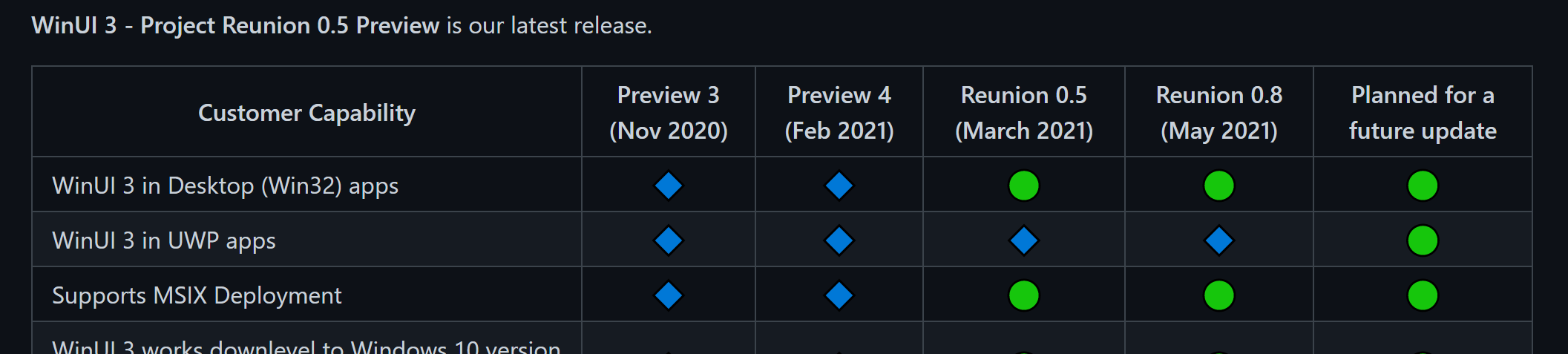
jamers99
on 24 Mar 2021
Related issues
 tesar-tech
·
4Comments
jonwis
·
5Comments
jonwis
·
4Comments
tesar-tech
·
4Comments
jonwis
·
5Comments
jonwis
·
4Comments
 Jaiganeshkumaran
·
4Comments
Jaiganeshkumaran
·
4Comments
 fisforfaheem
·
5Comments
fisforfaheem
·
5Comments
Most helpful comment
Can't stress this enough. .NET 5 support for UWP has been the number 1 question from the UWP developer community for months now (see for example the recent 3-4 WinUI Community Calls). The messaging from the MS teams on this very important topic for UWP developers has been absolutely catastrophic:
First, while the .NET team in its initial .NET 5 introduction blog post mentioned UWP, it has been silent on this topic very much ever since. If you read the blog posts for the different .NET 5 previews...do you see any official comment on the UWP .NET 5 situation? Nope, not at all. It feels like the .NET team has no interest in this topic any longer. For example, see this issue where in May this year, the community explicitly asks for a UWP roadmap for .NET. Do you see any reply by the .NET team there? Did the .NET team assign anyone to this this issue? The answer is: NOPE. Apparently, the .NET team just doesn't care about UWP.
Secondly, in the absence of other MS teams to ask or give us answers, the UWP developer community turned to the WinUI team. Now, the WinUI team arguably is the wrong team to ask on this matter here so they get a pass for not knowing the exact status of .NET 5 on UWP. Yet, the answers we do receive month after month of constant asking are incredibly disappointing. Here they are:
So, why are these answers we are getting time and time again really disappointing here? They tell me two things: MS doesn't know how .NET 5 support for UWP will arrive and it doesn't know when. The resulting optics paint a pretty bleak picture of the importance of UWP at MS. .NET 5 is one of the biggest stories for Windows developers out there and communication with the UWP community on this topic has been absolutely abysmal.
Lastly, the UWP developer community then went to Project Reunion to ask for clarification and details on the UWP on .NET 5 story. See this issue for example. A community member came - in that thread - to the following conclusion:
To which a Project Reunion team member at MS, @jonwis, replied with the following:
Remember the first point in my post? That the community went to the repo of the .NET team and asked for a ".NET roadmap for UWP"? Remember that that issue received zero care by the .NET team?
Remember the second point, where the WinUI team has been telling us that ".NET 5/6/... support might come via Project Reunion"?
What I am seeing here is this: No team at MS wants to be responsible for UWP on .NET 5:
The .NET team -> Absolute silence in both Preview blog posts and on their repo
The WinUI team -> Project Reunion might be used here to bring .NET 5 support to UWP
The Project Reunion team -> Ask the .NET team.
Is the state of the UWP really so pitiful internally at MS that more than a year after the intial introduction of .NET 5 the UWP developer community has zero clue at all how and when support for .NET 5 will arrive? Are we UWP developers that unimportant to MS that seemingly no one wants to step up, lead that project and have a respectful and constructive interaction with the community?
I will leave with this picture from the official .NET 5 introduction blog post:

It has been downhill ever since then for the UWP developer community....