Project64: Multiple Romhacks and SM64 Extended ROMs crash Mario 64, but not PJ64
I decided to get Project64 and start playing again, but this bug is super annoying.
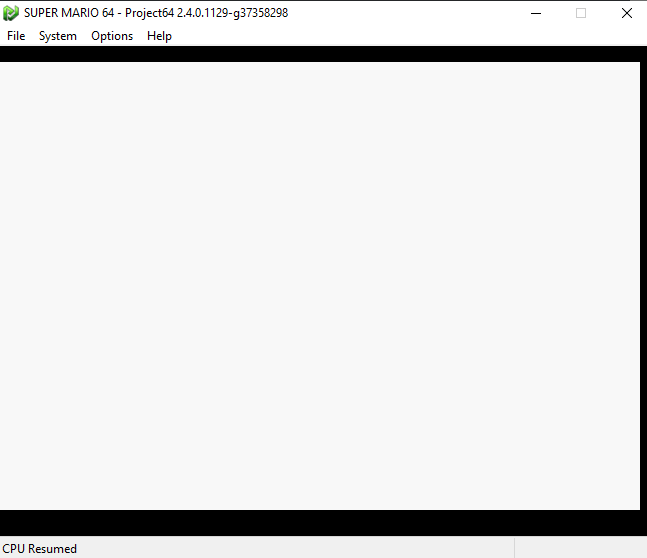
I get my ROM, patch it, start it in PJ64, press start to play, then the screen goes white and won't stop.
The same thing happens when I use my extended ROM for SM64.
(btw I'm using build 2.4.0.1129-g37358298)
Is anyone else having this issue? I have also seen this happen on non-school-issued laptops, so it can't be just me.
Images of a failed attempt below:


 naw9457
All 14 comments
what patch are you using?
 project64
on 30 Aug 2020
project64
on 30 Aug 2020
Try switching to a different video plugin like GLideN64 or Jabo's video (Options > Settings > Plugins > Graphics Plugin)
Though Jabo's supports romhacks better
You might also need to enable "Unaligned DMA" in either Settings > Defaults or the ROM settings
 oddMLan
on 30 Aug 2020
oddMLan
on 30 Aug 2020
most mario rom hacks dont work on console. the above suggestion is the most common fix for these older hacks but its not guaranteed to work. progress comes with a price. https://shygoo.net/wiki/doku.php?id=super_mario_64%3Aconsole_compatibility&do=register
 AriaHiro64
on 30 Aug 2020
AriaHiro64
on 30 Aug 2020
@project64 The ones that don't work are almost any romhack except for Mario Odyssey 64, Portal 64, Isabelle 64, and Waluigi 64. Other than that, blank white screen, like shown above. (The one used in the example attempt is my extended ROM, but with a "crazy eyes" texture)
@oddMLan I use Jabo for casual play, that worked in past builds, and am forced to use Jabo for Net64+ but nothing else helps.
GlideN64 is somehow missing from the dropdown box and the only one left is the traditional Project64 video plugin.
@AriaHiro64 These are not from a console. These images are straight from Project64.
All I want to do is have a great time in the modding and hacking community for SM64.
naw9457
on 30 Aug 2020
and just to say out, I really want to play Scrooge 64 and Waluigi's Tacostand 64
naw9457
on 30 Aug 2020
@project64 The ones that don't work are almost any romhack except for Mario Odyssey 64, Portal 64, Isabelle 64, and Waluigi 64. Other than that, blank white screen, like shown above. (The one used in the example attempt is my extended ROM, but with a "crazy eyes" texture)
@oddMLan I use Jabo for casual play, that worked in past builds, and am forced to use Jabo for Net64+ but nothing else helps.
GlideN64 is somehow missing from the dropdown box and the only one left is the traditional Project64 video plugin.@AriaHiro64 These are not from a console. These images are straight from Project64.
All I want to do is have a great time in the modding and hacking community for SM64.
What aria meant was is that PJ64 is more accurate than it was when those hacks were made, and as such they are broken. Either get an older version of pj64 just to play those romhacks, or don't play them.
This is not a PJ64 bug, as it is not PJ64's fault the hacks break, rather it is the hacks' fault
 CrashOveride95
on 30 Aug 2020
CrashOveride95
on 30 Aug 2020
Or you could simply do what I say and enable "Unaligned DMA" in the ROM settings or "Defaults" under Options > Settings. The option was implemented to help these romhacks play in the current PJ64 builds.
@naw9457 if GLideN64 is not there that means you have an outdated build. Download a newer build from the nightly builds page (link in this repo homepage). However, don't use GLideN64 for the romhacks since it's very close to console accuracy and you might have weird texture issues or sound issues.
oddMLan
on 30 Aug 2020
It's not a bug, it's a feature. The fact that a poorly written romhack is failing in PJ64 means that PJ64 works fine because that is the expected result in real hardware. The goal of PJ64 is to run games designed for N64, not games designed to run on old glitched versions of itself.
You can induce PJ64 to work less accurate ("ZSNES mode") by following @oddMLan instructions, good luck.
 Jj0YzL5nvJ
on 30 Aug 2020
Jj0YzL5nvJ
on 30 Aug 2020
@oddMLan 2.4.0 is the latest build unless my source for new builds (https://ci.appveyor.com/project/project64/project64/build/job/nn2fxdtr7dtxidta/artifacts) is completely broken.
I'll try Unaligned DMA, I looked over it the first time
Thanks to everyone who tried to help, imma try everything I can. If another issue flares up I'll be sure to open this again.
naw9457
on 30 Aug 2020
@oddMLan 2.4.0 is the latest build unless my source for new builds (https://ci.appveyor.com/project/project64/project64/build/job/nn2fxdtr7dtxidta/artifacts) is completely broken.
Jj0YzL5nvJ
on 30 Aug 2020
@Jj0YzL5nvJ My school tried to make sure I couldn't play games on these laptops and blocked that, but I found my ways around.
Announcement: Extended ROM works, haven't tried any romhacks. Thanks for everything @oddMLan, @project64, @Jj0YzL5nvJ, @AriaHiro64, and @CrashOveride95. I appreciate the help.
naw9457
on 30 Aug 2020
Again an announcement: I'm guessing that since SMB64 works, everything else does. Again, thank you guys for everything.
naw9457
on 30 Aug 2020
to clarify the pj64's goal is to get games to run accurately and fast. the only real way to do that is to mimic hardware. as a modder im well aware that you cant future proof emulation unless you target the real n64 hardware. that wasnt even a thought like 3 years ago because people assumed you needed a unrealistically powerful pc to achieve accuracy. if you really want to play old mods theres no shame in keeping old emulators around, but expecting to keep bugs in for compatibility is unrealistic.
AriaHiro64
on 31 Aug 2020
I do not mind adding settings to help compatibility, even if that is to add bugs in, but the main aim is to get it as accurate as a real n64. If it does not run on a real n64 then there is a chance as things get more accurate it will stop working on pj64.
project64
on 31 Aug 2020
Related issues
 robert-skinner
·
3Comments
robert-skinner
·
3Comments
 dsx-
·
15Comments
dsx-
·
15Comments
 Fanatic-64
·
7Comments
Fanatic-64
·
15Comments
Fanatic-64
·
7Comments
Fanatic-64
·
15Comments
 Nekokabu
·
12Comments
Nekokabu
·
12Comments
Most helpful comment
Again an announcement: I'm guessing that since SMB64 works, everything else does. Again, thank you guys for everything.