I've been playing with spread sheets, looking for other ways to calculate the buffer size and frequency (sample rate). Think I've stumbled on an idea worth trying.
We currently use the sample rate from the video_clock / (dacrate + 1), and send that to the directsound driver as the playback sample rate. The trouble is they're mostly odd frequencies, not precisely diviseable. We tried before rounding frequencies but it didn't work out well. When the buffer size cannot be evenly divided into the sample rate and frame rate (playback rate), we end up with gaps, crackles and pops.
Here is the result of my playing with spread sheets.
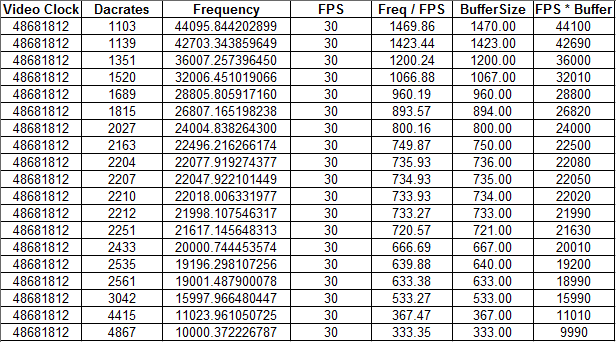
As you can see, we end up with perfectly diviseable frequencies and buffers. The rounded BufferSize multiplied by the FPS gives us a rounded, diviseable frequency to be sent to the directsound driver. Frequency = (FPS * BufferSize).
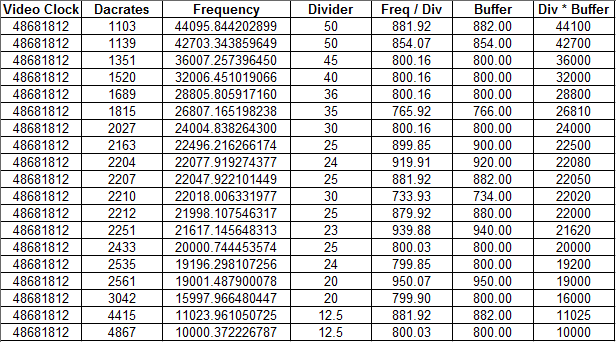
With changing the FPS to a custom divisor, we can get similar low latencies across the board. And closer frequencies to the original.
'll start trying to implement this over the weekend. See if it works out. Hoping this will also help solve PAL Goldeneye playback sample rate, being way too high, resulting in wrong pitch.
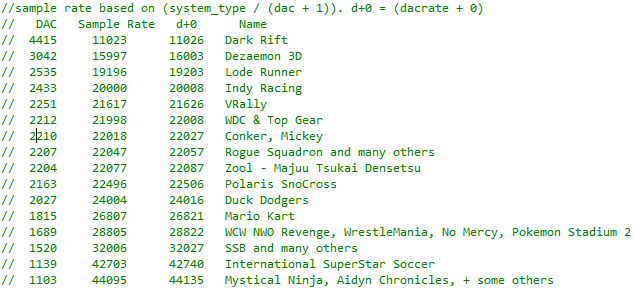
Also, these are all the dacrates i've found so far. If anyone has a complete list it would help out a bit.
 Frank-74
All 15 comments
looks good, looking forward to seeing the results
 project64
on 8 Dec 2018
project64
on 8 Dec 2018
@Frank-74 here's my list from when I used to mess around with that stuff
 LegendOfDragoon
on 8 Dec 2018
LegendOfDragoon
on 8 Dec 2018
@LegendOfDragoon Thanks! I've added four to my list, there's a few I have you don't. I've updated the first post.
Frank-74
on 8 Dec 2018
Cool. Mind running over the FPS and CustomDivider parts to your table? I get what use plugging these values in with the video clock may have in adjusting the final playback frequency to something more impressionable, but I don't follow the cause for manipulating it as a variable. Plus FPS can't be detected within the audio plugin specs anyway AFAIK.
I'm also not as convinced as half of everyone that the frequencies truly are supposed to be rounded. In hindsight a great idea would have been for me to record a very long track playing off the N64, then compare the sample (or at least in seconds) duration to the duration of a waveform logged by an emulator with the frequency adjusted. May have done this years ago had I not gone the first 25 years of my life without a phone (smart, cell or otherwise).
 cxd4
on 8 Dec 2018
cxd4
on 8 Dec 2018
@cxd4 According to the docs, the audio_clock is video_clock / framerate. I was calculating the buffer size from audio_clock / (dacrate + 1). This is how it is currently. I did it as the docs said.
But the Frequency and BufferSize are unsigned ints. We've been asking the backend to play 44095 with a correct buffer size but wrong frequency. I stumbled on the fact that rounding the buffer size to the nearest 1, and multiplying the buffer size by the desired framerate, results in perfecly aligned buffer size with sample rate and frame rate. The goal is audio plays at correct speed in accordance with the desired frame rate. Audio and Video in perfect sync with no gaps and using unsigned ints.
The custom divider is still based on the original VC/DAC+1, so is in time with the video clock, but buffer can be smaller and output sample rate can closer match the original Frequency = VC/DAC+1 calculation.
I've just tested with success. I used a switch statement with all the dacrates to assign the results from my spread sheet, setting Frequency and BufferSize. I had to double the buffer size, but sounds and looks good so far. I'm not sure how to implement my custom divisor without a switch statement caseing dacrates to set the divisor. I want it auto calculated, no options needed.
Frank-74
on 8 Dec 2018
Roughly implemented it without custom dividers. I.e. the top spread sheet. Using auto calc instead of any switches.
Just made a funny mistake with adding a buffer size option. I've changed the two options to Small Buffer and Force Sync. I forgot to double the divider along with the buffer size for a larger buffer. Result is Goldeneye at 120 VI/s, double speed audio.
Here it is to test. Turn off fixed audio and sync using audio. In the audio plugin game settings, to get 120 VI/s, turn off Small Buffer and restart. With Force Sync on, disabling frame limiter should sync using the audio plugin. Force Sync works immediately, no need for restart.
https://www.dropbox.com/s/a039q4ls7prs3r4/Project64-Audio_Frank-74experiment.zip?dl=1
Very rough first go, some games aren't great, but Goldeneye is great, very low latency and no clicks or pops here, even at 120 VI/s.
Frank-74
on 8 Dec 2018
Second attempt. Smaller buffer sizes by default. Custom dividers. Goldeneye has very small buffer 450 bytes. I like it because of the low latency. Uncheck smaller buffer if you need to. Needs plenty of testing. Bed time at 6:05am.
https://www.dropbox.com/s/rn7j6huna0s5ap6/Project64-Audio_Frank-74-experiment2.zip?dl=1
Frank-74
on 10 Dec 2018
Third experiment. Removed toggle buffer settings. Added buffer size slider, small, medium and large settings. No custom dividers. Auto calculate buffers. You need to restart the game for changes to buffer setting to take effect at the moment.
https://www.dropbox.com/s/5zw8dnrfh2p5i64/Project64-Audio_Frank-74-experiment3.zip?dl=1
Frank-74
on 12 Dec 2018
Found a problem when testing on an older laptop. The playback device was set to 44100 Sample Rate.
The MAX_SIZE enum of 48000 * 2 * 2 works ok if your audio device is set to 48000 (or 96000/192000), but is stuttery as hell if it's set to 44100. MAX_SIZE should instead use the default Windows playback device properties.
I can set the directsound playback to use the default audio device properties (code below), but not sure how to change the MAX_SIZE enum to use it.
#include <initguid.h>
#include <Mmdeviceapi.h>

    HRESULT dfp;
    IMMDevice * pDevice = NULL;
    IMMDeviceEnumerator * pEnumerator = NULL;
    IPropertyStore* store = nullptr;
    PWAVEFORMATEX deviceFormatProperties;
    PROPVARIANT prop;

    // get the device enumerator
    dfp = CoCreateInstance(__uuidof(MMDeviceEnumerator), NULL, CLSCTX_ALL, __uuidof(IMMDeviceEnumerator), (LPVOID *)&pEnumerator);

    // get default audio endpoint
    dfp = pEnumerator->GetDefaultAudioEndpoint(eRender, eMultimedia, &pDevice);

    dfp = pDevice->OpenPropertyStore(STGM_READ, &store);
    if (FAILED(dfp))
    {
        WriteTrace(TraceAudioDriver, TraceDebug, "OpenPropertyStore failed!");
    }

    dfp = store->GetValue(PKEY_AudioEngine_DeviceFormat, &prop);
    if (FAILED(dfp))
    {
        WriteTrace(TraceAudioDriver, TraceDebug, "GetValue failed!");
    }

    deviceFormatProperties = (PWAVEFORMATEX)prop.blob.pBlobData;
    WriteTrace(TraceAudioDriver, TraceInfo, "Channels: %d", deviceFormatProperties->nChannels);
    WriteTrace(TraceAudioDriver, TraceInfo, "Sample Rate: %d", deviceFormatProperties->nSamplesPerSec);
    WriteTrace(TraceAudioDriver, TraceInfo, "Bit Depth: %d", deviceFormatProperties->wBitsPerSample);
Edit:
There's a problem with VI/s being slightly too slow with default audio device set to 44100. So instead of above, either prompt user to change default audio device playback to 48000, 96000 or 192000, or, set the default audio device to 48Khz. Not sure how to set those settings from the plugin yet...
Frank-74
on 13 Dec 2018
I've realized there's no magic solution for perfect audio. My final result, I think, is better than it is currently though.
I'm getting the frequency by multiplying the divider(framerate) with the buffer size. I'm using 25 as a divider, but buffer slider adjusts the buffer size to compare to 30 divider, or 20/15 etc. Default is Buffer=4. 5 levels of buffer sizes. Top Gear Rally is good after an initial load of crackles, with smallest buffer 1 or 2 it clears up quickly and remains click and pop free. I played 3 stages without the sound breaking up or a single crackle. Once you boot up, let it go to demo race, it's click free audio before the lights go green.
Latency is also much lower (better), now.
Final, hopefully bug free result :- https://www.dropbox.com/s/6ecnnqe9thjb3mv/Project64-Audio-FinalExpreiment.zip?dl=1
It can be made a bit better with the lower buffer levels, because the directsound needs 4 DS segments, left/right, buffered, the LOCK_SIZE must be a multiple of 4. The calc done for that uses uint's, so can be made more precise to get a more accurate final result.
Also I've been reading up on the dx8 audio docs. Time stretching should be possible. I'm going to experiment with that next.
Frank-74
on 18 Dec 2018
Good very good, thanks for fix sound Top Gear Rally, the sound is perfect this game now. Congratulations.
 schubertguilherme
on 18 Dec 2018
schubertguilherme
on 18 Dec 2018
https://github.com/breakfastquay/rubberband
https://github.com/mpv-player/mpv/issues/5296#issuecomment-368374154
https://github.com/mpv-player/mpv/issues/2768#issuecomment-177067476
https://github.com/mpv-player/mpv/issues/3421
I really don't know if any of that has utility on this...
 Jj0YzL5nvJ
on 19 Dec 2018
Jj0YzL5nvJ
on 19 Dec 2018
I've realized there's no magic solution for perfect audio. My final result, I think, is better than it is currently though.
Does it play well with both 41000 44100 Hz and 48000 Hz configs?
Windows' generic High Definition Audio driver uses 44100 Hz as the default config while Realtek's uses 48000 Hz (I assume this is also the case with other manufacturers as well).
 oddMLan
on 19 Dec 2018
oddMLan
on 19 Dec 2018
@oddMLan do you mean 44100? I've never seen 41000 before :open_mouth: .
LegendOfDragoon
on 19 Dec 2018
Does it play well with both 41000 Hz and 48000 Hz configs?
Not with very small buffers. With the default Buffer=4, it's ok with 44100. I'm halving the backend (DirectSound) buffer size for lower latency. But can put in a test to not half it if driver is set to 44100.
Goldeneye plays slower with Buffer=1 and 44100 driver.
I ran into a problem trying to set the audio driver to 48000. It only works if Project64.exe is run in Administrator mode. Can't write to the DirectSound property store without admin privelage on Windows 8.1. Reference: https://docs.microsoft.com/en-us/windows/desktop/coreaudio/device-properties
Also, only use with Project64 732 or previous. Sync audio is broken after 732. Though this version works better than default audio plugin with Sync Audio off.
For adjusting playback rate when VI/s get slow, I was looking at waveOutSetPlaybackRate. Not implemented yet.
https://docs.microsoft.com/en-us/previous-versions//dd743873(v=vs.85)
Frank-74
on 20 Dec 2018
Related issues
 Lithium64
·
10Comments
Lithium64
·
10Comments
 naddel81
·
10Comments
naddel81
·
10Comments
 Nekokabu
·
12Comments
Nekokabu
·
12Comments
 Fanatic-64
·
13Comments
Fanatic-64
·
13Comments
 crazyboy92
·
4Comments
crazyboy92
·
4Comments
Most helpful comment
@Frank-74 here's my list from when I used to mess around with that stuff
