Project-system: Diagnostics not shown under packages in the dependencies node
<Project Sdk="Microsoft.NET.Sdk">

  <PropertyGroup>
    <TargetFramework>netcoreapp2.1</TargetFramework>
  </PropertyGroup>

  <ItemGroup>
    <PackageReference Include="FooBar" Version="1.0.0" />
  </ItemGroup>
</Project>
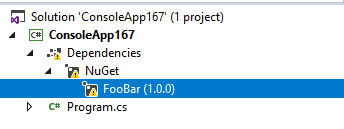
Expected: For the error to be listed under "FooBar" within the dependency node and for the icon to be an error.
Actual:
 davkean
All 17 comments
This regressed sometime in the last couple of releases - I'm not sure when. I think @nguerrera mentioned there was a change in the SDK - but not I'm not sure what, the errors still show up in design-time builds.
davkean
on 24 Jul 2018
After restoring this project, project.assets.json contains:
  "logs": [
    {
      "code": "NU1102",
      "level": "Error",
      "message": "Unable to find package FooBar with version (>= 1.0.0)\r\n  - Found 4 version(s) in nuget.org [ Nearest version: 0.1.8.12 ]\r\n  - Found 0 version(s) in Microsoft Visual Studio Offline Packages\r\n  - Found 0 version(s) in NuGet Local\r\n  - Found 0 version(s) in dotnet.myget.org roslyn",
      "libraryId": "FooBar",
      "targetGraphs": [
        ".NETCoreApp,Version=v2.1"
      ]
    }
  ]
This appears in the error list:
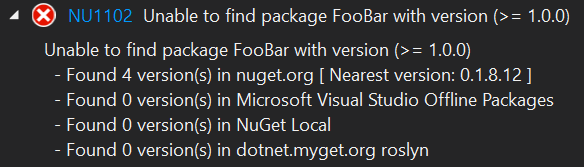
The Dependencies node is currently expecting a ResolvedPackageReference item (or PackageItem, but I don't think we'll see these during evaluation) with ProjectItemMetadata.Type metadata of Diagnostic to be provided in the IProjectSubscriptionUpdate. However we don't see these.
@davkean mentions above that @nguerrera may have said (a long time ago) that there was a change to how this works. Can either of you provide some guidance so I can get this fixed?
This problem is also blocking https://github.com/dotnet/project-system/issues/2582#issuecomment-507994415.
 drewnoakes
on 3 Jul 2019
drewnoakes
on 3 Jul 2019
We stopped depending on the targets that created insane numbers of ITaskItem[] for dependencies node and destroyed incremental build perf. But they still exist and project system still calls them in design time build. There’s another issue to rework the dependencies node to not depend on these targets. I’ll link it when I find it.
I do not remember this issue. I would think that you should still get all the same items with all the same data as long as you call the same design time targets. I would not expect it to be possible to get the tree without the error items.
But it’s been a very long time since I’ve looked at this code. I’ll do some debugging.
 nguerrera
on 3 Jul 2019
nguerrera
on 3 Jul 2019
Thanks Nick. My research led me to PreprocessPackageDependenciesDesignTime in the SDK, and its corresponding invocation in src\Tasks\Microsoft.NET.Build.Tasks\targets\Microsoft.PackageDependencyResolution.targets.
I'm out of time for the day so didn't get much further than that. It looks like the code's still there to produce these DependencyType.Diagnostic task items.
drewnoakes
on 3 Jul 2019
So I found a couple of things near there:
- ResolvePackageAssets hits this error and stops the DT build dead, before it gets to creating the diagnostic item. Seems this was relying on an ErrorAndContinue when the build still used the crazy DT targets.
- Adjusting to ErrorAndContinue on DT build produces an item, but there doesn't seem to be a node for FooBar parenting it.
I will dig in some more later.
nguerrera
on 3 Jul 2019
We stopped depending on the targets that created insane numbers of ITaskItem[] for dependencies node and destroyed incremental build perf
@nguerrera I'm going to investigate whether the dependencies node can work directly with project.assets.json for this information. It's been on the backlog for a while and this seems like a good place to start that work.
Is there an API for parsing the file that you'd recommend?
drewnoakes
on 4 Jul 2019
@drewnoakes Let's not wait on progress for reading project.assets.json to make existing infrastructure work. We already get diagnostics from the build, we should figure out why they aren't coming through these cases.
davkean
on 12 Jul 2019
Item 1 of 2 above is in PR to sdk (from @drewnoakes)
nguerrera
on 12 Jul 2019
nguerrera
on 12 Jul 2019
See also https://github.com/dotnet/sdk/issues/26 and https://github.com/dotnet/sdk/pull/1090 for history.
In these tests the mock diagnostics do not appear to be used.
drewnoakes
on 18 Jul 2019
It's not every day that you see a two digit issue referenced
nguerrera
on 18 Jul 2019
I was asked from @nkolev92 to upload here my assets json file
project.assets.json.zip
The compiler does not produce any error/warning.
No output from nuget step as well.
 raffaeler
on 26 Feb 2020
raffaeler
on 26 Feb 2020
@raffaeler Maybe you are seeing https://github.com/dotnet/project-system/issues/2509 then, but I'm not a project-system eng, they'll know better :)
 nkolev92
on 27 Feb 2020
nkolev92
on 27 Feb 2020
@nkolev92 It ma be the case but the main problem is over-using the yellow exclamation mark for very different errors and without any kind of hint for the developer.
Every time there is a warning, IMO it should be accompained with a detailed error and possible causes.
Who can fix this misuse, before my specfici case?
raffaeler
on 27 Feb 2020
@raffaeler thanks for the feedback. For this particular issue we have a repro, but indeed there are many reasons the yellow triangle could appear. Unfortunately we don't always know what causes a dependency to be unresolved, as a distant component could filter it out. We aim to always show something in the error list, and potentially include a tool tip (#4357).
This issue is tracking the fact that we're no longer receiving package diagnostic data, which means they're no longer appearing as child nodes in the tree.
drewnoakes
on 27 Feb 2020
@drewnoakes could you please use a different icon whenever the cause is different?
This is extremely confusing for everyone.
Even if you fix this issue for the future, people will just ignore the yellow triangle 'as they did in the past'. IMO you should introduce a different marker for known errors and let the yellow triangle for the unfixed problem (or remote it completely as it is just useless)
raffaeler
on 28 Feb 2020
@davkean pointed out that diagnostic nodes do appear in some cases:
<Project Sdk="Microsoft.NET.Sdk">

  <PropertyGroup>
    <TargetFramework>netcoreapp3.1</TargetFramework>
  </PropertyGroup>

  <ItemGroup>
    <PackageReference Include="Foo"  />
    <PackageReference Include="FooBar" Version="100" />
  </ItemGroup>

</Project>

  "logs": [
    {
      "code": "NU1604",
      "level": "Warning",
      "warningLevel": 1,
      "message": "Project dependency Foo does not contain an inclusive lower bound. Include a lower bound in the dependency version to ensure consistent restore results.",
      "libraryId": "Foo",
      "targetGraphs": [
        ".NETCoreApp,Version=v3.1"
      ]
    },
    {
      "code": "NU1102",
      "level": "Error",
      "message": "Unable to find package FooBar with version (>= 100.0.0)\r\n  - Found 4 version(s) in nuget.org [ Nearest version: 0.1.8.12 ]\r\n  - Found 0 version(s) in Microsoft Visual Studio Offline Packages\r\n  - Found 0 version(s) in NuGet Local\r\n  - Found 0 version(s) in dotnet.myget.org roslyn",
      "libraryId": "FooBar",
      "targetGraphs": [
        ".NETCoreApp,Version=v3.1"
      ]
    },
    {
      "code": "NU1701",
      "level": "Warning",
      "warningLevel": 1,
      "message": "Package 'Foo 1.0.0' was restored using '.NETFramework,Version=v4.6.1, .NETFramework,Version=v4.6.2, .NETFramework,Version=v4.7, .NETFramework,Version=v4.7.1, .NETFramework,Version=v4.7.2, .NETFramework,Version=v4.8' instead of the project target framework '.NETCoreApp,Version=v3.1'. This package may not be fully compatible with your project.",
      "libraryId": "Foo",
      "targetGraphs": [
        ".NETCoreApp,Version=v3.1"
      ]
    }
  ]
ResolvePackageDependenciesDesignTime output items:
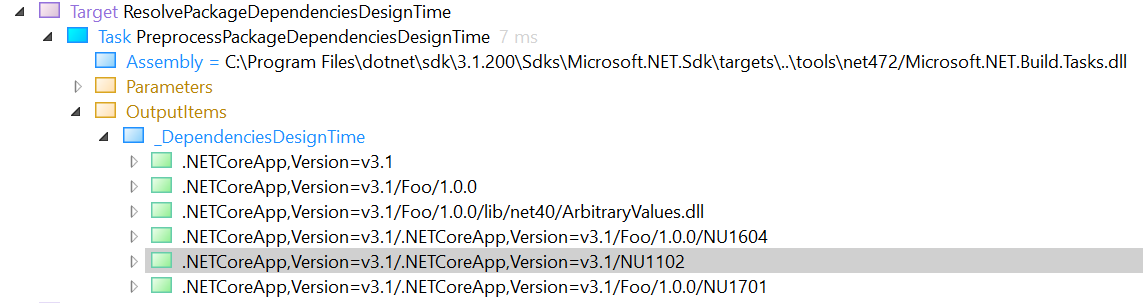
Interestingly the error is not displayed, but the two warnings are. The returned item's item spec doesn't contain the package name/version, which may be why it's being dropped.
drewnoakes
on 6 Mar 2020
Related issues
davkean
·
39Comments
nguerrera
·
70Comments
 jnm2
·
34Comments
jnm2
·
34Comments
 natidea
·
35Comments
natidea
·
35Comments
 srivatsn
·
36Comments
srivatsn
·
36Comments
Most helpful comment
It's not every day that you see a two digit issue referenced