Project-system: Visual Studio 2017: "Needs migration" message when using import project
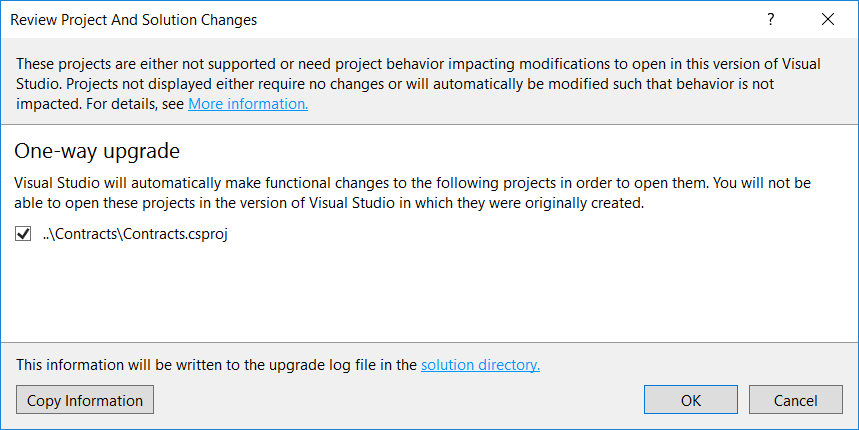
I have an issue where .NET Core 2.0 projects every now and then says "needs migration" in Visual Studio 2017 (15.5.5)

The solution has over 30 projects and they are all inheriting global project settings. Here is the Contracts.csproj file:
<Project Sdk="Microsoft.NET.Sdk">
  <Import Project="..\..\_Imports\LibraryImport.xml" />
  <PropertyGroup>
    <AssemblyName>MyProject.Shared.Contracts</AssemblyName>
    <RootNamespace>MyProject.Shared.Contracts</RootNamespace>
  </PropertyGroup>
</Project>
and the LibraryImport.xml file:
<Project>
  <PropertyGroup>
    <TargetFramework>netstandard2.0</TargetFramework>
    <OutputType>Library</OutputType>
  </PropertyGroup>
</Project>
Note that dotnet build works just fine - no errors or warnings.
I'm not sure what is going on as all other projects make use of imports as well, but it seems only these 2 projects are going the error. I merged the LibraryImport.xml content into CollectorInterfaces.csproj like this:
<Project Sdk="Microsoft.NET.Sdk">
  <PropertyGroup>
    <TargetFramework>netstandard2.0</TargetFramework>
    <OutputType>Library</OutputType>
  </PropertyGroup>
  <PropertyGroup>
    <AssemblyName>MyProject.Shared.CollectorInterfaces</AssemblyName>
    <RootNamespace>MyProject.Shared.CollectorInterfaces</RootNamespace>
  </PropertyGroup>
</Project>
That makes the problem go away, so it is definitely related to imports somehow:
 Genbox
All 6 comments
I have found out what's wrong. I checked the solution file and saw this:
Project("{9A19103F-16F7-4668-BE54-9A1E7A4F7556}") = "ProjectA", "ProjectA.csproj", "{931C888D-7E07-4B6F-9EF7-EE633AEFB1AA}"
EndProject
Project("{FAE04EC0-301F-11D3-BF4B-00C04F79EFBC}") = "CollectorInterfaces", "CollectorInterfaces.csproj", "{CBA79A92-335E-43FF-AAFE-49AA6D26B3B6}"
EndProject
Project("{FAE04EC0-301F-11D3-BF4B-00C04F79EFBC}") = "Contracts", "Contracts.csproj", "{F9EA87BB-9225-4CFC-AE06-650DBEEFB163}"
EndProject
All 3 projects reside in the same solution folder, but the GUIDs are different. The one for ProjectA is correct, the other GUID (FAE04EC0-301F-11D3-BF4B-00C04F79EFBC) is non-existing. I think this happened during a poweroutage and subsequent recovery by Visual Studio. The bug here is that it shows "needs migration" for a corrupt solutionfile.
Genbox
on 29 Jan 2018
I have further investigated the issue and it seems to have nothing to do with a corrupt solution. The FAE04EC0-301F-11D3-BF4B-00C04F79EFBC GUID is actually the "C# project type" and the other is the new .NET Core project type. When using imports that define the TargetFramework, VS2017 does not read the import and therefore add the project as a legacy project type.
See also https://github.com/dotnet/project-system/issues/1821
Genbox
on 31 Jan 2018
Right - we'll sniff files using the old guid and open them with CPS if they have TargetFramework or TargetFrameworks, but that's only directly in the file, we don't process it using MSBuild before making that determination.
See also - https://github.com/dotnet/project-system/blob/master/docs/configurations.md and https://github.com/dotnet/project-system/blob/master/docs/opening-with-cps.md
 Pilchie
on 1 Feb 2018
Pilchie
on 1 Feb 2018
@Pilchie Wouldn't it be possible to detect the new project style using the Sdk attribute? We're experiencing this issue - we specify the TargetFramework in Directory.Build.props, and every time we add a new project from the default template and remove the TargetFramework, VS (2019) reloads it and attempts to convert it.
 aelij
on 4 Apr 2019
aelij
on 4 Apr 2019
@aelij the Sdk attribute could be used, but is not a sufficient marker, since it can be split into <Import Sdk="..."> blocks inside the project as well.
Pilchie
on 10 Apr 2019
@Pilchie yes, but that's much less common. I think It wouldn't hurt to add it as an alternate detection condition. I'll open an issue.
aelij
on 10 Apr 2019
Related issues
 natidea
·
35Comments
natidea
·
35Comments
 davidfowl
·
56Comments
davidfowl
·
56Comments
 jnm2
·
34Comments
jnm2
·
34Comments
 davkean
·
39Comments
davkean
·
39Comments
 nguerrera
·
70Comments
nguerrera
·
70Comments
Most helpful comment
Right - we'll sniff files using the old guid and open them with CPS if they have
TargetFrameworkorTargetFrameworks, but that's only directly in the file, we don't process it using MSBuild before making that determination.See also - https://github.com/dotnet/project-system/blob/master/docs/configurations.md and https://github.com/dotnet/project-system/blob/master/docs/opening-with-cps.md