Project-system: VB projects always out-of-date (missing documentation XML file)
Every time you build the VB project, it will say that it is out of date. If you set the Tools > Options > "Projects and Solutions" > "Build and Run" > "MSBuild project build output verbosity" setting to Diagnostic, then it shows the following reason:
Project 'ClassLibrary1' is not up to date.
Missing output file 'obj\Debug\ClassLibrary1.xml'.
When you look in that folder, the XML file is there. It is not missing, so the message is wrong.
If you turn off the "My Project" > Compile > "Generate XML documentation file" setting, then it works properly, but as long as that option is turned on, it always thinks it's out-of-date.
This problem began with VS 15.5 and it has not been fixed by 15.5.1.
We've come up with the following steps which always reproduce the problem:
- Create new VB class library project
- Ensure that the "My Project" > Compile > "Generate XML documentation file" setting is turned on
- Copy the project to a second folder
- Make a solution which points to the first project
- Open the solution and build twice (second time will skip because it is up-to-date)
- Close visual studio
- Edit the solution file in an external editor to point it to the second copy of the project
- Open the solution and build (now it will always say it is out of date)
- Close visual studio
- Edit the solution file in an external editor to point it to the first project again
- Open the solution and build (now it will always say it is out of date)
_This issue has been moved from https://developercommunity.visualstudio.com/content/problem/165469/vb-projects-always-out-of-date-missing-documentati.html
VSTS ticketId: 536626_
_These are the original issue comments:_
(no comments)
_These are the original issue solutions:_
(no solutions)
 vsfeedback
All 13 comments
The following notes had been added to the original issue on Developer Community after they had been copied over to here:
You don't actually need to copy the project. You can just rename it's folder too. The important part is the external editing of the solution file. If you remove the project and re-add it to the solution in it's new location via the menus in Visual Studio, it works fine.
This sounds like an obscure problem, but it's actually quite common when working with multiple branches in a git repository. If a project is moved to a folder in one branch which is different from another branch, then every time you switch between those branches, Git modifies the solution file and causes practically the whole solution to forever be out-of-date.
 StevenDoggart
on 21 Dec 2017
StevenDoggart
on 21 Dec 2017
Also, I'm not sure why the bug was copied here and closed as a duplicate in Developer Community when it was an issue with the older project system, not the new one.
StevenDoggart
on 21 Dec 2017
@StevenDoggart - we track both types of issues here - that's what the Area-Legacy-Project-System label is for. Thanks for the detailed repro steps BTW - I was able to reproduce it yesterday, and I'll take a look soon.
 Pilchie
on 21 Dec 2017
Pilchie
on 21 Dec 2017
@StevenDoggart - can you try:
- Uncheck Tools\Options\Projects and solutions\Allow parallel project initialization.
- Close VS
- Delete the
.vsdirectory beside your project. - Start VS and see if things work.
Also try:
- Ensure that you have 15.5.2.
- Re-check Tools\Options\Projects and solutions\Allow parallel project initialization.
- Close VS
- Delete your
.vsdirectory beside your project - Start VS and see if things work.
The problem seems to be that with the "Allow parallel project initialization" option enabled, we're not correctly converting the path to the xml file from a relative path to an absolute path, and then that value gets cached in the .suo file. We fixed several issues like this in 15.5.2, but I'm not sure if this was one of them or not, and I don't have 15.5.2 handy to try.
I'm following up internally to see the state of things, but most of the devs in question are on vacation until the new year.
Pilchie
on 22 Dec 2017
Sorry for the delay... Christmas... Ok, I tried it and that did work. When I turn off the "Allow parallel project initialization" option, it no longer considers all the projects out of date. In fact, I didn't even need to delete the .vs directory. Just turning it off and reloading it worked fine. I tried it both ways a couple of times to verify that the .vs folder indeed did not need to be deleted.
StevenDoggart
on 26 Dec 2017
That’s great to hear. When you get a chance, could you also try installing 15.5.2 and re-enabling the option if you haven’t yet?
Pilchie
on 26 Dec 2017
Sorry. I meant to mention that. I already have 15.5.2 installed. So, no, that update does not fix the issue.
StevenDoggart
on 26 Dec 2017
Okay - thanks for the confirmation! We'll look at addressing this in an upcoming update.
Pilchie
on 26 Dec 2017
I'm seeing this too, for C# projects, with VS 15.5.2. Being familiar with MSBuild I've poked around a bit. Note that I don't use VB, so the issue may not be quite the same there.
- Workaround for C# projects.
_See details below for some kind of explanation (or at least supporting information). I have no reason to believe that this should work for VB projects._
For C# projects, make sure that XML documentation file is not in the same directory as Output path. So change the project settings (Build tab, repeat for all configurations) from something like this:

to something like this:
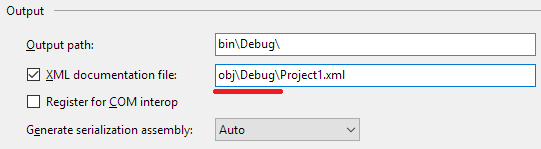
Or in .vcproj terms, change each occurrence of <DocumentationFile>.
- Details
_MSBuild properties are $(PropName), items are @(ItemName), targets are :TargetName. CVT is Microsoft.Common.CurrentVersion.targets, CST is Microsoft.CSharp.CurrentVersion.targets , VBT is Microsoft.VisualBasic.CurrentVersion.targets, CVT:TargetName is a target in CVT._
In C# projects, when first selecting that you want to generate a documentation file, the suggested path is like bin\Debug\ProjectOutput.xml. This value is stored as $(DocumentationFile) in the .csproj. CVT:CopyFilesToOutputDirectory is where various stuff gets copied from intermediate paths to the output path. Notably:
<!-- Copy the resulting XML documentation file, if any. -->
<Copy
    SourceFiles="@(DocFileItem)"
    DestinationFiles="@(FinalDocFile)"
    SkipUnchangedFiles="$(SkipCopyUnchangedFiles)"
    OverwriteReadOnlyFiles="$(OverwriteReadOnlyFiles)"
    Retries="$(CopyRetryCount)"
    RetryDelayMilliseconds="$(CopyRetryDelayMilliseconds)"
    UseHardlinksIfPossible="$(CreateHardLinksForCopyFilesToOutputDirectoryIfPossible)"
    UseSymboliclinksIfPossible="$(CreateSymbolicLinksForCopyFilesToOutputDirectoryIfPossible)"
    Condition="'$(_DocumentationFileProduced)'=='true'">

  <Output TaskParameter="DestinationFiles" ItemName="FileWrites"/>

</Copy>
This appears to assume that the XML doc file will have been written to an intermediate path, and should be copied to the output path. However, this contradicts the default suggested XML doc file path, which is based on $(OutDir) (eg, bin\Debug\...).
@(DocFileItem) appears to be intended as the intermediate XML doc file, @(FinalDocFile) as the output XML doc file.
CST line 156 sets @(DocFileItem) with:
<DocFileItem Include="$(DocumentationFile)" Condition="'$(DocumentationFile)'!=''"/>
VBT line 159 sets @(DocFileItem) with:
<DocFileItem Include="$(IntermediateOutputPath)$(DocumentationFile)" Condition="'$(DocumentationFile)'!=''"/>
CVT line 356 sets `@(FinalDocFile)' with:
<FinalDocFile Include="@(DocFileItem->'$(OutDir)%(Filename)%(Extension)')"/>
So, it looks like for both C# and VB, you'll get your XML doc file written to directory $(OutDir) regardless of the path specified for $(DocumentationFile). VB forces the intermediate doc file to be under $(IntermediateOutputPath) (eg, obj\Debug), but C# does not.
The origin of the endless rebuilding is CST:CoreCompile (line 16), which (quite sensibly) has @(DocFileItem) listed under Outputs. Note that the build works fine from command line MSBuild. I suspect something about the VS project system is confused by @(DocFileItem) and @(FinalDocFile) being the same.
 tg73
on 28 Dec 2017
tg73
on 28 Dec 2017
@tg73 thanks for the analysis. Do you see the issue with C# regardless of the value of the "Allow parallel project initialization" option? When I was debugging the old VB project system, the up to date check there had some extra code to handle the obj/bin copying of the doc file, but I didn't verify that the same applied to C#.
Pilchie
on 2 Jan 2018
Just a note that we're currently planning on shipping a fix for this issue in a 15.5.4 update.
Pilchie
on 12 Jan 2018
Note - the fix missed the 15.5.4 update, but was part of the 15.5.5 update, so closing.
Pilchie
on 18 Jan 2018
Err, nevermind, it was 15.5.4 after all. Too many version numbers.
Pilchie
on 18 Jan 2018
Related issues
 4creators
·
3Comments
4creators
·
3Comments
 abpiskunov
·
4Comments
abpiskunov
·
4Comments
 davkean
·
3Comments
davkean
·
3Comments
 davidmatson
·
4Comments
davidmatson
·
4Comments
 terrajobst
·
5Comments
terrajobst
·
5Comments