Project-system: Multi startup projects, cannot start
From VSFeedback | 415916
This affects both legacy and .NET Core projects.
I got a solution with multiple (in this case two) startup projects. When I press "Start" I get the error message "Unable to start debugging. The startup project cannot be launched. Ensure that the correct project is set as the startup project. The startup project can be changed[...]" (compare attachments).
Workaround: When I start any project (even not one of the startup projects) with right-clicking the project (in Solution Explorer), selecting "Debug", "Start new instance", stop that and again click on "Start" it works as expected (all startup projects launch). Feels like the single start "repairs" something.
After restarting Visual Studio the problem occurs again and I must perform the workaround again.
Internal Vendor Repro steps:
- Create two Console App(.Net Framework) projects in a solution;
- R-click the solution and select the "Property" option, then the "Solution Property Pages" appears;
- Go to "Common Properties->Startup Project", choose the "Multiple startup projects", set both projects' Action value to be "Start without debugging". Click "OK";
- Click "Start" button to run the solution.
ACTUAL:
Fail to run and pop up a error dialog as below.

EXPECTED:
Can build sucessfully without any error dialogs.
Other notes from customer:
I tested the following scenarios:
Both projects as "Start": Problem occurs
Both projects as "Start without Debugging": Problem still occurs
One project as only "Start" (while still in multi startup mode): Problem still occurs
 natidea
All 35 comments
@tannergooding Can we quickly see if this a regression or whether it's some related to the customer's setup?
 davkean
on 7 Sep 2017
davkean
on 7 Sep 2017
@davkean, I am not seeing this repro in the latest public rtm (15.3.3), the latest public preview (15.4.0 Preview 1), or in the latest vsuml build (26909.4000).
I tried, single netframework and single netcore project (in multiple startup mode).
I tried, dual netframework and dual netcore project (in multiple startup mode, both with only a single startup project and with both as startup projects).
I tried mixed netframework and netcore projects (in multiple startup mode, both with only a single startup project and with both as startup projects).
 tannergooding
on 11 Sep 2017
tannergooding
on 11 Sep 2017
@morrisjoe what build did you try this on?
natidea
on 11 Sep 2017
@natidea 15.3.3 RTM and 15.4 Preview2
 morrisjoe
on 11 Sep 2017
morrisjoe
on 11 Sep 2017
@tannergooding can you hook up with @morrisjoe and see if you can repro it. Going to move out of 15.4 as it appears to specific setup.
davkean
on 12 Sep 2017
Hi! Maybe you guys can add some more logging around the error message? I would happy to provide the logs with a 15.4 update.
 ZoolWay
on 12 Sep 2017
ZoolWay
on 12 Sep 2017
@ZoolWay You can repo this? Can you ~attack~ attach a solution that exhibits the issue?
davkean
on 12 Sep 2017
@davkean I am the one who reported this on VSFeedback so I had it from the beginning till 15.3.3. I even reproduced it with several different multi-startup settings.
After your request I just tried to come up with a minimal example solution but the problem did not occur. So I opened my problem-solution to check it again and the problem is suddenly gone! I am confused how that is possible as my version still is 15.3.3, no update occured meanwhile. 😲
ZoolWay
on 12 Sep 2017
@ZoolWay Was a .NET Core/.NET Standard (CPS-based) project always one of the startup projects?
davkean
on 12 Sep 2017
All project target .NET 4.6.1 but when I started the solution it was still the time of xproj and I exprimented with targeting .NET Core.
But I just installed 15.3.4 and the error occured again. Will try to provide something...
ZoolWay
on 13 Sep 2017
Recording a video on what exactly you are doing might also help - I do wonder if this is a race of some kind in the up-to-date check.
davkean
on 13 Sep 2017
Okay, here we go. Just starting Visual Studio with the solution, pressing "Start" - error occurs, clicking okay - and just pressing "Start" again and everything works.
https://zoolway.tinytake.com/sf/MTk0OTIyM182MTg4NTI1
- I have to close the VS instance before the error occurs again
- Closing the solution and reopen it does not reproduce the error
- I started Visual Studio with the solution and came back after 30 minutes and then pressed on Start, the error still occured - so it is not just timing
Full info about VS:
Microsoft Visual Studio Enterprise 2017  (VS-2017-RC)
Version 15.3.4
VisualStudio.15.Release/15.3.4+26730.15
Microsoft .NET Framework
Version 4.7.02046

Installed Version: Enterprise

Architecture Diagrams and Analysis Tools   00369-90252-59407-AA615
Microsoft Architecture Diagrams and Analysis Tools

Visual Basic 2017   00369-90252-59407-AA615
Microsoft Visual Basic 2017

Visual C# 2017   00369-90252-59407-AA615
Microsoft Visual C# 2017

Visual C++ 2017   00369-90252-59407-AA615
Microsoft Visual C++ 2017

ASP.NET and Web Tools 2017   15.0.30726.0
ASP.NET and Web Tools 2017

ASP.NET Core Razor Language Services   1.0
Provides languages services for ASP.NET Core Razor.

ASP.NET Template Engine 2017   15.0.30726.0
ASP.NET Template Engine 2017

ASP.NET Web Frameworks and Tools 2017   5.2.50601.0
For additional information, visit https://www.asp.net/

Azure App Service Tools v3.0.0   15.0.30728.0
Azure App Service Tools v3.0.0

BuildVision   2.0.1.98
Building process visualization.

Common Azure Tools   1.10
Provides common services for use by Azure Mobile Services and Microsoft Azure Tools.

File Icons   2.7
Adds icons for files that are not recognized by Solution Explorer

File Nesting   2.6.67
Automatically nest files based on file name and enables developers to nest and unnest any file manually

FormatDocumentOnSave   1.0
Enables auto formatting of the code when you save a file. Visual Studio supports auto formatting of the code with the CTRL+E,D or CTRL+E,F key shortcuts but with this extension the command 'Format Document' is executed on Save.

You can find the source here: https://github.com/Elders/VSE-FormatDocumentOnSave

JavaScript Language Service   2.0
JavaScript Language Service

JavaScript Project System   2.0
JavaScript Project System

JavaScript UWP Project System   2.0
JavaScript UWP Project System

Microsoft Continuous Delivery Tools for Visual Studio   0.3
Simplifying the configuration of continuous build integration and continuous build delivery from within the Visual Studio IDE.

Microsoft JVM Debugger   1.0
Provides support for connecting the Visual Studio debugger to JDWP compatible Java Virtual Machines

Microsoft MI-Based Debugger   1.0
Provides support for connecting Visual Studio to MI compatible debuggers

Microsoft Visual C++ Wizards   1.0
Microsoft Visual C++ Wizards

Microsoft Visual Studio VC Package   1.0
Microsoft Visual Studio VC Package

Node.js Tools   1.0.0.0
Adds support for developing and debugging Node.js apps in Visual Studio

NPM Task Runner   1.4.81
Adds support for npm scripts defined in package.json directly in Visual Studio's Task Runner Explorer. Includes full support for Yarn

NuGet Package Manager   4.3.1
NuGet Package Manager in Visual Studio. For more information about NuGet, visit http://docs.nuget.org/.

Open Command Line   2.1.179
Opens a command line at the root of the project. Support for all consoles such as CMD, PowerShell, Bash etc. Provides syntax highlighting, Intellisense and execution of .cmd and .bat files.

SQL Server Data Tools   15.1.61707.200
Microsoft SQL Server Data Tools

TypeScript   2.3.4.0
TypeScript tools for Visual Studio

Visual Studio Code Debug Adapter Host Package   1.0
Interop layer for hosting Visual Studio Code debug adapters in Visual Studio

Visual Studio tools for CMake   1.0
Visual Studio tools for CMake

Visual Studio Tools for Universal Windows Apps   15.0.26730.08
The Visual Studio Tools for Universal Windows apps allow you to build a single universal app experience that can reach every device running Windows 10: phone, tablet, PC, and more. It includes the Microsoft Windows 10 Software Development Kit.

WiX Toolset Visual Studio Extension   0.9.21.62588
WiX Toolset Visual Studio Extension version 0.9.21.62588
Copyright (c) .NET Foundation and contributors. All rights reserved.
Updated to 13.3.5, issues persits.
ZoolWay
on 20 Sep 2017
Thanks, we've not made any changes here yet to fix this.
@lifengl does this sound familiar?
davkean
on 20 Sep 2017
Just wanted to let you know because it might be related. Sometimes since the update to 13.3.5 I get this message when starting:
The project system has encountered an error.
Object reference not set to an instance of an object.
The referenced log contains this:
22.09.2017 15:30:16
Recoverable
System.AggregateException: One or more errors occurred. ---> System.NullReferenceException: Object reference not set to an instance of an object.
   at System.Collections.Generic.Dictionary`2.Insert(TKey key, TValue value, Boolean add)
   at Microsoft.VisualStudio.LanguageServices.Implementation.TaskList.ExternalErrorDiagnosticUpdateSource.InprogressState.SupportedDiagnosticId(ProjectId projectId, String id)
   at Microsoft.VisualStudio.LanguageServices.Implementation.TaskList.ExternalErrorDiagnosticUpdateSource.SupportedDiagnosticId(ProjectId projectId, String id)
   at Microsoft.VisualStudio.LanguageServices.Implementation.TaskList.ProjectExternalErrorReporter.CanHandle(String errorId)
   at Microsoft.VisualStudio.LanguageServices.Implementation.TaskList.ProjectExternalErrorReporter.ReportError2(String bstrErrorMessage, String bstrErrorId, VSTASKPRIORITY nPriority, Int32 iStartLine, Int32 iStartColumn, Int32 iEndLine, Int32 iEndColumn, String bstrFileName)
   at Microsoft.VisualStudio.LanguageServices.Implementation.ProjectSystem.AbstractProject.Microsoft.VisualStudio.Shell.Interop.IVsLanguageServiceBuildErrorReporter2.ReportError2(String bstrErrorMessage, String bstrErrorId, VSTASKPRIORITY nPriority, Int32 iStartLine, Int32 iStartColumn, Int32 iEndLine, Int32 iEndColumn, String bstrFileName)
   at Microsoft.VisualStudio.ProjectSystem.VS.Build.LanguageServiceErrorListProvider.<AddMessageCoreAsync>d__8.MoveNext()
--- End of stack trace from previous location where exception was thrown ---
   at System.Runtime.CompilerServices.TaskAwaiter.ThrowForNonSuccess(Task task)
   at System.Runtime.CompilerServices.TaskAwaiter.HandleNonSuccessAndDebuggerNotification(Task task)
   at Microsoft.VisualStudio.ProjectSystem.VS.Implementation.Build.VsProjectBuildErrorListPublishService.<AddMessagesAsync>d__29.MoveNext()
--- End of stack trace from previous location where exception was thrown ---
   at System.Runtime.CompilerServices.TaskAwaiter.ThrowForNonSuccess(Task task)
   at System.Runtime.CompilerServices.TaskAwaiter.HandleNonSuccessAndDebuggerNotification(Task task)
   at Microsoft.VisualStudio.ProjectSystem.VS.Implementation.Build.VsProjectBuildErrorListPublishService.<ProcessQueueAsync>d__28.MoveNext()
--- End of stack trace from previous location where exception was thrown ---
   at System.Runtime.ExceptionServices.ExceptionDispatchInfo.Throw()
   at Microsoft.VisualStudio.ProjectSystem.CommonProjectSystemTools.Rethrow(Exception ex)
   at Microsoft.VisualStudio.ProjectSystem.ProjectErrorReporting.<>c__DisplayClass6_0.<SubmitErrorReport>b__0()
   at Microsoft.VisualStudio.ProjectSystem.ExceptionFilter.<>c__DisplayClass2_0.<Guard>b__0()
   at GuardMethodClass.GuardMethod(Func`1 , Func`2 , Func`2 )
   --- End of inner exception stack trace ---
---> (Inner Exception #0) System.NullReferenceException: Object reference not set to an instance of an object.
   at System.Collections.Generic.Dictionary`2.Insert(TKey key, TValue value, Boolean add)
   at Microsoft.VisualStudio.LanguageServices.Implementation.TaskList.ExternalErrorDiagnosticUpdateSource.InprogressState.SupportedDiagnosticId(ProjectId projectId, String id)
   at Microsoft.VisualStudio.LanguageServices.Implementation.TaskList.ExternalErrorDiagnosticUpdateSource.SupportedDiagnosticId(ProjectId projectId, String id)
   at Microsoft.VisualStudio.LanguageServices.Implementation.TaskList.ProjectExternalErrorReporter.CanHandle(String errorId)
   at Microsoft.VisualStudio.LanguageServices.Implementation.TaskList.ProjectExternalErrorReporter.ReportError2(String bstrErrorMessage, String bstrErrorId, VSTASKPRIORITY nPriority, Int32 iStartLine, Int32 iStartColumn, Int32 iEndLine, Int32 iEndColumn, String bstrFileName)
   at Microsoft.VisualStudio.LanguageServices.Implementation.ProjectSystem.AbstractProject.Microsoft.VisualStudio.Shell.Interop.IVsLanguageServiceBuildErrorReporter2.ReportError2(String bstrErrorMessage, String bstrErrorId, VSTASKPRIORITY nPriority, Int32 iStartLine, Int32 iStartColumn, Int32 iEndLine, Int32 iEndColumn, String bstrFileName)
   at Microsoft.VisualStudio.ProjectSystem.VS.Build.LanguageServiceErrorListProvider.<AddMessageCoreAsync>d__8.MoveNext()
--- End of stack trace from previous location where exception was thrown ---
   at System.Runtime.CompilerServices.TaskAwaiter.ThrowForNonSuccess(Task task)
   at System.Runtime.CompilerServices.TaskAwaiter.HandleNonSuccessAndDebuggerNotification(Task task)
   at Microsoft.VisualStudio.ProjectSystem.VS.Implementation.Build.VsProjectBuildErrorListPublishService.<AddMessagesAsync>d__29.MoveNext()
--- End of stack trace from previous location where exception was thrown ---
   at System.Runtime.CompilerServices.TaskAwaiter.ThrowForNonSuccess(Task task)
   at System.Runtime.CompilerServices.TaskAwaiter.HandleNonSuccessAndDebuggerNotification(Task task)
   at Microsoft.VisualStudio.ProjectSystem.VS.Implementation.Build.VsProjectBuildErrorListPublishService.<ProcessQueueAsync>d__28.MoveNext()
--- End of stack trace from previous location where exception was thrown ---
   at System.Runtime.ExceptionServices.ExceptionDispatchInfo.Throw()
   at Microsoft.VisualStudio.ProjectSystem.CommonProjectSystemTools.Rethrow(Exception ex)
   at Microsoft.VisualStudio.ProjectSystem.ProjectErrorReporting.<>c__DisplayClass6_0.<SubmitErrorReport>b__0()
   at Microsoft.VisualStudio.ProjectSystem.ExceptionFilter.<>c__DisplayClass2_0.<Guard>b__0()
   at GuardMethodClass.GuardMethod(Func`1 , Func`2 , Func`2 )<---
@davkean, never heard this issue. But it looks like an issue in the language service, based on the logging.
 lifengl
on 22 Sep 2017
lifengl
on 22 Sep 2017
@heejaechang The error above looks familiar - do you recognize it?
 Pilchie
on 25 Sep 2017
Pilchie
on 25 Sep 2017
yes. I fixed it in https://github.com/dotnet/roslyn/pull/21641
 heejaechang
on 25 Sep 2017
heejaechang
on 25 Sep 2017
Just recreated the issue with 15.4.2
ZoolWay
on 2 Nov 2017
Still occuring in 15.4.5
ZoolWay
on 28 Nov 2017
@BillHiebert - any idea what might be up here?
Pilchie
on 22 Dec 2017
@abpiskunov @BillHiebert any ideas?
Pilchie
on 3 Jan 2018
@Pilchie No. The original call stack was an issue in the error list. Is this something different now? A call stack of the null reference exception would help.
 BillHiebert
on 4 Jan 2018
BillHiebert
on 4 Jan 2018
So, I'm also unable to repro this in a trivial app. The null ref was unrelated AFAICT though. I'm not really sure how to make progress here without a repro though :(
Pilchie
on 4 Jan 2018
Currently on 15.5.2, cannot reproduce any more.
ZoolWay
on 5 Jan 2018
That was a bit too fast. Rebooted today and again on the very first run of the solution I get the error message. I cannot provide the solution. It does not look like it would help but you can get the ActivityLog.xml here.
Is there something we can do for some additional logging?
As said before, currently running 15.5.2.
ZoolWay
on 8 Jan 2018
There's no logging in this code unfortunately :(
Pilchie
on 8 Jan 2018
This happens every single day on first load of my project core 2 mvc, API types. I have to right click solution, click multiple startup, click ok, it works for the day.
 cgountanis
on 13 Jun 2018
cgountanis
on 13 Jun 2018
@cgountanis with same callstack? can you provide us a dump?
heejaechang
on 13 Jun 2018
How do you gather that log? I will provide it I just don't know how to get it.
cgountanis
on 13 Jun 2018
@cgountanis you can use this
https://docs.microsoft.com/en-us/visualstudio/ide/how-to-report-a-problem-with-visual-studio-2017#provide-a-trace-and-heap-dump-optional-a-nameprovideatraceandheapdumpa
heejaechang
on 13 Jun 2018
It appears to be related to something in the user's environment, as users can share a project via version control, and some see the error while others don't.
 verybadcat
on 2 Oct 2018
verybadcat
on 2 Oct 2018
I am having the same problem with 15.9.2.
Just download and run the IdentityServer4.Samples/Quickstarts/3_ImplicitFlowAuthentication samples. The error will occurred.
The 3 projects I started were:
- Api
- MvcClient
QuickstartIdentityServer
clicking okay - and then pressing "Start" again, does not work for me.
 hanslai
on 24 Nov 2018
hanslai
on 24 Nov 2018
I am on 15.9.2 and I can debug all three if I do not debug IIS Express.
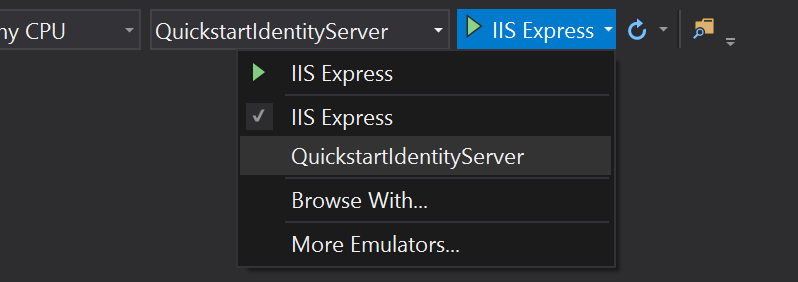
Does this repro for you under the .NET Core debugger? If so I would appreciate it if you created a new issue in this repo so we can track it (we can dupe it against this one if it has the same root cause).
 jmarolf
on 28 Nov 2018
jmarolf
on 28 Nov 2018
Close this out as we've been unable to reproduce this. Please file a new bug if you are still running into this.
davkean
on 11 Feb 2020
Related issues
davkean
·
45Comments
davkean
·
107Comments
davkean
·
41Comments
 davidfowl
·
56Comments
davidfowl
·
56Comments
 srivatsn
·
36Comments
srivatsn
·
36Comments