Project-system: Editor doesn't handle conditional compilation symbol with netstandard or .net core
From VSFeedback | 484140
Create either a Netstandard or Net Core project and put this code in the class:
if DEBUG
public static int I = 5;else
public static int I = 6;endif
Second statement (#else) will be correctly grayed out.
Change configuration to Release.Expected: first statement is grayed out.
Actual: second is still grayed out.
Note: Sometimes it picks the change but then gets stuck again to that. Compiler works properly.
In general these changes are not reflected in the editor until you reload the project.
 natidea
All 99 comments
Guy, this is a serious nightmare to work on with for everybody who's relying on compilation symbols.
It probably won't warrant a QFE for 15.3 but can you, please, reconsider it and bump it up to 15.4? Thank you.
 EPinci
on 15 Sep 2017
EPinci
on 15 Sep 2017
In 15.4 still doesn't work
 matiii
on 14 Oct 2017
matiii
on 14 Oct 2017
Milestone 15.6? Seriously? :(
 MihaMarkic
on 20 Oct 2017
MihaMarkic
on 20 Oct 2017
This should have gotten bigger priority. Unloading and Reloading a project just to change what compilation symbols are picked up is, as @EPinci said, a nightmare.
 andreujuanc
on 3 Dec 2017
andreujuanc
on 3 Dec 2017
Just added my own debug symbols DEV, STAGE and PROD. What is that f..... automatically added DEBUG_* and RELEASE_* and how to turn that off? Thanks in advance.
<PropertyGroup Condition="'$(Configuration)|$(Platform)'=='Debug|AnyCPU'">
    <DefineConstants>TRACE;DEBUG;DEV;NETSTANDARD1_4</DefineConstants>
  </PropertyGroup>

  <PropertyGroup Condition="'$(Configuration)|$(Platform)'=='Debug-PROD|AnyCPU'">
    <DefineConstants>TRACE;PROD;DEBUG_PROD;NETSTANDARD1_4</DefineConstants>
  </PropertyGroup>

  <PropertyGroup Condition="'$(Configuration)|$(Platform)'=='Debug-STAGE|AnyCPU'">
    <DefineConstants>TRACE;STAGE;DEBUG_STAGE;NETSTANDARD1_4</DefineConstants>
  </PropertyGroup>

  <PropertyGroup Condition="'$(Configuration)|$(Platform)'=='Release-DEV|AnyCPU'">
    <DefineConstants>TRACE;DEV;RELEASE_DEV;NETSTANDARD1_4</DefineConstants>
  </PropertyGroup>

  <PropertyGroup Condition="'$(Configuration)|$(Platform)'=='Debug-DEV|AnyCPU'">
    <DefineConstants>TRACE;DEV;DEBUG_DEV;NETSTANDARD1_4</DefineConstants>
  </PropertyGroup>

  <PropertyGroup Condition="'$(Configuration)|$(Platform)'=='Release|AnyCPU'">
    <DefineConstants>TRACE;PROD;RELEASE;NETSTANDARD1_4</DefineConstants>
  </PropertyGroup>

  <PropertyGroup Condition="'$(Configuration)|$(Platform)'=='Release-STAGE|AnyCPU'">
    <DefineConstants>TRACE;STAGE;RELEASE_STAGE;NETSTANDARD1_4</DefineConstants>
  </PropertyGroup>
 ericbrunner
on 17 Dec 2017
ericbrunner
on 17 Dec 2017
I stopped using netcore literally because of how annoying this is.
 rolandh
on 17 Dec 2017
rolandh
on 17 Dec 2017
Guys, please don't pollute this topic, rather open a new one (@ericbrunner)
Update: changed typo guts to guys.
MihaMarkic
on 18 Dec 2017
Why would we open a new one? We are discussing how his issue seems to have been ignored despite it being something we have to manually correct every day.
rolandh
on 18 Dec 2017
@MihaMarkic All I mentioned is all regarding that issue. So what's the problem? I refrenced the related issue (https://github.com/dotnet/project-system/issues/2720)
ericbrunner
on 18 Dec 2017
@ericbrunner I didn't mean no offence, calm down. Original issue is about syntax coloring not changing when condition changes. Yours, at least to me, is a different issue. But perhaps I'm wrong.
MihaMarkic
on 18 Dec 2017
Oh, and sorry, I meant "guys", not "guts", mobile autocorrect did change it :(
MihaMarkic
on 18 Dec 2017
@MihaMarkic Ok.
ericbrunner
on 18 Dec 2017
This issue is around the language service not handling the switch from debug -> release. This is a large work item that is being worked on as we speak; https://github.com/dotnet/project-system/pull/3020, https://github.com/dotnet/project-system/pull/3032 and https://github.com/dotnet/project-system/pull/3060 are all parts of the building blocks to enable this. Once these are in, we can start consuming them from the language service host and handle this case.
The duplicate condition constants issue is being tracked by https://github.com/dotnet/project-system/issues/2720.
 davkean
on 18 Dec 2017
davkean
on 18 Dec 2017
Unfortunately due to the size and risk of these changes, they are not going to make 15.6, though we hope to land them in an early 15.7 change so that we have time to vet them.
 Pilchie
on 10 Jan 2018
Pilchie
on 10 Jan 2018
So the IDE is not updating the greying out visually when changing build configs. My question is whether it is getting respected during compile time. Is this a visual only issue or visual and it will not correctly compile?
 OmegaPrimeZ3
on 27 Jan 2018
OmegaPrimeZ3
on 27 Jan 2018
@OmegaPrimeZ3 the option will be respected at compile time. This is about passing all the correct data through to the IDE so that it is updated.
 jmarolf
on 27 Jan 2018
jmarolf
on 27 Jan 2018
For us the options are not respected at run time.
On Fri, Jan 26, 2018 at 7:26 PM, Jonathon Marolf notifications@github.com
wrote:
@OmegaPrimeZ3 https://github.com/omegaprimez3 the option will be
respected at compile time. This is about passing all the correct data
through to the IDE so that it is updated.—
You are receiving this because you are subscribed to this thread.
Reply to this email directly, view it on GitHub
https://github.com/dotnet/project-system/issues/2733#issuecomment-360948239,
or mute the thread
https://github.com/notifications/unsubscribe-auth/AGKtPFs_6PbU_bzAKJKEwhg8KFBDmYlQks5tOnstgaJpZM4PCFSJ
.
 hvaughan3
on 27 Jan 2018
hvaughan3
on 27 Jan 2018
@hvaughan3 Are you sure? That'd be really terrible.
MihaMarkic
on 27 Jan 2018
The custom ones definitely were not for us. I will double check with the latest version.
hvaughan3
on 27 Jan 2018
This is a far greater issue that should be addressed if it is not respected and compile time, that can drastically effect CI/CD along with configuration based settings for testing.
OmegaPrimeZ3
on 27 Jan 2018
I'm having this issue at compile time.
The following is set in the conditional compilation symbols:
RELEASE_PROD;NETSTANDARD2_0;PRODUCTION
And the following in my class:
#if PRODUCTION
    public static readonly string Url = "https://prod.example.com";
#else
#error 'Environment not specified.'
#endif
This does NOT compile for me (Syntax highlighting is wrong too).
Also every time I open the project settings RELEASE_PROD;NETSTANDARD2_0 is added to the compilation symbols again.
 deisterhold
on 1 Feb 2018
deisterhold
on 1 Feb 2018
@deisterhold if this is affecting compilation at compile time, there is something different going on. Can you get us a build log? The issue with the implicit symbols appearing again in project properties is https://github.com/dotnet/project-system/issues/2720.
Pilchie
on 1 Feb 2018
I can't believe this still isn't fixed. Is it being actively worked on?
Compilation symbols are some of the most common things that people use every day. I ended up putting real if statements in my programs to get around it. So ugly.
rolandh
on 1 Feb 2018
:link: Also reported here: https://developercommunity.visualstudio.com/content/problem/178371/gewahle-konfiguration-beeinflusst-intellisense-nic.html
 sharwell
on 2 Feb 2018
sharwell
on 2 Feb 2018
@Pilchie I'll have to work on getting you a build log (Xamarin Headaches), but the weird thing is if I build the project it compiles correctly, but when I compile the solution it doesn't.
deisterhold
on 2 Feb 2018
As you can see from the screenshot, I have set my environment to QA, set a breakpoint in my conditional DEBUG code and I end up hitting the DEBUG code. So this is not just a display/syntax issue.

hvaughan3
on 21 Feb 2018
I am seeing this same problem, in my tests this appears to be specific to net standard projects
 ahoefling
on 24 Feb 2018
ahoefling
on 24 Feb 2018
What's the status of that issue?
ericbrunner
on 7 Mar 2018
Please, don't ask. Everytime we get an update, it is pushed to a later major version. :)
Said that, I'm curious, too.
MihaMarkic
on 8 Mar 2018
@Pilchie @davkean - this is also causing issues for test discovery in 15.6. When a user changes the project configuration from debug to release, CPS never sends us notification about that and we end up duplicating every test in TE window. This happens for all .NET Core projects and SDK style desktop projects. Do we have an ETA on getting this resolved?
 ManishJayaswal
on 19 Mar 2018
ManishJayaswal
on 19 Mar 2018
not fix yet!
 zuozhiwen
on 22 Mar 2018
zuozhiwen
on 22 Mar 2018
Folks we haven't forgotten about this issue, its very top of mind.
The existing code that hooked up the language service had a large architectural flaw that prevented this from being a single bug fix. We've redesigned the architecture over here: https://github.com/dotnet/project-system/pull/3423 to handle this better. Note this is still a work in progress.
davkean
on 26 Mar 2018
Just to add another voice: I'm experiencing the pain of Conditional Compile not working in a multitargeted .netstandard / .net45 project. Is there an ETA to getting this fixed?
 brunzefb
on 13 Apr 2018
brunzefb
on 13 Apr 2018
.net core 2.0 projects. Using latest C# minor version. xUnit
Live tests work fine. Visual studio tests have above mentioned error.
In my notebook I havent such error (it has fresh install of visual studio)
 OlekRia
on 17 Apr 2018
OlekRia
on 17 Apr 2018
I'm hitting this @Pilchie.
 shanselman
on 28 Apr 2018
shanselman
on 28 Apr 2018
Oh, guys, once more pushed back, now to 15.8? SRSLY? This is a huge annoyance and is pushed back and back.
MihaMarkic
on 28 Apr 2018
We're currently focused on performance and blocking issues without workarounds. In this case, it's quite feasible to hand edit the project to work around this.
Pilchie
on 29 Apr 2018
OTOH, we welcome contributions, if anyone has the urge to fix it themselves! 😉
Pilchie
on 29 Apr 2018
In this case, it's quite feasible to hand edit the project to work around this.
I don't believe that is the case at all. Here's a scenario that is completely broken just now.
|----- Shared (Conditionals in code here)
|----- Project_A (Net Standard 1.4, 2.0)
| ---- Project_B (Net Framework 4.6.1)
If I have conditionals like the following in my shared code:
``` c#
if COMPAT
using System.Net.Http.Headers;
using System.Web;
else
using Microsoft.AspNetCore.Http;
using Microsoft.AspNetCore.Http.Extensions;
using Microsoft.AspNetCore.Http.Headers;
using Microsoft.Net.Http.Headers;
endif
``
The only way I can work with code utilizing theCOMPATcompilation conditional inProject_Bis if I completely unloadProject_A` from the solution. That's tiresome and slows my workrate down to a crawl.
This issue is actively harming migration of projects to .NET Core as it makes bridge building from legacy framework projects incredibly inefficient.
 JimBobSquarePants
on 1 May 2018
JimBobSquarePants
on 1 May 2018
In this case, it's quite feasible to hand edit the project to work around this.
I'm sure I missed this easy workaround. So far only reloading projects works AFAIK.
MihaMarkic
on 1 May 2018
My bad - I thought this issue was https://github.com/dotnet/project-system/issues/2720 when I commented.
Pilchie
on 1 May 2018
@Pilchie I thought that might be the case :) Now go, implement this in 15.7 :)
MihaMarkic
on 1 May 2018
I am facing this issue now. This seems like a issue for quite some time. Best if it could be resolved quickly or more people will face it. Visual studio mac does not seem to have this issue just the windows version only. https://social.msdn.microsoft.com/Forums/vstudio/en-US/69eccb39-d55e-47d5-a676-fb958202edb3/conditional-compilation-code-colour-coding-not-working-when-switching-configuration?forum=visualstudiogeneral
 e0003315
on 4 May 2018
e0003315
on 4 May 2018
Folks appreciate the feedback, this requires large architecture changes & VS platform changes and not something we felt comfortable taking in 15.7. We're just finishing up the 15.7 release, and this is the first thing we're tackling. VS Platform changes have been made, and we'll be consuming them in https://github.com/dotnet/project-system/pull/3423 which when merged will resolve the issue. The change will likely appear in the second preview of 15.8.
davkean
on 4 May 2018
Thanks for all the great work, looking forward to 15.8 👍
 BrianBergh
on 12 Jun 2018
BrianBergh
on 12 Jun 2018
I'm trying to be patient, but it's still not fixed in 15.8 preview 3. 😞
Any indication on if this bugfix is still targeting 15.8 RTW?
 AdamDotNet
on 27 Jun 2018
AdamDotNet
on 27 Jun 2018
@AdamDotNet can you describe exactly what you have in your project file? The change @davkean made should be in 15.8 P2. Basically, now instead of doing a text search for <TargetFramework> or <TargetFrameworks>, we look for the close tag instead (</TargetFramework> or </TargetFrameworks>).
(We are limited to doing a text search at that point, because VS doesn't even have an xml parser loaded at that point :(
However, you should be able to force the new project system regardless of the contents of the file by using the right guid in the .sln file per https://github.com/dotnet/project-system/blob/master/docs/opening-with-new-project-system.md.
Pilchie
on 27 Jun 2018
@Pilchie
In VS 15.8 P3, this is essentially file new .Net Core Console application:
By default, looks like the csproj SLN guid is
{FAE04EC0-301F-11D3-BF4B-00C04F79EFBC}
<Project Sdk="Microsoft.NET.Sdk">

  <PropertyGroup>
    <OutputType>Exe</OutputType>
    <TargetFramework>netcoreapp2.1</TargetFramework>
  </PropertyGroup>

</Project>
using System;

namespace ConsoleApp2
{
    class Program
    {
        static void Main(string[] args)
        {
#if DEBUG
            string name = "Debug";
#else
            string name = "Release";
#endif

            Console.WriteLine($"Hello World {name}!");
        }
    }
}
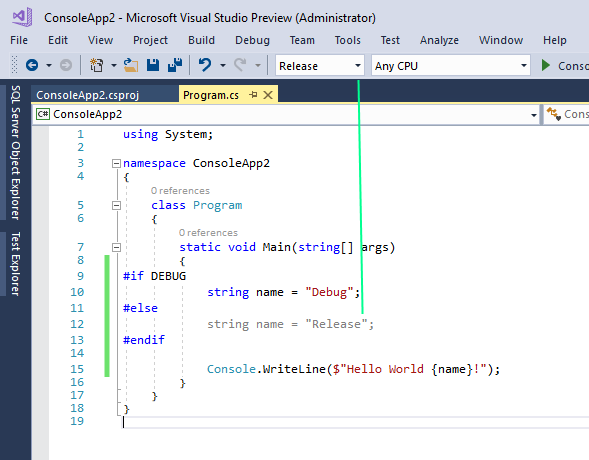
Looking at the wiki page you sent me, I changed the csproj SLN guid to {9A19103F-16F7-4668-BE54-9A1E7A4F7556} but still got the same result. The console app tended to print the expected string, but the IDE did not give the right result.
AdamDotNet
on 27 Jun 2018
@AdamDotNet I need more ☕️, sorry. I was thinking this was https://github.com/dotnet/project-system/issues/3587. This is indeed not fixed yet 😭 . https://github.com/dotnet/project-system/pull/3423 is where @davkean is working on the change that will enable config switch to work.
Pilchie
on 27 Jun 2018
My experience supports the conclusion that not only is the IDE not properly greying out the intended source, but the compiler is ignoring the directive as well.
VS info:
Microsoft Visual Studio Community 2017
Version 15.7.4
VisualStudio.15.Release/15.7.4+27703.2035
Microsoft .NET Framework
Version 4.7.03056
Installed Version: Community
Application Insights Tools for Visual Studio Package 8.12.10405.1
Application Insights Tools for Visual Studio
ASP.NET and Web Tools 2017 15.0.40601.0
ASP.NET and Web Tools 2017
ASP.NET Core Razor Language Services 15.7.31476
Provides languages services for ASP.NET Core Razor.
ASP.NET Web Frameworks and Tools 2017 5.2.60419.0
For additional information, visit https://www.asp.net/
Azure App Service Tools v3.0.0 15.0.40608.0
Azure App Service Tools v3.0.0
C# Tools 2.8.3-beta6-62923-07. Commit Hash: 7aafab561e449da50712e16c9e81742b8e7a2969
C# components used in the IDE. Depending on your project type and settings, a different version of the compiler may be used.
Common Azure Tools 1.10
Provides common services for use by Azure Mobile Services and Microsoft Azure Tools.
JavaScript Language Service 2.0
JavaScript Language Service
Microsoft Continuous Delivery Tools for Visual Studio 0.3
Simplifying the configuration of continuous build integration and continuous build delivery from within the Visual Studio IDE.
Microsoft JVM Debugger 1.0
Provides support for connecting the Visual Studio debugger to JDWP compatible Java Virtual Machines
Microsoft MI-Based Debugger 1.0
Provides support for connecting Visual Studio to MI compatible debuggers
Microsoft Visual Studio Tools for Containers 1.1
Develop, run, validate your ASP.NET Core applications in the target environment. F5 your application directly into a container with debugging, or CTRL + F5 to edit & refresh your app without having to rebuild the container.
NuGet Package Manager 4.6.0
NuGet Package Manager in Visual Studio. For more information about NuGet, visit http://docs.nuget.org/.
ProjectServicesPackage Extension 1.0
ProjectServicesPackage Visual Studio Extension Detailed Info
ResourcePackage Extension 1.0
ResourcePackage Visual Studio Extension Detailed Info
SQL Server Data Tools 15.1.61804.210
Microsoft SQL Server Data Tools
TypeScript Tools 15.7.20419.2003
TypeScript Tools for Microsoft Visual Studio
Visual Basic Tools 2.8.3-beta6-62923-07. Commit Hash: 7aafab561e449da50712e16c9e81742b8e7a2969
Visual Basic components used in the IDE. Depending on your project type and settings, a different version of the compiler may be used.
Visual F# Tools 10.1 for F# 4.1 15.7.0.0. Commit Hash: 173513e369ffb7a1c4d5dccf83696d9aac2ab2d0.
Microsoft Visual F# Tools 10.1 for F# 4.1
Visual Studio Code Debug Adapter Host Package 1.0
Interop layer for hosting Visual Studio Code debug adapters in Visual Studio
 razorware
on 1 Jul 2018
razorware
on 1 Jul 2018
I'm hitting this in dotnet/corefx as well with the switch to SDK-style projects. Switching configurations is a common task in corefx because we use configurations to change if we are building for netfx, netcoreapp, netstandard, etc or even between Windows and Unix builds. We don't have many #if conditions in the code. Instead, we have separate files for TFM/OS specific code - ex. Socket.Unix.cs.
The nice thing is the Solution Explorer updates immediately to add/remove the right files. However, opening those files in the editor doesn't have all the features enabled in them. I get some intellisense, but the "X references" links at the top of each method don't show up, and other members from partial classes don't show.
Unloading and reloading the project after switching configurations makes this work again.
 eerhardt
on 6 Jul 2018
eerhardt
on 6 Jul 2018
With corefx having updated to the new SDK-style projects, I'm also now hitting this.
I frequently switch back and forth between configurations we have for different OSes, with different files included for different OS builds, and when I do, although the solution explorer updates to show the right set of files, things like Go To Definition are broken and go to the wrong files, e.g. I switch to use the macOS configuration, but navigating to an implementation navigates me to the Windows one. I need to manually unload and reload it in order to make forward progress.
 stephentoub
on 12 Jul 2018
stephentoub
on 12 Jul 2018
Hitting this in 15.8P4 :(
 raffaeler
on 23 Jul 2018
raffaeler
on 23 Jul 2018
Hitting this in 15.8P4 :(
 Varorbc
on 31 Jul 2018
Varorbc
on 31 Jul 2018
Serious question: will this be fixed in VS 15? We’re hitting this multiple times a day and I’m really, really tired of restarting Visual Studio to fix it. We’ve tried to be patient but this keeps being forecasted and punted over and over, for 5 releases now.
 NickCraver
on 8 Aug 2018
NickCraver
on 8 Aug 2018
Hitting the same here, agree, really annoying.
Hope you could take this issue into account!
 jacano
on 8 Aug 2018
jacano
on 8 Aug 2018
I've had the problem for over a year now. Don't hold your breath.
rolandh
on 8 Aug 2018
You should all thumbs-up the original issue. I think that is sometimes used to prioritise things. It only has 1 (me) so far
 mungojam
on 8 Aug 2018
mungojam
on 8 Aug 2018
-  It only has 1 (me) so far
+  It only has 17 (me, and 16 others) so far
Once more it has been pushed back :( I think I'll just get used to this behavior where I can't trust the text coloring.
MihaMarkic
on 8 Aug 2018
15.8 has caused an issue. The #if preprocessor directives do not autoupdate in editor if the csproj is of newer format starting with <Project Sdk="Microsoft.NET.Sdk"> I will probably create a new bug. If you are inquisitive, create a new C# library project and update the csproj file to following
<Project Sdk="Microsoft.NET.Sdk">
  <PropertyGroup>
    <TargetFramework>net471</TargetFramework>
    <AssemblyVersion>1.0.0.0</AssemblyVersion>
    <FileVersion>1.0.0.0</FileVersion>
  </PropertyGroup>
  <PropertyGroup Condition="'$(Configuration)|$(Platform)'=='Debug|AnyCPU'">
    <PlatformTarget>x64</PlatformTarget>
    <DefineConstants>DEBUG;TRACE</DefineConstants>
    <OutputPath></OutputPath>
  </PropertyGroup>
  <PropertyGroup Condition="'$(Configuration)|$(Platform)'=='Release|AnyCPU'">
    <PlatformTarget>x64</PlatformTarget>
    <OutputPath></OutputPath>
  </PropertyGroup>
  <ItemGroup>
    <Reference Include="System" />
  </ItemGroup>
</Project>
In your CS file try adding below and toggle Debug and Release mode from the dropdown to see if editor refreshes.
namespace ClassLibrary1
{
    public class Class1
    {
#if DEBUG
        //do something
#endif
    }
 AbhishekTripathi
on 15 Aug 2018
AbhishekTripathi
on 15 Aug 2018
@AbhishekTripathi That's exactly what this issue tracks.
Pilchie
on 15 Aug 2018
@Pilchie thanks for clarifying. I got misled by the title of this thread and thought this issue is specific to dotnet standard/core. In my case, it is the new csproj format but the target version is the full framework. As long as it is being tracked here, we are all good.
AbhishekTripathi
on 15 Aug 2018
My$.02...
I want to first say I really love how far VS 2017 has come and where it is going. Especially for us with .NET Core and upcoming Blazor work. Simply genius!!!
However my apologies but I gotta say on this one that it is incredibly frustrating this has not been addressed. It leaves such a big hole in the tooling and has been a source of workarounds for us for so long. I am begging (yes I have resorted to begging... :-/) whoever controls the budget/product dev lifecycle to get this one done. PLEASE!!
Still seems broken in 15.8.0 for us as I guess it got pushed back...
 chassq
on 17 Aug 2018
chassq
on 17 Aug 2018
Note that @davkean is actively working on this right now in the https://github.com/dotnet/project-system/tree/features/LanguageService branch
Pilchie
on 20 Aug 2018
I know this is somewhat off topic, but JetBrains Rider handles changing configuration and/or project context by updating inactive preprocessor branches without having to unload/reload projects with both old and new csproj files.
 0xced
on 25 Aug 2018
0xced
on 25 Aug 2018
:link: Also reported at https://developercommunity.visualstudio.com/content/problem/324830/debug-symbol-incorrectly-checked-by-syntax-highlig.html
Pilchie
on 6 Sep 2018
As of v15.8.3 this started breaking my xUnit test runner.
Back in March this thread was linked as the cause of:
https://developercommunity.visualstudio.com/content/problem/215235/test-container-not-found-when-trying-to-run-tests.html
 MV10
on 9 Sep 2018
MV10
on 9 Sep 2018
This is just one of a large number of issues in Visual Studio 2017 + Core that indicate to me that, overall, we're going backwards, not forwards. Basic stuff in previous versions of VS that has been fine for donkey's years is now broken. It's quite incredible. I've been using VS 2017 in anger for 2 days now, and cannot believe the number of idiotic gotchas, bugs, inconsistencies, missing bits, etc. etc. Everything that I've found has already been found and reported by others - ages ago - and is still outstanding. Who cares about "exciting new features" when there are so many basic, silly bugs that stop you in your tracks? This is stuff that MS in previous years would never have shipped with. I've only been loading up VS 2017 intermittently for the last few months, and now I understand why every time I did so, there was YET ANOTHER update.
Do I go back to VS 2015 and the .NET Framework and forget about all this "Core" stuff? (even ASP.NET Core against the .NET Framework is rife with problems) It's very tempting as I'm spending more time dealing with idiocies like this issue than getting work done.
 Andrew-Webb
on 19 Sep 2018
Andrew-Webb
on 19 Sep 2018
Title seems incorrect, the condition for the bug is using a new (SDK-style) csproj, not core or netstandard.
Minimal csproj (Full .NET Framework):
<Project Sdk="Microsoft.NET.Sdk">
  <PropertyGroup>
    <TargetFramework>net471</TargetFramework>
    <OutputType>Exe</OutputType>
  </PropertyGroup>
</Project>
This program does not correctly update in the editor (Preprocessor works OK with compiler though - expected output is produced)
using System;
class Program
{
   static void Main(string[] args)
   {
#if DEBUG
      Console.WriteLine("Debug!");
#else
      Console.WriteLine("Release!");
#endif
      Console.ReadKey();
   }
}
Has the work going on in the LanguageService branch meant that this is pushed beyond VS15.X?
For config switches perhaps VS 15.9 could unload and reload all SDK style projects as a stopgap? It's what everyone has to do now anyway!
 andersforsgren
on 5 Oct 2018
andersforsgren
on 5 Oct 2018
OOPS, not yet fixed issue, I am with v15.8.5.. when it will go on live?
 BhaurajBiradar
on 11 Oct 2018
BhaurajBiradar
on 11 Oct 2018
With VS 15.8.7 still same wrong behavior...
 massimoappi
on 24 Oct 2018
massimoappi
on 24 Oct 2018
This doesn't appear to be restricted to netstandard or netcore projects. In a asp.net core project targeting framework 4.7.1 in vs 15.8.7 I see the same problem. Seems to choose an arbitrary block on each startup, and sticks with it.
As a workaround, moved to creating two files, each with extension / static methods with the same name, then conditionally excluding those files in csproj. This seemed to be more reliable.
Will file a premier support ticket and see if that gets any traction.
 kevbry
on 24 Oct 2018
kevbry
on 24 Oct 2018
@kevbry Yeah, well, asp.net core.
MihaMarkic
on 25 Oct 2018
Still buggy. Thanks!
 ErcinDedeoglu
on 1 Nov 2018
ErcinDedeoglu
on 1 Nov 2018
Same issue on 15.8.8
 nvianhd
on 2 Nov 2018
nvianhd
on 2 Nov 2018
I had thought it was just a bug in the editor.
It does not affect the compilation.
So in C #, it's really what I thought it would be.
But in Visual Basic, it's also a bug in the compiler .
Version 15.8.9
 jing8956
on 11 Nov 2018
jing8956
on 11 Nov 2018
@jing8956 can you supply a repro solution and steps for this in a different issue? This one is definitely an editor specific issue, and I'd like to track a potential compilation issue separately.
Pilchie
on 11 Nov 2018
Note: this is not fixed in 15.9
NickCraver
on 14 Nov 2018
Not fixed in 15.9? FFS. This is really, like really, disappointing.
MihaMarkic
on 14 Nov 2018
Given the problems on the project system and on msbuild, it is not suprising seeing people creating their own building tools. But fragmentation is definitively a bad thing.
In companies I see a lot of people drowning in wrong error messages, difficult diagnostics, tons of custom msbuild targets, bad documentation. What about stopping all of this?
raffaeler
on 14 Nov 2018
Folks appreciate the enthusiasm that you folks have in seeing this fixed and understand your disappointment.
This issue is my entire focus right now - it's been actively worked on in https://github.com/dotnet/project-system/tree/features/LanguageService, it's a large non-trivial rewrite due to an architecture flaw in how we originally implemented multi-targeting support for the project system. It touches a huge number of features across the product, not only IntelliSense, but Error List support, Edit & Continue, Razor, solution load, and Editor context to name a few. It's not something we turn on without a lot of risk mitigation, regression and performance testing, something we didn't feel confident we could land in a minor update.
The good news, is that we're very close and will merge into master soon.
davkean
on 14 Nov 2018
Just to show that I was serious when I said this was being actively worked on, here's a quick demo of some private bits I have from the LanguageServices branch:

davkean
on 14 Nov 2018
@davkean How do we know that's .NET Core code :-P
Fun aside, personally I don't doubt you are working on it, it's just that this issues is dragging for more than a year. And it will still take time...
MihaMarkic
on 14 Nov 2018
Lol. Two ways; look at the template and look at the play button in the toolbar. Legacy uses "Start".
davkean
on 14 Nov 2018
@davkean off topic, but I really would like a start button next to the project name in the solution explorer. That would be really helpful imho.
Sent the wish several times, but bumped.
raffaeler
on 14 Nov 2018
@davkean is the title correct for this issue? A quick test showed it to be an issue with any framework, not just core/standard.
andersforsgren
on 14 Nov 2018
This occurs with the new project system targeting any framework. The legacy project does not suffer from this problem.
davkean
on 14 Nov 2018
@davkean are you going to provide the fix for VS2017 right?
I have a large customer who will not be able to jump on VS2019 before a very long time and this issue risk to block him (since it is now migrating on the new project system).
raffaeler
on 14 Nov 2018
@raffaeler
It's not something we turn on without a lot of risk mitigation, regression and performance testing, something we didn't feel confident we could land in a minor update.
I interpret that as nope, will never work in 15.x, because VS 2017 will always be 15.x, and a minor update won't change this behavior, as @davkean said. I'm sure he'll correct me if I'm wrong though.
It's encouraging to see this fix soon be merged into master. The ReadMe.md seems to suggest the master branch = preview 2 though, so a tad more waiting to go than just the first preview. However, the light at the end of the tunnel is there! Thank you.
AdamDotNet
on 14 Nov 2018
@AdamDotNet they will get vnext in 2 years and get some external tool to fix that. Bad but that's the way it works in many industries.
raffaeler
on 14 Nov 2018
Well, VS 2019 should be in 1Q 2019 I guess, not in two years. However, this fix has targeted 15.9 (the latest tag, before that was 15.8, 15.7, etc.). If it really targets VS2019 that means at least another half year or so, which is a long time. But hey, we've been waiting for, what, 14 months now?
MihaMarkic
on 14 Nov 2018
@MihaMarkic Two years is the latency for corps in adopting the major releases tools. While I don't like it, there are good reasons for that.
raffaeler
on 14 Nov 2018
@raffaeler Ah, that. Yep, it can be even longer timespan.
MihaMarkic
on 14 Nov 2018
Milestone changed, _again_... I wonder when this will be fixed.
 Haplois
on 16 Nov 2018
Haplois
on 16 Nov 2018
Is there really no better way than reloading the project? This really annoys me
 smokja
on 19 Nov 2018
smokja
on 19 Nov 2018
@davkean, glad you're working on this! It has been such an irritation for a long time! Good work!
 scottieslg
on 24 Nov 2018
scottieslg
on 24 Nov 2018
I was surprised that the problem was not solved in Visual Studio 2017 15.9.11 (ASP.NET Core 2.2).
It is an important feature.
 Garfie2016
on 5 Apr 2019
Garfie2016
on 5 Apr 2019
@Garfie2016
Look at the original report date and be happy that at least it seems solved in VS2019 though. I might have seen improperly colored syntax in VS2019 once so far though.
MihaMarkic
on 5 Apr 2019
Related issues
 MBulli
·
3Comments
MBulli
·
3Comments
 4creators
·
3Comments
4creators
·
3Comments
 BillHiebert
·
3Comments
davkean
·
4Comments
davkean
·
3Comments
BillHiebert
·
3Comments
davkean
·
4Comments
davkean
·
3Comments
Most helpful comment
Serious question: will this be fixed in VS 15? We’re hitting this multiple times a day and I’m really, really tired of restarting Visual Studio to fix it. We’ve tried to be patient but this keeps being forecasted and punted over and over, for 5 releases now.