Project-system: VS2017 .NET Standard - Pack option - generate Nuget Packages in a unified directory for all projects in the solution / customize package creation path
_From @mss37 on August 14, 2017 10:35_
Please read the following information before posting the issue.
Details about Problem
NuGet product used (VS UI | Package Manager Console | dotnet.exe):
NuGet version (Package Manager Console Host Version 4.1.0.2427):
dotnet.exe --version (2.0.0-preview2-006497):
VS version (VS2017 26403.7):
OS version (win10):
Worked before? If so, with which NuGet version: No
Detailed repro steps so we can see the same problem
Create a .NET Standard project (class library)
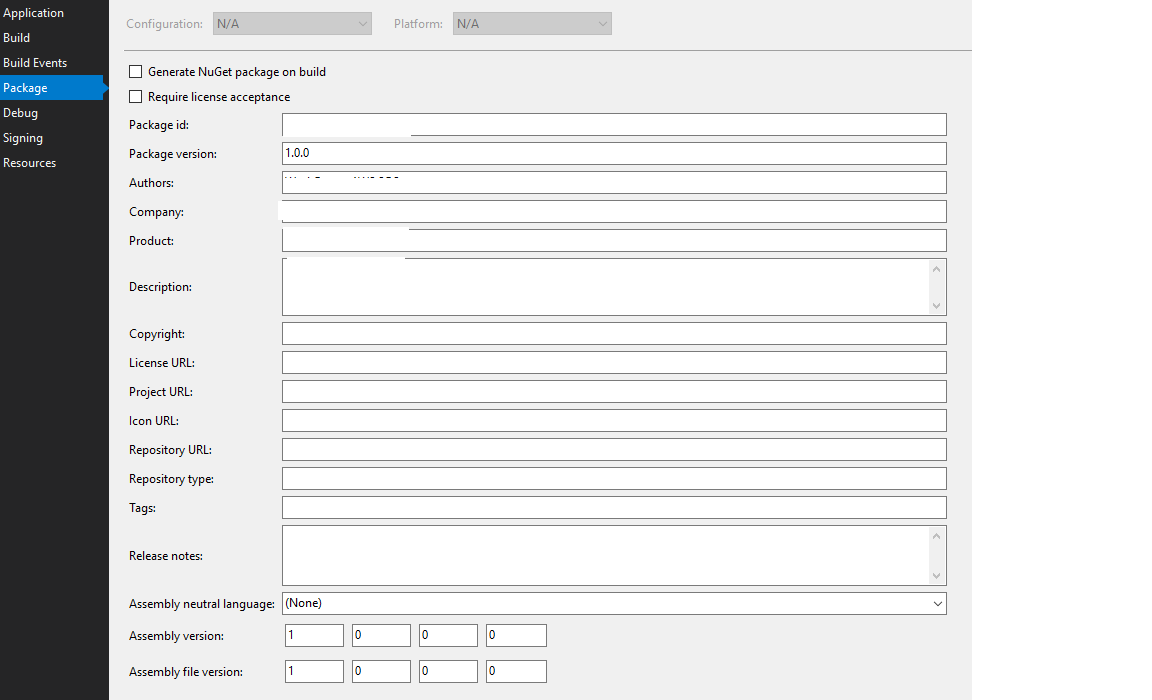
Configure it to create a Nuget package (from project properties, Package tab).
Build, it will build in (bin/debug), but there is no way to configure it to create the package in a relative path, where that path can be set as a local package repo, to reference from it later.
Other suggested things
Suggest to add this option (to customize the path where Nuget packages are created).
_Copied from original issue: NuGet/Home#5753_
 rohit21agrawal
All 6 comments
@mss37 you can set the <PackageOutputPath> property in your csproj (which is relative to your project directory) to determine where the package gets output.
For reference , https://docs.microsoft.com/en-us/nuget/schema/msbuild-targets#pack-target
rohit21agrawal
on 14 Aug 2017
_From @mss37 on August 14, 2017 18:16_
I realized that, then the request is to make this available in VS 2017 UI (Package tab in project properties page).
rohit21agrawal
on 14 Aug 2017
oh, let me move this to the appropriate repository then.
Appreciate the feedback @mss37 ! Keep it coming :)
rohit21agrawal
on 14 Aug 2017
CC: @mavasani
rohit21agrawal
on 14 Aug 2017
Tagging @davkean - I have moved to a different feature team now.
 mavasani
on 14 Aug 2017
mavasani
on 14 Aug 2017
Output path's are configuration dependant, but the package properties are configuration-independent, so that page is probably not the correct place to put it. We'd need a design for this.
 davkean
on 4 Sep 2017
davkean
on 4 Sep 2017
Related issues
 wjk
·
4Comments
wjk
·
4Comments
 dlemstra
·
5Comments
dlemstra
·
5Comments
 terrajobst
·
5Comments
terrajobst
·
5Comments
 MBulli
·
3Comments
MBulli
·
3Comments
 gulbanana
·
4Comments
gulbanana
·
4Comments
Most helpful comment
_From @mss37 on August 14, 2017 18:16_
I realized that, then the request is to make this available in VS 2017 UI (Package tab in project properties page).
