Project-system: Project properties doesn't understand how target framework and runtime identifier are appended to output path
- File -> New Console Application (.NET Core)
- Right click project and choose Properties
- Choose Build tab, in Output Path change "bin\Debug\netcoreapp2.0" to "Bar"
- Save, then close and reopen properties
EXPECTED: Output path is still "Bar"
ACTUAL: Output path is "Bar\netcoreapp2.0"
Note that if the RuntimeIdentifier is set, then it will also be included in the output path.
The .NET SDK automatically appends the target framework and (if present) the runtime identifier to the output path. This can be disabled with the AppendTargetFrameworkToOutputPath and AppendRuntimeIdentifierToOutputPath properties. I'm not sure what we'd want for the behavior here. Perhaps the property page should set those properties to false if you modify the output path. Or maybe the value in the text box shouldn't include the target framework and runtime identifier.
 dsplaisted
All 31 comments
@dsplaisted This is because we changed OutputPath reading to "AfterContext" where we read the value after we've evaluated the entire graph of targets.
We really need to revisit how properties are read/written to handle this sort of thing.
 davkean
on 16 May 2017
davkean
on 16 May 2017
Isn't the issue here that if I set OutputPath in the project the SDK decides to still append the TFM? Maybe AppendTargetFrameworkToOutputPath should be false if OutputPath is non-null when we get to the targets? We could teach the prop page about this but if someone sets the output path by editing csproj then thy are still broken.
 srivatsn
on 16 May 2017
srivatsn
on 16 May 2017
I understand why we append the TFM - if the user wasn't careful to set output path per TFM\RID then they are in a broken state but if the prop pages automatically set AppendTargetFrameworkToOutputPath=false then we are make it easier for people to get into that broken state at which point we may as well be consistent and do that in the SDK.
srivatsn
on 16 May 2017
I think OutputPath should represent the root, not override the TFM\RID paths.
davkean
on 16 May 2017
But it hasn't represented the root in the past - the prop pages have always shown the final value because the page is configuration specific - so even when users change the values, the final configuration-specific value gets written out under a condition. Even @dsplaisted's expected behavior above is that it would be the final value. Your suggested fix of not reading the value with AfterContext would fix this display problem but the output path on disk wont match what the property page says and I think that would still be surprising. More so because today configuration doesn't get force-appended life tfm\rid - so it's not really the root either.
srivatsn
on 16 May 2017
Agreed, but there's no way via the UI set one per TFM either, so I don't think setting the OutputPath should override TFM appending.
We could add a per-TFM page drop down though...
davkean
on 16 May 2017
We probably should if the project is a multi-tfm one. CPS already includes the TargetFramework in the condition for multi-tfm projects. If I set the outputpath in a multi-tfm project this is what gets added to the project
  <PropertyGroup Condition="'$(Configuration)|$(TargetFramework)|$(Platform)'=='Debug|netcoreapp2.0|AnyCPU'">
    <OutputPath>blah</OutputPath>
  </PropertyGroup>
So, I think the work would be to just add and populate the dropdowns.
srivatsn
on 16 May 2017
How about for SDK projects, we just show the base output path (which is "bin" by default). That way you don't shoot yourself in the foot by changing it.
If we wanted we could also add checkboxes to control what gets appended to the base output path.
dsplaisted
on 16 May 2017
It's just that that page is configuration-specific.
davkean
on 16 May 2017
The page where OutputPath shows up today is a configuration-specific page. So changes to those properties get written to the project with conditions like above. So if we had a BaseOutputPath that we set there, it would only get set for that configuration which would be surprising as well.
srivatsn
on 16 May 2017
I don't think it's too surprising that changes to a value on the build page would be saved as configuration-specific, since that's how everything on that page has always worked. If you want to set the value for all configurations you have the dropdowns at the top of the page to do that (though it ends up saving it to a separate PropertyGroup for each configuration, which seems like a separate issue).
dsplaisted
on 16 May 2017
The pages are a whole lot of broken at the moment, we need an all-up-design of how this is going to work. I do like the idea of only setting BaseOutputPath.
davkean
on 5 Sep 2017
This bug report was closed as a duplicate of this issue. It sounds _related_, I'm not sure it's actually a duplicate, so I'll go ahead and re-post the scenario here.
Basically the target folder is appended a second time.
Began with output path for all build-configs (probably a key point) pointing to:
C:\Source\Company.NuGet\AzureLibrary
VS automatically appended the build-target, as described here:
C:\Source\Company.NuGet\AzureLibrary\net461
Decided to use underscore instead of period.
Edited output path (again all build-configs selected):
C:\Source\Company_NuGet\AzureLibrary\net461
After saving and building, we found an extra net461 folder.
Going back to the project properties, we found this output path:
C:\Source\Company_NuGet\AzureLibrary\net461\net461
 MV10
on 7 Feb 2018
MV10
on 7 Feb 2018
Appending any version to the output path after the user has changed it to what they want should not be done. I set the output paths to what I wanted now I have visual studio changing it and appending something for .net core or .net standard. That's not the behavior I need. We know what the version we are building is set to and we set a base path where everything needs to be. Can this please be addressed and removed as a feature.
 dgxhubbard
on 2 Apr 2018
dgxhubbard
on 2 Apr 2018
Pulling into 15.8 to try and address this sooner.
See also :link: https://developercommunity.visualstudio.com/content/problem/37622/project-build-output-path.html
 Pilchie
on 2 Apr 2018
Pilchie
on 2 Apr 2018
Same here with a dotnet core 2 project https://developercommunity.visualstudio.com/content/problem/259233/output-path-permanently-overriden.html#reply-form
In the meanwhile, my workaround was to add in post-build action "move files", and "delete the created folder".
Having a common target directory is very common when we have projects working together.
 mprevot
on 25 May 2018
mprevot
on 25 May 2018
I have a fix for this: https://github.com/dotnet/project-system/pull/3585. Note, I've not added a new property for writing to BaseOutputPath, I just fixed the property.
davkean
on 28 May 2018
This is still broken for me. If I define an output path for a configuration, an additional tfm folder is added to the end by default. bin\Release becomes bin\Release\netstandardN.N and something like bin\Release\netstandardN.N becomes bin\Release\netstandardN.N\netstandardN.N
This is wholly unexpected and burned several hours of my time trying to figure out why my nuget packages are missing DLL's but have the XML doc (that _is_ honoring the path set). Please before saying "not this issue/open a new issue", understand that all the other reports of this behavior are being closed as duplicates and point to this issue for tracking.
 StingyJack
on 19 Mar 2019
StingyJack
on 19 Mar 2019
Are the other bugs that are closed as dupe of this on github? I cannot see them. Can you can point me to an example one I'll reopen it if filed after on 15.8 or higher. The above repro steps/bugs does not reproduce for me on 15.9/16.0 (based on the fix I made here, so I'll need more information (project types, exact steps to reproduce) to figure out this bug.
davkean
on 20 Mar 2019
The reason we don't reopen existing bugs - is for tracking reasons. We've made (what we think) is the fix for it - and the repro steps no longer repro after that fix. There may be _other_ situations or symptoms that seem _similar_ to this bug, but they will need a _different_ fix and likely have different steps to repro the bug. A new bug is the best way to do that and get it on our radar, if we incorrectly close that new bug as a duplicate of an existing bug, absolutely we should reopen it and I am happy to do that.
davkean
on 20 Mar 2019
@davkean The other bugs I was finding were mostly on devcomm.
I had at least one there, but there were others. I'll dig a few up when I get into the office.
StingyJack
on 20 Mar 2019
I found a bunch on dev comm many of them have links to this or to other issues that link to this.
StingyJack
on 21 Mar 2019
Thanks @StingyJack I looked through a tonne of them and they all were filed before 15.8 (there's a tag that mentions the version onthe bug) and hence were very likely hitting the bug that we fixed above. Can you point me one that was filed on or after 15.8? If not, I'm going to need a new bug with the repro.
davkean
on 22 Mar 2019
@davkean - yeah, this one was on 15.9.7 or 15.9.9.
I had the same problem a year or so ago when I was starting to tinker with .net standard and netcore. I think its reasonable to that expect whatever is displayed in that output path for that configuration (or in the proj file) to be where I can find the output. and that doesnt seem to be happening.
StingyJack
on 22 Mar 2019
@StingyJack I think you may have pasted the wrong link there, it just links back to this page.
dsplaisted
on 22 Mar 2019
@dsplaisted - it links back to my comment on this page, that is the link I meant.
StingyJack
on 23 Mar 2019
@davkean I think this was regressed. Using latest dogfood VS:
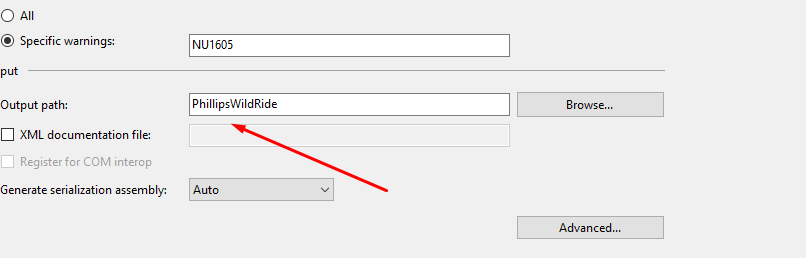
Yields:

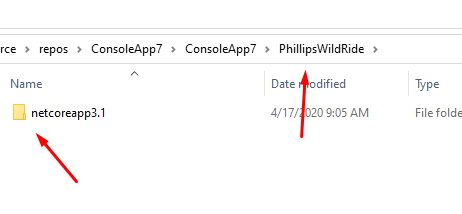
This is true regardless of configuration.
 cartermp
on 17 Apr 2020
cartermp
on 17 Apr 2020
@cartermp I think this is more or less working as intended. If you want it to use the output path you've specified directly, set AppendTargetFrameworkToOutputPath and AppendRuntimeIdentifierToOutputPath to false. Perhaps there should be checkboxes for those in the UI, though they are a bit dangerous if you are multi-targeting or switching RuntimeIdentifiers.
dsplaisted
on 17 Apr 2020
Yeah, that makes sense. I think I was misunderstanding the fix then. I agree that TFM and RID should be a part of the path. Bit of a shame that multi-targeting prevents what should be pretty straightforward for the majority of users. I don't really support adding those checkboxes though, since that would just overcomplicate the UI.
cartermp
on 17 Apr 2020
A potential solution to that could be more project file validation and UI validation based on if you're multitargeting, but that is certainly scoped beyond the project system. Right now it will emit a warning about not being able to copy a file if you do something like this:
  <PropertyGroup>
    <OutputType>Exe</OutputType>
    <TargetFrameworks>netcoreapp3.1; netcoreapp3.0</TargetFrameworks>
    <AppendTargetFrameworkToOutputPath>false</AppendTargetFrameworkToOutputPath>
  </PropertyGroup>
I imagine it's pretty niche to get into that state but it is sort of confusing. Is there an MSBuild issue for this?
cartermp
on 17 Apr 2020
I agree that TFM and RID should be a part of the path.
Wait, what? NO. Big NO for anyone who is not multi-targeting by framework. I dont want to pay a price in complexity so a few others can have tfm folders setup for them automatically. The path we direct the output to needs to be where the binaries are found. (Its a direction given to the computer that should be followed and not interpreted as a suggestion). We shouldnt have to also read the target framework from the project file just to figure out where the output is for the current compilation. What a needless pain! How is the current choice the right one for the overall user base that does not multi target? I could be wrong about the muilti targeting usage, but someone will have to be armed with general user (i.e. not MSFT and probably not other tool vendor) stats.
Either detect the multi targeting and use the tfm folders and issue a build message about it, or put the checkboxes in and default them to unchecked or maybe both. The right choice was not to disrupt continuity and add complexity for the majority of the user base just to satisfy the needs of a few. I would hope that this poor decision was learned from, but the amount of justification here and elsewhere for it says we can expect more complexity for no benefit in the future.
StingyJack
on 19 Apr 2020
Related issues
 SomeAnonDev
·
37Comments
SomeAnonDev
·
37Comments
 brthor
·
42Comments
brthor
·
42Comments
 NickCraver
·
43Comments
NickCraver
·
43Comments
 abpiskunov
·
39Comments
abpiskunov
·
39Comments
 jnm2
·
34Comments
jnm2
·
34Comments
Most helpful comment
Appending any version to the output path after the user has changed it to what they want should not be done. I set the output paths to what I wanted now I have visual studio changing it and appending something for .net core or .net standard. That's not the behavior I need. We know what the version we are building is set to and we set a base path where everything needs to be. Can this please be addressed and removed as a feature.