Project-system: How to clarify distinction between .NET Core and .NET Standard library project templates
As brought up on Twitter by @filipw: https://twitter.com/filip_woj/status/847783708262268928
Currently the .NET Core Class Library template in Visual Studio targets netcoreapp and not netstandard. Granted, they are two different things, but why wouldn't anyone want to create a netstandard library when building for .NET Core?
 daveaglick
All 27 comments
.NET Core has more APIs than .NET Standard (e.g. this list), so there is use case for just that. You could argue it is less common, but we should acknowledge it as an option (e.g. breaking larger .NET Core project into components).
I think the most valuable discussion is how to avoid developer's confusion and lead him/her to make the right choice (without being expert on all .NET Standard vs. .NET Core things). How can we improve current experience to make it happen?
From offline discussion with @terrajobst (apparently there have been a dozen of threads on this topic in the past 6-12 months):
In ideal world, we would have a single Class Library project, which guides developer (e.g. asks developer "which platforms you want to run on") -- that work is rather large and is on backlog for future VS releases.
So let's focus on potential targeted solutions instead:
Problem as I understand it:
Target audience: A developer who is familiar with VS, but is new to .NET Core / .NET Standard concept. The developer didn't follow all the news and just heard about .NET Core-ish thing being new and great and cross-platform, so he/she wants to give it a try.
Problem: Developer chooses .NET Core class library project over .NET Standard class library project when he/she could benefit from targeting mulitple platforms (Desktop, UWP, Xamarin, Core) by choosing .NET Standard class library project. The developer chooses .NET Core, because it is something that pops in File | New Project dialog and is familiar.
Is that fair summary of the problem or would you change it / twist it? Or am I missing some angles?
 karelz
on 31 Mar 2017
karelz
on 31 Mar 2017
For context I added query of APIs approved and closed=implemented in .NET Core (~100) - they are by design not in .NET Standard, because they are not in .NET Framework 4.6.1 (it shipped before we added them into .NET Core and we didn't backport anything yet to Desktop)
@weshaggard do you have API surface diff between .NET Standard and .NET Core? I can't find it in standard repo.
It will be useful to explain the difference between .NET Core and .NET Standard and it will help developers choose what to target (i.e. if targeting .NET Core is useful for them or not).
karelz
on 31 Mar 2017
It does make sense why you may want to create a .NET Core-specific library given the expanded API surface area of .NET Core over .NET Standard.
Is that fair summary of the problem
Yes, I think that hits it on the nose. The underlying cause of confusion is over the terms ".NET Core" and ".NET Standard" (and their associated netcoreapp/netstandard monikers). It can be especially confusing because you can't use cross-platform as a distinguishing factor since they're both cross-platform. A lot of developers aren't going to care or understand the subtlety of the runtime vs. a standard API contract.
So let's focus on potential targeted solutions instead
Those terms obviously aren't going anywhere, so the goal should be to clarify what they mean. The trick is communicating that .NET Core and .NET Framework are analogous but .NET Standard is something else entirely that encompasses both. Perhaps merely adding ".NET Standard (.NET Core and .NET Framework)" to the template category would help (though that makes the category name kind of long). It also doesn't make it any clearer that .NET Framework project templates are under the goofy "Windows Classic Desktop" category.
daveaglick
on 31 Mar 2017
Thanks for confirmation of the problem description @daveaglick!
Note that .NET Standard is about ALL platforms - you forgot Xamarin, UWP. Adding all into the template name is no-go.
I had 2 ideas in mind:
- Copy "Class library (.NET Standard)" template also into .NET Core subnode to rub it in developers' node.
- Sadly, technically it requires copy of the entire template, i.e. duplicated code and bug farm in differences. Moreover it just helps discovery of both, it does not help dev to make a choice.
- So not an option from technical perspective, we will have to wait for improvements of the dialog (mentioned above).
- Edit text of both templates
- .NET Core should hint "hey, you might want to consider .NET Standard if you don't need latest Core APIs and you want to use the library also on Desktop, Xamarin and UWP".
- .NET Standard should explain "this template can target all these 4 platforms" (potentially with a link to a blog post or some longer education/explanation which @terrajobst plans to write).
[1] is not technically feasible.
[2] has the problem that it is just text on the right side and most folks probably don't read it ... IMO it is still better than do nothing.
Thoughts? Other suggestions? Wording suggestions?

karelz
on 31 Mar 2017
Just a quick 2c - what if you renamed the top-level template categories to make it obvious what is and is not a "platform" by using that term.
My ideal top-level categories would go something like:
- Windows Universal Platform
- .NET Framework Platform
- Web
- .NET Core Platform
- .NET Standard (All Platforms)
Etc.
I personally don't like Windows Classic Desktop (which is why I renamed it to .NET Framework Platform above), but that might need to stay for reasons. In that case, maybe it could be Windows Classic Desktop Platform.
I personally think using the term "Platform" after the runtimes and then "(All Platforms)" for .NET Standard makes it at least a little clearer, and more obvious than just tweaking the descriptions.
daveaglick
on 1 Apr 2017
Personally I am not thrilled about the new names. They are long. I like shorter names.
Platform is IMO a bit overloaded term, so also not super-helpful.
What about .NET Standard -> .NET Standard (All Platforms)" on its own?
I don't think I like that either.
Disclaimer: I am not decision maker on this topic, not even expert, just voicing my private opinion as user of the wizards.
karelz
on 1 Apr 2017
Let's ignore for a second the concrete issue and let's look at the intent and long term goals.
- We have several .NET platforms and will continue to have them, as each has unique APIs that allow tailoring your applications to a particular experience.
- Class libraries allow you encapsulate code. Sometimes you want to share code that runs on all platforms, sometimes for a particular set of platforms, and sometimes just for a single platform.
So logically this means that we have:
- Several platforms your code runs on (also called the verticals)
- A standard that allows you to reason about features all these platforms have in common (also called the horizontal).
Code sharing happens in both of these scenarios which is why we provide class library templates for all verticals:

Long term, I'd like us to fix the File | New Project (as in: burn it to the ground and build something from scratch). The biggest problem in my opinion is that we have too many class library templates. And that makes it very hard for people to decide what to use. At the minimum, this could be like ASP.NET i.e. a single template with dialog afterwards. But ideally, the New Project dialog would be a cascading set of choices that guide you towards the right outcome with no following dialog.
 terrajobst
on 1 Apr 2017
terrajobst
on 1 Apr 2017
as in: burn it to the ground and build something from scratch
Sounds like @terrajobst is more developer than manager these days. 😆
 Mike-E-angelo
on 1 Apr 2017
Mike-E-angelo
on 1 Apr 2017
Quick fix, stick .NET Standard library in all the types...
In Core
Class Library (.NET Standard)
Class Library (.NET Core)
In Classic Desktop
Class Library (.NET Standard) [defaulting to framework version chosen - if that has to stick around]
Class Library (.NET Framework)
In .NET Standard
Class Library (.NET Standard)
In Windows Universal
Class Library (.NET Standard) [version that UWP supports]
etc...
 benaadams
on 1 Apr 2017
benaadams
on 1 Apr 2017
@benaadams check my answer above https://github.com/dotnet/project-system/issues/1909#issuecomment-290834857 [1] -- sadly, it is technically ugly and non-trivial :( (at least I have been told)
karelz
on 1 Apr 2017
Doesn't ntfs have symbolic links these days? 😉
benaadams
on 1 Apr 2017
@Mike-EEE
Sounds like @terrajobst is more developer than manager these days. 😆
Hate to disappoint 😄 To be honest, you might not like the dialog because I don't think it will involve a XAML-based data model 😈
terrajobst
on 1 Apr 2017
@benaadams
Quick fix, stick .NET Standard library in all the types...
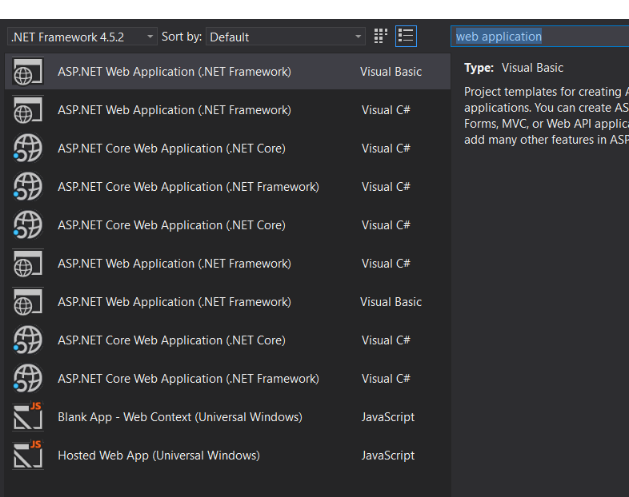
We considered this, but it has the problem that the nodes on the left are like physical file folders, i.e. the template has to be duplicated. That wouldn't be a big deal (besides duplication in VS) but it means that searching for class library in the top right would now also list them multiple times.
terrajobst
on 1 Apr 2017
@terrajobst argh, uglier than I thought - the multiple entries is a very good point ... I hate it when we are limited by technical limitations like this one :(
karelz
on 1 Apr 2017
you might not like the dialog because I don't think it will involve a XAML-based data model
haha OK, I deserved that, @terrajobst. 👼
Mike-E-angelo
on 1 Apr 2017
it means that search for class library in the top right would now also list them multiple times.
Am sure there is a Distinct method in Linq that would work on name. While I'm sure its a  in computer science; I'm sure if we put our heads together we could divise an approximate solution that might just work 😉
The main issue as I see it is:
- The default go to for libraries should be a .NET Standard library.
- A library locked to a different platform is a more specialized use-case.
- (this is the kicker) You will stick to your vertical to look for templates (whether Core/UWP/Desktop/Web)
What if you take libraries out of all the verticals and remove .NET Standard and replace it with .NET Library. In there have the different types:
 .NET Library
  -  Class Library (.NET Standard - All frameworks)
  -  Class Library (Universal Windows - Only)
  -  Class Library (.NET Framework - Only)
  -  Class Library (.NET Core - Only)
Am sure there is a Distinct method in Linq that would work on name.
Can't speak to the complexities of implementing that in File | New Project dialog, but I was told by the VS owners that's it not that simple. Keep in mind that this is also an extension point for third parties that we don't want to break.
What if you take libraries out of all the verticals and remove .NET Standard and replace it with .NET Library.
That's an interesting idea that I don't think was discussed before. Thinks to consider:
- Should this only include "pure" class libraries or should this also include specialized class library templates as well, like "WPF User Control Library". I'd say no as specialized templates would belong into nodes associated with a given vertical.
- How much would this mess with muscle memory of single vertical developers? If I'm only building desktop apps for .NET Framework, I might find it annoying having to jump between different nodes in the dialog. Also, I might not even consider looking in this new node. On the upside, having a dedicated node might help in educating library developers about their choices.
@srivatsn @davkean @kieranmo Thoughts?
terrajobst
on 1 Apr 2017
but I was told but the VS owners that's it not that simple.
Needed to cover the "I do programming its just setting a flag" angle before someone else did 😉
should this include specialized class library templates
No, as you say, they should be in their own vertical
How much would this mess with muscle memory of single vertical developers? If I'm only building desktop apps for .NET Framework...
Would you prefer them to create .NET Standard libraries over .NET Framework libraries? If so then you have to disrupt the flow or they will just keep making .NET Framework libraries only.
If the node is called .NET Library it should be fairly easy to find.
Web developers have to go to a different node already...
benaadams
on 1 Apr 2017
Would you prefer them to create .NET Standard libraries over .NET Framework libraries?
I prefer them to create the library that makes sense for their particular task at hand. I'm writing a ton of libraries myself and not all of them can be .NET Standard libraries.
Web developers have to go to a different node already...
Agreed, although it was the ASP.NET's team decision to not include any class libraries there as they found that their devs find it more confusing than helpful.
terrajobst
on 2 Apr 2017
not all of them can be .NET Standard libraries
Reminds me of that famous Beach Boys song...
🎵 I wish they all could be .NET Standard libs 🎵
daveaglick
on 2 Apr 2017
but it means that searching for class library in the top right would now also list them multiple times.
Looks that way 😄
benaadams
on 3 Apr 2017
Yep, and that's just duplication between two nodes (Cloud and ASP.NET). Imagine what across all verticals would look like for libraries :-)
terrajobst
on 3 Apr 2017
@daveaglick
That reminds of my favorite 90s song:
Call him Mr.Aider call him Mr.Right
Call him Mr.Brain
He'd say: I know what I want
And I want it now
I want .NET Standard cause I'm Mr.Brain
I know what I want and I want it now
I want .NET Standard cause I'm Mr.Brain
🎵 😄🎵😄 🎵😄 🎵😄 🎵
terrajobst
on 3 Apr 2017
I would love to see an asp.net core class library template.. right now you have to know some esoteric concepts like using the web sdk but changing output type to library.
 gulbanana
on 6 Apr 2017
gulbanana
on 6 Apr 2017

Perhaps merely adding ".NET Standard (.NET Core and .NET Framework)" to the...
The mental dissonance of .NET standard "covering" like the image or the "(core and framework)" is counter to its actuality in being a narrower base or common ancestor of both. Trying to explain that well enough to a team with varying skills and abilities can be challenging, and is bound to cause confusion or worse (projects with weird and/or costly bugs that dont accept changing from one to the other nicely - see newly linked issue)
".NET Standard (Core _or_ Framework)", ".NET Base " or even ".NET Common" is far less ambiguous than "Standard" and "Core" .
 StingyJack
on 11 Apr 2017
StingyJack
on 11 Apr 2017
@StingyJack Even if you were right that ".Net Standard" is confusing, I really don't think it makes sense to rename it at this point. I think it would cause much more confusion, not less.
 svick
on 27 Apr 2017
svick
on 27 Apr 2017
I'm going to close this issue - it seems like the majority of questions were answered. If you have further questions about this, feel free to file bugs over on http://github.com/dotnet/standard
 davkean
on 4 Sep 2017
davkean
on 4 Sep 2017
Related issues
 dlemstra
·
5Comments
davkean
·
4Comments
dlemstra
·
5Comments
davkean
·
4Comments
 abpiskunov
·
4Comments
terrajobst
·
5Comments
abpiskunov
·
4Comments
terrajobst
·
5Comments
 DavidArno
·
3Comments
DavidArno
·
3Comments
Most helpful comment
@Mike-EEE
Hate to disappoint 😄 To be honest, you might not like the dialog because I don't think it will involve a XAML-based data model 😈