Project-system: Show project file itself in Solution Explorer
One of the big benefits of project.json was ease of editing. Unfortunately, that's now hidden behind a right click and a menu scan for the user. Here's what that looks like:

In the project.json world, this access for human editing was far easier:

Can we please add the .csproj back to the tree for easy editing? It could take many forms. The project.json was easy because the name was consistent, which would be a challenge here. Either it could be a special node always at the top, or some other access.
 NickCraver
All 43 comments
I like the idea of displaying the .csproj file in Solution Explorer when the Show All Files option is enabled.
 scottaddie
on 18 Jan 2017
scottaddie
on 18 Jan 2017
I really miss the intellisense for the NuGet package versions in the project file. Would be great to have this again in the csproj file.
 damienbod
on 18 Jan 2017
damienbod
on 18 Jan 2017
@damienbod Can you file a different issue for this? While we have this in the back of our minds, having a customer filed bug would be useful to prioritize.
 davkean
on 19 Jan 2017
damienbod
on 19 Jan 2017
davkean
on 19 Jan 2017
damienbod
on 19 Jan 2017
@scottaddie wrote:
I like the idea of displaying the .csproj file in Solution Explorer when the Show All Files option is enabled.
Yuck. Show All Files is an ugly view. What's wrong with having the .csproj visible all the time for SDK-style projects?
 bradwilson
on 21 Feb 2017
bradwilson
on 21 Feb 2017
@bradwilson Nothing wrong with that idea at all, and I'm definitely not married to the Show All Files idea. All I really care about is that I can edit the CSPROJ file without having to hunt for the appropriate Edit option in the cluttered context menu.
scottaddie
on 21 Feb 2017
I'm wondering if treating the project file node in a similar manner to how we treat code files would be appropriate here.
That is, if you click it once, it opens the Project file for editing in the 'Preview' tab. But if you double click, it opens the Project file for editing as a 'Keep Open' tab.
I think this would provide a cleaner and more familiar approach to editing the project file overall, However, it would modify the existing behavior of collapsing or expanding the project file node on double-click (which is what we do today).
 tannergooding
on 9 Mar 2017
tannergooding
on 9 Mar 2017
@tannergooding We're thinking we want to go with the approach of showing the node as a file itself, similar to this prototype I did. We'll want a predictable order regardless of the project name, I was thinking originally you might need this feature: https://github.com/dotnet/roslyn-project-system/issues/1896, but I'm wrong. I think you can just mark the thing as bubbleup and because it's a file it will float to the location we're think it should live; between Folders and Files.
davkean
on 30 Mar 2017
Please can the csproj file in Solution Explorer support right-click >> View History, as per project.json?
Currently I'm forced to use TortoiseGit on the project folder outside VS to access the csproj's history.
 danielgreen
on 18 May 2017
danielgreen
on 18 May 2017
Can we please add the
.csprojback to the tree for easy editing?
The way I see it, the project file is already in the tree. It's just treated differently than other files. It would be easier/faster/more consistent if the project nodes' default action (expand/collapse project - who uses that anyway?) was changed to open the project file for editing instead. Just like other files, it could have the preview/keep open behavior. I think that's pretty much what @tannergooding is suggesting.
BTW, this was recently mentioned in @shawnwildermuth's "Why is ASP.NET Core Development So Much Harder in VS2017?" blog post.
 khellang
on 22 May 2017
khellang
on 22 May 2017
+1 for adding the csproj into the tree!
 douglaswaights
on 22 May 2017
douglaswaights
on 22 May 2017
Just adding that this is still a daily annoyance that I honestly can't understand. The goals of .csproj to make it approachable and editable by humans (like project.json) while simultaneously burying it in an ever-growing right click menu are completely antithetical to each other.
What is the release schedule for 15.6?
NickCraver
on 22 Jul 2017
This is currently in 15.5. We have no date for this other it will be after 15.3 is released. Our team will be doing very little/if anything for 15.4, and our master is currently tracking the 15.5 release: https://github.com/dotnet/project-system/blob/master/docs/repo/roadmap.md.
davkean
on 24 Jul 2017
@Pilchie, do we want to target this for 15.5, with the understanding that it may not be ordered in the "optimal" location until the CPS work unblocking https://github.com/dotnet/project-system/issues/1896 happens post 15.5?
tannergooding
on 12 Sep 2017
@tannergooding I had a idea on how to enable this without any changes from CPS - if it's a file item marked bubble up, it should float to the exact location we want it.
davkean
on 13 Sep 2017
@davkean, that is currently blocked by https://github.com/dotnet/project-system/issues/391, which causes bubble sorted items to still be sorted alphabetically.
tannergooding
on 13 Sep 2017
Been a while since I looked at this, but I think "file" bubble up items are sorted separately to "folder" bubble up items. In fact, my prototype images seem to show that: https://github.com/dotnet/project-system/issues/107#issuecomment-220790116.
davkean
on 13 Sep 2017
ie the project file would be the only bubble up file that we have, so it would be okay.
davkean
on 13 Sep 2017
Alright, it might end up being fine after all then, provided we don't add any other bubble up items before we get actual DisplayOrder support.
tannergooding
on 13 Sep 2017
We've been playing around with this and have a PR up to allow a double-click or enter key press on the project file to open it up in the text editor:
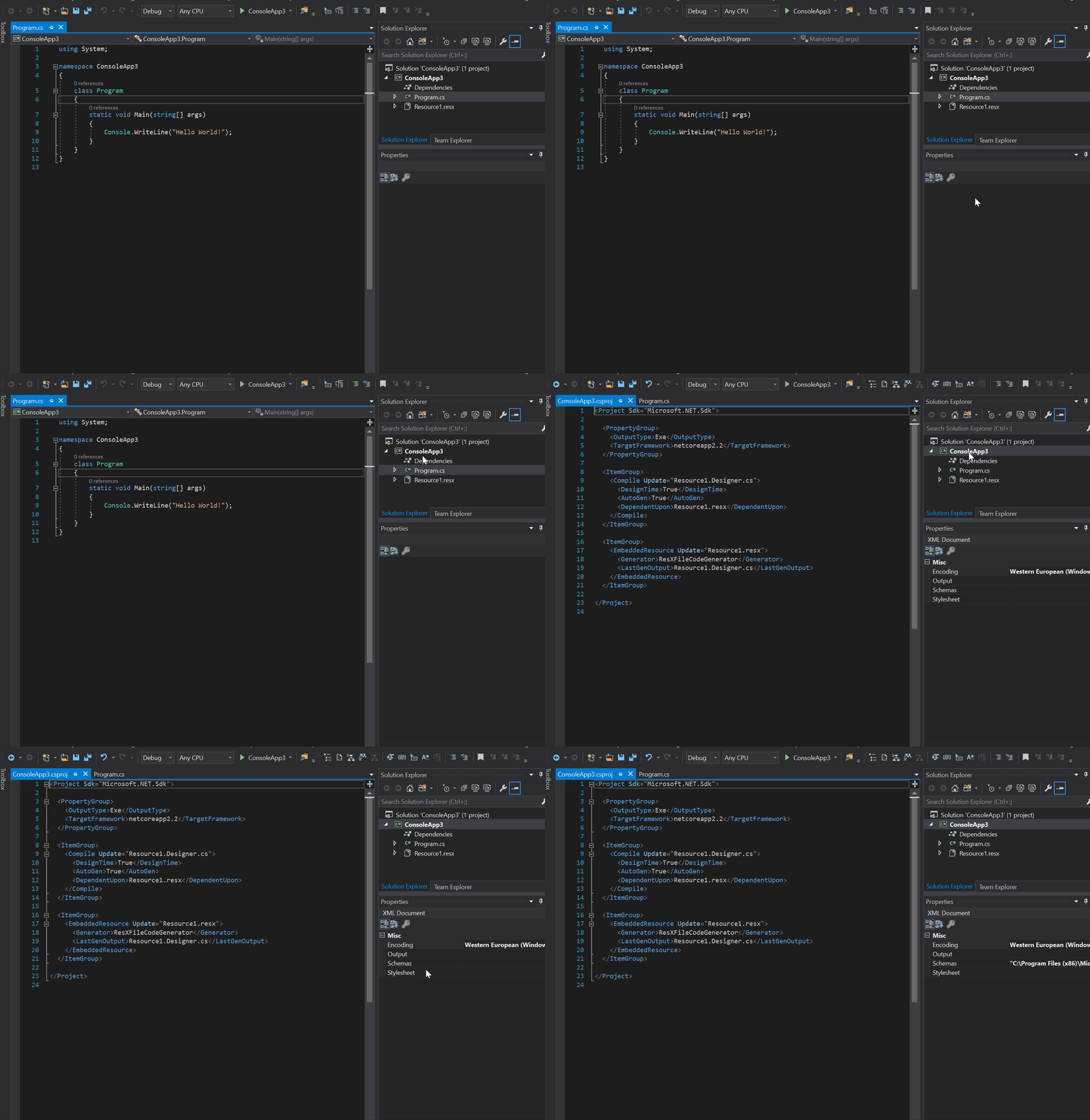
We'll have to see what the feedback on this is like as it removes double-click to expand/collapse.
 davidwengier
on 6 Sep 2018
davidwengier
on 6 Sep 2018
Why not just show the .csproj file underneath the project node? What’s the rationale behind not doing that?
 MrBliz
on 6 Sep 2018
MrBliz
on 6 Sep 2018
I've thought about this and played with the same, but in the end I agree with others here, please don't make double click to that - it's bad UX, IMO.
Thinking about it overall: we have a lot of project types. Double clicking some will do one thing and double clicking others will do another thing. With no warning. A C# SDK project has the same look as a non-SDK project in the Solution Explorer.
I have the same problem today. While my "workaround" for sanity has been to move the Edit <name>.csproj context menu item to the top:
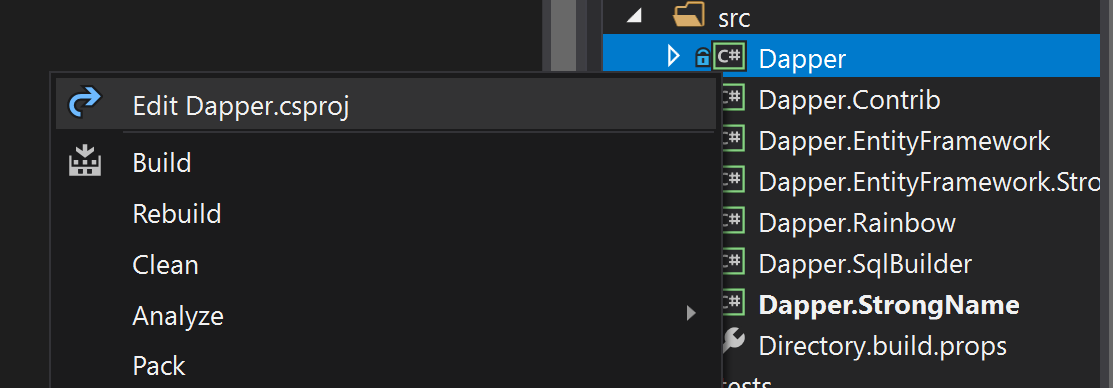
...it still means I have to right click and look for it to even tell it's an SDK project I can edit. A double click solution is even worse...now that's an editor tab I need to go close.
Please, add a node for this instead. Preferably at the top, like Dependencies is.
For what it's worth, I think Edit <name>.csproj should be in the top group (with Build) by default for everyone. I'm probably biased though, same with everything above.
NickCraver
on 6 Sep 2018
@NickCraver Assuming the nodes are collapsed, you still need to take the same number of actions to get to the project file regardless of if double-click opens the file, or if it's a node in the project tree. When they're not collapsed, they look different due to the References/Dependencies difference.
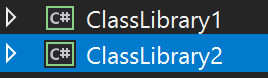
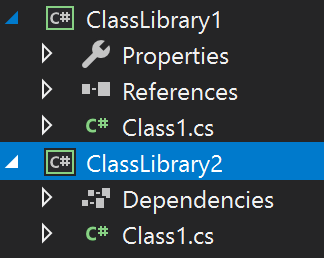
Regardless of the solution, you still need to perform an action to see which project node can have the file be opened without unloading.
So this really does come down to two things:
- How people prefer to get to that file
- How people prefer to visualize their artifacts on disk (i.e., is the project node a "real thing" or is it just some visual container that Visual Studio needs?)
We could A/B test each solution in a VS 2019 Preview, but we'd need some measure to drive based on that and a feedback mechanism we can trust. What that is isn't clear to me right now.
 cartermp
on 6 Sep 2018
cartermp
on 6 Sep 2018
I like the double-click solution. It feels consistent with double-clicking files to edit them. Note too that double-clicking the "Properties" node of a non-SDK projects launches the property pages.
Adding a node for the project file would also provide a good experience IMO.
I can see how having different double-click behaviour per project type might lead to frustration.
Thinking through alternatives, starting with some current pain points:
- It's paper-cut-painful to find the "Edit .csproj" context menu item as it's buried among a bunch of other items
- There's no keyboard shortcut to edit the file (that I know of)
Moving the edit item to the top reduces the cognitive load and addresses the first point, but I bet lots of people are conditioned to expect "Build" there. People likely build their project more regularly than edit it. Moving it to the bottom, alongside "Properties" and "Open Folder in Explorer" would make it easier to locate, though further from where the user clicks.
I'd personally be very happy if Shift+Enter edited the file. That shortcut fits nicely with Alt+Enter showing the property pages. This shortcut would be advertised in the context menu, as is done for the property pages.
A slightly more out-there idea: Shift double-clicking the project could edit the file, with Alt double-click opening properties. This is not discoverable though.
 drewnoakes
on 7 Sep 2018
drewnoakes
on 7 Sep 2018
One idea I've thought of is having "View Code" and "View Designer" (F7/Shift+F7) toggle between the xml file editor and the property pages.
 Pilchie
on 7 Sep 2018
Pilchie
on 7 Sep 2018
@davidwengier I think we should invent a new capability for the feature as you've written that we turn on ourselves just to dogfood for the next couple of weeks, I want to at least play around with it to feel the pain/experience before/if we turn it on for everyone else.
@drewnoakes I like the idea of a new shortcut - SHIFT and CTRL do already have meanings (expand selection/multi-select) in the tree view, so we'll need to make sure it doesn't interfere with that. We should also probably do a pass by the Accessibility team - there is also a valid concern that enter has always been expand.
An alternative is that we auto-open the editor in the Preview tab (respecting "Allow new files to be opened in the preview tab") when you select it - this will definitely help with discoverability. Editing the file will immediately "promote" it like every other document.
@Pilchie Your suggestion is a good one, but seems like it's in addition to the above suggestions rather than a replacement?
davkean
on 7 Sep 2018
If we do preview wouldn't that negate the need for double click (since the first click would show the editor anyway) so we could leave double click for expand/collapse, at least if the preview option is on?
I also agree like Kevin's idea of F7, as that takes advantage of the existing meaning. Again would only be needed if the preview option is off.
davidwengier
on 7 Sep 2018
I assumed Kevin's suggestion was in the App Designer & Editor itself?
Preview doesn't mean not have double-click (though that might be an option); think of a source file, single click means preview, double-click means open.
davkean
on 7 Sep 2018
Preview is interesting - removes the need to close unintended windows open...I really think that has promise. “Was this what you wanted?” Okay start editing. Not so? Just click away. I’d love to test this if it’s viable.
NickCraver
on 7 Sep 2018
I’d love to test this if it’s viable.
Isn't this how preview works today? I'm assuming the behavior would be the same with project files.
khellang
on 7 Sep 2018
Yeah...I mean test it with project files, which isn’t the case today :) It sounds like an ideal use case for preview (for my tastes), but you really need to test that in action to make any informed opinion there.
I’d happily guinea pig an extension...
NickCraver
on 7 Sep 2018
From a implementation standpoint, it appears like whether something shows up in "preview" tab is going to be controlled by CommonPhysicalViewAttributes (in particular set it to "00000002") on the ProjectFileEditorFactory registration in CPS. Even then I don't suspect this is going to work until the open document service actually knows how to correctly open the project file (same underlying bug as https://github.com/dotnet/project-system/issues/2063 and part of https://github.com/dotnet/project-system/issues/35).
Microsofties, this is quasi being tracked by this PR https://devdiv.visualstudio.com/DevDiv/_git/VS/pullrequest/124985?_a=overview, though lots of work to do.
Short answer: You're not going to see this for a while.
davkean
on 7 Sep 2018
Can we progress the idea of a shortcut key? I like @Pilchie's F7 idea more than Shift+Enter. Should I open a separate issue?
drewnoakes
on 7 Sep 2018
Ah, my assumption was that F7/SHIFT+F7 was for the editor itself - but it's global. It's currently bound to ViewCode - so I think we'll need to reuse that command. Yes, let's open a new bug that tracks shortcut keys.
davkean
on 7 Sep 2018
Shortcut keys discussion moved to #3968.
drewnoakes
on 7 Sep 2018
Apologies for the closure, in case you got a notification. This issue is still active, but I've just merged in the double-click change for us to dogfood internally. We are also exploring some other possibilities.
davidwengier
on 11 Sep 2018
Just to also provide an update, we want to explore the preview route (as well as the shortcut) but we're currently blocked on 3 different platform changes - 1 of which is quite significant with possible downstream repercussions. We're meeting in a couple of weeks to discuss as a group and figure out a plan of action. Good news is that this will unblock a bunch of other stuff (Find and Replace in project files for example) when we eventually resolve this.
davkean
on 11 Sep 2018
We're using https://github.com/dotnet/project-system/issues/4061 to track "finishing" the project file editing including Find/Find in Files, Open from Results/Error List and Show in Preview tab. I'll leave this bug open to continue to track the Show project file in Solution Explorer.
davkean
on 1 Oct 2018
Okay folks; we've just committed the above work in #4061 and the following things now occur:
- Find/Find In Files & Replace/Replace In Files now work over project files
- Single click on a project node opens project file itself in Preview tab similar to source files, double-click opens it in a "promoted" tab
This work will show up in Visual Studio 2019 _Preview 2_ (not Preview 1). Please try out the new experience and provide feedback.
davkean
on 7 Nov 2018
Visual Studio 2019 Preview 2 is out and you can use the new experience in that; https://twitter.com/davkean/status/1088308654338502657. I've been dogfooding it for a while and it's feels very natural. Some positive feedback so far:
"This is so great! I've been using this a lot over the past week"
"It's amazing! No complaints"
"Works a charm! It's how it always should have worked."
"Works great, I appreciate not having to right click so much"
"This will make upgrading old .net projects by hand...a breeze...Thanks for this!"
For those that do not like the new double-click behavior, we plan on adding an option to switch to the old behavior before we finish VS 2019: https://github.com/dotnet/project-system/issues/4493.
At this point we have no further plans on showing a separate node to the root node, and consider this feature request complete. If you have further feedback/issues on this area, feel free to file a new issue. Thanks!
davkean
on 8 Feb 2019
Sorry to bother, but is it possible to revert this behavior to collapsing/expanding the project in the solution explorer? It's so annoying that this changed 👎
 stefankip
on 29 Mar 2019
stefankip
on 29 Mar 2019
@stefankip That is being tracked by https://github.com/dotnet/project-system/issues/4493 and we are adding a setting to disable the double click behavior for those who don't want it.
davidwengier
on 29 Mar 2019
Thanks @davidwengier, didn't notice that.
stefankip
on 1 Apr 2019
Related issues
 DavidArno
·
3Comments
DavidArno
·
3Comments
 davidmatson
·
4Comments
davkean
·
4Comments
davidmatson
·
4Comments
davkean
·
4Comments
 MV10
·
4Comments
MV10
·
4Comments
 aL3891
·
3Comments
aL3891
·
3Comments
Most helpful comment
Visual Studio 2019 Preview 2 is out and you can use the new experience in that; https://twitter.com/davkean/status/1088308654338502657. I've been dogfooding it for a while and it's feels very natural. Some positive feedback so far:
For those that do not like the new double-click behavior, we plan on adding an option to switch to the old behavior before we finish VS 2019: https://github.com/dotnet/project-system/issues/4493.
At this point we have no further plans on showing a separate node to the root node, and consider this feature request complete. If you have further feedback/issues on this area, feel free to file a new issue. Thanks!