Project-system: Related files support
C# and VB have a registration API for automatically registering dependency relationship between files so that they are automatically parented underneath and hidden in some cases.
For example, in VB, Foo.Designer.cs and Foo.resx is automatically grouped under Foo.cs, and both are hidden by default.
We should implement similar support - but I'd like to see an MSBuild equivalent of this - not via the registry as it is today:

See: CVbPackage::InitializeRelatedFiles and CCSharpPackage::InitializeRelatedFiles internally.
We should make sure that we have sensible defaults that do not require DependantUpon metadata item to be written to the project file.
 davkean
All 34 comments
Today in VB if you add an existing form, the related don't always get copied and if you use the OS to copy all the files you have to restart Visual Studio for the nesting to happen. It would be nice if these were cleaned up as part of the change.
 paul1956
on 17 May 2016
paul1956
on 17 May 2016
:+1:
davkean
on 17 May 2016
Wonder if a hybrid approach of using project.json's heuristics + flags to hide nested types for the VB cases might be enough.
davkean
on 25 May 2016
I've experienced cases where related files like these aren't automatically grouped unless you hand edit the .csproj file and add some MSBuild voodoo. What and where, I don't remember. I just mention it as another argument for doing something about this grouping, which I agree is a nice feature. :smiley:
 asbjornu
on 25 May 2016
davkean
on 26 May 2016
asbjornu
on 25 May 2016
davkean
on 26 May 2016
People seem to want this feature turned off too, so a flexible way to configure which files are nested by which pattern and the ability to turn this on and off on a per-file basis (without writing megabytes of XML) would be neat.
asbjornu
on 26 May 2016
I'm really interested in this - we make extensive use of it at Stack Overflow. For example, for a User object, we have User.cs, User.Render.cs, etc. Here's a view:

We also use a similar dot-delineation pattern for views and their models as well:

And of course the classics: Global.asax, Web.config, .cs beneath .dbml (anything generated really), etc.
Built-in functions that cover most cases would be great (though I definitely see some people not wanting this turned on at all). Barring that working well, I think the most inclusive design would be from the would-be child's point of view. e.g. given my file name, what file(s) should I look for in my current directory to nest user?
For example in our first one I'd replace anything from the first dot until .cs to look for a parent. In the second example I'd replace .Mobile and .Model.
I'm not sure this approach would work for others, but I'm picturing an element in the .csproj that allows for this configuration. Perhaps you could add n of these mappings. Or perhaps since it's strictly a VS view concern, it could be separate. It needs to be in source control and team shared, though. Just throwing out ideas here.
 NickCraver
on 16 Dec 2016
NickCraver
on 16 Dec 2016
@srivatsn I think we need do at least basic support here for xproj parity. We should grab CPS's demo implementation and productize it.
davkean
on 23 Jan 2017
@abpiskunov already has implemented most of the nesting rules that xproj had. There's no ux for controlling that behavior yet and that's a large part of this feature
 srivatsn
on 23 Jan 2017
srivatsn
on 23 Jan 2017
But it's not enabled for us.
davkean
on 23 Jan 2017
You mean non aspnet projects? Xproj had one or two rules there - didn't seem too important.
srivatsn
on 23 Jan 2017
They had the main rule there; group Foo.js under Foo.cs, and Foo.Bar.js, under Foo.js.
davkean
on 23 Jan 2017
I implemented same rules we had for xproj , but , yes, they are active only for Web projects. All rules configured via json file in user settings: C:Users\antonpis\AppData\Local\Microsoft\VisualStudio\15.0_f669a566\toolSettings.json . There some rules that also applicatble to core projects as David suggested and i would remove them when you implement your version of them. However not sure if it is happening for RTM now, is it?
 abpiskunov
on 23 Jan 2017
abpiskunov
on 23 Jan 2017
 wli3
on 19 Sep 2017
wli3
on 19 Sep 2017
🔗 Also reported in https://developercommunity.visualstudio.com/content/problem/100452/solution-explorer-no-longer-nests-files.html
 Pilchie
on 2 Oct 2017
Pilchie
on 2 Oct 2017
I just wanted to let everyone know that since Visual Studio 2017 15.6 Preview 4 (which was made available a few days ago) users have the ability to control how file nesting works in Solution Explorer.
Check out this blog posts for more details:
https://blogs.msdn.microsoft.com/webdev/2018/02/07/file-nesting-in-solution-explorer/
 AngelosP
on 9 Feb 2018
AngelosP
on 9 Feb 2018
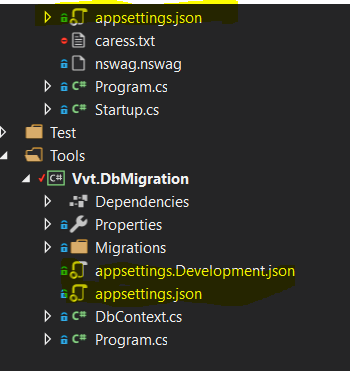
Appsetting for console app still not working in vs2017 (15.6.6). For the web app it works
 Anderman
on 13 Apr 2018
Anderman
on 13 Apr 2018
I posted a feedback issue yesterday which was closed as duplicate to this issue:
https://developercommunity.visualstudio.com/content/problem/287067/file-nesting-doesnt-work-in-core-21-vs158-preview.html
However, I don't think it's fixed. This was just a simple .Net Core 2.1 Class library, and it definitely wouldn't nest files regardless of what I tried using the "new nesting" feature.
I tried this in VS 15.7.4 and 15.8.0 preview 3.
 Allann
on 6 Jul 2018
Allann
on 6 Jul 2018
@Allann It's not fixed, this bug is still open. Nesting support is currently only enabled for ASP.NET projects.
davkean
on 9 Jul 2018
This blocks WinForms bringup as the template relies on the project system introducing the relationship between Form.cs and Form.Designer.cs. This causes WinForms designer to think it's in v1 mode and generate InitializeComponent in Form.cs.
davkean
on 25 Jul 2018
We've implemented a version of file nesting that mimics legacy's behavior: https://devdiv.visualstudio.com/DevDiv/_git/CPS/pullrequest/135035 (internal-only), except we do this without using DependentUpon. We're tracking supporting ASP.NET's implementing of file nesting here: https://github.com/dotnet/project-system/issues/3242.
davkean
on 2 Aug 2018
Is there a reason that support for nesting at least using DependentUpon data in a vcxproj is missing? I use Premake which generates this data, but without nesting my solution explorer is mostly unusable. Am I posting in the right place to get that feature restored?
 englercj
on 13 Aug 2018
englercj
on 13 Aug 2018
@englercj vcxproj unfortunately is not this project system but the C++ one.
 jmarolf
on 13 Aug 2018
jmarolf
on 13 Aug 2018
Do you have a link for the project that I should be posting on about this issue for C++ projects? Or is that one not OSS?
englercj
on 13 Aug 2018
@englercj unfortunately that project system is not open source. I would follow these directions to get this fixed: https://docs.microsoft.com/en-us/visualstudio/ide/how-to-report-a-problem-with-visual-studio-2017
jmarolf
on 13 Aug 2018
I have both VS 2013 and 2017 installed. On 2013 when I expand a C# form it will show 4 files:
Main.cs
- Main.cs
- Main.Designer.cs
- Main.resx
So I can either double click first file to open designer or double click second fine to open code editor.
Now in VS 2017 the 2nd file is missing. So I have to right click and choose View Code.
To make things more confusing if I expands Main.Designer.cs and expands Main class to see its members, both members from Main.cs and Main.Designer.cs are mixed, when members from Main.cs should not be listed under Main.Designer.cs.
I hope this change can get reverted, or at least togglable.
 MakiseKurisu
on 18 Aug 2018
MakiseKurisu
on 18 Aug 2018
Just for your info: you can configure file nesting manually using the <DependentUpon> attribute.
Ie. for the appsettings.json, this would look like the following in your .csproj file:
<ItemGroup>
<None Remove="appsettings*.json" />
</ItemGroup>
<ItemGroup>
<Content Include="appsettings.json" />
<Content Include="appsettings.Development.json">
<DependentUpon>appsettings.json</DependentUpon>
</Content>
<Content Include="appsettings.Staging.json" >
<DependentUpon>appsettings.json</DependentUpon>
</Content>
</ItemGroup>
I agree that this should be detected automatically by default.
 MovGP0
on 20 Aug 2018
MovGP0
on 20 Aug 2018
@MovGP0 FWIW, you can shorten that greatly in MSBuild 15+, like this:
  <ItemGroup>
    <Content Update="appsettings.Development.json" DependentUpon="appsettings.json" />
    <Content Update="appsettings.Staging.json" DependentUpon="appsettings.json" />
  </ItemGroup>
...and if using an SDK project, further with wildcards:
  <ItemGroup>
    <Content Update="appsettings.*.json" DependentUpon="appsettings.json" />
  </ItemGroup>
Of course the configurable version is much better, but it's at least a lot better manually in .csproj due to other changes there already.
NickCraver
on 20 Aug 2018
@lifengl added support for this in CPS, but we need to opt in to a capability I think. @lifengl - can you let us know what the capability is? @drewnoakes do you want to tackle adding that?
Pilchie
on 14 Sep 2018
@Pilchie for sure. I'll take a look on Monday. @lifengl anything you can tell me about CPS support for this would be appreciated.
 drewnoakes
on 14 Sep 2018
drewnoakes
on 14 Sep 2018
Your project need turn on the capability "DynamicDependentFile", which enables the feature to compute file dependencies dynamically. It was turn on in web .Net Core projects, but not in a plain .Net Core projects. Note: web project has its own dynamic dependencies rule applied, The code to read registry for file dependencies is only added in the next version of CPS. (BTW, I think maybe ML team is the right team to own this logic, since it is only turned on for .Net Core projects. Let me know if you agree, and want to move that piece of code to the ML project system codebase.)
 lifengl
on 17 Sep 2018
lifengl
on 17 Sep 2018
BTW, the logic to use project registry for file dependencies is turned on for .Net Core project, with or without the capability. Without the capability, the dependency is only computed for new files, and persisted into the project file like the old project system. With the capability, it will not persisted, but dynamically computed.
lifengl
on 17 Sep 2018
drewnoakes
on 17 Sep 2018
This was fixed in #4376.
drewnoakes
on 4 Jan 2019
Related issues
 dlemstra
·
5Comments
dlemstra
·
5Comments
 MV10
·
4Comments
davkean
·
3Comments
MV10
·
4Comments
davkean
·
3Comments
 MBulli
·
3Comments
MBulli
·
3Comments
 4creators
·
3Comments
4creators
·
3Comments
Most helpful comment
@MovGP0 FWIW, you can shorten that greatly in MSBuild 15+, like this:
...and if using an SDK project, further with wildcards:
Of course the configurable version is much better, but it's at least a lot better manually in
.csprojdue to other changes there already.