Processing: 3.3.7 core.jar (false) flagged as trojan on win10
So I opened up processing this morning and it didn't boot, instead gave a warning something went seriously wrong (forgot to screengrab it). Then I recalled java needed updating on my machine so did that, but to no avail. Then I figured a reinstall might fix the issue, however, while extracting the files the following warning popped up;
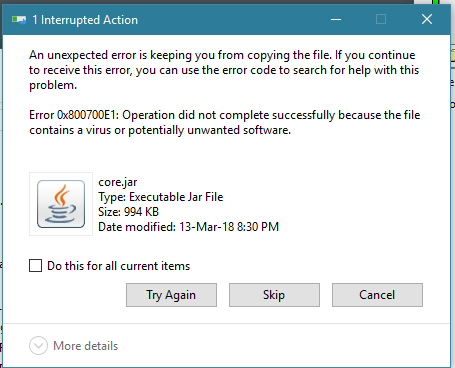
and the defender details;

Luckily I still have the previous version at hand, and in addition telling windows defender to restore the file works too. So there's no immediate need for a fix on my end, however, I figured reporting it nonetheless would be useful since it's an annoying issue and could potentially scare off newcomers installing Processing only to have this, what I presume is a false positive quarantine, render it unusable.
 GoldenQubicle
All 8 comments
Windows real time protection actually stops core.jar from even extracting.
To resolve this, open Windows Defender Security Center -> Virus and Threat Protection Setting. Turn off real time protection (temporary). Download and extract processing. Back in the Settings, Add and Exclusion -> Folder (your local processing folder). Then turn real time protection back on.
 ZachSundberg
on 16 Jun 2018
ZachSundberg
on 16 Jun 2018
Thanks a lot @ZachSundberg it works ! Here is the way as you told it, with images that can help french people :
I use Windows 7, same issue. So I opened the security center to deactivate real time protection.
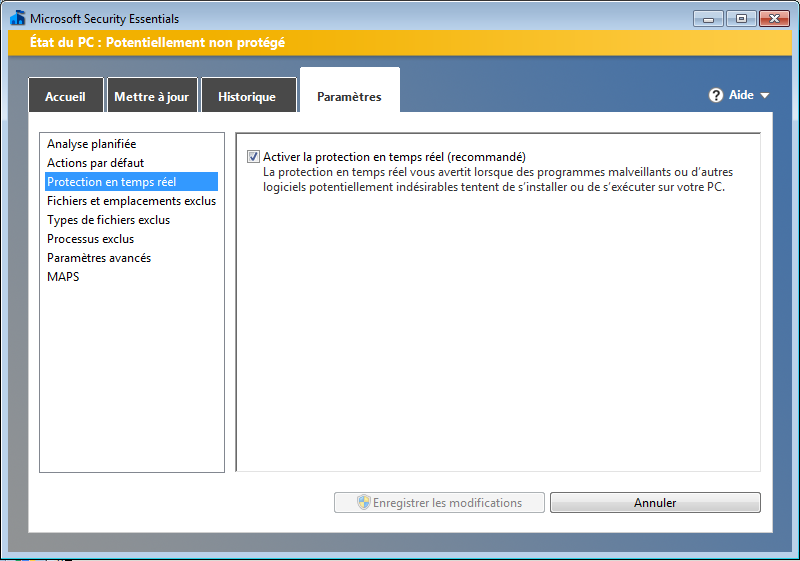
Then I deleted my processing folder (I first try to restore the quarantined file but it didn't do well), installed it again, and I went there to exclude this folder :
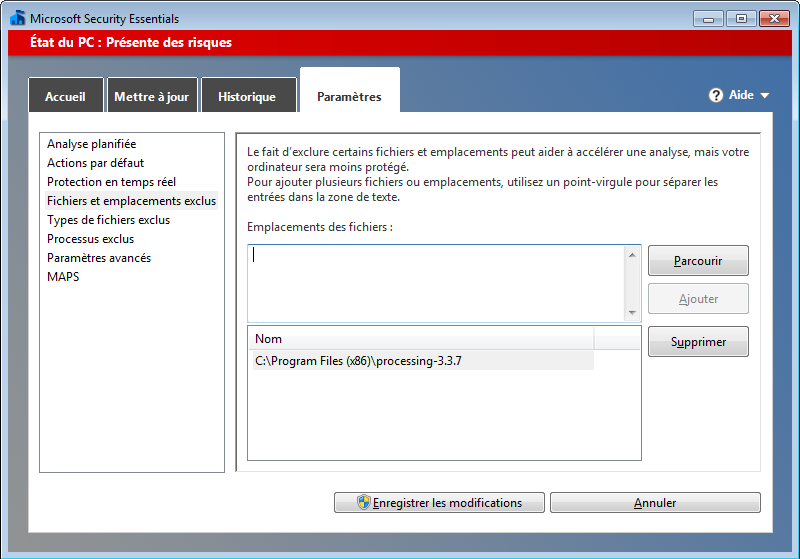
...Then I ractivated the realtime protection.
And it's allright.
Damn Windows !
 Jean-no
on 16 Jun 2018
Jean-no
on 16 Jun 2018
I just submitted the file to Microsoft for review.
 gohai
on 17 Jun 2018
gohai
on 17 Jun 2018
You are not alone. I have similar issue on latest Windows 10 build. I knew I was using Processing 3.3.7 (I trusted Processing) until M$ flagged it. I guess I am going add exclusion to processing.

 BatteryDie
on 17 Jun 2018
BatteryDie
on 17 Jun 2018
FYI: on my pretty regular version of Windows 10, I just installed the latest round of available updates, and afterwards Processing was able to be installed without an issue. Can anyone else, who saw this earlier confirm that this resolved itself?
gohai
on 19 Jun 2018
@gohai : I guess the problem only occurs for those who use Microsoft Security Essentials as their antivirus
Jean-no
on 19 Jun 2018
@Jean-no Isn't this built into Windows 10 as "Microsoft Security Essentials"? Anyway, submitting core.jar to Microsoft came back clean.
gohai
on 20 Jun 2018
Added extra checks for this during startup in Processing 3.4.
 benfry
on 26 Jul 2018
benfry
on 26 Jul 2018
Related issues
 villares
·
3Comments
villares
·
3Comments
 yousifalyousifi
·
4Comments
yousifalyousifi
·
4Comments
 moritzsalla
·
8Comments
moritzsalla
·
8Comments
 GenJamGuy
·
10Comments
GenJamGuy
·
10Comments
 hype
·
3Comments
hype
·
3Comments
Most helpful comment
Windows real time protection actually stops core.jar from even extracting.
To resolve this, open Windows Defender Security Center -> Virus and Threat Protection Setting. Turn off real time protection (temporary). Download and extract processing. Back in the Settings, Add and Exclusion -> Folder (your local processing folder). Then turn real time protection back on.