Processing: noStroke() and noFill() also affect shape(obj), with unclear behavior
Description
When you use the noStroke() or noFill() instruction, it disables the possibility of drawing strokes or fills of any kind of shape also.
Expected Behavior
I would have thought that a PShape object would have its own properties of having its stroke or fill able to be drawn, as the obj.noStroke() and the obj.noFill() exist and instruct the display behavior of this object. I then think that the noStroke() and noFill() general instructions are too powerful.
Current Behavior
Right now, when noStroke() or noFill() is issued, every PShape object that is built _after_ will have its stroke or fill disabled. However, if the object is set _before_ noStroke is used, then at the moment of drawing using shape(obj), the result is _not_ affected: it has a stroke.
Steps to Reproduce
- This small code should help you understand the problem/feature proposition :
PShape circle;

void setup() {
  size(200, 200);

  circle = createShape(ELLIPSE, 0, 0, 60, 60);
  circle.setFill(255);
  circle.setStrokeWeight(10);
  circle.setStroke(0);
}

void draw() {
  shape(circle, 100, 100);
}
At this point, it should simply draw a white circle with a black stroke on a grey background:

- But if you add a noStroke() _before_ the initialization of the PShape object circle, it disables the drawing of its stroke:
PShape circle;

void setup() {
  size(200, 200);
  noStroke();

  circle = createShape(ELLIPSE, 0, 0, 60, 60);
  circle.setFill(255);
  circle.setStrokeWeight(10);
  circle.setStroke(0);
}

void draw() {
  shape(circle, 100, 100);
}
Which makes this:

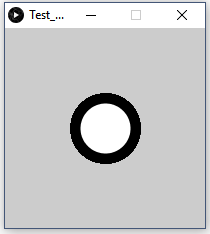
- Finally, when you add a noStroke() _after_ the object is built, the stroke is drawn:
PShape circle;

void setup() {
  size(200, 200);

  circle = createShape(ELLIPSE, 0, 0, 60, 60);
  circle.setFill(255);
  circle.setStrokeWeight(10);
  circle.setStroke(0);
}

void draw() {
  noStroke();
  shape(circle, 100, 100);
}
Thus producing this:
Your Environment
- Processing version: 3.3.6
- Operating System and OS version: Windows 10, version 1709 (v. 16299.192)
- Other information: N/A
Possible Causes / Solutions
It seems to me that when the PShape class builds the object, it does it depending on the variables stating if strokes or fills are enabled, but the shape method does not check again. The part that is unclear for me is how it should work: should noStroke() and noFill() overpower the PShape obect's own .noStroke() and .noFill() ? The Processing reference states that
If both noStroke() and noFill() are called, nothing will be drawn to the screen.
So it could mean that yes. But then it should be fixed because it doesn't work. Otherwise, it means that there is a mistake in the PShape's createShape(...) method. In any case, I think it shouldn't be as the reference suggests, but that shapes and 2D natives should have distinct and independent behaviors upon drawing.
For now though, it is possible to trick the problem using strokeWeight(0) for 2D natives' stroke, and set fill(...) to the background's color instead of noFill().
 PaulDance
All 4 comments
Anyone ? This is still in 3.3.7.
PaulDance
on 23 Apr 2018
This is still happening in the latest version (3.5.4) using the same code provided. It can be bypassed using pushStyle() and popStyle() but still, is a bug with other potential side effects.
 danieltorrer
on 2 Jun 2020
danieltorrer
on 2 Jun 2020
The code responsible for the behavior, in PShapes constructor:
https://github.com/processing/processing/blob/8e86389c7e017d0e4d61f81fb942c25e3ed348c7/core/src/processing/core/PShape.java#L316-L325
So it's intentional that createShape copies the state of the primary graphics on calling. The confusing thing is that setStroke(int) doesn't change whether stroke is enabled or not (unlike the regular stroke(int) functions), and you need to make a separate setStroke(true) call to actually enable the stroke to be shown (which I believe isn't documented anywhere, despite being pretty important).
 dzaima
on 3 Jun 2020
dzaima
on 3 Jun 2020
Thanks for the explanation @dzaima , I'm wondering if it would make sense to have setStroke(int) to internally call setStroke(boolean) cause most of the time when you set a color you also want it to have it displayed, right?
danieltorrer
on 4 Jun 2020
Related issues
 hamoid
·
5Comments
hamoid
·
5Comments
 hype
·
3Comments
hype
·
3Comments
 jdslab
·
4Comments
jdslab
·
4Comments
 Tacodude7729
·
5Comments
danieltorrer
·
10Comments
Tacodude7729
·
5Comments
danieltorrer
·
10Comments
Most helpful comment
The code responsible for the behavior, in
PShapes constructor:https://github.com/processing/processing/blob/8e86389c7e017d0e4d61f81fb942c25e3ed348c7/core/src/processing/core/PShape.java#L316-L325
So it's intentional that
createShapecopies the state of the primary graphics on calling. The confusing thing is thatsetStroke(int)doesn't change whether stroke is enabled or not (unlike the regularstroke(int)functions), and you need to make a separatesetStroke(true)call to actually enable the stroke to be shown (which I believe isn't documented anywhere, despite being pretty important).