Privatebin: Allow users to enter the number of hours or days to expire paste.
This is a feature request, not a bug.
Allow users to simply enter a number for the hours or number of days after which the paste expire. Provide a dropdown box which contains "hours" or "days", and a text box where the user can enter a number. So if the user enters "4" and chooses "hours", the paste will expire after 4 hours. If the user enters "10" and "days" the paste will expire after 240 hours.
What should happen
Additional information
Basic information
Server address:
Server OS:
Webserver:
Browser:
PrivateBin version:
I can reproduce this issue on https://privatebin.net: Yes / No
 bulrush15
All 10 comments
Why do you need such exact times? Are not the currently provided ones sufficient?
I.e. what is the use case behind this feature request?
 rugk
on 24 Sep 2019
rugk
on 24 Sep 2019
There are lots of use cases. Some people want more flexibility in how they enter the expire time. Many people simply will not use the service if the expire times are inflexible. If I want to expire something after 3 days or 5 days I cannot do that. If I'm sending a file to someone I don't want it out there all week, but the receiver needs more than 1 day to find time to get the file because they work full time and are often tired. Or they may want to redownload the item a day later if something goes wrong with the original download.
It's a good site, it just needs some more flexibility with the expiration times. If we can enter N days we don't need the "months" or "years" options at all.
bulrush15
on 24 Sep 2019
The alternative solution I'd thinmk of would be to just create/add new (better) default times there.
But I see that this could be problematic.
So for an UI on how to solve this, I'd say let's add another entry that you can click on, that then changes the menu then from this...
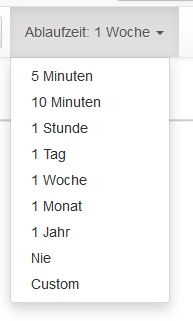
...to an input field:

That said, I would really like to keep all of these current ones for quickly selecting them. Always having to enter some number is way to cumbersome. 😄 (UX thing)
rugk
on 24 Sep 2019
I think better use not fixed multiplier, like
[Expire in >_(input field)_< [minutes|days|months|years] (list)]
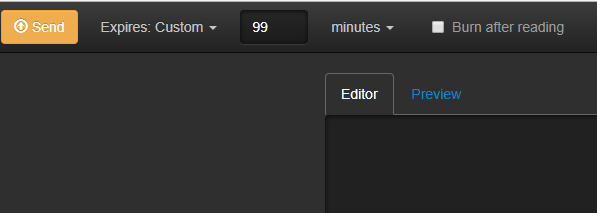
(ugly example pic)
Fields must appear when Custom is selected.
 r4sas
on 24 Sep 2019
r4sas
on 24 Sep 2019
I assume you are already aware of the configuration options for custom expirations. It doesn't let you use a custom multiplier, but you could totally create a very long list with many possible hours from 1-23 and days from 1-30 etc.
 elrido
on 25 Sep 2019
elrido
on 25 Sep 2019
For what? Doesn't better simply calculate time in seconds depend on base and multiplier?
Just provide multiplier values and calculate paste life lenght.
I think we must use [expire_options] as list used to provide pre-defined paste life length shown on page, but calculate on server-side when processing meta (example for 15 days) :
- splitting received
meta['expire']in two parts, - getting numberic base, (15day)
- getting multiplier (15day)
- calculating 15 * 86400 (pre-define multipliers in code for minute,hour,day,week,month,year).
        $multarray = array(
             "minute" => 60,
             "hour" => 3600,
             ...
        );
        ...
        $expiration = $data['meta']['expire'];
        unset($data['meta']['expire']);
        $expire_options = $this->_conf->getSection('expire_options');
        if ($expiration =="never") {
            $expire = 0;
        } else {
            try {
                // I'm not tested, must be checked, it's just example.
                preg_match("([0-9]*)(minute|hour|day|week|month|year)+", $expiration, $split);
                $base = $split[1];
                $multiplier = $split[2];
                $expire = $base * $multarray[$multiplier];
            } catch (Exception $e) {
            // using getKey() to ensure a default value is present
                $expire = $this->_conf->getKey($this->_conf->getKey('default', 'expire'), 'expire_options');
            }
        }
        if ($expire > 0) {
            $data['meta']['expire_date'] = time() + $expire;
        }
        return $data;
The idea with the configured time limits was to allow a server administrator to limit the expiration options their users have. PR for the more flexible UI is highly welcome.
I assume that we still allow the server to reject pastes outside of a defined range. The server may set both a minimum and/or a maximum of accepted values - an admin might not want to allow burn after reading or the opposite, no pastes for longer then a week so never expiring pastes are rejected). You would have to somehow communicate this to the client via the webpage, so the JS only allows to select values permitted on the installation, as not to confuse the user.
elrido
on 25 Sep 2019
In that case expiration limitation can be set using config file too...
r4sas
on 25 Sep 2019
Also, the expire_options can have one line custom = custom or so that indicates, whether the admin wants to have this "custom menu entry" in there. By doing so, they can also disable the custom expire time at all.
rugk
on 25 Sep 2019
Sounds like you have it all well figured out. Go for it! :-D
elrido
on 25 Sep 2019
Related issues
 koehn
·
5Comments
koehn
·
5Comments
 Haocen
·
5Comments
Haocen
·
5Comments
 pstray
·
7Comments
Haocen
·
6Comments
elrido
·
3Comments
pstray
·
7Comments
Haocen
·
6Comments
elrido
·
3Comments
Most helpful comment
I think better use not fixed multiplier, like

[Expire in >_(input field)_< [minutes|days|months|years] (list)]
(ugly example pic)
Fields must appear when Custom is selected.