Privacytools.io: 🆕 Software Suggestion | CanvasBlocker Firefox Addon
I think it would be more helpful to have CanvasBlocker addon in https://www.privacytools.io/browsers/#addons and under the For Experts Only part.
Because, at the moment its easy to miss as it is easily overlooked also, its an addon and the current section that it is in is mostly browser fingerprint testing and informational, https://www.privacytools.io/browsers/#fingerprint.
 zero77
All 20 comments
Blocking Canvas makes you more unique.
Better solution is using "privacy.resistFingerprinting" in Firefox which send only a Tor browser ID and this is the same for all users.
 beerisgood
on 23 Jun 2019
beerisgood
on 23 Jun 2019
@beerisgood
Thanks but i think that's just the name, i think it does do things like this and more.
But, correct me if i am wrong.
https://github.com/kkapsner/CanvasBlocker
zero77
on 23 Jun 2019
What do you mean with "more and more"?
Their is no need for this addon
beerisgood
on 23 Jun 2019
@beerisgood
I think its name is misleading, reed through what it does.
zero77
on 23 Jun 2019
Okay i do, but don't recommend it now.
If you wan't make your Firefox less trackable, take a look at gHacks user.js which do the same stuff this addon do and more.
beerisgood
on 23 Jun 2019
What does CanvasBlocker do that Privacy.Resistfingerprinting doesn't?
 Mikaela
on 23 Jun 2019
Mikaela
on 23 Jun 2019
I can't find everything Privacy.Resistfingerprinting covers, does it cover audio, history, window and navigator for example.
zero77
on 23 Jun 2019
@zero77 From https://github.com/ghacksuserjs/ghacks-user.js/blob/master/user.js - [SECTION 4500]: RFP (RESIST FINGERPRINTING)
418986 - limit window.screen & CSS media queries leaking identifiable info (FF41+)
[NOTE] Info only: To set a size, open a XUL (chrome) page (such as about:config) which is at
100% zoom, hit Shift+F4 to open the scratchpad, type window.resizeTo(1366,768), hit Ctrl+R to run.
Test your window size, do some math, resize to allow for all the non inner window elements
[TEST] https://ghacksuserjs.github.io/TorZillaPrint/TorZillaPrint.html#screen
* 1281949 - spoof screen orientation (FF50+)
* 1281963 - hide the contents of navigator.plugins and navigator.mimeTypes (FF50+)
FF53: Fixes GetSupportedNames in nsMimeTypeArray and nsPluginArray (1324044)
* 1330890 - spoof timezone as UTC 0 (FF55+)
FF58: Date.toLocaleFormat deprecated (818634)
FF60: Date.toLocaleDateString and Intl.DateTimeFormat fixed (1409973)
* 1360039 - spoof navigator.hardwareConcurrency as 2 (see 4601) (FF55+)
This spoof shouldn't affect core chrome/Firefox performance
* 1217238 - reduce precision of time exposed by javascript (FF55+)
* 1369303 - spoof/disable performance API (see 2410-deprecated, 4602, 4603) (FF56+)
* 1333651 & 1383495 & 1396468 - spoof Navigator API (see section 4700) (FF56+)
FF56: The version number will be rounded down to the nearest multiple of 10
FF57: The version number will match current ESR (1393283, 1418672, 1418162, 1511763)
FF59: The OS will be reported as Windows, OSX, Android, or Linux (to reduce breakage) (1404608)
FF66: The OS in HTTP Headers will be reduced to Windows or Android (1509829)
FF68: Reported OS versions updated to Windows 10, OS 10.14, and Adnroid 8.1 (1511434)
* 1369319 - disable device sensor API (see 4604) (FF56+)
* 1369357 - disable site specific zoom (see 4605) (FF56+)
* 1337161 - hide gamepads from content (see 4606) (FF56+)
* 1372072 - spoof network information API as "unknown" when dom.netinfo.enabled = true (see 4607) (FF56+)
* 1333641 - reduce fingerprinting in WebSpeech API (see 4608) (FF56+)
* 1372069 & 1403813 & 1441295 - block geolocation requests (same as denying a site permission) (see 0201, 0201b) (FF56-62)
* 1369309 - spoof media statistics (see 4610) (FF57+)
* 1382499 - reduce screen co-ordinate fingerprinting in Touch API (see 4611) (FF57+)
* 1217290 & 1409677 - enable fingerprinting resistance for WebGL (see 2010-12) (FF57+)
* 1382545 - reduce fingerprinting in Animation API (FF57+)
* 1354633 - limit MediaError.message to a whitelist (FF57+)
* 1382533 - enable fingerprinting resistance for Presentation API (FF57+)
This blocks exposure of local IP Addresses via mDNS (Multicast DNS)
* 967895 - enable site permission prompt before allowing canvas data extraction (FF58+)
FF59: Added to site permissions panel (1413780) Only prompt when triggered by user input (1376865)
* 1372073 - spoof/block fingerprinting in MediaDevices API (FF59+)
Spoof: enumerate devices reports one "Internal Camera" and one "Internal Microphone" if
media.navigator.enabled is true (see 2505 which we chose to keep disabled)
Block: suppresses the ondevicechange event (see 4612)
* 1039069 - warn when language prefs are set to non en-US (see 0207, 0208) (FF59+)
* 1222285 & 1433592 - spoof keyboard events and suppress keyboard modifier events (FF59+)
Spoofing mimics the content language of the document. Currently it only supports en-US.
Modifier events suppressed are SHIFT and both ALT keys. Chrome is not affected.
FF60: Fix keydown/keyup events (1438795)
* 1337157 - disable WebGL debug renderer info (see 4613) (FF60+)
* 1459089 - disable OS locale in HTTP Accept-Language headers (ANDROID) (FF62+)
* 1479239 - return "no-preference" with prefers-reduced-motion (FF63+)
* 1363508 - spoof/suppress Pointer Events (see 4614) (FF64+)
FF65: pointerEvent.pointerid (1492766)
* 1485266 - disable exposure of system colors to CSS or canvas (see 4615) (FF67+)
* 1407366 - enable inner window letterboxing (see 4504) (FF67+)
* 1540726 - return "light" with prefers-color-scheme (FF67+)
beerisgood
on 23 Jun 2019
I can't find everything Privacy.Resistfingerprinting covers, does it cover audio, history, window and navigator for example.
Sorry, I got stuck on the name and haven't actually took a look at CanvasBlocker yet.
From https://github.com/ghacksuserjs/ghacks-user.js/blob/master/user.js - [SECTION 4500]: RFP (RESIST FINGERPRINTING)
I think this is the official list, but yours seems a lot more detailed.
Mikaela
on 24 Jun 2019
I think this is the official list, but yours seems a lot more detailed.
Heh. That was just something Mozilla threw together but it's not definitive. It was originally planned that RFP and FPI get a UX presence around ESR60, but that ship has long sailed, and the goal posts have moved.
I've been part of the Tor Uplift for a very long time (I am not a Mozilla employee) and that list at ghacks user.js is MY own personal (but useful for others) list for tracking and referencing a few things. I actually have even MORE detailed lists, but I don't want to overwhelm people.
What does CB have that RFP currently doesn't: Off the top of my head
- web audioContext (it's not widely used/useful: maybe if you wanted a JS web-audio editing suite?) and users can just disable the web audio API (
dom.webaudio.enabled). I'm not even sure if the entropy is that high. But it does need addressing at some point. - widows.name and history (these would be fixed at some point under FPI: first party isolation: it's not something RFP would do: and there are bugzillas for them) and there are other solutions
- FPI -> windows.name 444222
- FPI -> visited links 1398414 <-- or you can set
layout.css.visited_links_enabledtofalseto turn the whole thing off - reduce history length 1436489 <-- there's actually a pref for this:
browser.sessionhistory.max_entrieswhere1is the bare minimum (current page), but something like 5 or 10 might be better than the default 50 - apply OA (origin attributes) to history -> 1283320 - e.g containers, FPI, etc
- CB randomizes DOMRect. RFP doesn't touch this stuff (yet), but Tor Browser do, to a small degree. It's very complicated (and I am not an expert). And so many things affect it: including system settings. From the little I know, it's high entropy (but parts of it will be addressed by other things that are being done: such as replacing all form controls and widgets 1411425
- CB covers readPixels in WebGL: RFP doesn't yet 1428034.
- CB covers offScreen Canvas (which is disabled by default: but is not far off being turned on: but RFP will cover this before that happens) 1422862
There may be something else: just ask @kkapsner
 Thorin-Oakenpants
on 24 Jun 2019
Thorin-Oakenpants
on 24 Jun 2019
PS: the user.js section 4500 notes are a summary from https://github.com/ghacksuserjs/ghacks-user.js/issues/7 of most fixes already in place (I deliberately don't include some). It also has some pending items because, why not shrug but I'm not really maintaining that side of it - that's not the list I was referring to when I said I have more detailed ones where I am tracking everything imaginable (500+ items)
Thorin-Oakenpants
on 24 Jun 2019
PPS: can we add the firefox label to this?
Thorin-Oakenpants
on 24 Jun 2019
The name CanvasBlocker is legacy. That's what it did at the beginning. Now it spoofs data by default (but you can block if really want to...). This generates more entropy but this entropy is changing so it's reducing the tracking potential.
Thorin highlighted already some things and he has more insight of RFP than me. Two things I want to add are that CB can be a second layer of defence for canvas (e.g. you have a page that needs canvas to work properly so you have to allow them from RFP and then CB still protects you against fingerprinting - CB also has a more detailed whitelisting system.) and the navigator protection of RFP is horrible (visit https://canvasblocker.kkapsner.de/test/navigatorTest.php on a non windows machine:
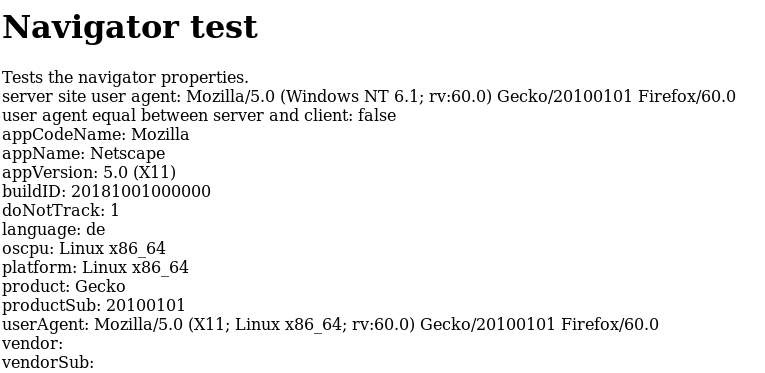
- inconsistent data are increased entropy!)
 kkapsner
on 24 Jun 2019
kkapsner
on 24 Jun 2019
the navigator protection of RFP is horrible | inconsistent data are increased entropy!
Actually, it's neither horrible nor inconsistent. It's by design. That is: RFP's UA/Navigator spoofing is currently in a state where the headers only report two OSes (windows, android) but they allow JS to detect 4 OSes (win, droid, linux, mac) as this prevents breakage. This is in line with what Tor Browser does. It seems sites like to use JS when detecting OS, e.g to provide you with functionality. Meanwhile, if a site doesn't do that, then at least header entropy can be reduced to windows/android. Gicing away free entropy is never good. This does break the spec though, but we don't care. The main breakage was with Mac and command keys: and there is a fix for that coming, and then RFP and Tor Browser can revert back to limiting JS to 2 OSes, and then the spec is respected again, and everyone is happy.
Meanwhile.... it is trivial to detect your OS anyway via numerous other mechanisms. So don't get hung up over it.
As for the increased entropy: it does not exist. When you are in a set of users where values are enforced, the entropy in that set is .. well, only in that set. e.g if every RFP and TB user reports that their timezone is UTC, then entropy does not exist: the rest of the world doesn't matter: i.e panopticlick might report that you are 1 in 25 users on that timezone, but Tor users are already unique as Tor users, so it's a stupid entropy measurement in this context. The same goes for RFP users as a set: they are already easily detected as Firefox users (hundreds of methods here), and easily detected as RFP users. Whether or not any FPing script tries to detect that is a different story - but mathwise we don't care. Enforcing a value within a set makes that set protected.
I hope that makes sense to you.
Thorin-Oakenpants
on 25 Jun 2019
The "hide in the masses" makes totally sense to me. I just think that having different values for the same property (userAgent), depending on the way you retrieve it, is bad. If you have to report 4 OSes to not break things it should be done consistently (I also guess that the HTTP-Header with the pretended OS will break pages. At least this issue was related to it: https://github.com/kkapsner/CanvasBlocker/issues/362)
But having four sets instead of two makes you less protected.
kkapsner
on 29 Jun 2019
yeah, it kind of a weird one, but when you have a captive/closed set like TB users, you can do what you like: and it does in fact reduce entropy ("But having four sets instead of two makes you less protected" if that's what you meant). Simple math says so. Your users, on the other hand, are not (in such a set) and mixing OSes makes no sense.
Thorin-Oakenpants
on 29 Jun 2019
@Thorin-Oakenpants @kkapsner
Thank you for the explanations.
@beerisgood @Mikaela
I think the name CanvasBlocker has proven misleading but, i think it is more user friendly, simply because of the interface which makes it easier for less technical users.
That's why i think it should be moved from where it is now to addons > For Experts Only so as not to alienate less technical users.
That's not to say one is better than the other as thats, a very different conversation.
zero77
on 1 Jul 2019
PPS: can we add the firefox label to this?
Yes. sorry, I had a bit busy time apparently and no one else seems to have came here.
That's why i think it should be moved from where it is now to addons > For Experts Only so as not to alienate less technical users.
Where is it now?
(I have 813 emails and I guess I am not that interested in this issue. CC: @privacytoolsIO/editorial )
Mikaela
on 2 Jul 2019
Sorry for the delay.
It is in https://www.privacytools.io/browsers/#fingerprint and under the "Firefox Addon: CanvasBlocker" part.
But, i think it should be under https://www.privacytools.io/browsers/#addons and then the "For Experts Only" part.
zero77
on 22 Jul 2019
To be fair, I think canvas blocker does not provide enough extras as we already recommend RFP. Every extra add on we recommend is another add on that can slow the browser down, go bad, and discourage the user from installing the tweaks at all because its so much work. I am closing this issue, if someone else has more arguments on why they think it should still be listed, feel free to comment below to reopen the issue again for further discussion.
 blacklight447-ptio
on 3 Sep 2019
blacklight447-ptio
on 3 Sep 2019
Related issues
 BurungHantu1605
·
3Comments
BurungHantu1605
·
3Comments
 ghost
·
3Comments
ghost
·
3Comments
 johnozbay
·
3Comments
johnozbay
·
3Comments
 0verk1ll
·
3Comments
ghost
·
3Comments
0verk1ll
·
3Comments
ghost
·
3Comments