Privacybadger: Broken in Firefox, "version null" popup, blank options page
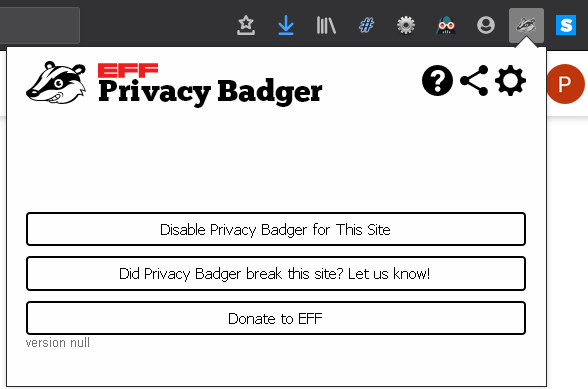
I've been using PB for a long time. After the FF 70 update, it doesn't work anymore. When I click on the PB icon, I get a minimalistic window with version null:
All other extensions work fine, including HTTPS everywhere. The only exception is "Dark reader" extension, which doesn't work neither.
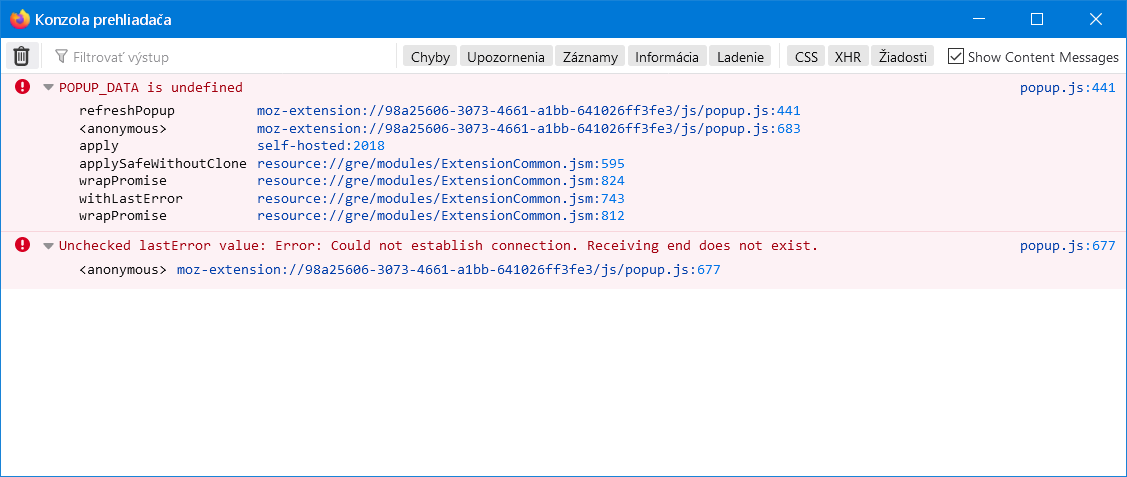
When i click PB icon, the browser console shows the following messages:
When I open PB options (moz-extension://98a25606-3073-4661-a1bb-641026ff3fe3/skin/options.html), I get an empty white page. When I display the source code of this page, it is a correct HTML code starting with <html style="visibility:hidden">. It seems that no JS is executed that makes it visible.
Please let me know if I should provide more info.
 PeterMacej
All 10 comments
Hello! This looks like a bug in Firefox itself, one where extension storage gets corrupted (probably upon browser update).
Could you open Privacy Badger's background page and share the contents or a screenshot of the Console tab? You may have to scroll all the way to the top to find anything meaningful (the POPUP_DATA error is just a symptom, for example).
To open Privacy Badger's background page in Firefox:
- Navigate to
about:debugging - Click on "This Firefox"
- Scroll down to find the entry for Privacy Badger and click "Inspect"
- Select the Console tab
Previously: #2504
 ghostwords
on 12 Nov 2019
ghostwords
on 12 Nov 2019
The workaround here seems to be to "refresh" your Firefox profile.
We should file a bug in Mozilla Bugzilla, as this is not a Privacy Badger-specific issue.
ghostwords
on 12 Nov 2019
The extension storage seems to be the problem. The contents of the PB background page:
Content Security Policy: Nebolo možné spracovať neplatný server 'wasm-eval'
UnknownError: The operation failed for reasons unrelated to the database itself and not covered by any other error code. ExtensionStorageIDB.jsm:812
    normalizeStorageError resource://gre/modules/ExtensionStorageIDB.jsm:812
    method chrome://extensions/content/child/ext-storage.js:273
    AsyncFunctionThrow self-hosted:843
store is undefined storage.js:67
    BadgerPen moz-extension://98a25606-3073-4661-a1bb-641026ff3fe3/js/storage.js:67
    forEach Underscore
    BadgerPen moz-extension://98a25606-3073-4661-a1bb-641026ff3fe3/js/storage.js:66
    apply self-hosted:2018
    applySafeWithoutClone resource://gre/modules/ExtensionCommon.jsm:595
    wrapPromise resource://gre/modules/ExtensionCommon.jsm:824
    withLastError resource://gre/modules/ExtensionCommon.jsm:743
    wrapPromise resource://gre/modules/ExtensionCommon.jsm:812
Unchecked lastError value: Error: An unexpected error occurred storage.js:65
    BadgerPen moz-extension://98a25606-3073-4661-a1bb-641026ff3fe3/js/storage.js:65
UnknownError: The operation failed for reasons unrelated to the database itself and not covered by any other error code. ExtensionStorageIDB.jsm:812
    normalizeStorageError resource://gre/modules/ExtensionStorageIDB.jsm:812
    method chrome://extensions/content/child/ext-storage.js:273
    AsyncFunctionThrow self-hosted:843
can't convert undefined to object storage-sync-polyfill.js:46
    <anonymous> moz-extension://1abab79f-486c-4e77-954b-2089bbd81cca/storage-sync-polyfill.js:46
    apply self-hosted:2018
    applySafeWithoutClone resource://gre/modules/ExtensionCommon.jsm:595
    wrapPromise resource://gre/modules/ExtensionCommon.jsm:824
    withLastError resource://gre/modules/ExtensionCommon.jsm:743
    wrapPromise resource://gre/modules/ExtensionCommon.jsm:812
Unchecked lastError value: Error: An unexpected error occurred storage-sync-polyfill.js:45
    <anonymous> moz-extension://1abab79f-486c-4e77-954b-2089bbd81cca/storage-sync-polyfill.js:45
UnknownError: The operation failed for reasons unrelated to the database itself and not covered by any other error code. ExtensionStorageIDB.jsm:812
    normalizeStorageError resource://gre/modules/ExtensionStorageIDB.jsm:812
    method chrome://extensions/content/child/ext-storage.js:273
    AsyncFunctionThrow self-hosted:843
local is undefined index.js:2114
    loadSettingsFromStorage moz-extension://c2863844-2a1b-4f04-817f-d2345df8bf82/background/index.js:2114
    apply self-hosted:2018
    applySafeWithoutClone resource://gre/modules/ExtensionCommon.jsm:595
    wrapPromise resource://gre/modules/ExtensionCommon.jsm:824
    withLastError resource://gre/modules/ExtensionCommon.jsm:743
    wrapPromise resource://gre/modules/ExtensionCommon.jsm:812
Unchecked lastError value: Error: An unexpected error occurred index.js:2113
    loadSettingsFromStorage moz-extension://c2863844-2a1b-4f04-817f-d2345df8bf82/background/index.js:2113
UnknownError: The operation failed for reasons unrelated to the database itself and not covered by any other error code. ExtensionStorageIDB.jsm:812
    normalizeStorageError resource://gre/modules/ExtensionStorageIDB.jsm:812
    method chrome://extensions/content/child/ext-storage.js:273
    InterpretGeneratorResume self-hosted:1302
    AsyncFunctionThrow self-hosted:843
Error: An unexpected error occurred ExtensionUtils.jsm
UnknownError: The operation failed for reasons unrelated to the database itself and not covered by any other error code. ExtensionStorageIDB.jsm:812
    normalizeStorageError resource://gre/modules/ExtensionStorageIDB.jsm:812
    method chrome://extensions/content/child/ext-storage.js:273
    InterpretGeneratorResume self-hosted:1302
    AsyncFunctionThrow self-hosted:843
data is undefined store.js:29
    generic_get_promise moz-extension://d0b0be77-6003-457f-9e54-46707265fac3/background-scripts/store.js:29
    apply self-hosted:2018
    applySafeWithoutClone resource://gre/modules/ExtensionCommon.jsm:595
    wrapPromise resource://gre/modules/ExtensionCommon.jsm:824
    withLastError resource://gre/modules/ExtensionCommon.jsm:743
    wrapPromise resource://gre/modules/ExtensionCommon.jsm:812
Unchecked lastError value: Error: An unexpected error occurred store.js:29
    generic_get_promise moz-extension://d0b0be77-6003-457f-9e54-46707265fac3/background-scripts/store.js:29
Use of nsIFile in content process is deprecated. NetUtil.jsm:253:8
NS_ERROR_FAILURE: Failed to open input source 'file:///' DevToolsUtils.js:678
TypeError: Argument 1 of PrecompiledScript.executeInGlobal is not an object.
2 ExtensionContent.jsm:559:25
Content Security Policy: Nebolo možné spracovať neplatný server 'wasm-eval'
POPUP_DATA is undefined popup.js:441
    refreshPopup moz-extension://98a25606-3073-4661-a1bb-641026ff3fe3/js/popup.js:441
    <anonymous> moz-extension://98a25606-3073-4661-a1bb-641026ff3fe3/js/popup.js:683
    apply self-hosted:2018
    applySafeWithoutClone resource://gre/modules/ExtensionCommon.jsm:595
    wrapPromise resource://gre/modules/ExtensionCommon.jsm:824
    withLastError resource://gre/modules/ExtensionCommon.jsm:743
    wrapPromise resource://gre/modules/ExtensionCommon.jsm:812
Unchecked lastError value: Error: Could not establish connection. Receiving end does not exist. popup.js:677
    <anonymous> moz-extension://98a25606-3073-4661-a1bb-641026ff3fe3/js/popup.js:677
I'm going to refresh the profile, I'll let you know.
PeterMacej
on 12 Nov 2019
ghostwords
on 12 Nov 2019
Thank you for your help. You navigated me to the right direction so I was able to solve the problem even without "Refresh Firefox" which would delete my settings. I described it in detail at https://bugzilla.mozilla.org/show_bug.cgi?id=1595913
Let's hope they will improve FF to prevent similar situations.
PeterMacej
on 13 Nov 2019
Having the same problems running Firefox 71.0 on Fedora 31, PB version 2019.11.18.
 corndog2000
on 9 Dec 2019
corndog2000
on 9 Dec 2019
Just noticed same problem in FF 71.0 on Win10 x64. At a loss as to how to find the offending folder without serious tedium. (Refreshing the entire profile is a nuclear option.)
Edit: Uninstalling and reinstalling PB has it working again, though I haven't tested it with a browser restart yet.
 seascape
on 10 Dec 2019
seascape
on 10 Dec 2019
The above just happened again in the same browser, necessitating another uninstall/reinstall of PB and importing its tracker settings from a still-working FF PB instance.
seascape
on 25 Dec 2019
This is a Firefox bug that should be fixed by https://bugzilla.mozilla.org/show_bug.cgi?id=1536796.
ghostwords
on 29 Dec 2019
According to Mozilla Bugzilla, this should be fixed as of Firefox 76.
ghostwords
on 29 May 2020
Related issues
 jawz101
·
4Comments
jawz101
·
4Comments
 aphid
·
4Comments
aphid
·
4Comments
 smarkwell
·
5Comments
smarkwell
·
5Comments
 andresbase
·
4Comments
andresbase
·
4Comments
 cynddl
·
5Comments
cynddl
·
5Comments
Most helpful comment
Thank you for your help. You navigated me to the right direction so I was able to solve the problem even without "Refresh Firefox" which would delete my settings. I described it in detail at https://bugzilla.mozilla.org/show_bug.cgi?id=1595913
Let's hope they will improve FF to prevent similar situations.