Privacybadger: "An unexpected error occurred" in Firefox 71
Only this message appear after disabling & enabling extension:
1570472797925 addons.webextension.jid1-MnnxcxisBPnSXQ-eff@jetpack WARN Loading extension 'jid1-MnnxcxisBPnSXQ-eff@jetpack': Reading manifest: Warning processing storage: An unexpected property was found in the WebExtension manifest.
 okias
okias
All 25 comments
Hello! I'm unable to reproduce the problem in the latest Nightly (2019-10-07). The "unexpected property" message is a harmless warning, it doesn't really mean anything.
 ghostwords
on 7 Oct 2019
ghostwords
on 7 Oct 2019
I get this for every page
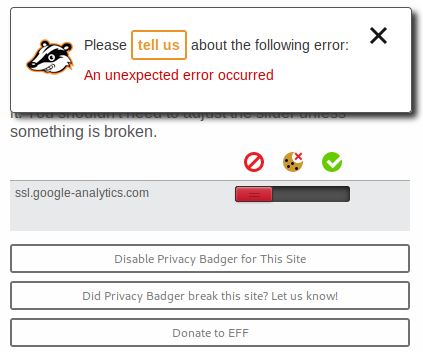
it's ongoing already for few compiled nightlies, but I'll try recompile today.
okias
on 7 Oct 2019
According to https://bugzilla.mozilla.org/show_bug.cgi?id=1555491#c18, "An unexpected error occurred" has to do with failing to write to extension storage (powered by IndexedDB). This is probably not a Privacy Badger-specific problem, and it may be particular to your environment (is your Firefox partition out of space?).
ghostwords
on 7 Oct 2019
I have exactly the same problem after installing FF 71 on Linux.
I tried disabling my other addons and restarted FF but the problem persists.
It worked fine with FF 70. The FF partition has 16GB of freespace.
 Teuniz
on 4 Dec 2019
Teuniz
on 4 Dec 2019
I have exactly the same problem after installing FF 71 on Linux.
Same, specifically Fedora 31, with the latest upgrade: firefox-71.0-8.npgo.fc31.x86_64. I haven't tried any other distributions. Is that the same as you @Teuniz? I doubt it's an issue with the Fedora build of Firefox, but if that happens to be the same for both of us, then it's maybe worth not ruling out.
I've also noticed other extensions broken, such as simple-tab-groups, which I've reported here: https://github.com/Drive4ik/simple-tab-groups/issues/501
 grdryn
on 4 Dec 2019
grdryn
on 4 Dec 2019
I have exactly the same problem after installing FF 71 on Linux.
Same, specifically Fedora 31, with the latest upgrade:
firefox-71.0-8.npgo.fc31.x86_64. I haven't tried any other distributions. Is that the same as you @Teuniz? I doubt it's an issue with the Fedora build of Firefox, but if that happens to be the same for both of us, then it's maybe worth not ruling out.I've also noticed other extensions broken, such as simple-tab-groups, which I've reported here: Drive4ik/simple-tab-groups#501
I'm using openSUSE Leap 15.1 and FF is installed from the openSUSE Mozilla repo.
So, It doesn't look like a specific build issue from just one distro...
Teuniz
on 4 Dec 2019
Could you file a Mozilla Bugzilla bug and link to it here? Thank you!
ghostwords
on 4 Dec 2019
Same, specifically Fedora 31, with the latest upgrade:
firefox-71.0-8.npgo.fc31.x86_64. I haven't tried any other distributions. Is that the same as you @Teuniz? I doubt it's an issue with the Fedora build of Firefox, but if that happens to be the same for both of us, then it's maybe worth not ruling out.I've also noticed other extensions broken, such as simple-tab-groups, which I've reported here: Drive4ik/simple-tab-groups#501
Also experiencing this error on Fedora 31, along with some other weird behavior (such as extensions not saving settings). I reinstalled FF71 and it seems to have fixed the settings problem, but still getting "An unexpected error occurred" in Privacy Badger.
Edit: spoke too soon about fixing the settings not being saved problem. Guessing this is more of an issue with Firefox.
 ghost
on 4 Dec 2019
ghost
on 4 Dec 2019
still getting "An unexpected error occurred" in Privacy Badger
Privacy Badger reports browser errors that come up when trying to write to extension storage, other extensions probably do not (and fail silently).
ghostwords
on 4 Dec 2019
keepassxreboot/keepassxc-browser is experiencing similar issues and throws an error to the console: "Error: Cannot load extension settings"
I noticed both immediately following the upgrade to Firefox 71 on OpenSUSE Leap 15.1 yesterday.
 linkp
on 4 Dec 2019
linkp
on 4 Dec 2019
keepassxreboot/keepassxc-browser is experiencing similar issues and throws an error to the console: "Error: Cannot load extension settings"
I noticed both immediately following the upgrade to Firefox 71 on OpenSUSE Leap 15.1 yesterday.
Yea same problem here. The settings panel doesn't load so I can't connect to my database. Also, uBlock Origin deletes its filters and settings whenever I close Firefox. I'm guessing this is a problem with Firefox.
ghost
on 4 Dec 2019
I submitted a report on Mozilla Bugzilla for those with the same problem: https://bugzilla.mozilla.org/show_bug.cgi?id=1601424
ghost
on 4 Dec 2019
Just upgraded to 71.0 from Debian unstable and got the same problem.
 alex65536
on 5 Dec 2019
alex65536
on 5 Dec 2019
Just upgraded to 71.0 from Debian unstable and got the same problem.
Just like me
 antistress
on 6 Dec 2019
antistress
on 6 Dec 2019
Seems to work fine in the Firefox 71.0 build provided by Mozilla, on Fedora. The Fedora-built one does appear to be broken (Fedora bug https://bugzilla.redhat.com/show_bug.cgi?id=1779570).
 Stupendoussteve
on 7 Dec 2019
Stupendoussteve
on 7 Dec 2019
Downgrading Fedora 31 to firefox-69.0.1-3.fc31.x86_64 also works fine.
 bcl
on 8 Dec 2019
bcl
on 8 Dec 2019
Also happens for me on NixOS 19.09. KeepassXC Browser extension doesn't show settings page. uBlock Origin shows suspiciously low number of blocked advertisements since installing it (that lowers when restarting a web browser), Decentraleyes always shows 1 locally injected resource.
I think everything is broken in Firefox 71.
 xfix
on 9 Dec 2019
xfix
on 9 Dec 2019
For me the problem seems to be resolved after upgrading FF to 71.0-lp151.5.1 from the openSUSE repo.
Teuniz
on 11 Dec 2019
Debian also fixed the bug in firefox 71.0-2.
Maybe the issue can be closed, because it's not a bug of the extension itself?
alex65536
on 12 Dec 2019
Great news! I'll close this once new reports stop coming in.
ghostwords
on 12 Dec 2019
Also happens for me on NixOS 19.09. KeepassXC Browser extension doesn't show settings page. uBlock Origin shows suspiciously low number of blocked advertisements since installing it (that lowers when restarting a web browser), Decentraleyes always shows 1 locally injected resource.
I think everything is broken in Firefox 71.
I had this problem, too and just now upgraded to nixos-19.09.1549.45ea6092203 and the problem seems to be gone. :tada:
 das-g
on 12 Dec 2019
das-g
on 12 Dec 2019
Fixed on Fedora with firefox-71.0-15.fc31 as well
 LorbusChris
on 12 Dec 2019
LorbusChris
on 12 Dec 2019
Also fixed on Fedora 30.
 renatobellotti
on 13 Dec 2019
renatobellotti
on 13 Dec 2019
fixed with firefox-71.0_2 on Void Linux
 go2null
on 13 Dec 2019
go2null
on 13 Dec 2019
Haven't gotten any new reports in a while, resolving.
ghostwords
on 18 Dec 2019
Related issues
 DJCrashdummy
·
5Comments
DJCrashdummy
·
5Comments
 smarkwell
·
5Comments
smarkwell
·
5Comments
 aphid
·
4Comments
aphid
·
4Comments
 urfausto
·
4Comments
urfausto
·
4Comments
 da2x
·
3Comments
da2x
·
3Comments
Most helpful comment
I have exactly the same problem after installing FF 71 on Linux.
I tried disabling my other addons and restarted FF but the problem persists.
It worked fine with FF 70. The FF partition has 16GB of freespace.