Privacybadger: QuotaExceededError: The current transaction exceeded its quota limitations.
PB is showing an "exclamation mark" icon in Firefox, and there is a box in its popup saying:
Please tell us about the following error:
QuotaExceededError: The current transaction exceeded its quota limitations.
 stuartlangridge
All 12 comments
Hello and thanks for the report! This might be another one of those Firefox IndexedDB-powered extension storage errors that Privacy Badger can't do anything about except ignore. Previously: #2156.
Which version of Firefox do you have? Does this problem come back after restarting the browser and browsing around for a bit?
 ghostwords
on 10 Jul 2019
ghostwords
on 10 Jul 2019
Asked Mozilla about this on Bugzilla: https://bugzilla.mozilla.org/show_bug.cgi?id=1555491#c10
ghostwords
on 10 Jul 2019
@stuartlangridge Could you tell us how much space Privacy Badger's storage takes up in your Firefox? To do so, visit Privacy Badger's background page, and copy and paste the following code into the console:
chrome.storage.local.get(null, r=>console.log(
parseFloat(JSON.stringify(r).length / 1024 / 1024).toFixed(2), "MB"));
Please see step 2 of our debugging page for instructions for opening the background page.
ghostwords
on 10 Jul 2019
Certainly.
chrome.storage.local.get(null, r=>console.log(
  parseFloat(JSON.stringify(r).length / 1024 / 1024).toFixed(2), "MB"));

2.11 MB
Interestingly, in about:debugging, in the privacy badger part, it also says this:
Reading manifest: Error processing storage: An unexpected property was found in the WebExtension manifest.
For reference, this is Firefox Quantum 67.0.4 (64-bit) on Ubuntu 18.04.
stuartlangridge
on 10 Jul 2019
Could you post a screenshot?
Does this problem come back after restarting the browser and browsing around for a bit?
ghostwords
on 10 Jul 2019
Sure thing:
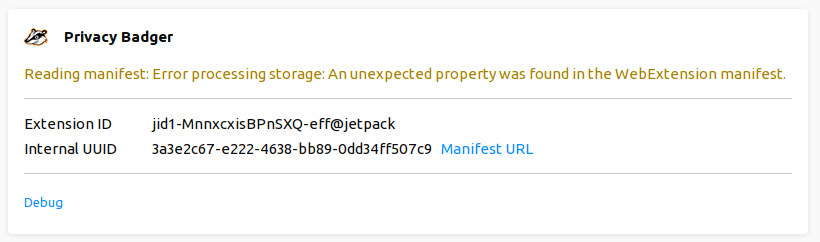
(I don't really want to restart the browser right now; I'm in the middle of stuff, and rearranging all the windows after a restart is really annoying. If that's what I need to do to test it, I'll try to get to it tomorrow and then report back.)
stuartlangridge
on 10 Jul 2019
OK, great, sounds good, thank you!
ghostwords
on 10 Jul 2019
I think the "error processing storage" error is unrelated, by the way. It does sound relevant, but it's something else (https://github.com/EFForg/privacybadger/issues/1774#issuecomment-473539483).
ghostwords
on 10 Jul 2019
I can now confirm that restarting the browser cleared the error and PB is no longer showing that error.
stuartlangridge
on 20 Jul 2019
I am also seeing this, on firefox 68.0 (64-bit), Ubuntu 18.04.2 LTS.
 Darxus
on 25 Jul 2019
Darxus
on 25 Jul 2019
I got the same error when the partition was full just now.
 l0b0
on 12 Sep 2019
l0b0
on 12 Sep 2019
Related issues
 BlackRabbit22
·
5Comments
BlackRabbit22
·
5Comments
 cowlicks
·
4Comments
cowlicks
·
4Comments
 aphid
·
4Comments
aphid
·
4Comments
 DJCrashdummy
·
5Comments
DJCrashdummy
·
5Comments
 hairetikos
·
3Comments
hairetikos
·
3Comments
Most helpful comment
Certainly.