Privacybadger: jQuery freezes PrivacyBadger
When clicking on the PrivacyBadger icon, the browser freezes. At some point the "JS is slowing down your browser pop-ups…"
It mentions this URL: moz-extension://48e8a53b-891a-…lib/vendor/jquery-2.2.4.min.js:4
Firefox 56, 2017.10.25.1
 rugk
rugk
All 25 comments
Does this happen everywhere, or only on certain pages? (Does it happen on the about:addons page?)
 ghostwords
on 4 Nov 2017
ghostwords
on 4 Nov 2017
Everywhere.
rugk
on 5 Nov 2017
Do this happen if you install Privacy Badger into the same Firefox launched with a fresh profile?
ghostwords
on 5 Nov 2017
I could not even reproduce it now with the normal profile. Maybe fixed itself, maybe just strange…
rugk
on 5 Nov 2017
OK, thanks for letting us know. I haven't gotten any other reports of this, but clearly it happens under certain circumstances. Would be good to figure out what those circumstances are.
ghostwords
on 5 Nov 2017
Hello! I've got the same problem. Happens on some sites, e.g. w3schools.com. On a clean profile Firefox just freezes to death (sites won't load, PB window won't open)
 MadFatVlad
on 6 Nov 2017
MadFatVlad
on 6 Nov 2017
Yeah, could reproduce it on w3schools.com. This time, the line causing the freeze changed, however: moz-extension://0e936aff-a0a4-…lib/vendor/jquery-2.2.4.min.js:2
rugk
on 6 Nov 2017
I had a similar issue a couple of days ago when I clicked the cog in privacy badger popup. I just restarted firefox and I haven't been able to reproduce since then.
 Bisaloo
on 7 Nov 2017
Bisaloo
on 7 Nov 2017
My guess is this is somehow related to #1704, which was part of the 2017.10.25.1 update. I haven't yet been able to reproduce the issue though, which makes fixing it difficult.
ghostwords
on 7 Nov 2017
Possibly related to this issue is needing to disable the tooltips added in #1704 on Firefox 52 (ESR): 2ae8d1e6be66236c5657e7543840c6032bcee724.
Triggering tooltips (by hovering over a tooltip-equipped element) in Privacy Badger's popup on Firefox 52 would freeze Firefox and eventually show an unresponsive script warning (screenshot follows), but only on pages with enough domains to produce a scrollbar in Privacy Badger's popup.
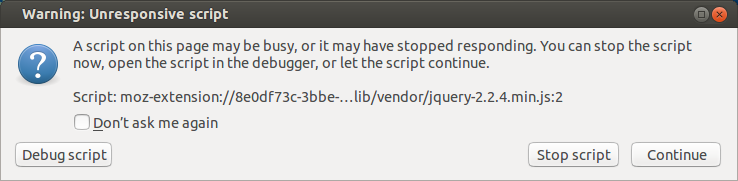
ghostwords
on 7 Nov 2017
However, the above problem was consistently reproducible under the right conditions, and was triggered by hovering over certain parts of the popup, not just by opening the popup.
ghostwords
on 7 Nov 2017
But the error message is the same. BTW: Did someone try to click on the "debug script" button and at least take a screenshot?
rugk
on 7 Nov 2017
I'm curious if this will still be an issue with Firefox 57.
ghostwords
on 9 Nov 2017
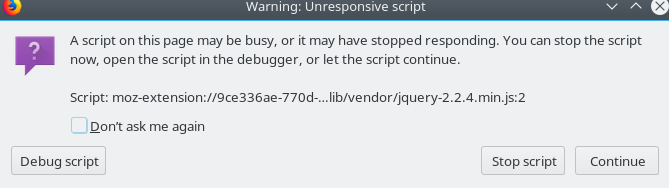
Still an issue, definitely. Happens either on clicking the Badger icon or on trying to move a slider for some of the websites.
Firefox Quantum / 57
Started to happen just recently, that means there is some regression from in the latest updates (i.e. October-November).
 nekromoff
on 12 Nov 2017
nekromoff
on 12 Nov 2017
Same here
FF 56.0.2 (64-Bit) on OS X 10.10.5
Privacy Badger Version 2017.11.9 – updated 11. Nov. 2017
Error message: Skript: moz-extension://0ee6106a-eaf4-…lib/vendor/jquery-2.2.4.min.js:4
Happens on any website when clicking on the icon to open the badger. Sometimes it works for some seconds, then (or immediately) freezes, some seconds later the error message appears.
 sogood2know
on 12 Nov 2017
sogood2know
on 12 Nov 2017
Could everyone try temporarily installing Privacy Badger from privacy_badger-no-fancy-tooltips-in-firefox.zip and using it a bit to see if it solves the problem?
To install, unpack the archive into a new folder, open Firefox, visit about:debugging, click the Load Temporary Add-on button, navigate to where you unpacked the archive, and select the manifest.json file there.
ghostwords
on 18 Nov 2017
@ghostwords, the only difference with the "normal" Privacy Badger is purely cosmetic right? This doesn't affect the security or the privacy in any way? If so, I will install it and test it.
Bisaloo
on 18 Nov 2017
What I posted above is the latest Privacy Badger codebase from GitHub, with a tweak to disable the new tooltips entirely in all versions of Firefox. It's not a new Privacy Badger release, it won't replace your existing Badger installation, it's just a test so that I can confirm it's what I think it is. The reason I have to do this is I still can't reproduce the problem locally.
ghostwords
on 18 Nov 2017
That temp fix worked great no lockups on my end whatsoever.
 vaytane
on 19 Nov 2017
vaytane
on 19 Nov 2017
Experiencing this issue on Firefox 57 on Linux; can confirm that the changes in the zip posted above by @ghostwords resolves the problem.
 Linux-cpp-lisp
on 19 Nov 2017
Linux-cpp-lisp
on 19 Nov 2017
was there no checkin/trunk for the temporary fix? I'm curious what it was, too.
 genewitch
on 19 Nov 2017
genewitch
on 19 Nov 2017
@genewitch Not yet. You could diff the contents of the zip against the src directory of this repository. The only change should be tweaking the following check that disables nicer tooltips to disable them in all versions of Firefox, not just Firefox 52:
https://github.com/EFForg/privacybadger/blob/b0ae6c0b8d0aa1161f39938626bac08e79254cb6/src/js/popup.js#L32-L42
ghostwords
on 19 Nov 2017
I've disabled custom tooltips in the popup on all versions of Firefox in the just-released 2017.11.20 update. We should restore nicer tooltips in the future, but for now this is the quickest way to resolve browser freezing without losing too much functionality (system-powered tooltips are still present).
ghostwords
on 20 Nov 2017
Excellent. Thank you very much.
vaytane
on 21 Nov 2017
I just updated the eff.org-hosted version of Privacy Badger to version 2020.6.25. (The AMO-hosted (addons.mozilla.org) version is still on 2020.6.2 until next week.)
The new version has fancy tooltips re-enabled in Firefox. Could you give the new version a try in Firefox and let me know if the hanging/freezing is back? Thank you!
(Note that if you already have Privacy Badger installed from Mozilla, installing from eff.org will give you two copies of Privacy Badger. There is no reason to have two copies of Privacy Badger.)
ghostwords
on 25 Jun 2020
Related issues
 apehex
·
4Comments
apehex
·
4Comments
 DJCrashdummy
·
5Comments
DJCrashdummy
·
5Comments
 cowlicks
·
4Comments
cowlicks
·
4Comments
 bitnik
·
5Comments
bitnik
·
5Comments
 jawz101
·
4Comments
jawz101
·
4Comments