Privacybadger: RequestPolicy add-on causes yellowlist initialization to fail, breaks all yellowlisted domains
https://media.readthedocs.org/css/sphinx_rtd_theme.css
Ends up blocked after a while. It's necessary for proper display of documentation using readthedocs.io
 weatherman2095pro
All 22 comments
Previously: 91120d85c413e724ca0f76f428a42b79f132949a / https://github.com/EFForg/privacybadgerfirefox-legacy/issues/351.
 ghostwords
on 25 Sep 2017
ghostwords
on 25 Sep 2017
Thanks to https://github.com/EFForg/privacybadger/commit/91120d85c413e724ca0f76f428a42b79f132949a, media.readthedocs.org should become cookieblocked (yellow) instead of blocked (red).
ghostwords
on 25 Sep 2017
Could you run the following JavaScript on your Badger's background page console and share what it prints out?
(function () {
  const STR = "readthedocs";
  console.log("**** ACTION_MAP for", STR);
  _.each(badger.storage.getBadgerStorageObject('action_map').getItemClones(), (obj, domain) => {
    if (domain.indexOf(STR) != -1) console.log(domain, JSON.stringify(obj, null, 2));
  });
  console.log("**** SNITCH_MAP for", STR);
  _.each(badger.storage.getBadgerStorageObject('snitch_map').getItemClones(), (sites, domain) => {
    if (domain.indexOf(STR) != -1) console.log(domain, JSON.stringify(sites, null, 2));
  });
}());
To get to the background page console in Chrome, visit chrome://extensions, make sure "Developer mode" is checked, click on the "background page" link in Privacy Badger's row, and select the Console tab.
In Firefox, visit about:debugging, enable add-on debugging, click Debug next to Privacy Badger, click the OK button on the popup warning about remote debugging, and enter the above script into the console after the >>.
ghostwords
on 25 Sep 2017
Example pages that reference media.readthedocs.org:
ghostwords
on 25 Sep 2017
@weatherman2095 Could you provide the debugging information requested in https://github.com/EFForg/privacybadger/issues/1690#issuecomment-332000465?
ghostwords
on 27 Sep 2017
@weatherman2095 Could you provide the debugging information requested
in
https://github.com/EFForg/privacybadger/issues/1690#issuecomment-332000465?
Certainly. I was somewhat busy in the last few days. As you can see by
userAction, I manually fixed it as noted in the data you got me to pull.
* ACTION_MAP for readthedocs
media.readthedocs.org {
"userAction": "user_cookieblock",
"dnt": false,
"heuristicAction": "block",
"nextUpdateTime": 1506757319281
}
readthedocs.org {
"userAction": "user_cookieblock",
"dnt": false,
"heuristicAction": "block",
"nextUpdateTime": 0
}
* SNITCH_MAP for readthedocs
readthedocs.org [
"readthedocs.io",
"flatpak.org",
"hylang.org"
]
weatherman2095pro
on 28 Sep 2017
Could you also run the following (also in Badger's background page console)? Just making sure your "yellowlist" is OK.
console.log(Object.keys(badger.storage.getBadgerStorageObject('cookieblock_list')._store).length);
Also, which browser version and which version of Privacy Badger do you have?
ghostwords
on 28 Sep 2017
Could you also run the following? Just making sure your "yellowlist"
is OK.javascript console.log(Object.keys(badger.storage.getBadgerStorageObject('cookieblock_list')._store).length);
I did so. It returns 0.
Somehow I don't think that's what it's supposed to be.
Also, which browser version and which version of Privacy Badger do you have?
Firefox 52.3.0 (presumably with debian patches)
weatherman2095pro
on 28 Sep 2017
I did so. It returns 0.
Ah! That indeed is the problem. How did this happen though? Does restarting Firefox fix the issue?
ghostwords
on 29 Sep 2017
Also, which version of Privacy Badger do you have? You can find out by clicking on Badger's popup and looking for the version to the right of Badger's logo.
ghostwords
on 29 Sep 2017
Also, which version of Privacy Badger do you have? You can find out
by clicking on Badger's popup and looking for the version to the
right of Badger's logo.
Privacy Badger version 2017.9.12.1
Seems reasonably up-to-date.
I did so. It returns 0.
Ah! That indeed is the problem. How did this happen though? Does
restarting Firefox fix the issue?
No idea how it happened, it stopped working from one day to the other.
So I went about the various blockers I have on my browser and
eventually stopped at Privacy Badger, which had somehow decided to
start blocking it. Setting to cookie-block via the interface promptly
restored proper display.
I figured it'd be nice to mention to other people that it's a problem
that exists.
Also, on restart the count is still 0.
weatherman2095pro
on 29 Sep 2017
Definitely, thank you for reporting! It seems like your yellowlist updates are failing for some reason. Can you access https://www.eff.org/files/cookieblocklist_new.txt OK from your network?
ghostwords
on 29 Sep 2017
Definitely, thank you for reporting! It seems like your yellowlist
updates are failing for some reason. Can you access
https://www.eff.org/files/cookieblocklist_new.txt OK from your
network?
I can access it through the very same browser. Blocklist updates aren't
failing at that part I guess.
weatherman2095pro
on 29 Sep 2017
What happens if you run the following in Badger's background page console?
DEBUG=1;
badger.updateCookieBlockList();
If this doesn't restore the yellowlist (it should be 618 items, not 0), could you (after running the above code) switch debugger tabs from Console to Network, find the row for "cookieblocklist_new.txt", click on it, and then click on the Response sub-tab on the right side. For example:
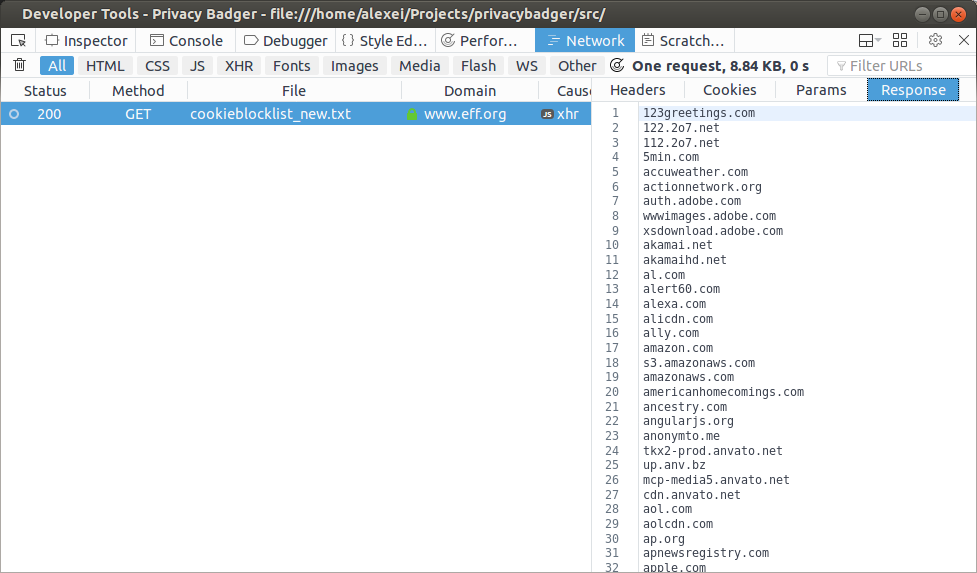
ghostwords
on 29 Sep 2017
What happens if you run the following in Badger's background page
console?javascript DEBUG=1; badger.updateCookieBlockList();
If this doesn't restore the yellowlist (it should be 618 items, not
0), could you (after running the above code) switch debugger tabs
from Console to Network, find the row for "cookieblocklist_new.txt",
click on it, and then click on the Response sub-tab on the right
side. For example:
Right after opening it, even without doing anything, in the console I
do have:
'Problem fetching cookieblock list at "https://www.eff.org/files/cookieblocklist_new.txt" 0'
Running the commands, I get the same error.
Details of the error are:
Badger.prototype.updateCookieBlockList/< moz-extension://43fa936e-a0e7-475d-b471-472609da0537/js/background.js:249:9
xhrRequest/xhr.onerror moz-extension://43fa936e-a0e7-475d-b471-472609da0537/js/utils.js:51:5
Said blocklist is reachable. Testing with other plugins disabled
changed nothing. I can't get the network tab details, the requests
don't make it that far, apparently.
weatherman2095pro
on 29 Sep 2017
Regardless of how we ran into this problem, we can fix the major part of the breakage by implementing #1487.
ghostwords
on 29 Sep 2017
According to https://stackoverflow.com/a/10584491, XMLHttpRequest's onerror handler should fire when there is a failure on the network level such as when your connection is down, or when the request was denied because of CSP or CORS.
ghostwords
on 29 Sep 2017
Does this issue (yellowlist failing to fetch) happen to you with Privacy Badger installed on other Firefox versions?
ghostwords
on 29 Sep 2017
Does this issue (yellowlist failing to fetch) happen to you with
Privacy Badger installed on other Firefox versions?
The version in Debian Stretch (Firefox 52.4.0) has no such issue.
I tried debugging further. Since disabling all my plugins didn't do a
thing. I decided to just go and delete all my settings and reinstall.
Privacy Badger got the list fine.
I found that after installing the plugins the problem was back.
Filtering by elimination found that it appears that RequestPolicy Continued (https://addons.mozilla.org/en-US/firefox/addon/requestpolicy-continued/)
is incompatible with Privacy Badger by default. Manually whitelisting "any to eff.org" however fixes it.
weatherman2095pro
on 30 Sep 2017
Filtering by elimination found that it appears that RequestPolicy Continued (https://addons.mozilla.org/en-US/firefox/addon/requestpolicy-continued/) is incompatible with Privacy Badger by default. Manually whitelisting "any to eff.org" however fixes it.
The issue is fixed in RequestPolicy 1.0.beta13.1
 myrdd
on 4 Oct 2017
myrdd
on 4 Oct 2017
OK, we should be all set here now. We bundle the yellowlist as part of the extension package as of version 2017.10.25.1 (#1487), plus this particular conflict is resolved in new versions of RequestPolicy.
ghostwords
on 27 Oct 2017
Related issues
 da2x
·
3Comments
da2x
·
3Comments
 BlackRabbit22
·
5Comments
BlackRabbit22
·
5Comments
 urfausto
·
4Comments
urfausto
·
4Comments
 bitnik
·
5Comments
bitnik
·
5Comments
 apehex
·
4Comments
apehex
·
4Comments
Most helpful comment
The issue is fixed in RequestPolicy 1.0.beta13.1