Privacybadger: Mass operations on user filters
Using app for some months and now there are 5000 domains in the user filter tabs.
Would be useful to be able to delete all settings of some kind (all greens for example), to sort by policy (all greens first for example) or as last option to dellete everything in the tab.
Exaplanation: I would like to see all access I granted, review them and even revoke them, but mixed with red and yellow is nigh impossible.
Thank you
 maxvader
All 17 comments
Thanks for the report @maxvader ! I agree, it would be useful for users to filter the domains which they've changed in the options. My first idea is a checkbox on User Filter Settings page, that would make the tracker list only show the trackers the user has edited the settings for. How does that sound?
 cowlicks
on 8 Jun 2017
cowlicks
on 8 Jun 2017
And I currently have a WIP PR that would partially accomplish clearing the list of trackers #1416. Right now to accomplish this you will have to uninstall then reinstall privacy badger.
cowlicks
on 8 Jun 2017
Thank you @cowlicks , sure #1416 will be an improvement for me, at least it will be possible to nuke everything and start from scratch.
But I think your proposal of showing the edited filters will be even better would reduce the list from 5000+ to a shorter and more manageable one, highliting user choices which is very important (so user can backtrack a previus wrong choice...).
Thanks!
maxvader
on 9 Jun 2017
@maxvader I'm glad to hear it. You're welcome to pick up #1416 if you like. It has a bug with the settings data.
cowlicks
on 11 Jun 2017
Excuse me, but how can I exactly "pick it up" and use it?
I guess I'll have to wait until you release the new version... (puzzled)
2017-06-11 0:40 GMT+02:00 Blake Griffith notifications@github.com:
@maxvader https://github.com/maxvader I'm glad to hear it. You're
welcome to pick up #1416
https://github.com/EFForg/privacybadger/pull/1416 if you like. It has a
bug with the settings data.—
You are receiving this because you were mentioned.
Reply to this email directly, view it on GitHub
https://github.com/EFForg/privacybadger/issues/1422#issuecomment-307594370,
or mute the thread
https://github.com/notifications/unsubscribe-auth/ALZ3038sQ_5phsKtZ6ytWxZC6-hjBg7rks5sCxt3gaJpZM4N0OAj
.
maxvader
on 15 Jun 2017
Oh, sorry. I was saying you are welcome to finish that code if you would like to. Once it is ready it will included in the next Privacy Badger release.
cowlicks
on 15 Jun 2017
in https://github.com/EFForg/privacybadger/issues/1664#issue-257479653 i thought a little bit about this topic... to be precise, not so much about the operation but filtering and its implementation in the UI:
i would suggest to add some filters for the domain-list, like for _overridden settings_, _DNT-domains_ and all three kinds of statuses.
--> the easiest implementation into the GUI would be to simply make the symbols above the list clickable... and there is also enough space for the DNT-icon and so on.
...
--> maybe there is also enough space for a _"clear all filters (including text)"_-icon.
 DJCrashdummy
on 14 Sep 2017
DJCrashdummy
on 14 Sep 2017
Problem: Unable to globally reset all tracking domains to default behavior at once
On the "Tracking Domains" tab, there is no way to reset all tracking domains to their default behavior.
Because it isn't clear that changing the behavior of a tracking domain on one web site changes the behavior of that tracking domain for all sites, I have globally disabled many trackers when I only wanted to disable them for a particular site.
In order to recover from this, I need to reset all tracking domains to their default behavior - it's not feasible to scroll though over 5,000 tracking domains searching for and resetting modified tracking domains.
Alternatively, having a way to sort the domain list so that all modified tracking domains are at the top would at least avoid the need of reviewing over 5,000 sites, although the inconvenience of having to reset each one individually would still remain.
 sylerner
on 27 Nov 2017
sylerner
on 27 Nov 2017
We aim to make Privacy Badger as configuration-free and hands-off as possible. You might imagine the ideal version of Privacy Badger as having no user interface at all. But we are not there yet; Privacy Badger often breaks websites.
My general recommendation for dealing with broken websites is to disable Privacy Badger on those pages by clicking the "Disable Privacy Badger for This Site" button in Privacy Badger's popup.
If you've customized a lot of settings and then realized you don't like your changes, I recommend removing and then reinstalling Privacy Badger. Your Badger should relearn what to block quickly.
I do not recommend manually managing Badger's blocking preferences. If you find yourself doing this with any frequency, I'd like to hear why you do it.
 ghostwords
on 30 Nov 2017
ghostwords
on 30 Nov 2017
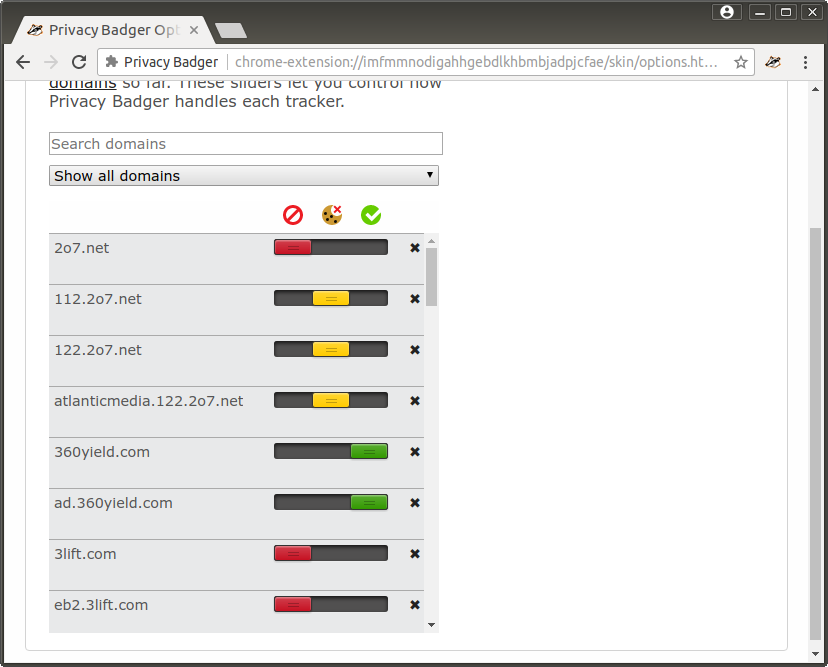
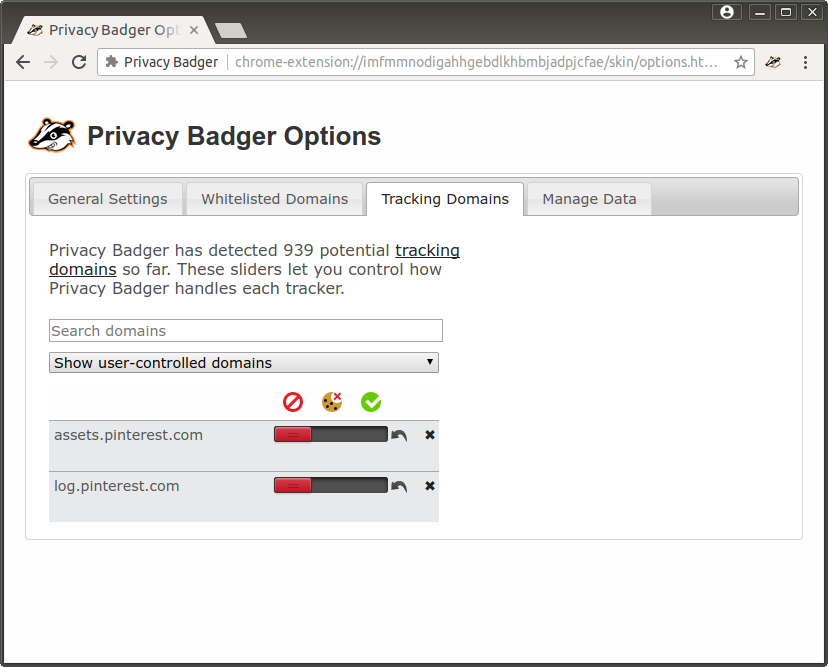
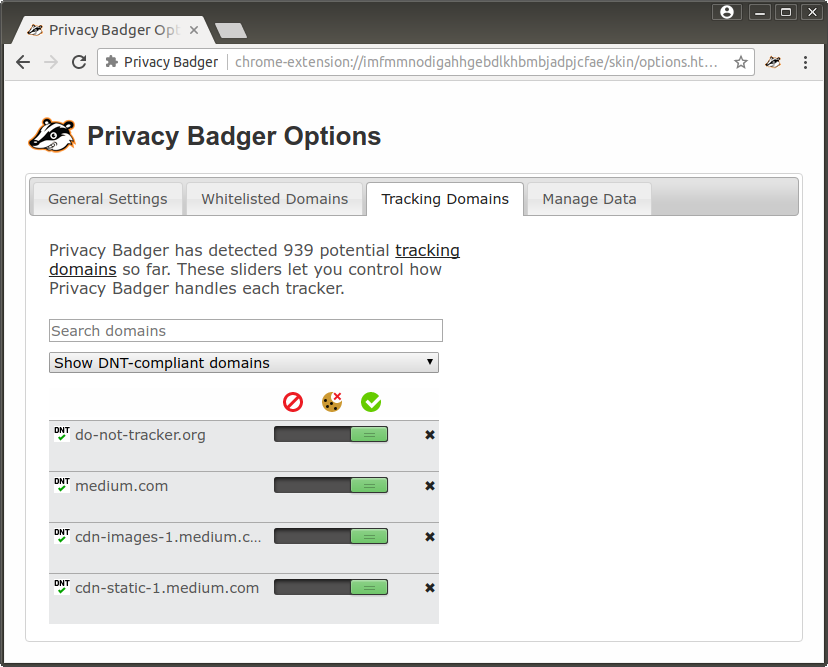
If you really don't want to make your Badger relearn everything and/or if you are interested in reviewing your custom domain settings, how do you feel about gaining a way to filter the tracking domains list to customized domains only? Screenshots follow.
No filtering
Filtering by user control
Filtering by DNT compliance
ghostwords
on 30 Nov 2017
Looks very good. Would be much better than the current situation.
I hope this gets into the product and released soon.
Thanks!
On Thu, Nov 30, 2017 at 10:54 AM, Alexei notifications@github.com wrote:
If you really don't want to make Badger relearn everything and/or if you
are interested in reviewing your custom domain settings, how do you feel
about gaining a way to only show customized domains above the tracking
domains list? Screenshots follow.[image: screenshot from 2017-11-30 10 39 14]
https://user-images.githubusercontent.com/794578/33439964-c7500170-d5bc-11e7-8165-0d8556793d07.png[image: screenshot from 2017-11-30 10 39 22]
https://user-images.githubusercontent.com/794578/33439967-c8d7bfba-d5bc-11e7-9704-e95a1c7919a8.png[image: screenshot from 2017-11-30 10 39 28]
https://user-images.githubusercontent.com/794578/33439969-ca0dc50a-d5bc-11e7-89d4-9c897c361431.png—
You are receiving this because you commented.
Reply to this email directly, view it on GitHub
https://github.com/EFForg/privacybadger/issues/1422#issuecomment-348230828,
or mute the thread
https://github.com/notifications/unsubscribe-auth/ATlsbXizk2K0SwtO0ZjzDMp7n9k2vwEnks5s7s_LgaJpZM4N0OAj
.
sylerner
on 4 Dec 2017
@ghostwords this looks very good! :+1:
so the last thing what is still missing - like already mentioned in https://github.com/EFForg/privacybadger/issues/1422#issuecomment-329396546 - is to filter by status:
they should also cooperate with the other filters, especially drop-down (all or user-controlled), but also the text-filter.
making the symbols click-able would maybe be the easiest to combine the different kind of filters... and because there is still place left right above the domains, a text-button to "clear ALL filters" wouldn't hurt either. :wink:
DJCrashdummy
on 4 Dec 2017
Take a look at #1805 for the latest update and let me know what you think please.
ghostwords
on 11 Dec 2017
Please take a look at the latest version of domain list filters in https://github.com/EFForg/privacybadger/pull/1805#issuecomment-358133587. I'd like to close out this ticket with #1805, opening followup tickets for further improvements as necessary.
ghostwords
on 18 Jan 2018
:clap: and if all 3 kind of filters cooperate with each other, this is a huge improvement compared to now; kudos!
one important question is: do the filters stay after you took some action on a domain? - i'm thinking of a kind of the "reset scroll position" (#1581)... since this bug is still a deal-breaker for serious work with the domain list. :frowning_face:
btw: somewhere a "clear all filters"-button would put the cherry on the cake, but i don't mind if it won't be there, since it is possible to achieve the function with some extra-clicks.
DJCrashdummy
on 21 Jan 2018
The filters do indeed cooperate with each other.
The filters stay, but the domain may disappear from view. For example, unblocking a domain with the status filter set to "blocked" will make that domain disappear.
Yep, we can keep making refinements in the future.
Feel free to try out the changes in #1805 by loading Privacy Badger from source from the add-tracking-domains-type-filter Git branch.
We'll try to release these changes sometime with the next update or two.
ghostwords
on 22 Jan 2018
Previously: #691.
ghostwords
on 6 Jun 2018
Related issues
cowlicks
·
4Comments
 mrphs
·
5Comments
mrphs
·
5Comments
 da2x
·
3Comments
da2x
·
3Comments
 jawz101
·
4Comments
jawz101
·
4Comments
 ghost
·
5Comments
ghost
·
5Comments
Most helpful comment
If you really don't want to make your Badger relearn everything and/or if you are interested in reviewing your custom domain settings, how do you feel about gaining a way to filter the tracking domains list to customized domains only? Screenshots follow.
No filtering
Filtering by user control
Filtering by DNT compliance