Privacybadger: Move `*.cloudinary.com` to yellow list
Move *.cloudinary.com to yellow list. Blocks images: https://www.apartmentlist.com/cycle?category=E1&category_rank=0&index=0&pane=listing&rids%5B%5D=p68898&rids%5B%5D=p17422&rids%5B%5D=p26341&rids%5B%5D=p23136&rids%5B%5D=u42822807&rids%5B%5D=u42861803
 terrorist96
All 34 comments
I'm looking at the site example you gave with the latest build of privacy badger on the latest Google Chrome Canary and I don't see any issue. All the images show up, and Privacy Badger reports "no tracking" for res-4 and res-5.cloudinary.com. What am I not seeing? (New to the project so it's quite possible I'm missing something obvious, in which case I apologize)
 maxvonhippel
on 30 Jan 2017
maxvonhippel
on 30 Jan 2017
PB learns over time what is tracking you. In your case, you most likely haven't browsed enough sites for PB to detect and block the aforementioned site.
terrorist96
on 30 Jan 2017
Gotcha, thanks for the explanation. I'll start using canary as my default browser so I can accurately test stuff.
maxvonhippel
on 30 Jan 2017
Just found this issue after getting broken images on grubhub.com from res.cloudinary.com. I'm a little confused about what the earlier conversation implies, but happy to submit a PR to yellowlist it if that makes sense!
 phinze
on 18 Mar 2017
phinze
on 18 Mar 2017
@phinze do you get the same behavior? If so, I think you can go ahead and add to the list. (Previous conversation was because I did not get the same behavior).
maxvonhippel
on 20 Mar 2017
Also seeing this behavior
 leggomuhgreggo
on 28 Mar 2017
leggomuhgreggo
on 28 Mar 2017
I guess they collect fingerprinting info: http://cloudinary.com/privacy
Here's their policy on sharing info: http://cloudinary.com/privacy#section5
While the language seems to imply they aren't sharing for marketing purposes, there does appear to be some heavy nuance. Im not well enough versed in EULA language to say for sure that they're obfuscating, but it seems like a legit flag from PB.
leggomuhgreggo
on 28 Mar 2017
https://www.crunchbase.com/organization/synapdx#/entity
crunchbase-production-res.cloudinary.com breaks images
terrorist96
on 9 May 2017
https://www.valuepenguin.com/american-express-blue-cash-card
res.cloudinary.com blocks images.
terrorist96
on 10 May 2017
http://www.voxelcloud.io/
res.cloudinary.com
terrorist96
on 26 May 2017
https://www.bwpawards.org/winners2015
res.cloudinary.com
terrorist96
on 14 Jun 2017
terrorist96
on 2 Jul 2017
All their product images are delivered by Cloudinary.
 erikhuizinga
on 27 Aug 2017
erikhuizinga
on 27 Aug 2017
@ghostwords should I make a PR adding cloudinary.com to the yellowlist?
terrorist96
on 27 Aug 2017
I can't figure out how to get Privacy Badger to start seeing cloudinary.com domains as tracking.
@erikhuizinga Would you mind running debugging code as per instructions here for "cloudinary", and sharing what gets printed out?
 ghostwords
on 28 Aug 2017
ghostwords
on 28 Aug 2017
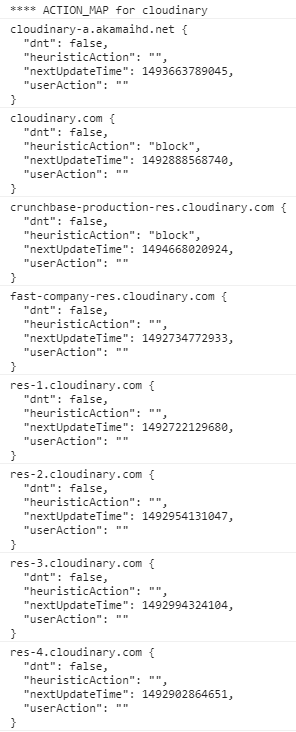
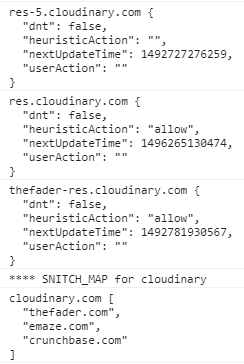
Here's mine:
terrorist96
on 28 Aug 2017
That's interesting that my output says the heuristic action for res and thefader-res subdomains are "allow" but they're clearly not:


terrorist96
on 28 Aug 2017
@ghostwords if you can't reproduce, then it is probably another one of those sites that got blocked incorrectly in the past and needs to be migrated.
terrorist96
on 28 Aug 2017
https://www.xfinity.com/mobile/
blocks images and fucks with the font.
terrorist96
on 28 Aug 2017
Yeah, we should make everyone's Badger forget about this one. Unable to reproduce but still getting lots of error reports.
ghostwords
on 28 Aug 2017
I suggest when you test for reproducibility, try on an old/experienced profile as well, cuz testing on a fresh profile is not representative of real-world situations.
You should probably create a new label for all these sites (suggest changing the unable to reproduce tags to needs migration or whatever)
terrorist96
on 29 Aug 2017
My result for cloudinary.com:
**** ACTION_MAP for cloudinary.com
VM123:5 cloudinary.com {
  "dnt": false,
  "heuristicAction": "block",
  "nextUpdateTime": 0,
  "userAction": ""
}
VM123:5 res.cloudinary.com {
  "dnt": false,
  "heuristicAction": "block",
  "nextUpdateTime": 1504207187514,
  "userAction": "user_cookieblock"
}
VM123:5 res-1.cloudinary.com {
  "userAction": "user_cookieblock",
  "dnt": false,
  "heuristicAction": "",
  "nextUpdateTime": 1504093869687
}
VM123:5 res-2.cloudinary.com {
  "userAction": "user_cookieblock",
  "dnt": false,
  "heuristicAction": "",
  "nextUpdateTime": 1504221387657
}
VM123:5 res-3.cloudinary.com {
  "userAction": "user_cookieblock",
  "dnt": false,
  "heuristicAction": "",
  "nextUpdateTime": 1504367130750
}
VM123:5 res-4.cloudinary.com {
  "userAction": "user_cookieblock",
  "dnt": false,
  "heuristicAction": "",
  "nextUpdateTime": 1503953614019
}
VM123:5 res-5.cloudinary.com {
  "userAction": "user_cookieblock",
  "dnt": false,
  "heuristicAction": "",
  "nextUpdateTime": 1504191615302
}
VM123:7 **** SNITCH_MAP for cloudinary.com
VM123:9 cloudinary.com [
  "nedap-omnom.herokuapp.com",
  "lush.com",
  "urbandictionary.com"
]
What do you see when you run this in the extension console:
chrome.cookies.getAll({domain: "cloudinary.com"}, console.log)
Please don't post the "value" field of the cookie here, it may contain private sensitive data.
 cowlicks
on 7 Sep 2017
cowlicks
on 7 Sep 2017
I get nothing. Length is 0.
terrorist96
on 7 Sep 2017
https://health.usnews.com/doctors/albert-osbahr-382042
Profile image blocked. Two others blocked on right column.
terrorist96
on 14 Nov 2017
terrorist96
on 3 Dec 2017
terrorist96
on 7 Jan 2018
terrorist96
on 10 Jan 2018
terrorist96
on 27 Jan 2018
@ghostwords Hi, I work at Cloudinary. This issue can be reproduced by visiting https://cloudinary.com and then visiting any of the sites mentioned. The problem is that google analytics on https://cloudinary.com sets a global domain cookie which is detected by PB as a tracking cookie.
Cloudinary is essentially a CDN similar to other domains on the yellow list. Our privacy policy specifically restrict tracking and we do not do it - it's not part of our business model in any way.
Can we add *.cloudinary.com to the yellowlist after all?
Thanks! I'm open to any questions about this.
 ranrub
on 26 Feb 2018
ranrub
on 26 Feb 2018
Although I see Google Analytics on the Cloudinary homepage, I haven't been able to reproduce this way. For some reason I don't get the tracking cookie (in a new all-defaults Chrome profile with fresh Privacy Badger installed).
I have been able to reproduce, however, by first visiting http://culverlabs.co/ (an example page mentioned earlier in this issue), which seems to set a _mkto_trk (Marketo?) cookie on the .cloudinary.com domain. I think several more cookies get set there too, but one is enough for Privacy Badger. Visiting two more cloudinary.com-powered pages results in Privacy Badger learning to block Cloudinary domains.
As Cloudinary is a CDN that uses the same base domain across multiple customer accounts, this seems similar to https://github.com/EFForg/privacybadger/pull/1881#issue-170551628.
ghostwords
on 26 Feb 2018
The cloudinary.com yellowlist update should be live. Privacy Badgers can take up to a day to get the latest yellowlist. To force an update, you could restart your browser (or just the Privacy Badger extension).
ghostwords
on 26 Feb 2018
Are you saying yellowlist additions can now be pushed without having to release a new version of the extension?
terrorist96
on 27 Feb 2018
It's been this case for a while ... since 2016.5.16 I think (c4024ea6ab37a3dc5d4f16757b47dde673e0b3cd). Edit: Before then too, as a "subscription", part of the original Adblock Plus infrastructure.
ghostwords
on 27 Feb 2018
Related issues
 cynddl
·
5Comments
cynddl
·
5Comments
 apehex
·
4Comments
apehex
·
4Comments
 bitnik
·
5Comments
bitnik
·
5Comments
 aphid
·
4Comments
aphid
·
4Comments
 Zalexard
·
3Comments
Zalexard
·
3Comments