Prisma1: Your token is invalid. It might have expired or you might be using a token...
Describe the bug
‼ Your token is invalid. It might have expired or you might be using a token from a different project.: {"response":{"errors":[{"message":"Your token is invalid. It might have expired or you might be using a token from a different project.","code":3015...
This issue occurs when deploying to dev on prisma-eu1.
To Reproduce
- Globally install of prisma
npm i -g [email protected] - Update datamodel to v1.1 syntax.
- Run
prisma deploy --env-file variables.env
Expected behavior
- Update Prisma table structure
- Generate new prisma.graphql file via hook speceified in prisma.yml
hooks:
  post-deploy:
    - graphql get-schema -p prisma
Screenshots
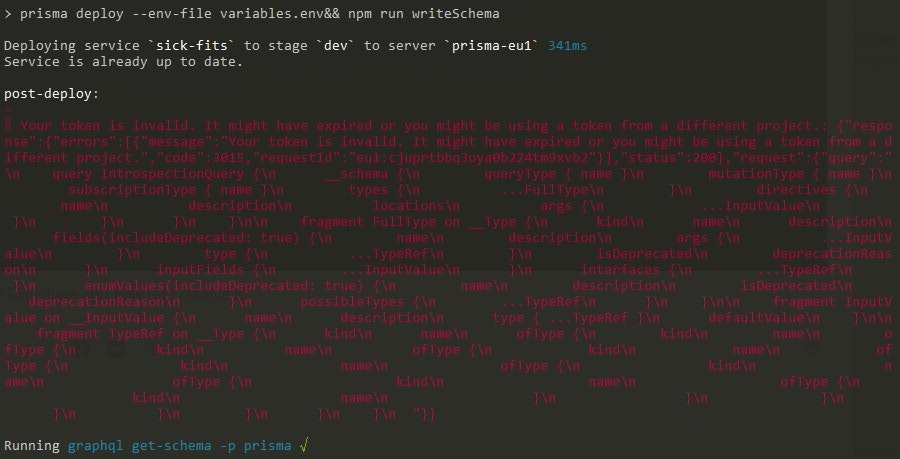
Versions (please complete the following information):
- Connector: Dev -
prisma-eu1 (MySQL). ProductionHeroku (Prisma 1.32.0-beta/PostgresSQL) - Prisma Server: Dev - 1.32.0-beta. Proiduction - installed 1.32.0-beta-heroku
prismaCLI: [e.g.prisma/1.32.0-beta (darwin-x64) node-v9.5.0]- OS:
Windows 10 Pro prisma-binding- 2.2.14
Additional context
This issue does not occur when deploying to production (Heroku, with prisma instance updated to 1.32.0-beta-heroku)

 TheoMer
All 3 comments
Looks like you are using a secret in development in your prisma config. That is why it is asking for a token.
I will recommend not to use graphql cli now as it uses introspection for this. Instead use the prisma cli itself to generate the graphql schema.
Add this to your prisma.yml
generate:
  - generator: graphql-schema
    output: ./path/to/your/schema.graphql
After this run prisma generate to generate your schema.
 pantharshit00
on 21 Apr 2019
pantharshit00
on 21 Apr 2019
@pantharshit00 Many thanks for the update.
I updated my package scripts so:
"deploy": "prisma deploy --env-file variables.env&& prisma generate --env-file variables.env&&...",
replaced the hooks: section of my prisma.yml file with the generate: section you referenced, and finally npm run deploy.
All is working fine now.
TheoMer
on 21 Apr 2019
Closing as this is resolved now :)
pantharshit00
on 21 Apr 2019
Related issues
 akoenig
·
3Comments
akoenig
·
3Comments
 nikolasburk
·
3Comments
nikolasburk
·
3Comments
 hoodsy
·
3Comments
hoodsy
·
3Comments
 ragnorc
·
3Comments
ragnorc
·
3Comments
 schickling
·
3Comments
schickling
·
3Comments
Most helpful comment
Looks like you are using a secret in development in your prisma config. That is why it is asking for a token.
I will recommend not to use graphql cli now as it uses introspection for this. Instead use the prisma cli itself to generate the graphql schema.
Add this to your prisma.yml
After this run
prisma generateto generate your schema.