Prisma1: Error following AWS Fargate tutorial
CREATE_FAILED error following the tutorial after completing the steps leading to step 2.3.

I really doubt I missed a step, but maybe I did?
 romseguy
All 15 comments
I've just done the tutorial with no error. Try removing all your stacks related to the tutorial and start over.
 emilforsmann
on 5 Mar 2019
emilforsmann
on 5 Mar 2019
@romseguy
I am also not experiencing any issue. Can you please try again?
If you are still getting this, please tell us the steps to reproduce this.
 pantharshit00
on 6 Mar 2019
pantharshit00
on 6 Mar 2019
I've stumbled upon the same error, what helped is this command from step 1.2 (in Note) of the tutorial, which creates a service linked role in IAM:
aws iam create-service-linked-role --aws-service-name ecs.amazonaws.com
though I was using mysql template.
 taikn
on 6 Mar 2019
taikn
on 6 Mar 2019
@taikn thank you, I had skipped this instruction because it was beginning with If you’d like the aurora.yml template instead,
romseguy
on 6 Mar 2019
I think this has solved it. Let me know if you are still experiencing some issues.
pantharshit00
on 6 Mar 2019
@pantharshit00 yes, I'm getting following cryptic error on prisma deploy
$ porygon-prisma-service prisma deploy
  environment FetchError: invalid json response body at http://poryg-publi-19rale09ondd0-1625885604.eu-west-1.elb.amazonaws.com/management reason: Unexpected token < in JSON at position 0
  environment     at /home/x240/n/lib/node_modules/prisma/node_modules/node-fetch/lib/index.js:254:32
  environment     at process._tickCallback (internal/process/next_tick.js:68:7) +0ms
  environment FetchError: invalid json response body at http://poryg-publi-19rale09ondd0-1625885604.eu-west-1.elb.amazonaws.com/management reason: Unexpected token < in JSON at position 0
  environment     at /home/x240/n/lib/node_modules/prisma/node_modules/node-fetch/lib/index.js:254:32
  environment     at process._tickCallback (internal/process/next_tick.js:68:7) +882ms
Error: Could not connect to server at http://poryg-publi-19rale09ondd0-1625885604.eu-west-1.elb.amazonaws.com. Please check if your server is running.
    at Deploy.<anonymous> (/home/x240/n/lib/node_modules/prisma/node_modules/prisma-cli-core/src/commands/deploy/deploy.ts:127:13)
    at step (/home/x240/n/lib/node_modules/prisma/node_modules/prisma-cli-core/dist/commands/deploy/deploy.js:45:23)
    at Object.next (/home/x240/n/lib/node_modules/prisma/node_modules/prisma-cli-core/dist/commands/deploy/deploy.js:26:53)
    at fulfilled (/home/x240/n/lib/node_modules/prisma/node_modules/prisma-cli-core/dist/commands/deploy/deploy.js:17:58)
    at process._tickCallback (internal/process/next_tick.js:68:7)
  util timed out +0ms
Exiting with code: 0
I opened prisma.yml out of curiosity and found:
endpoint: http://poryg-publi-19rale09ondd0-1625885604.eu-west-1.elb.amazonaws.com/porygon-prisma-service/porygon-prisma-stage
I found it odd and replaced it with:
endpoint: http://poryg-Publi-19RALE09ONDD0-1625885604.eu-west-1.elb.amazonaws.com
No difference on prisma deploy.

Getting 503 accessing directly http://poryg-publi-19rale09ondd0-1625885604.eu-west-1.elb.amazonaws.com/
romseguy
on 6 Mar 2019
Can you please open cloud watch and see if there any logs for this?
pantharshit00
on 6 Mar 2019
Only thing I see in cloudwatch (first time I'm using the tool) is an alarm from 2 days ago (I was stuck at step 2.3 so prisma-server was not created) about the database, so pretty unrelated.
edit: in case you need the info: I selected version 1.9.0 instead of 1.8.3 here
romseguy
on 6 Mar 2019
I'm facing the exact same issue. Any updates on this?
 5achinJani
on 20 Mar 2019
5achinJani
on 20 Mar 2019
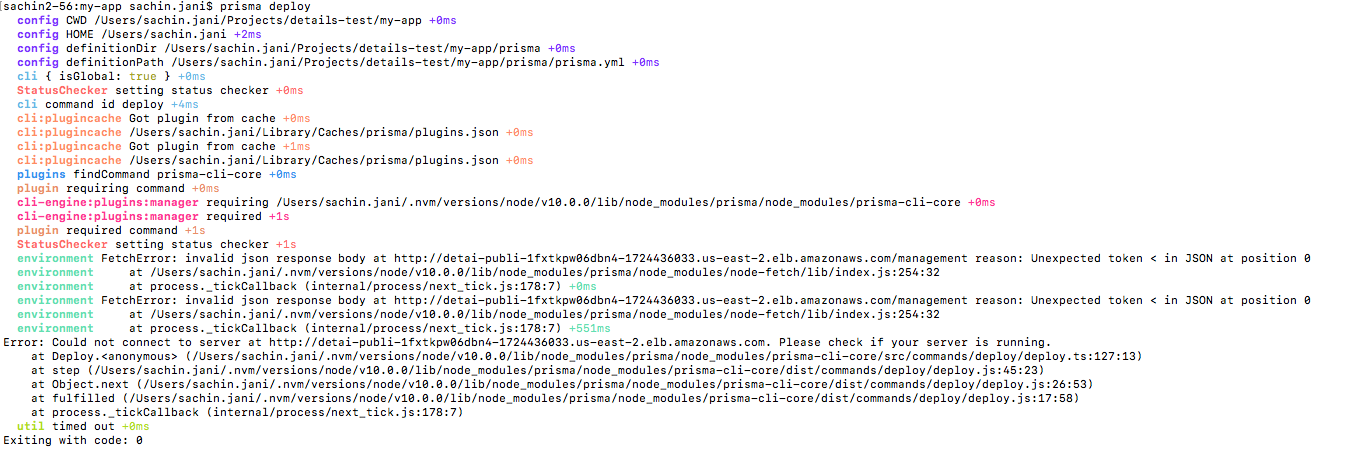

export MANAGEMENT_API_SECRET="protecting-my-prisma-server" has been set according to what I set while configuring the prisma server on aws.
This doc was followed exactly how it says : https://www.prisma.io/tutorials/deploy-prisma-to-aws-fargate-ct14
Also not able to connect to the server using https://app.prisma.io/user-name/servers/connect-server
cloudwatch prisma-server service logs:
Caused by: java.sql.SQLInvalidAuthorizationSpecException: Could not connect: Access denied for user 'details-prisma'@'ec2-*-135.us-east-2.compute.amazonaws.com' (using password: YES)
5achinJani
on 20 Mar 2019
I figured it out the issue was related to the db user name it should be the same that you set in creating the database cloud-formation stack.
DatabaseUsername in the database stack and
DbUser in the prisma server stack should be the same.
Resolved for me.
@romseguy Can you verify this thing in your stacks if it is still not resolved for you.
5achinJani
on 20 Mar 2019
@5achinJani thank you but for me both DatabaseUsername and DbUser were set to prisma.
romseguy
on 2 Apr 2019
@romseguy
Can you please try redeploying the fargate instance. We recently did some changes in the template.
pantharshit00
on 3 Apr 2019
@pantharshit00 sorry but I recently gave up using AWS for deployment
romseguy
on 3 Apr 2019
I am going to close then. Anyone facing similar issues, please open a new one
pantharshit00
on 3 Apr 2019
Related issues
 ragnorc
·
3Comments
ragnorc
·
3Comments
 schickling
·
3Comments
schickling
·
3Comments
 notrab
·
3Comments
notrab
·
3Comments
 hoodsy
·
3Comments
hoodsy
·
3Comments
 sedubois
·
3Comments
sedubois
·
3Comments
Most helpful comment
I've stumbled upon the same error, what helped is this command from step 1.2 (in Note) of the tutorial, which creates a service linked role in IAM:
though I was using mysql template.