Prisma1: Unable to load Prisma config: mapping values are not allowed here
Describe the bug
When trying to deploy prisma to AWS ECS + EC2, on setting the env variable PRISMA_CONFIG.
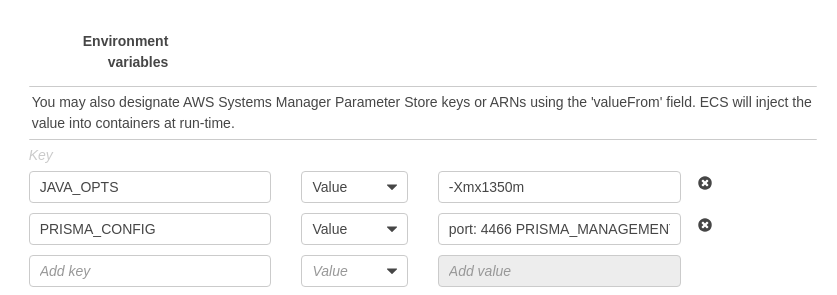
The value of the variable looks like this:
port: 4466 PRISMA_MANAGEMENT_API_SECRET: sesd-secret-api databases: default: connector: mysql host: aaa.ssss.us-east-1.rds.amazonaws.com port: 3306 user: foobaz password: XXX migrations: true.
Note: I am not using AWS Fargate.
Getting the following error:
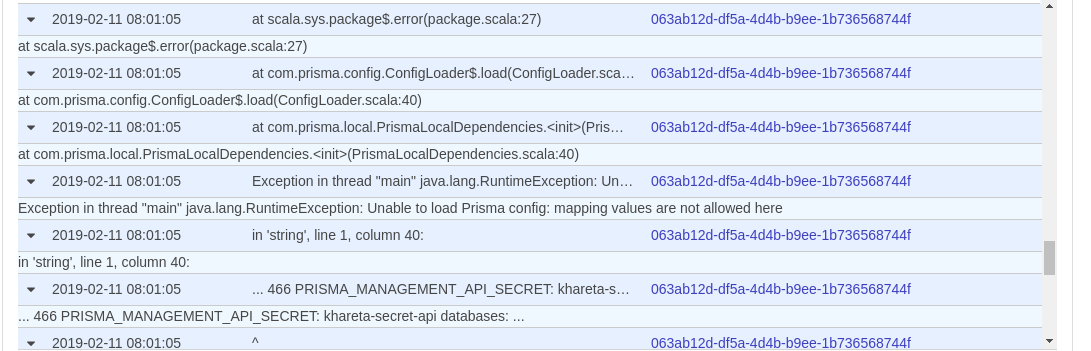
Exception in thread "main" java.lang.RuntimeException: Unable to load Prisma config: mapping values are not allowed here
in 'string', line 1, column 40:
... 466 PRISMA_MANAGEMENT_API_SECRET: khareta-secret-api databases: ...
Setting the env variable in AWS task definition:
Expected behavior
Prisma containers should be deployed.
Versions (please complete the following information):
- Connector: [
MySQL] - Prisma Server: [
1.13.0] prismaCLI: (not needed)- OS: [
Ubuntu 16.04]
- Docker image: [
prismagraphql/prisma:1.13.0]
- Docker image: [
 aitchkhan
All 9 comments
You will need to pass it like so
| \n port: 4466\n managementApiSecret: sesd-secret-api\n databases:\n default:\n connector: mysql\n host: aaa.ssss.us-east-1.rds.amazonaws.com \n port: 3306\n database: database\n user: foo\n password: bar\n migrations: true\n
We also support a PRISMA_CONFIG_PATH if this feels ugly to you. Here is an example: https://www.prisma.io/tutorials/deploy-prisma-to-dokku-ct15/#create-a-new-project-folder
 pantharshit00
on 12 Feb 2019
pantharshit00
on 12 Feb 2019
I tried the first option:
2019-02-13 08:37:56 at scala.Function0.apply$mcV$sp$(Function0.scala:34)
2019-02-13 08:37:56 at scala.runtime.AbstractFunction0.apply$mcV$sp(AbstractFunction0.scala:12)
2019-02-13 08:37:56 at scala.App.$anonfun$main$1$adapted(App.scala:76)
2019-02-13 08:37:56 at scala.collection.immutable.List.foreach(List.scala:389)
2019-02-13 08:37:56 at scala.App.main(App.scala:76)
2019-02-13 08:37:56 at scala.App.main$(App.scala:74)
2019-02-13 08:37:56 at com.prisma.local.PrismaLocalMain$.main(PrismaLocalMain.scala:12)
2019-02-13 08:37:56 at com.prisma.local.PrismaLocalMain.main(PrismaLocalMain.scala)
2019-02-13 08:37:56 at scala.sys.package$.error(package.scala:27)
2019-02-13 08:37:56 at com.prisma.config.ConfigLoader$.load(ConfigLoader.scala:40)
2019-02-13 08:37:56 at com.prisma.local.PrismaLocalDependencies.<init>(PrismaLocalDependencies.scala:40)
2019-02-13 08:37:56 at com.prisma.local.PrismaLocalMain$.delayedEndpoint$com$prisma$local$PrismaLocalMain$1(PrismaLocalMain.scala:15)
2019-02-13 08:37:56 at com.prisma.local.PrismaLocalMain$delayedInit$body.apply(PrismaLocalMain.scala:12)
2019-02-13 08:37:56 at scala.Function0.apply$mcV$sp(Function0.scala:34)
2019-02-13 08:37:56Exception in thread "main" java.lang.RuntimeException: Unable to load Prisma config: while scanning a block scalar
2019-02-13 08:37:56 in 'string', line 1, column 1:
2019-02-13 08:37:56 | \n port: 4466\n managementApiS ...
2019-02-13 08:37:56 ^
2019-02-13 08:37:56expected a comment or a line break, but found \(92)
2019-02-13 08:37:56 in 'string', line 1, column 3:
2019-02-13 08:37:56 | \n port: 4466\n managementApiSec ...
2019-02-13 08:37:56 ^
Just getting a different error message.
I will give a shot to the other one...
aitchkhan
on 13 Feb 2019
Any luck with this ?
 paulrostorp
on 13 May 2019
paulrostorp
on 13 May 2019
I'm running into this same issue. My two cents, it's cumbersome to have one long env var like this.
 captDaylight
on 16 May 2019
captDaylight
on 16 May 2019
@aitchkhan @pantharshit00 I've had the same exact trajectory, I've gotten both of these errors after modifying the variable string. Is there a standard way to format the PRISMA_CONFIG var that works on AWS?
captDaylight
on 16 May 2019
The only way I found was to use Edit Stack from AWS CloudFormation. You can update the variables there. Other than that, no luck.
aitchkhan
on 18 May 2019
This one worked for me!
"port: 4466\ndatabases:\n default:\n connector: postgres\n host: postgres\n database: db\n port: 5432\n user: foo\n password: bar\n migrations: false\n schema: public\n"
You can use some online YAML to JSON converter.
 gabrielgian
on 23 May 2019
gabrielgian
on 23 May 2019
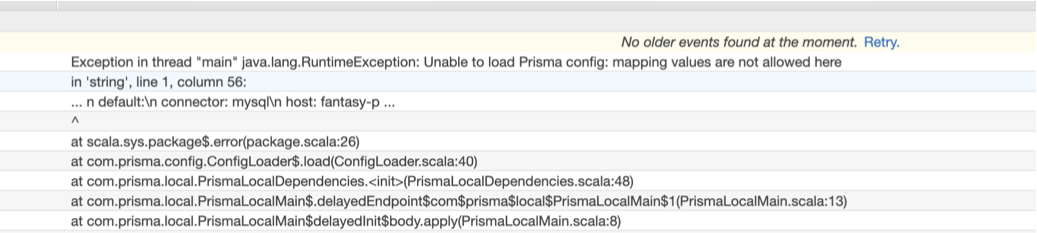
@gabrielgian, your solution is still making an issue...
No way to achieve this on AWS console?
Has anyone solved this issue perfectly?
port: 4466\ndatabases:\n default:\n connector: mysql\n host: mysql\n port: 3306\n user: prisma\n password: password\n migrations: true\n rawAccess: true\n
 batmanhit
on 30 Jul 2019
batmanhit
on 30 Jul 2019
So, I had no luck with any of the solutions presented above.
The only thing that worked for me was creating a custom image with a config.yml file inside, as presented here.
It works fine this way, but the prisma settings become hard coded in the image (though it's ok for my use case).
If anyone wants to try the same, I'll list the steps I've followed to make it work:
- Create a custom prisma image with a config.yml as described here. I'll post the full guide bellow, just in case the link gets broken some day:
- Create a new folder on your local machine and add these two files with the following content to it (customize them with your own configurations):
Dockerfile:
FROM prismagraphql/prisma:1.34.6
ARG PRISMA_CONFIG_PATH
ENV PRISMA_CONFIG_PATH prisma.yml
COPY config.yml prisma.yml
EXPOSE 4466
config.yml:
port: 4466
databases:
  default:
    connector: postgres
    host: dokku-postgres-prisma-server-db
    port: 5432
    user: postgres
    password: bd793d8a330715891698434697a0345b
    database: prisma
Build the docker image and push it to Amazon ECR
Use the image you just pushed instead of the original prisma image
???
Profit
 stefanfuchs
on 22 Jan 2020
stefanfuchs
on 22 Jan 2020
Related issues
 sedubois
·
3Comments
sedubois
·
3Comments
 sorenbs
·
3Comments
sorenbs
·
3Comments
 marktani
·
3Comments
marktani
·
3Comments
 notrab
·
3Comments
notrab
·
3Comments
 Fi1osof
·
3Comments
Fi1osof
·
3Comments