Prisma1: FetchError while setting up Prisma for existing database
Describe the bug
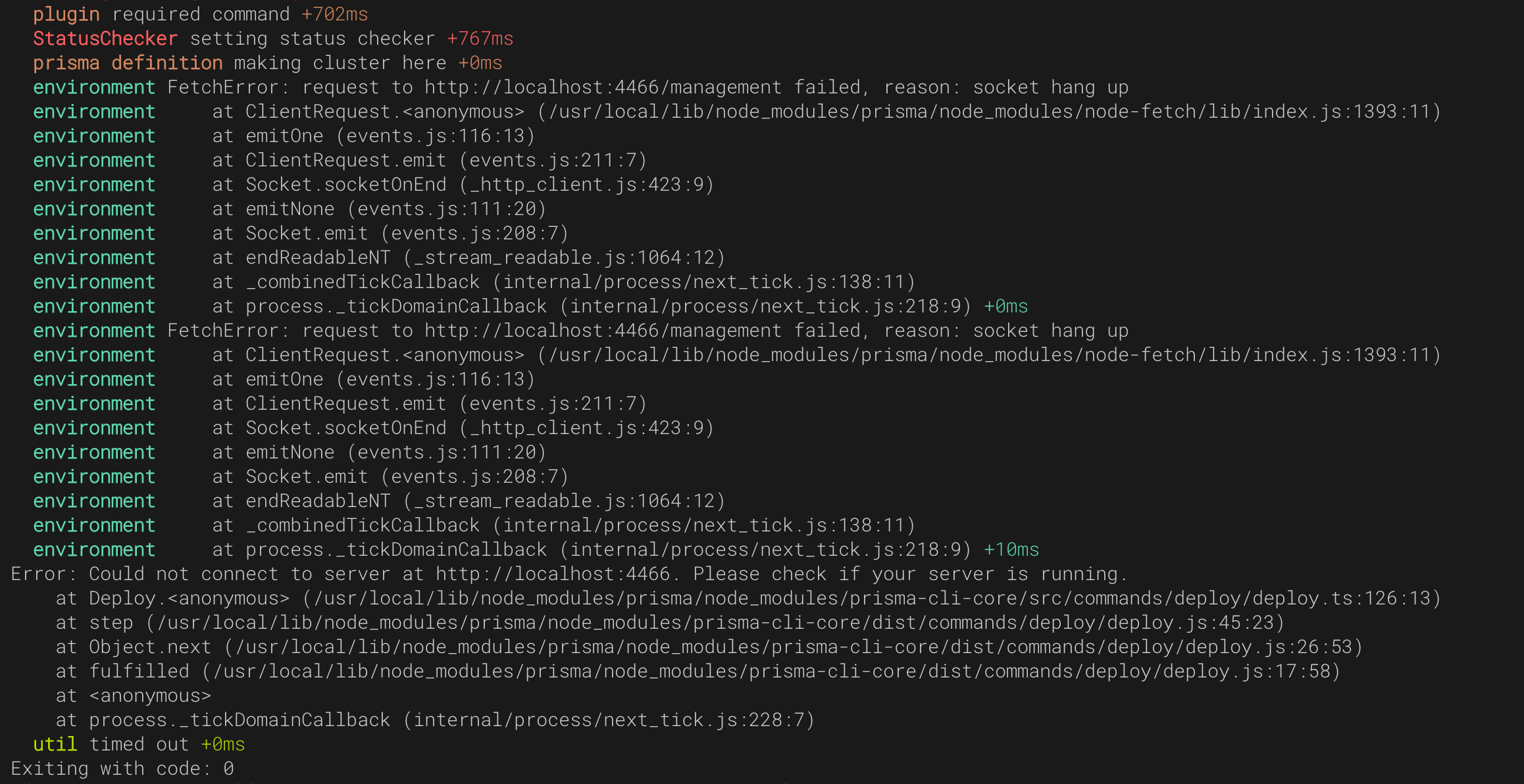
I am currently following the steps in the documentation here for setting up Prisma with existing database and I was getting an error in when running prisma deploy. So i decided to add the export DEBUG="*" and got this in the console
environment FetchError: request to http://localhost:4466/management failed, reason: socket hang up
  environment     at ClientRequest.<anonymous> (/usr/local/lib/node_modules/prisma/node_modules/node-fetch/lib/index.js:1393:11)
  environment     at emitOne (events.js:116:13)
  environment     at ClientRequest.emit (events.js:211:7)
  environment     at Socket.socketOnEnd (_http_client.js:423:9)
  environment     at emitNone (events.js:111:20)
  environment     at Socket.emit (events.js:208:7)
  environment     at endReadableNT (_stream_readable.js:1064:12)
  environment     at _combinedTickCallback (internal/process/next_tick.js:138:11)
  environment     at process._tickDomainCallback (internal/process/next_tick.js:218:9) +0ms
  environment FetchError: request to http://localhost:4466/management failed, reason: socket hang up
  environment     at ClientRequest.<anonymous> (/usr/local/lib/node_modules/prisma/node_modules/node-fetch/lib/index.js:1393:11)
  environment     at emitOne (events.js:116:13)
  environment     at ClientRequest.emit (events.js:211:7)
  environment     at Socket.socketOnEnd (_http_client.js:423:9)
  environment     at emitNone (events.js:111:20)
  environment     at Socket.emit (events.js:208:7)
  environment     at endReadableNT (_stream_readable.js:1064:12)
  environment     at _combinedTickCallback (internal/process/next_tick.js:138:11)
  environment     at process._tickDomainCallback (internal/process/next_tick.js:218:9) +10ms
Error: Could not connect to server at http://localhost:4466. Please check if your server is running.
    at Deploy.<anonymous> (/usr/local/lib/node_modules/prisma/node_modules/prisma-cli-core/src/commands/deploy/deploy.ts:126:13)
    at step (/usr/local/lib/node_modules/prisma/node_modules/prisma-cli-core/dist/commands/deploy/deploy.js:45:23)
    at Object.next (/usr/local/lib/node_modules/prisma/node_modules/prisma-cli-core/dist/commands/deploy/deploy.js:26:53)
    at fulfilled (/usr/local/lib/node_modules/prisma/node_modules/prisma-cli-core/dist/commands/deploy/deploy.js:17:58)
    at <anonymous>
    at process._tickDomainCallback (internal/process/next_tick.js:228:7)
  util timed out +0ms
Exiting with code: 0
To Reproduce
Steps to reproduce the behavior:
- Run
prisma init <project-name>to initialise the project - Input information of a localhost database from the prompt
- Run
$ccd <project-name>
$ docker-compose up -d
- Try to deploy by running
prisma deploy
- See the Error
Expected behavior
I was expecting the Prisma API to be deployed
Screenshots
Versions:
- Connector:
Postgres v10.4 - Prisma Server:
1.24.0 prismaCLI:prisma/1.24.0 (darwin-x64) node-v8.11.3- OS:
MacOS Mojave
 chidioguejiofor
All 4 comments
i have the same issue
 finch001
on 16 Jan 2019
finch001
on 16 Jan 2019
Can I see a screenshot of your docker-compose.yml?
 chukwuemekachm
on 16 Jan 2019
chukwuemekachm
on 16 Jan 2019
I had the same issue a week ago but when I read through the tutorial I discovered that I had to replace localhost with host.docker.internal which solved it for me. @finch001 and @chidioguejiofor you can try it and see if it solves your problem.
version: '3'
services:
  prisma:
    image: prismagraphql/prisma:1.24
    restart: always
    ports:
    - "4467:4467"
    environment:
      PRISMA_CONFIG: |
        port: 4467
        # uncomment the next line and provide the env var PRISMA_MANAGEMENT_API_SECRET=my-secret to activate cluster security
        # managementApiSecret: my-secret
        databases:
          default:
            connector: postgres
            host: host.docker.internal
            database: prisma_graphql
            user: postgres
            password:
            rawAccess: true
            port: '5432'
            migrations: true
Thanks a lot @chukwuemekachm I changed the host to host.docker.internal and the deploy worked perfectly.
However, I think this fix should be added to the documentation so that others would not be misled by it
chidioguejiofor
on 16 Jan 2019
Related issues
 MitkoTschimev
·
3Comments
MitkoTschimev
·
3Comments
 sedubois
·
3Comments
sedubois
·
3Comments
 tbrannam
·
3Comments
tbrannam
·
3Comments
 schickling
·
3Comments
schickling
·
3Comments
 jannone
·
3Comments
jannone
·
3Comments