Prisma1: `prisma introspect` throws Project not found
When running the prisma introspect command, I am always getting this error: ERROR: Project not found: 'default_default'
Here's what I did:
- Kill and remove all Docker containers
- Create new Docker Compose file:
yml version: '3' services: prisma: image: prismagraphql/prisma:1.23 restart: always ports: - "4466:4466" environment: PRISMA_CONFIG: | port: 4466 databases: default: connector: mongo uri: mongodb+srv://Admin:[email protected]/test?retryWrites=true database: testdb - Run
docker-compose up -d - Create
prisma.ymland addendpoint: http://localhost:4466to it - Run:
prisma introspect \
  --mongo-uri "mongodb+srv://Admin:[email protected]/test?retryWrites=true" \
  --mongo-db testdb
The CLI now throws this error:
$ prisma introspect \
                    --mongo-uri "mongodb+srv://Admin:[email protected]/test?retryWrites=true" \
                    --mongo-db testdb

ERROR: Project not found: 'default_default'

{
  "errors": [
    {
      "message": "Project not found: 'default_default'",
      "code": 3016,
      "requestId": "local:cjpwohq5b00000939vm45rf67"
    }
  ],
  "status": 200
}

Get in touch if you need help: https://www.prisma.io/forum/
To get more detailed output, run $ set -x DEBUG "*"
Removing the endpoint from prisma.yml and rerunning the same command leads to this error:
$ prisma introspect \
                    --mongo-uri "mongodb+srv://Admin:[email protected]/test?retryWrites=true" \
                    --mongo-db testdb
 ▸    Cannot read property 'custom' of null

Get in touch if you need help: https://www.prisma.io/forum/
To get more detailed output, run $ set -x DEBUG "*"
 nikolasburk
All 11 comments
It is not limited to MongoDB. A person reported that he was unable to follow along with the existing database flow in the docs and encountered this same error. https://www.prisma.io/forum/t/im-following-the-tutorial-on-mac-for-existing-database-prisma-introspect-does-not-work/5428/2
I was also able to reproduce the same:
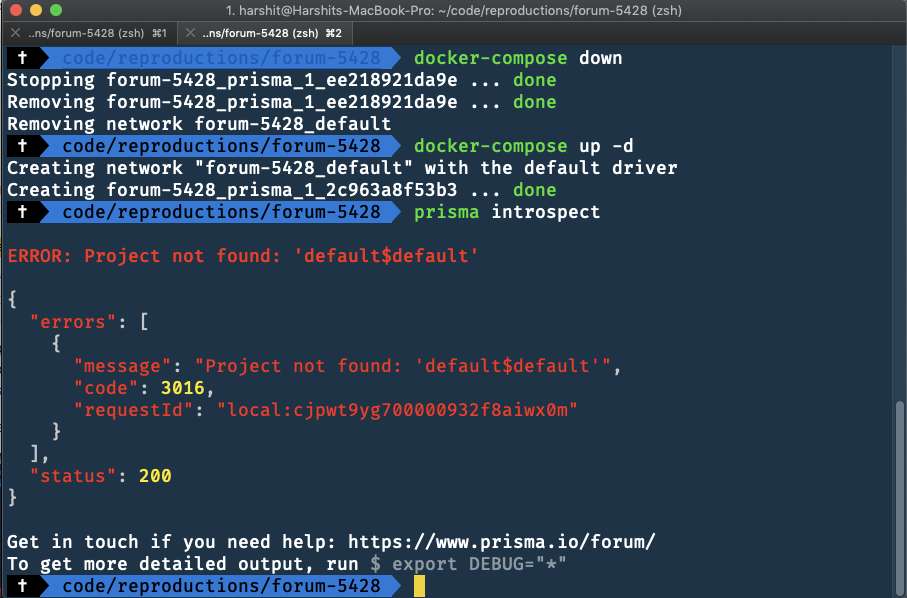
 pantharshit00
on 20 Dec 2018
pantharshit00
on 20 Dec 2018
@pantharshit00 this doesn't look Go related to me, i.e. not my jurisdiction.
 dominikh
on 20 Dec 2018
dominikh
on 20 Dec 2018
Sorry, @dominikh. I accidentally tagged you in this issue while I meant to tag you on #3745
pantharshit00
on 20 Dec 2018
I'm having this exact problem with mongo. It previously was working (1.22) with Postgres.
 kjkurtz
on 21 Dec 2018
kjkurtz
on 21 Dec 2018
Thanks a lot for reporting! We just published a fix on beta, please try out [email protected]
 timsuchanek
on 21 Dec 2018
timsuchanek
on 21 Dec 2018
With [email protected]
I get:
Enter name of existing database heavy_job
Error: Could not connect to database. database name must be a string
Looks like the underscore is breaking it.
kjkurtz
on 21 Dec 2018
Thanks so much @timsuchanek, it now worked for me with the latest beta 🙌
@kjkurtz Try to provide the DB names with quotes, e.g. "heavy_job". If it's still failing, please open another issue for your bug.
nikolasburk
on 22 Dec 2018
@timsuchanek, I know this issue is closed, but I thought I would chime in and say that the 1.24.0-beta.7 fixed the exact same issue that I was having with a PostgreSQL DB. Thanks!
 HartiganHM
on 31 Dec 2018
HartiganHM
on 31 Dec 2018
Chiming in here, do you think it has to do with using database default@default when the config file explicitly states database: testdb?
I think I'm experiencing this issue with version 1.26 in docker (tag prismagraphql/prisma:1.26).
 juliusecker
on 13 Feb 2019
juliusecker
on 13 Feb 2019
I got this fixed by wrapping the name of the database on docker-compose.yml on double quotes " "
 serranoarevalo
on 20 Feb 2019
serranoarevalo
on 20 Feb 2019
I am facing same issue again with
Prisma CLI version: prisma/1.34.10 (darwin-x64) node-v13.7.0
 ruhankhandakar
on 19 Feb 2020
ruhankhandakar
on 19 Feb 2020
Related issues
 jannone
·
3Comments
jannone
·
3Comments
 tbrannam
·
3Comments
tbrannam
·
3Comments
 hoodsy
·
3Comments
hoodsy
·
3Comments
 MitkoTschimev
·
3Comments
MitkoTschimev
·
3Comments
 ragnorc
·
3Comments
ragnorc
·
3Comments
Most helpful comment
@timsuchanek, I know this issue is closed, but I thought I would chime in and say that the
1.24.0-beta.7fixed the exact same issue that I was having with a PostgreSQL DB. Thanks!