Prisma1: Cannot use GraphQLSchema "[object GraphQLSchema]" from another module or realm.
I am having trouble running my script:
"get-schema": "graphql get-schema -p prisma"
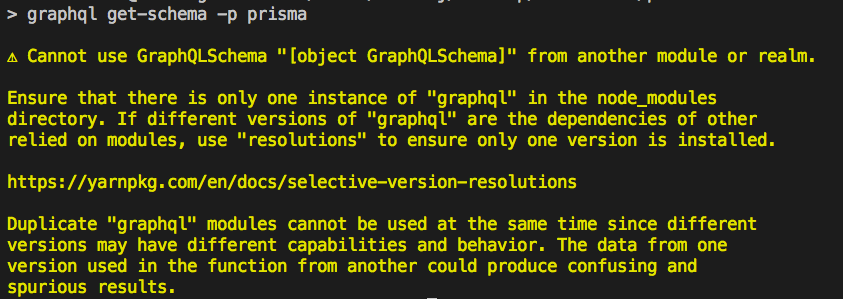
I have tried every solution out there, and nobody has brought this up since February.
This is causing a major roadblock in the development of my application.
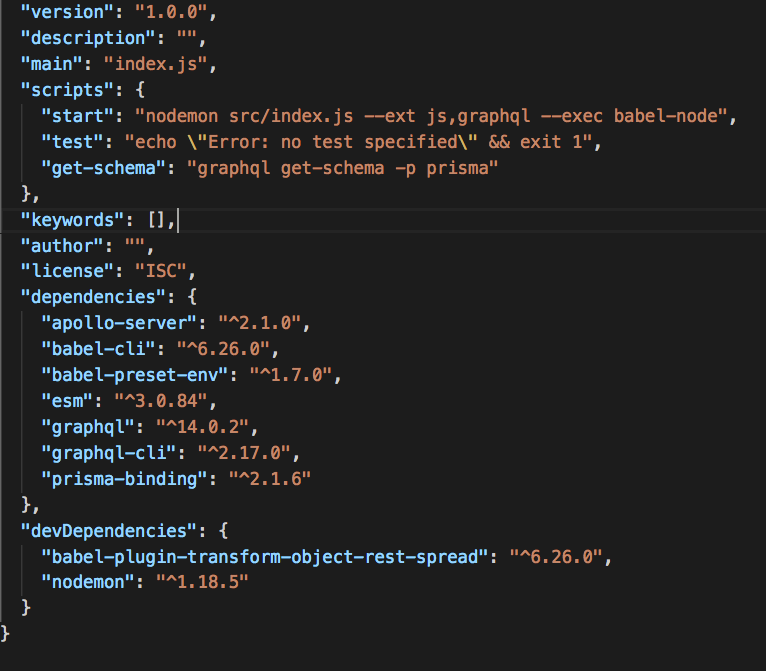
This is my package.json file:
Any and all help is appreciated.
 AviIhej
All 6 comments
Hey @AviIhej thanks for reporting! The problem is, that the prisma-binding is not yet supporting graphql@14, which we're working on. Until then, please use [email protected].
We keep this issue open, until exactly the package.json that you provided is working.
 timsuchanek
on 12 Nov 2018
timsuchanek
on 12 Nov 2018
Thank you! I’ll downgrade to graphql 0.13
AviIhej
on 12 Nov 2018
@AviIhej as a temporary workaround you can try using Yarn resolutions. You can read more about them in the link below, and I also added a short chunk to portray the idea. The issue should be resolved soon though 🙂
https://yarnpkg.com/lang/en/docs/selective-version-resolutions/
{
  "resolutions": {
    "graphql-yoga/**/graphql": "0.13.2",
    "prisma-binding/**/graphql": "0.13.2",
    "graphql-cli/**/graphql": "0.13.2"
  }
}
 maticzav
on 14 Nov 2018
maticzav
on 14 Nov 2018
anything new ?? hate switching half-way to yarn, for some weird reasons... even going back version did not work, it did with resolutions, but...
small stack... not sure where was the issue, telling me I have duplicate graphqls..
"babel-cli": "^6.26.0",
"babel-plugin-transform-object-rest-spread": "^6.26.0",
"babel-preset-env": "^1.7.0",
"graphql-cli": "^2.16.4",
"graphql-yoga": "^1.14.10",
"prisma-binding": "^2.1.1",
"uuid": "^3.3.2"
 axe-z
on 9 Dec 2018
axe-z
on 9 Dec 2018
I hope this comment helps someone.
I'm using yarn, which does not have NPX and I had some issues.
This error occurs for me when using npx nexus-prisma-generate --client ./generated/prisma-client --output ./generated/nexus-prisma as the docs suggest.
I also faced issues if I installed nexus-prisma-generate globally.
To fix, I:
- Made the
resolutionssection the same GraphQL version downloaded - Deleted
node_modulesandyarn.lock - Ran
yarn cache clean(to clean global cache) - Installed
nexus-prisma-generateas a dev-dependency - Ran
yarn nexus-prisma-generate --client ./generated/prisma-client --output ./generated/nexus-prisma(replaced NPX with yarn, as I installed it LOCALLY TO THE PROJECT).
"dependencies": {
    "graphql": "^14.4.2",
    "graphql-yoga": "^1.18.1",
    "nexus": "^0.12.0-beta.6",
    "nexus-prisma": "^0.3.7",
    "prisma": "^1.34.5",
    "ts-node": "^8.3.0"
  },
  "devDependencies": {
    "nexus-prisma-generate": "^0.3.7",
    "ts-node-dev": "^1.0.0-pre.41",
    "typescript": "^3.5.3"
  },
  "resolutions": {
    "graphql": "14.4.2"
  }
 waynevanson
on 17 Aug 2019
waynevanson
on 17 Aug 2019
@waynevanson Thanks that gave me some insight into the issue. Resolutions dont work in yarn workspaces!!
Figured this out by running this in top level ./node_modules
$ ag -G package.json -l '"name": "graphql"' | xargs -I {} bash -c 'echo "$(grep version {}) {}"'

  "version": "14.2.1", prisma-client-lib/node_modules/graphql/package.json
  "version": "14.5.8", graphql/package.json
  "version": "14.5.8", nexus-prisma-generate/node_modules/prisma-generate-schema/node_modules/graphql/package.json
  "version": "14.2.1", nexus-prisma-generate/node_modules/graphql/package.json
  "version": "14.5.8", nexus-prisma-generate/node_modules/prisma-datamodel/node_modules/graphql/package.json
 expelledboy
on 25 Sep 2019
expelledboy
on 25 Sep 2019
Related issues
 jannone
·
3Comments
jannone
·
3Comments
 nikolasburk
·
3Comments
nikolasburk
·
3Comments
 akoenig
·
3Comments
akoenig
·
3Comments
 dohomi
·
3Comments
dohomi
·
3Comments
 schickling
·
3Comments
schickling
·
3Comments
Most helpful comment
@AviIhej as a temporary workaround you can try using Yarn resolutions. You can read more about them in the link below, and I also added a short chunk to portray the idea. The issue should be resolved soon though 🙂
https://yarnpkg.com/lang/en/docs/selective-version-resolutions/