Prisma1: Prisma CLI command returns "0" as exit code
Describe the bug
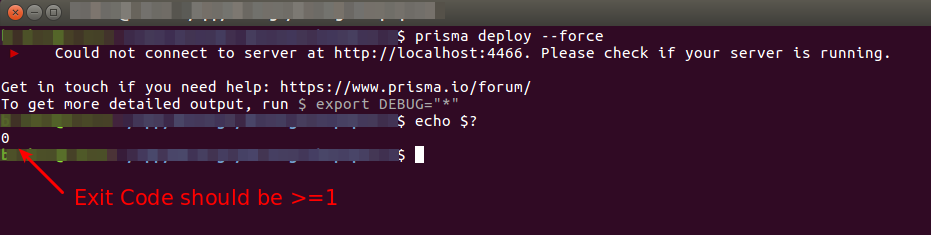
Running prisma CLI command like "prisma deploy", always return "0" as exit code.
To Reproduce
- Do not start prisma container
- Run
prisma deploy --forceand check we getCould not connect to server at... - Check exitCode with
echo $?... it is0instead of>=1
Expected behavior
Returned exitCode should be >=1
Screenshots
If applicable, add screenshots to help explain your problem.
Versions (please complete the following information):
- OS:
Ubuntu 16.04 prismaCLI:prisma/1.15.3 (linux-x64) node-v8.11.4- Prisma Server:
1.15
Additional context
This bug prevent running script like:
set -eux

docker-compose up --detach
timeout --preserve-status 5s sh -c 'until prisma deploy --force; do sleep 1; done'
 brikou
All 4 comments
I am unable to reproduce this one. @brikou Can you please share a sample project (datamodel + prisma.yml) where this is happening? Hooks or something else might be causing this.
Here are the logs from my console.
divyendusingh [prisma-3045]$ prisma deploy
 ▸    Could not connect to server at http://localhost:4467. Please check if your server is running.

Get in touch if you need help: https://www.prisma.io/forum/
To get more detailed output, run $ export DEBUG="*"
divyendusingh [prisma-3045]$ echo $?
1

divyendusingh [prisma-3045]$ prisma deploy --force
 ▸    Could not connect to server at http://localhost:4467. Please check if your server is running.

Get in touch if you need help: https://www.prisma.io/forum/
To get more detailed output, run $ export DEBUG="*"
divyendusingh [prisma-3045]$ echo $?
1

divyendusingh [prisma-3045]$ prisma --version
prisma/1.17.0-beta.24 (darwin-x64) node-v10.4.0
 divyenduz
on 21 Sep 2018
divyenduz
on 21 Sep 2018
You can close the issue as I cannot reproduce it (I get the right 1 status code). I'll reopen with more reproduction steps if encounter again this. Thanks @divyenduz
brikou
on 21 Sep 2018
I am facing the same issue using different prisma versions (included latest). I am running Prisma inside a docker container.
root@09848c2dd1b4:/app# prisma deploy; echo $?
 ▸    Could not connect to server at http://prisma:4466.
 ▸    Please check if your server is running.

Get in touch if you need help: https://www.prisma.io/forum/
To get more detailed output, run $ export DEBUG="*"
0
root@09848c2dd1b4:/app#
It could be an issue redirecting the error code to the client after writing the message "Get in touch if you need help: https://www.prisma.io/forum/ To get more detailed output, run $ export DEBUG="*"
 brunocascio
on 7 Nov 2018
brunocascio
on 7 Nov 2018
FYI @divyenduz @brikou
brunocascio
on 7 Nov 2018
Related issues
 dohomi
·
3Comments
dohomi
·
3Comments
 marktani
·
3Comments
marktani
·
3Comments
 thomaswright
·
3Comments
thomaswright
·
3Comments
 sedubois
·
3Comments
sedubois
·
3Comments
 MitkoTschimev
·
3Comments
MitkoTschimev
·
3Comments