Prisma1: Unable to deploy Prisma: request to http://localhost:4466/management failed
Bug Report
'ECONNRESET': request to http://localhost:4466/management failed, reason: socket hang up
Current behavior
When running prisma deploy for existing postgres db with data:
$ prisma deploy
Creating stage default for service default !
 ▸    'ECONNRESET': request to http://localhost:4466/management failed, reason: socket hang up

Get in touch if you need help: https://www.graph.cool/forum
To get more detailed output, run $ export DEBUG="*"
Seems to be related to the recent change from /cluster to /management
Reproduction
- correct db setup
- latest versions of docker tooling and prisma 1.8.3
- experiencing error both locally and on a hosted digital ocean droplet
- following this guide pretty much verbatim:
Someone else on the slack channel provided a docker log they obtained from experiencing the same issue:
- https://pastebin.com/HaTr15ny
- https://prisma.slack.com/archives/CA491RJH0/p1527782175000202?thread_ts=1527776706.000394&cid=CA491RJH0
Expected behavior?
Expect Prisma service to deploy successfully
 james-ff
All 25 comments
2517 #2479
james-ff
on 31 May 2018
Anyway we can mitigate this by using a previous version of prisma?
 Dorkside
on 1 Jun 2018
Dorkside
on 1 Jun 2018
Please share the output of docker ps. What happens when you open http://localhost:4466, http://localhost:4466/cluster and http://localhost:4466/management in a browser, respectively?
 marktani
on 1 Jun 2018
marktani
on 1 Jun 2018
Same error on 1.7.4 on digital ocean, but different path specified :
https://pastebin.com/ZdbFPGtL
Doesn't seem related to the /management or /cluster
Dorkside
on 1 Jun 2018
Output of docker ps:

All of those links give me this error:
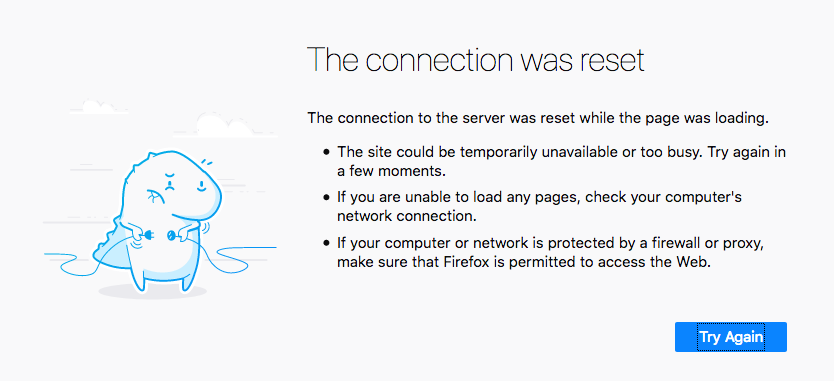
james-ff
on 1 Jun 2018
@james-ff Thanks for your report. Please try pinning the Prisma version explicitly to 1.8.3 (or better 1.8.4), or make sure you're running the latest 1.8 image by pulling the image by hand docker pull prismagraphql/prisma:1.8. Having logs would also help tremendously (docker logs <container_id>).
 dpetrick
on 1 Jun 2018
dpetrick
on 1 Jun 2018
1.8.4 not accessible to us. Pinning 1.8.3 now, will post logs in a bit.
Dorkside
on 1 Jun 2018
Still the same error.
Dorkside
on 1 Jun 2018
Can you share the exact docker-compose.yml file you are using? Please obfuscate any sensitive information first.
marktani
on 1 Jun 2018
The error looks like an invalid Prisma config issue. As Nilan requested, I'd like to see an obfuscated version of your docker-compose.yml, if possible.
dpetrick
on 1 Jun 2018
Obfuscated Docker file:
- Hasn't been modified since prisma init
- have tried both 1.8 and 1.8.4 for image
- ** for obfuscated
version: '3'
services:
  prisma:
    image: prismagraphql/prisma:1.8
    restart: always
    ports:
    - "4466:4466"
    environment:
      PRISMA_CONFIG: |
        port: 4466
        # uncomment the next line and provide the env var PRISMA_MANAGEMENT_API_SECRET=my-secret to activate cluster security
        # managementApiSecret: my-secret
        databases:
          default:
            connector: postgres
            host: localhost
            port: '5432'
            database: ********
            schema: public
            user: ********
            password: ********
            migrations: false
This log is repeated many times in the log output:
```Jun 01, 2018 4:13:52 PM org.postgresql.Driver connect
SEVERE: Connection error:
org.postgresql.util.PSQLException: Connection to localhost:5432 refused. Check that the hostname and port are correct andthat the postmaster is accepting TCP/IP connections.
at org.postgresql.core.v3.ConnectionFactoryImpl.openConnectionImpl(ConnectionFactoryImpl.java:245)
at org.postgresql.core.ConnectionFactory.openConnection(ConnectionFactory.java:49)
at org.postgresql.jdbc.PgConnection.
at org.postgresql.Driver.makeConnection(Driver.java:452)
at org.postgresql.Driver.connect(Driver.java:254)
at slick.jdbc.DriverDataSource.getConnection(DriverDataSource.scala:101)
at com.zaxxer.hikari.pool.PoolBase.newConnection(PoolBase.java:341)
at com.zaxxer.hikari.pool.PoolBase.newPoolEntry(PoolBase.java:193)
at com.zaxxer.hikari.pool.HikariPool.createPoolEntry(HikariPool.java:430)
at com.zaxxer.hikari.pool.HikariPool.access$500(HikariPool.java:64)
at com.zaxxer.hikari.pool.HikariPool$PoolEntryCreator.call(HikariPool.java:570)
at com.zaxxer.hikari.pool.HikariPool$PoolEntryCreator.call(HikariPool.java:563)
at java.util.concurrent.FutureTask.run(FutureTask.java:266)
at java.util.concurrent.ThreadPoolExecutor.runWorker(ThreadPoolExecutor.java:1149)
at java.util.concurrent.ThreadPoolExecutor$Worker.run(ThreadPoolExecutor.java:624)
at java.lang.Thread.run(Thread.java:748)
Caused by: java.net.ConnectException: Connection refused (Connection refused)
at java.net.PlainSocketImpl.socketConnect(Native Method)
at java.net.AbstractPlainSocketImpl.doConnect(AbstractPlainSocketImpl.java:350)
at java.net.AbstractPlainSocketImpl.connectToAddress(AbstractPlainSocketImpl.java:206)
at java.net.AbstractPlainSocketImpl.connect(AbstractPlainSocketImpl.java:188)
at java.net.SocksSocketImpl.connect(SocksSocketImpl.java:392)
at java.net.Socket.connect(Socket.java:589)
at org.postgresql.core.PGStream.
at org.postgresql.core.v3.ConnectionFactoryImpl.openConnectionImpl(ConnectionFactoryImpl.java:156)
... 15 more
Exception in thread "main" java.sql.SQLTransientConnectionException: database - Connection is not available, request timed out after 5000ms.
at com.zaxxer.hikari.pool.HikariPool.createTimeoutException(HikariPool.java:548)
at com.zaxxer.hikari.pool.HikariPool.getConnection(HikariPool.java:186)
at com.zaxxer.hikari.pool.HikariPool.getConnection(HikariPool.java:145)
at com.zaxxer.hikari.HikariDataSource.getConnection(HikariDataSource.java:83)
at slick.jdbc.hikaricp.HikariCPJdbcDataSource.createConnection(HikariCPJdbcDataSource.scala:18)
at slick.jdbc.JdbcBackend$BaseSession.
at slick.jdbc.JdbcBackend$DatabaseDef.createSession(JdbcBackend.scala:47)
at slick.jdbc.JdbcBackend$DatabaseDef.createSession(JdbcBackend.scala:38)
at slick.basic.BasicBackend$DatabaseDef.acquireSession(BasicBackend.scala:218)
at slick.basic.BasicBackend$DatabaseDef.acquireSession$(BasicBackend.scala:217)
at slick.jdbc.JdbcBackend$DatabaseDef.acquireSession(JdbcBackend.scala:38)
at slick.basic.BasicBackend$DatabaseDef$$anon$2.run(BasicBackend.scala:239)
at java.util.concurrent.ThreadPoolExecutor.runWorker(ThreadPoolExecutor.java:1149)
at java.util.concurrent.ThreadPoolExecutor$Worker.run(ThreadPoolExecutor.java:624)
at java.lang.Thread.run(Thread.java:748)
Caused by: org.postgresql.util.PSQLException: Connection to localhost:5432 refused. Check that the hostname and port are correct and that the postmaster is accepting TCP/IP connections.
at org.postgresql.core.v3.ConnectionFactoryImpl.openConnectionImpl(ConnectionFactoryImpl.java:245)
at org.postgresql.core.ConnectionFactory.openConnection(ConnectionFactory.java:49)
at org.postgresql.jdbc.PgConnection.
at org.postgresql.Driver.makeConnection(Driver.java:452)
at org.postgresql.Driver.connect(Driver.java:254)
at slick.jdbc.DriverDataSource.getConnection(DriverDataSource.scala:101)
at com.zaxxer.hikari.pool.PoolBase.newConnection(PoolBase.java:341)
at com.zaxxer.hikari.pool.PoolBase.newPoolEntry(PoolBase.java:193)
at com.zaxxer.hikari.pool.HikariPool.createPoolEntry(HikariPool.java:430)
at com.zaxxer.hikari.pool.HikariPool.access$500(HikariPool.java:64)
at com.zaxxer.hikari.pool.HikariPool$PoolEntryCreator.call(HikariPool.java:570)
at com.zaxxer.hikari.pool.HikariPool$PoolEntryCreator.call(HikariPool.java:563)
at java.util.concurrent.FutureTask.run(FutureTask.java:266)
... 3 more
Caused by: java.net.ConnectException: Connection refused (Connection refused)
at java.net.PlainSocketImpl.socketConnect(Native Method)
at java.net.AbstractPlainSocketImpl.doConnect(AbstractPlainSocketImpl.java:350)
at java.net.AbstractPlainSocketImpl.connectToAddress(AbstractPlainSocketImpl.java:206)
at java.net.AbstractPlainSocketImpl.connect(AbstractPlainSocketImpl.java:188)
at java.net.SocksSocketImpl.connect(SocksSocketImpl.java:392)
at java.net.Socket.connect(Socket.java:589)
at org.postgresql.core.PGStream.
at org.postgresql.core.v3.ConnectionFactoryImpl.openConnectionImpl(ConnectionFactoryImpl.java:156)
... 15 more```
james-ff
on 1 Jun 2018
Is there a Postgres database running at localhost:5432?
marktani
on 1 Jun 2018
yes, the datamodel.graphql accurately reflects the structure of my database, so the database connection config is correct, otherwise prisma init would not have been able to set that file up
james-ff
on 1 Jun 2018
Ah, so you were using the introspection feature and it correctly introspected the Postgres schema and generated the datamodel.graphql, is that what you're saying? 🙂
marktani
on 1 Jun 2018
Which leads me to believe that the database config part of the docker file is not the cause of this issue
james-ff
on 1 Jun 2018
@james-ff @Dorkside are you actually working together, or are you both experiencing the same error message in two different projects/setups?
Because the error message is very generic and happens for various reasons. So it gets quite confusing to read through this thread 😄
marktani
on 1 Jun 2018
Not working together, but experiencing the same issue it seems =]
james-ff
on 1 Jun 2018
Yep, it sounds like you are experiencing the same issue for two different reasons.
@james-ff: it seems there are connection problems. Note that the introspection is initially done from the CLI, so that this worked does not necessarily mean that the server can connect to the DB. Are there any network or security related configurations that you can think of that would cause connection problems?
@Dorkside: please share your docker-compose.yml 🙂
marktani
on 1 Jun 2018
I can't think of any reasons as this is happening both locally and across two digital ocean droplets. Are you able to reproduce the issue with a similar setup following the guide that I linked at the top? @marktani
james-ff
on 1 Jun 2018
https://www.prisma.io/docs/1.0/tutorials/cluster-deployment/digital-ocean-(manual)-texoo6aemu
This tutorial was my first go to trying to launch my prisma cluster.
Following exactly as outlined in that tutorial, you get the error after prisma local start
We're not working together, but it seems we're experiencing the same problem. I have nothing configured yet, basically trying to wrap my head around the graphql/prisma layers and wanting to have control over custom resolvers.
_Ended up trying to find a way to upgrade my W10 Home to W10 Pro to be able to unlock Hyper-V for Docker and getting to run locally. And THAT turned out to be waaaaay longer than intended._
Dorkside
on 1 Jun 2018
Ok, my bad, but the docs need their refreshing :-)
Went through the cli commands to get a better grasp on what was happening...
Well, it's gonna sound stupid, I didn't initiliaze my prisma. So I had NO docker-compose.yml.
I kinda naively thought that prisma local start took care of that given how it was explained in the tutorial. There is kind of a missing step I guess, but maybe it's just me being too spoilt.
I pinned my version in docker-compose.yml to 1.8.4 but it might actually have worked without that.
Well, got this done after getting back home, and really feel relieved. Monday is gonna be a well started day.
From here, should I use the same droplet for my graphql front ?
Thanks for your time.
Dorkside
on 1 Jun 2018
Update! I have got docker up working for my default local database (where username is both user and database in config, with no password), but for the local database I'm actually trying to use I get:
permission denied for database <my-database-name>
james-ff
on 2 Jun 2018
Another update. Have got connection to my intended db working by using the default postgres user (my username, not "postgres"). I was previously using a user role that I had created in postgres that would have specific access to my db, are created user roles supported at the moment?
I've modified the datamodel slightly to fix issues like @unique missing. Right now the issue I'm facing is that everything is up and deployed, I can load the graphql playground, but docs don't appear and docker up log is saying the following:
prisma_1  | java.lang.RuntimeException: Could not find relatedModel for field ["field-name"] on model [None]
prisma_1  |     at scala.sys.package$.error(package.scala:27)
prisma_1  |     at com.prisma.shared.models.Field.relatedModel_$bang(Models.scala:255)
prisma_1  |     at com.prisma.api.schema.UncachedInputTypesBuilder.$anonfun$computeRelationalInputFieldsForCreate$1(InputTypesBuilder.scala:289)
prisma_1  |     at scala.collection.immutable.List.flatMap(List.scala:335)
prisma_1  |     at com.prisma.api.schema.UncachedInputTypesBuilder.computeRelationalInputFieldsForCreate(InputTypesBuilder.scala:288)
...............
prisma_1  | [Bugsnag - local / testing] Error report: com.bugsnag.Report@44ceddf1
"field-name" being a field of the format ["table-name"!]!
james-ff
on 2 Jun 2018
It seems the initial problem I was having was not using my default user postgres account. I will start a new issue for this new problem.
james-ff
on 4 Jun 2018
I found a solution https://stackoverflow.com/questions/50539700/docker-compose-ip-hostname-for-the-host-machine/50571616
 blackflame007
on 11 Sep 2019
blackflame007
on 11 Sep 2019
Related issues
 tbrannam
·
3Comments
tbrannam
·
3Comments
 ragnorc
·
3Comments
ragnorc
·
3Comments
 akoenig
·
3Comments
akoenig
·
3Comments
 nikolasburk
·
3Comments
nikolasburk
·
3Comments
 hoodsy
·
3Comments
hoodsy
·
3Comments
Most helpful comment
Ok, my bad, but the docs need their refreshing :-)
Went through the cli commands to get a better grasp on what was happening...
Well, it's gonna sound stupid, I didn't initiliaze my prisma. So I had NO docker-compose.yml.
I kinda naively thought that
prisma local starttook care of that given how it was explained in the tutorial. There is kind of a missing step I guess, but maybe it's just me being too spoilt.I pinned my version in docker-compose.yml to 1.8.4 but it might actually have worked without that.
Well, got this done after getting back home, and really feel relieved. Monday is gonna be a well started day.
From here, should I use the same droplet for my graphql front ?
Thanks for your time.