Prisma1: The prisma deploy command with a get-schema hook does not download the generated folder
Bug Report
Current behavior
Running prisma deploy on the root of my project fails to generate code but succeeds when I move .graphqlconfig.yml to the database folder and runs the deploy command on the database folder
Reproduction
A simple Prisma setup in the master branch of the following repository generates the generated folder when running prisma deploy:
https://github.com/christiannwamba/hackernews-node
On the other hand, it fails when you try it on the generated branch:
https://github.com/christiannwamba/hackernews-node/tree/generated
Expected behavior?
The generated branch should behave like the master branch by generating the generated folder in the specified directory.
 christiannwamba
All 13 comments
@christiannwamba, I tried your approach but still cant get it to update or generate those files
 aqwert
on 30 May 2018
aqwert
on 30 May 2018
@christiannwamba Thanks for raising this issue! However, I was not able to reproduce this with the provided reproduction instructions - the files are correctly generated for me in both branches. Can you please share your prisma version?
Mine is
divyendusingh [hackernews-node]$ prisma --version
prisma/1.8.3 (darwin-x64) node-v8.4.0
Thanks!
 divyenduz
on 31 May 2018
divyenduz
on 31 May 2018
Really? That's weird. If you cloned and it worked on both branches then I might be getting something wrong
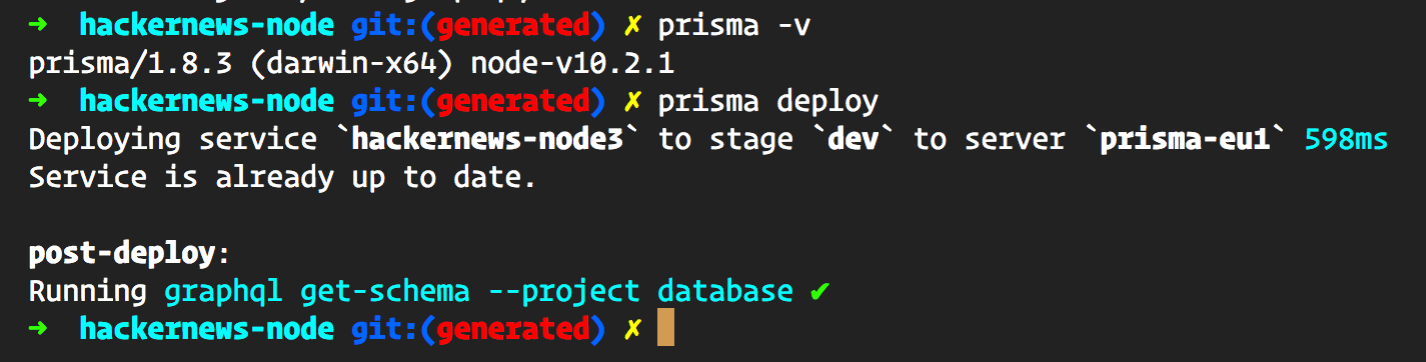
It runs the deploy hook but nothing is generated.
christiannwamba
on 31 May 2018
@divyenduz It works on node 9.4 but fails on 10.2.1 and 8.4. I am surprised it works on 8.4 for you.
christiannwamba
on 31 May 2018
Thanks for the additional information, can you please tell me what OS are you on?
Most likely, it is an issue around https://github.com/substack/node-mkdirp, see if you can try and replicate the issue by creating nested directories in this package.
divyenduz
on 31 May 2018
I am using Mac OS 10.13.
Where do you want me to create the nested directories? In the project's src folder? Not sure I got the instructions :)
christiannwamba
on 31 May 2018
Ah! my bad! so, under the hood, we use this library to create the provided path. Maybe on your OS you can try to create src/generated/someFolder i.e. nested path to try and replicate but I am also on Mac OS 10.13, so, I think it is something else. For now, I am unable to replicate, will take another look.
divyenduz
on 31 May 2018
Ok, no problem. At least it works for a particular version so that's progress for anyone who runs into the issue. Thank you!
christiannwamba
on 31 May 2018
I encountered this using the typescript boilerplate. I believe hit this issue: https://github.com/prismagraphql/prisma/issues/2494
- Node version 8.10.0
- prisma version 1.8.3
- OS Windows 10
So I:
- Downgraded prisma-binding package to v1.5.19, change
- Changed .graphqlconfig to have
      prepare-binding:
        output: src/generated/prisma.ts
        generator: prisma-ts
instead of codegen however the prisma deploy command still did not auto gen.
So I had to manually run graphql get-schema --project database and then graphql prepare to auto generate the files, which worked.
Note that the node boilerplate also has the issue of not autogenerating so running graphql get-schema --project database still needs to be a manual task.
It does say it is running the command:
post-deploy:
Running graphql get-schema --project database √
but it does not auto generate the files. Maybe there is a swallowed error happening.
aqwert
on 31 May 2018
I ran into this bug while following the Build a GraphQL tutorial (step #10), I got it working by creating the src/generated folder but I'm not sure if that should be specified on the docs or if this is a bug that should be addressed somewhere else.
 giocodes
on 1 Jun 2018
giocodes
on 1 Jun 2018
Related issue - https://github.com/prismagraphql/prisma/issues/2362
@christiannwamba: Can you please confirm if the following command works when run manually?
graphql get-schema --project database or graphql get-schema --project prisma with project name changing based on the project name in graphql config. I observed that it is different in master and generated branch.
divyenduz
on 2 Jun 2018
THIS IS EXACTLY THE ISSUE :)
Apparently, when switching to different node versions with nvm, the global npm modules are not shared across the different versions. For this reason, graphql-cli is only available in the node version instance that I installed it on (v9.4).
When you switch to another version, the CLI commands are not run/working and according to #2362 the error that would have told us what went wrong (not installed) is swallowed.
Doing npm install --save-dev graphql-cli solves the issue of inconsistency
christiannwamba
on 2 Jun 2018
Noted. Thanks :)
So, since we already have an open issue to resolve this I am closing this one in favor of that.
Thanks again!
divyenduz
on 2 Jun 2018
Related issues
 marktani
·
3Comments
marktani
·
3Comments
 akoenig
·
3Comments
akoenig
·
3Comments
 nikolasburk
·
3Comments
nikolasburk
·
3Comments
 ragnorc
·
3Comments
ragnorc
·
3Comments
 schickling
·
3Comments
schickling
·
3Comments
Most helpful comment
THIS IS EXACTLY THE ISSUE :)
Apparently, when switching to different node versions with
nvm, the global npm modules are not shared across the different versions. For this reason,graphql-cliis only available in the node version instance that I installed it on (v9.4).When you switch to another version, the CLI commands are not run/working and according to #2362 the error that would have told us what went wrong (not installed) is swallowed.
Doing
npm install --save-dev graphql-clisolves the issue of inconsistency