Prisma1: How do we get generated files I.e prisma.graphql & prisma.ts - post 1.7
I haven't found a way to perform the same function which we had pre-1.7, that's one of the main features I really liked.
 OGNeutron
All 10 comments
- Install graphql-cli
npm i -g graphql-cli
- Add post-deploy hook to prisma.yml:
hooks:
  post-deploy:
    - echo "Deployment finished"
    - graphql get-schema --project database
    - graphql prepare
- Now you can execute
prisma deploy
This is example .graphqlconfig.yml:
projects:
  app:
    schemaPath: src/schema.graphql
    extensions:
      endpoints:
        default: http://localhost:5000/graphql
  database:
    schemaPath: src/generated/prisma.graphql
    extensions:
      prisma: prisma.yml
      prepare-binding:
        output: src/generated/prisma.ts
        generator: prisma-ts
 mzygmunt
on 27 Apr 2018
mzygmunt
on 27 Apr 2018
Also covered in the upgrade guide.
 frankdugan3
on 27 Apr 2018
frankdugan3
on 27 Apr 2018
Did that, still doesn't want to do it, I'll show mine if you want and it keeps saying
Syntax Error: Unexpected Name "F"
projects:
  main_hub_app:
    schemaPath: src/schema.graphql
    extensions:
      endpoints:
        default: "http://localhost:4000"
  prisma:
    schemaPath: src/generated/prisma.graphql
    extensions:
      prisma: prisma.yml
      prepare-binding:
        output: src/generated/prisma.ts
        generator: prisma-ts
endpoint: http://localhost:4466
datamodel: database/datamodel.graphql
hooks:
  post-deploy:
    # - echo "Deployment finished"
    - graphql get-schema --project prisma
    - graphql prepare
I found out the problem it seems the previous generated code was causing an error, once I removed them, it built new ones, but I doubt that's intended, but it seems you need to delete the old one first.
OGNeutron
on 27 Apr 2018
Docs seem to be strangely incomplete. There is a mention of these hooks in upgrade guide, but in actual structure doc there is not a word about it 😕
 FredyC
on 28 Apr 2018
FredyC
on 28 Apr 2018
It is very difficult for me with a working project because of this
 overpod
on 28 Apr 2018
overpod
on 28 Apr 2018
$ cat .graphqlconfig.yml
projects:
  app:
    schemaPath: src/schema.graphql
    extensions:
      endpoints:
        default: http://localhost:4000
  prisma:
    schemaPath: src/generated/prisma.graphql
    extensions:
      prisma: database/prisma.yml
      prepare-binding:
        output: src/generated/prisma.ts
        generator: prisma-ts
```bash
$ cat database/prisma.yml
endpoint: ${env:PRISMA_ENDPOINT}
datamodel: datamodel.graphql
secret: ${env:PRISMA_SECRET}
hooks:
post-deploy:
- graphql get-schema --project prisma
- graphql prepare
**Error**
```bash
$ prisma deploy
Deploying service `autoparts` to stage `dev` to server `default` 426ms
Service is already up to date.
post-deploy:
Running graphql get-schema --project prisma !
! "graphql" �� ���� ����७��� ��� ���譥�
! ��������, �ᯮ��塞�� �ணࠬ��� ��� ������ 䠩���.
!
Get in touch if you need help: https://www.graph.cool/forum
To get more detailed output, run $ export DEBUG="*"
how do i generate files ?
overpod
on 30 Apr 2018
Hello Everyone,
I am having the same issue, but I get a different Error Output.
Below is my prisma.yml:
```secret: ${env:PRISMA_SECRET}
datamodel: datamodel.graphql
seed:
import: seed.graphql
endpoint: https://example-rds-aws_example.prisma.sh/example/example-project/dev
hooks:
post-deploy:
- echo "Deployment finished"
- graphql get-schema --project prisma
- graphql prepare
Below is my graphqlconfig.yml:
```projects:
  app:
    schemaPath: "src/schema.graphql"
    extensions:
      endpoints:
        default: "http://localhost:4000"
  prisma:
    schemaPath: generated/prisma.graphql
    extensions:
      prisma: prisma.yml
      perpare-binding:
        output: generated/prisma.ts
        generator: prisma-ts
Below is the Error I receive:
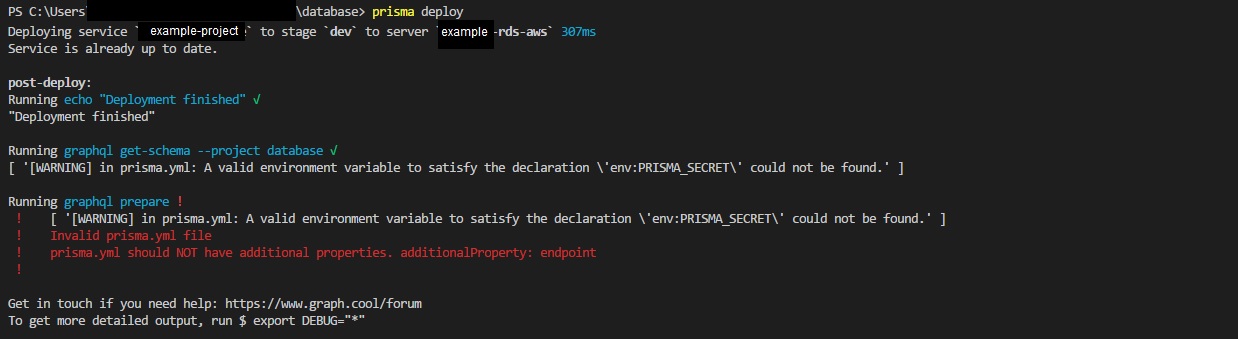
1) Why does CLI respond saying Invalide prisma.yml file?
2) After the v1.7.1 upgrade, I am not able to deploy because of the endpoint in prisma.yml
Is there something I'm doing incorrectly?
 yoorw
on 30 Apr 2018
yoorw
on 30 Apr 2018
@FredyC: thanks for your feedback, we added docs here. Please create a new issue if you feel something in the documentation could be improved 🙂
@overpod: syntactically, everything looks good to me. However, the error message could hint towards an encoding issue. Could you please create a new bug report, including a minimal setup for reproduction here?
@yoorw: One part of your issue is being discussed here: https://www.graph.cool/forum/t/how-to-fix-invalid-prisma-yml-file-prisma-yml-should-not-have-additional-properties-additionalproperty-endpoint-errors/3303/2?u=nilan. And then, it looks like you are not setting the env variable PRISMA_SECRET, but you use it in your prisma.yml file.
I am closing this issue, as the original question is answered.
Please don't reply here, but create a new issue if you have further questions for your indivual problems.
 marktani
on 30 Apr 2018
marktani
on 30 Apr 2018
Related issues
 schickling
·
3Comments
schickling
·
3Comments
marktani
·
3Comments
schickling
·
3Comments
schickling
·
3Comments
marktani
·
3Comments
 sedubois
·
3Comments
sedubois
·
3Comments
 jannone
·
3Comments
jannone
·
3Comments
Most helpful comment
This is example .graphqlconfig.yml: