Prisma1: Could not connect to cluster `local` if `~/.prisma/config.yml` does not exist or is empty
Bug Report
Current behavior
prisma init # create new database
docker-compose up -d
prisma deploy
results in this error message:
▸ Could not connect to cluster local. Please use docker-compose up -d to start your local Prisma cluster.
if ~/.prisma/config.yml does not exist.
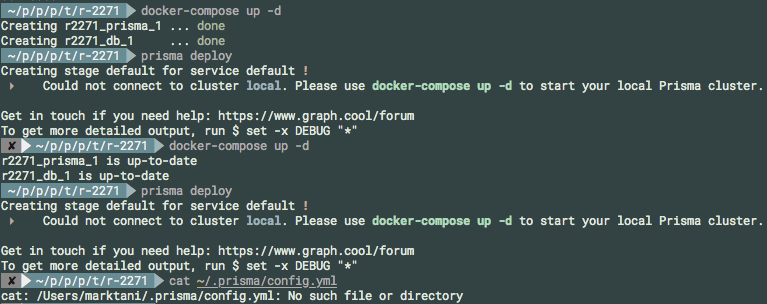
I just tried it with this ~/.prisma/config.yml:
clusters:
the behavior is the same.
Expected behavior
Is there even a need for ~/.prisma/config.yml in the above scenario? The prisma.yml file should be enough for deploying.
If it is still needed, create ~/.prisma/config.yml as required.
If not, it should just work ™.
 marktani
All 16 comments
I played around more, and now it behaves differently.
I am using this docker-compose.yml:
version: '3'
services:
  prisma:
    image: prismagraphql/prisma:1.7
    restart: always
    ports:
    - "4466:4466"
    environment:
      PRISMA_CONFIG: |
        managementApiSecret: my-server-secret-123
        port: 4466
        databases:
          default:
            connector: mysql
            active: true
            host: db
            port: 3306
            user: root
            password: prisma
  db:
    image: mysql:5.7
    restart: always
    environment:
      MYSQL_ROOT_PASSWORD: prisma
Note the managementApiSecret: my-server-secret-123.
With this ~/.prisma/config.yml:
  clusters:
    local:
      host: 'http://localhost:4467'
      clusterSecret: "-----BEGIN RSA PRIVATE KEY-----\r\nMIIEogIBAAKCAQEAuhdbbP8r/yoH7xBahic4/gLwtP+7DE1Lp2ykvmNBZmjGc6H7\r\nY25+zPXfSdT8iWIaqkKsy0Y2WnmMMWU0n9rFVlS1OJMS3P+Gy7/KAXeK8aWRoI/P\r\ndCyQc1FCYteim+OfolEhDmLSmHQxCPdcEtzceWcs0ABLdcSf5AxW/3693nNA6U/N\r\nfngDhHF+a5f1CQXRaryj4nGZXrtoHYM5gyeLVcgVx0POIp59Pm0V2lNOG5C0oiFS\r\nqdsSvEYQooqzcNz/7XiXhJ54GeNibW4Gf+3NwLmy+Wd8MZSx78W
eD9RrPoyECD3w\r\nJ5He2xhCxF2b9nXk6ZMgR546Air55i8CIdjE+wIDAQABAoIBAGPr4sWWBpPOh9AQ\r\nIeti6DFMdt9ZaaBjaLoPli48sYNBwz2XvppXXHLFmw3T9X33VYYSoyHLI6hVF7f2\r\nNdmX6NpARcaJAln0QvbolplPDSZP1vA2CBjDTRT+jvzv+HpoMPFBStSkr5v419OO\r\nrrvaJ/BwPBm77sjfuVMEZTpvXZgxtAKuEhXX0kOG+N5dRU/N+N+qj2e32E+1MjlZ\r\ni8+OaFYqkodyphEESHuYBWUrP08XGDt1AV+GXi2yugo4Q+yTaBGep1bCaUZ+9Gbq\r\nibQnkk1Z/NUVidnATja+8g78ml//WJqV3kDG4yhi7Ch7APWeKER3AMAFufwrQZCu\r\nAHdifEECgYEA5M25lMN8QNBNfAUpMT09f+z94XIZD3oxa+Y9U1HMCwefome1cWob\r\nVk1i6BU5EQnwCRG910xqMev0OG+RcWiBGOeF2ph4TYlVTEwnjd4zv5URiJ7Ly8SC\r\nMr2TTU3jp
Ky3iM7GGP/vzE5G8QTLZCzmsNVlsPoROoTfHUo7vIjA1SsCgYEA0DXv\r\nfgfdOF71WJFPLhZl4qtroUOGJsFNsTV0vYw7iVnZaYmf/Dr2HK9b+Ckcl5RS2W9S\r\nq8v2I9fdRm84pkI2iM6j1B5nufkt760l7w9zU5R0mbGzBRhke+oupKLuODZNcpND\r\nxqLnSQsmsT3aZwo1qoXBwk0GBXwQrQwLH/Zzh3ECgYBMl/3fKg3HWLQHp2ahwCF9\r\nWKWoudxfzQUMXNf8s2495wBuio8391BNdLx+etROuufq8VB+6WrHaXipB9hFgblt\r\nz9uEUPQ86JNwZjH7kP37zXhAJwCMJy16tPHBuChTsSoDl0zDg
7IPz8h52KQJ1eoo\r\nGlffhecMkvxpvrb+pzz+XwKBgCP7jj4bodGiJ4h85FA0srrvoRQnlUGRWpnrgRdY\r\n6tkb3ATvMeTnU601aRGEGVrg2UiWgpUKFKmxHp6Tjhi9jKsr+wgnkQmE1Ll9FPcx\r\nll61Y0lEeonA42y+1fzB46V3TP8mECp98Lag5Ljw1ZPFIe0sXIX1xbqg7Ejbsfh+\r\nIQ0hAoGAUgXTeWNPwhyRVf8qVptwAPywy2sAH6Cd0BAPpq1ZZkWPP1DohPKjkUx+\r\nhchePvjjsQMVexgWOCFAzHl7i6E2R5SDcvCFOVKjmQFNOcn2QWFkhHQl4vmwOsnA\r\nFshcQgGZ+MkNDuhuDJkW5
gPTJtiy1+lZ0hDCHQEKHE4v/w8bjNY=\r\n-----END RSA PRIVATE KEY-----\r\n"
There are two things wrong with my config here:
- port is
4467, should be4466 clusterSecretis using the old asymmetric key, should bemy-server-secret-123
I got the same error as above when running prisma deploy:
Could not connect to cluster local. Please use docker-compose up -d to start your local Prisma cluster.
Now I changed my ~/.prisma/config.yml to this (port is now correct, secret is still incorrect):
  clusters:
    local:
      host: 'http://localhost:4466'
      clusterSecret: "-----BEGIN RSA PRIVATE KEY-----\r\nMIIEogIBAAKCAQEAuhdbbP8r/yoH7xBahic4/gLwtP+7DE1Lp2ykvmNBZmjGc6H7\r\nY25+zPXfSdT8iWIaqkKsy0Y2WnmMMWU0n9rFVlS1OJMS3P+Gy7/KAXeK8aWRoI/P\r\ndCyQc1FCYteim+OfolEhDmLSmHQxCPdcEtzceWcs0ABLdcSf5AxW/3693nNA6U/N\r\nfngDhHF+a5f1CQXRaryj4nGZXrtoHYM5gyeLVcgVx0POIp59Pm0V2lNOG5C0oiFS\r\nqdsSvEYQooqzcNz/7XiXhJ54GeNibW4Gf+3NwLmy+Wd8MZSx78W
eD9RrPoyECD3w\r\nJ5He2xhCxF2b9nXk6ZMgR546Air55i8CIdjE+wIDAQABAoIBAGPr4sWWBpPOh9AQ\r\nIeti6DFMdt9ZaaBjaLoPli48sYNBwz2XvppXXHLFmw3T9X33VYYSoyHLI6hVF7f2\r\nNdmX6NpARcaJAln0QvbolplPDSZP1vA2CBjDTRT+jvzv+HpoMPFBStSkr5v419OO\r\nrrvaJ/BwPBm77sjfuVMEZTpvXZgxtAKuEhXX0kOG+N5dRU/N+N+qj2e32E+1MjlZ\r\ni8+OaFYqkodyphEESHuYBWUrP08XGDt1AV+GXi2yugo4Q+yTaBGep1bCaUZ+9Gbq\r\nibQnkk1Z/NUVidnATja+8g78ml//WJqV3kDG4yhi7Ch7APWeKER3AMAFufwrQZCu\r\nAHdifEECgYEA5M25lMN8QNBNfAUpMT09f+z94XIZD3oxa+Y9U1HMCwefome1cWob\r\nVk1i6BU5EQnwCRG910xqMev0OG+RcWiBGOeF2ph4TYlVTEwnjd4zv5URiJ7Ly8SC\r\nMr2TTU3jp
Ky3iM7GGP/vzE5G8QTLZCzmsNVlsPoROoTfHUo7vIjA1SsCgYEA0DXv\r\nfgfdOF71WJFPLhZl4qtroUOGJsFNsTV0vYw7iVnZaYmf/Dr2HK9b+Ckcl5RS2W9S\r\nq8v2I9fdRm84pkI2iM6j1B5nufkt760l7w9zU5R0mbGzBRhke+oupKLuODZNcpND\r\nxqLnSQsmsT3aZwo1qoXBwk0GBXwQrQwLH/Zzh3ECgYBMl/3fKg3HWLQHp2ahwCF9\r\nWKWoudxfzQUMXNf8s2495wBuio8391BNdLx+etROuufq8VB+6WrHaXipB9hFgblt\r\nz9uEUPQ86JNwZjH7kP37zXhAJwCMJy16tPHBuChTsSoDl0zDg
7IPz8h52KQJ1eoo\r\nGlffhecMkvxpvrb+pzz+XwKBgCP7jj4bodGiJ4h85FA0srrvoRQnlUGRWpnrgRdY\r\n6tkb3ATvMeTnU601aRGEGVrg2UiWgpUKFKmxHp6Tjhi9jKsr+wgnkQmE1Ll9FPcx\r\nll61Y0lEeonA42y+1fzB46V3TP8mECp98Lag5Ljw1ZPFIe0sXIX1xbqg7Ejbsfh+\r\nIQ0hAoGAUgXTeWNPwhyRVf8qVptwAPywy2sAH6Cd0BAPpq1ZZkWPP1DohPKjkUx+\r\nhchePvjjsQMVexgWOCFAzHl7i6E2R5SDcvCFOVKjmQFNOcn2QWFkhHQl4vmwOsnA\r\nFshcQgGZ+MkNDuhuDJkW5
gPTJtiy1+lZ0hDCHQEKHE4v/w8bjNY=\r\n-----END RSA PRIVATE KEY-----\r\n"
and I get this on prisma deploy:
▸ Cluster local requires a cluster secret. Please provide it with the env var PRISMA_MANAGEMENT_API_SECRET
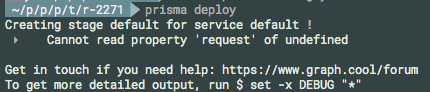
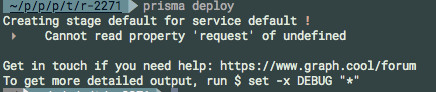
Now I changed my ~/.prisma/config.yml to this (both port and secret are correct):
  clusters:
    local:
      host: 'http://localhost:4466'
      clusterSecret: 'my-server-secret-123'
And I get this on prisma deploy:
▸ Cannot read property 'request' of undefined
marktani
on 25 Apr 2018
If I do this, all works as expected:
set -x PRISMA_MANAGEMENT_API_SECRET "my-server-secret-123"
prisma deploy
However, all of the above situations should be handled gracefully.
marktani
on 25 Apr 2018
@marktani Having this problem, but even after following your workaround I still get:
FetchError: request to http://localhost:4466/cluster failed, reason: connect ECONNREFUSED 127.0.0.1:4466
One odd thing I notice is that if I keep an eye on docker ps, every time I run prisma deploy, the Prisma container goes from status up to Restarting and stays there for 60 seconds. Nothing I can see in the debug logs indicates why Prisma may be crashing, or that it has, but that Docker status sure is strange. Any thoughts?
 frankdugan3
on 27 Apr 2018
frankdugan3
on 27 Apr 2018
In my docker-compose:
managementApiSecret: abc
In my .env:
PRISMA_MANAGEMENT_API_SECRET="abc"
Or afterset -x PRISMA_MANAGEMENT_API_SECRET "abc"
If I want to execute 'prisma deploy', I get following error:
Authentication token is invalid: Token can't be decoded: Invalid signature for this token or wrong algorithm.
I've tested this in both version 1.7.1 and 1.7.2.
 mzygmunt
on 27 Apr 2018
mzygmunt
on 27 Apr 2018
I fixed the problem by adding a "default" cluster to my ~/.prisma/config.yml with the cluster endpoint and managementApiSecret, like this:
~/.prisma/config.yml
clusters:
  local: # my local cluster, does not matter for this answer
    host: 'http://localhost:4466'
    clusterSecret: my-management-api-secret-for-local-cluster
  default: # the remote cluster that I want to deploy my service to
    host: 'http://18.232.79.238:4466'
    clusterSecret: my-management-api-secret-for-remote-cluster
@marktani Despite it works, this is very strange behavior. For some reason, the deploy command is not looking for the PRISMA_MANAGEMENT_API_SECRET variable. I was able to come up with this workaround after debugging prisma deploy command and find out that the 'cluster' property had name 'default', but clusterSecret was undefined.
 lucasmafra
on 28 Apr 2018
lucasmafra
on 28 Apr 2018
@lucasmafra That works indeed, but totally unexpected behavior for sure. Based on this code it should be working with environment variable, but it doesn't.
 FredyC
on 28 Apr 2018
FredyC
on 28 Apr 2018
Well, now I have stumped again when trying to deploy to AWS. I mean it's no problem to get it running, but again there is the Authentication token is invalid. This whole thing got so confusing considering that "clusters" are supposed to be replaced by "servers".
I tried running prisma deploy and picking custom server. After specifying the endpoint, this one got replaced in prisma.yml (where I had use of env variable🙄) and it did not fixed anything because api secret is still ignored.
If the ultimate goal is dropping .prisma/config.yml file (which sounds as a good direction), it should be basically possible to specify this api secret in prisma.yml as well. Then it would be much more consistent instead of relying on existence of environment variable.
FredyC
on 28 Apr 2018
So it looks like that things are even more entangled. Since it's no longer possible to specify cluster in prisma.yml, it will always pick the default apparently. I haven't found a way to let it choose a different one. The upgrade guide is talking only about service name and stage name accepting value "default", but there is no mention how to specify the server/cluster for deployment.
I've managed to successfully deploy to my AWS server after changing host in config.yml for the default _cluster_. So before every deployment, I need to make sure that I have a correct host in that file. The endpoint from prisma.yml is simply ignored :/
Edit: I even tried to have config.yml like this and having the endpoint in .env file, but for some reason it does not see the variable when running deploy.
  default:
    host: '${env:PRISMA_DEPLOY_ENDPOINT}'
    clusterSecret: ${env:PRISMA_MANAGEMENT_API_SECRET}
Thanks for reporting @marktani @mzygmunt @frankdugan3 @lucasmafra and @FredyC !
Can you confirm if this is fixed for you in [email protected]?
Thanks!
 timsuchanek
on 30 Apr 2018
timsuchanek
on 30 Apr 2018
_posted in wrong issue, correct one: #2305_
FredyC
on 30 Apr 2018
@timsuchanek On both Linux and Mac, using that version still throws ECONNRESET or socket hang up when querying http://localhost:4466/cluster on the deploy. Tried in existing and in new projects, with and without managementApiSecret secret.
frankdugan3
on 30 Apr 2018
@timsuchanek As a follow up, deploy works fine if creating a new DB with prisma init. I suspect there may be issues connecting to an existing DB that are not being shown in the log output. (I have DEBUG="*"). I have no .prisma/config.yml, so I suppose that particular issue may be resolved with the beta.
frankdugan3
on 30 Apr 2018
same issue when I upgraded to "prisma": "1.7.4":
$ prisma deploy
Creating stage default for service default !
 ▸    Cluster local requires a cluster secret. Please provide it with the env var PRISMA_MANAGEMENT_API_SECRET
~/.prisma/config.yml
  clusters:
    local:
      host: 'http://localhost:4466'
      clusterSecret: "-----BEGIN RSA PRIVATE KEY-----\r\nMIIEogIBAAKCAQEAuhdbbP8r/yoH7xBahic4/gLwtP+7DE1Lp2ykvmNBZmjG$
eD9RrPoyECD3w\r\nJ5He2xhCxF2b9nXk6ZMgR546Air55i8CIdjE+wIDAQABAoIBAGPr4sWWBpPOh9AQ\r\nIeti6DFMdt9ZaaBjaLoPli48sYNBwz2X$
Ky3iM7GGP/vzE5G8QTLZCzmsNVlsPoROoTfHUo7vIjA1SsCgYEA0DXv\r\nfgfdOF71WJFPLhZl4qtroUOGJsFNsTV0vYw7iVnZaYmf/Dr2HK9b+Ckcl5$
7IPz8h52KQJ1eoo\r\nGlffhecMkvxpvrb+pzz+XwKBgCP7jj4bodGiJ4h85FA0srrvoRQnlUGRWpnrgRdY\r\n6tkb3ATvMeTnU601aRGEGVrg2UiWgp$
gPTJtiy1+lZ0hDCHQEKHE4v/w8bjNY=\r\n-----END RSA PRIVATE KEY-----\r\n"
prisma.yml
endpoint: http://localhost:4466
datamodel: datamodel.graphql
secret: my-server-secret-123
Full repo: https://github.com/alan345/naperg/tree/dev
 alan345
on 4 May 2018
alan345
on 4 May 2018
@alan345 Have you tried what it actually says to use env variable? Since 1.7.4 the ~/.prisma/config.yml should no longer be used (haven't tested it by myself yet). Also, it's a different secret than the one you have in prisma.yml, check https://github.com/graphcool/prisma/issues/2288
Besides your clusterSecret is all wrong, Prisma is no longer using asymmetrical keys, please read upgrade guide.
FredyC
on 4 May 2018
Thanks @FredyC ! My project is working now.
If someone wants to have the code: https://github.com/alan345/naperg/
alan345
on 5 May 2018
Fixed in the latest version. Please let us know if you still have that issue, then we reopen it!
timsuchanek
on 11 Jun 2018
Related issues
marktani
·
3Comments
 schickling
·
3Comments
schickling
·
3Comments
 AlessandroAnnini
·
3Comments
AlessandroAnnini
·
3Comments
 sorenbs
·
3Comments
sorenbs
·
3Comments
 dohomi
·
3Comments
dohomi
·
3Comments
Most helpful comment
In my docker-compose:
In my .env:
Or after
set -x PRISMA_MANAGEMENT_API_SECRET "abc"If I want to execute 'prisma deploy', I get following error:
I've tested this in both version 1.7.1 and 1.7.2.