Prisma1: Document programmatic deployment of Prisma services
I ask for assistance in programmatic deployment of Prisma services. I'm not posting this at forum because this topic follows #1808 and it is useful for more deep understanding of Prisma for other devs and can lead to documentation enrichment.
I've tried to reverse-engineer prisma-cli-engine, but yet had no luck with this.
My goal is to build a cli with node js, that will read multiple Prisma graphql-schemes and will wind up several special Prisma services for further use in a complex system, built on top of them (and also winded up with my cli).
Lets go from a point, where I have a docker mysql service and graphql prisma schemes in place. I need to:
- create prisma containers
- join them in to the network with mysql
- link mysql service to prisma services
- migrate Prisma service with new or updated schemas
First 3 steps are easy with docker api and by reproducing environment as described here.
So now we have running containers with Prisma and Mysql. How to provision/migrate them? As far as I understand, this can be accomplished with prisma-cli-engine/Client, but without documentation and with quite complex code, I can't figure out how.
 terion-name
All 22 comments
@marktani I really hope for your help with this, please
terion-name
on 20 Feb 2018
@terion-name Thanks for you effort to a more programmatic way of deploying Prisma services. I have to ask some questions in order to fully understand what you're trying to achieve: Do you plan to have one MySQL instance and several Prisma service containers that interact with that database server instance? If so, why not deploying everything horizontally – one Prisma service + one MySQL instance each?
Then you could follow this workflow:
- Write a shell script which conducts the MySQL + Prisma service container creation (in your cloud)
- Integrate this shell script into your CI/CD pipeline
- Write another shell script which adds the cluster to
.prisma/config.ymland performs aprisma deployafterwards**
With those three steps in place, you can fully automate a Prisma service deployment.
**The configuration file adjustment is a workaround and can be omitted when #1919 has landed.
 akoenig
on 20 Feb 2018
akoenig
on 20 Feb 2018
Hello, @akoenig
Do you plan to have one MySQL instance and several Prisma service containers that interact with that database server instance? If so, why not deploying everything horizontally – one Prisma service + one MySQL instance each?
this is project-specific, long time to explain, that is needed
Write another shell script which adds the cluster to.prisma/config.yml and performs a prisma deploy afterwards**
prisma config does not allow me to use advanced networking and db linking :(
terion-name
on 21 Feb 2018
Here is some additional information that might be helpful:
- A Prisma Cluster exposes a
/clusterGraphQL API (the "Cluster API") that can be used to migrate Prisma services. For the development cluster in EU, that's the URL: https://eu1.prisma.sh/cluster. Self-hosted and private clusters also expose a Cluster API. - The main logic for migrating services is handled in the Cluster API. When running
prisma deploy, the CLI sends the new datamodel to the cluster, where the "delta" is computed and translated into separate migration steps. Then, the CLI polls the execution of the migration steps and updates the progress in the terminal (Applying changes: (33/999)).
The CLI provides a simple interface to the Cluster API. But of course you can consume the Cluster API of your own cluster in whichever way you want.
Side note:
The development clusters might receive "breaking changes" to the cluster API without notice, as the CLI is assumed the only consumer of this API.
For your own cluster that's of course note an issue, as you can coordinate any changes yourself by upgrading the cluster on your own time.
I hope this information provides you with more context to tackle your situation.
What exactly are you missing from the prisma CLI?
Do you have some specific questions that we can discuss?
 marktani
on 21 Feb 2018
marktani
on 21 Feb 2018
@marktani thank you!
I miss in Prisma cli manual control. My use case is quite specific, it is not just an app built on top of prisma, it is a complex microservice system with subsystems and development tools that I've decided to build using Prisma. And I need fully manual control over services, setup services using special logic etc. Built-in prisma deploy just won't fit
Thus I need to create docker containers with prisma server manually, as it described in docs about docker-compose. And then run migrations over them.
The main logic for migrating services is handled in the Cluster API. When running prisma deploy, the CLI sends the new datamodel to the cluster, where the "delta" is computed and translated into separate migration steps. Then, the CLI polls the execution of the migration steps and updates the progress in the terminal (Applying changes: (33/999)).
And this is the main question: how can I send new datamodel to cluster manually? I have set up a docker servise with prisma-server, it is up and running. How now I can send the datamodel to it? For example, using the client from prisma-cli-core?
terion-name
on 21 Feb 2018
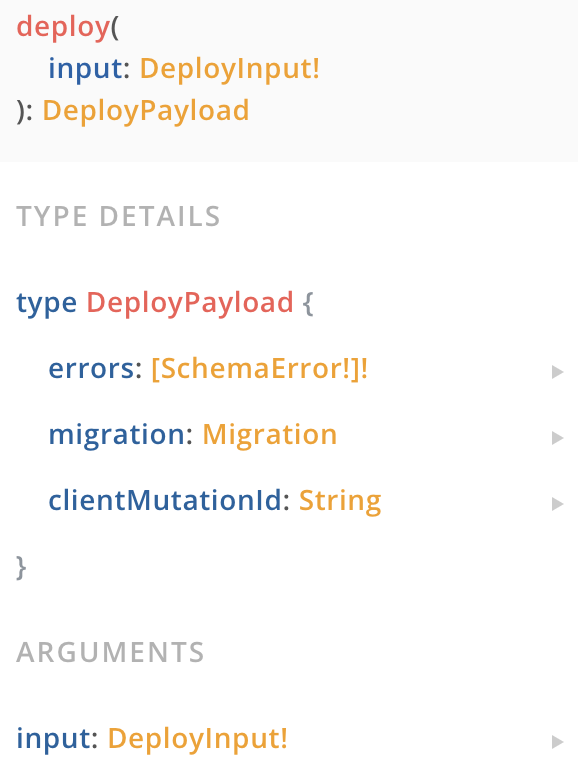
How now I can send the datamodel to it?
Using the deploy mutation in the Cluster API:
marktani
on 21 Feb 2018
@marktani thank you! I'l try to use this.
Also, it would be great to cover this in docs section about docker deployment, because without this information that docs section is not full
terion-name
on 21 Feb 2018
@terion-name this part is not fully covered in the docs yet, because the CLI is the primary consumer of the Cluster API.
Nevertheless, I agree with you. We can add more information about the Cluster API to the documentation.
marktani
on 21 Feb 2018
@marktani what is SCHEMA_MANAGER_ENDPOINT in env and what should be written there?
terion-name
on 21 Feb 2018
@marktani stuck on simple starting the services, nor via api, nor via compose — they don't work. I've described details here #1972
terion-name
on 24 Feb 2018
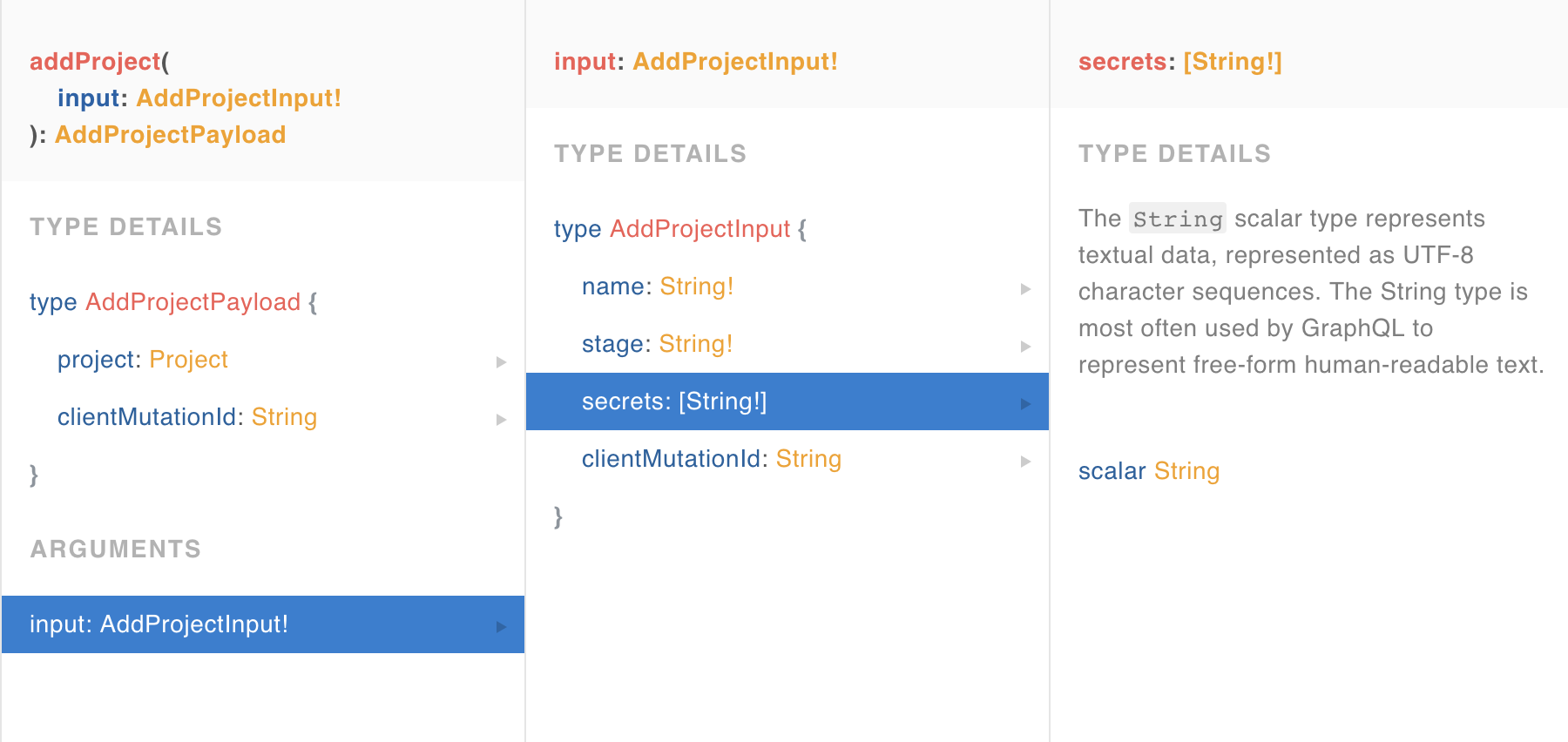
what are these secrets in project add?
terion-name
on 26 Feb 2018
I send an appProject mutation, it runs ok.
Then I send a deploy request. It runs ok, with no errors, but nothing migrates. What is wrong?
{ query: 'mutation($project_name: String!, $stage: String!, $types: String!) {\n    deploy(input: {\n        name: $project_name\n        stage: $stage,\n        types: $types\n    }) {\n        errors {\n            type\n            field\n            description\n        }\n    }\n}',
  variables:
   { project_name: 'test-project',
     stage: 'local',
     types: 'type Place {\n  id: ID! @unique\n  name: String\n  size: PLACE_SIZES\n  shortDescription: String!\n  description: String!\n  slug: String!\n  maxGuests: Int!\n  numBedrooms: Int!\n  numBeds: Int!\n  numBaths: Int!\n  reviews: [Review!]!\n  amenities: Amenities!\n  host: User!\n  pricing: Pricing!\n  location: Location!\n  views: Views!\n  guestRequirements: GuestRequirements\n  policies: Policies\n  houseRules: HouseRules\n  bookings: [Booking!]!\n  pictures: [Picture!]!\n  popularity: Int!\n}\n\ntype Pricing {\n  id: ID! @unique\n  place: Place!\n  monthlyDiscount: Int\n  weeklyDiscount: Int\n  perNight: Int!\n  smartPricing: Boolean! @default(value: "false")\n  basePrice: Int!\n  averageWeekly: Int!\n  averageMonthly: Int!\n  cleaningFee: Int\n  securityDeposit: Int\n  extraGuests: Int\n  weekendPricing: Int\n  currency: CURRENCY\n}\n\ntype GuestRequirements {\n  id: ID! @unique\n  govIssuedId: Boolean! @default(value: "false")\n  recommendationsFromOtherHosts: Boolean! @default(value: "false")\n  guestTripInformation: Boolean! @default(value: "false")\n  place: Place!\n}\n\ntype Policies {\n  id: ID! @unique\n  createdAt: DateTime!\n  updatedAt: DateTime!\n  checkInStartTime: Float!\n  checkInEndTime: Float!\n  checkoutTime: Float!\n  place: Place!\n}\n\ntype HouseRules {\n  id: ID! @unique\n  createdAt: DateTime!\n  updatedAt: DateTime!\n  suitableForChildren: Boolean\n  suitableForInfants: Boolean\n  petsAllowed: Boolean\n  smokingAllowed: Boolean\n  partiesAndEventsAllowed: Boolean\n  additionalRules: String\n}\n\ntype Views {\n  id: ID! @unique\n  lastWeek: Int!\n  place: Place!\n}\n\ntype Location {\n  id: ID! @unique\n  lat: Float!\n  lng: Float!\n  neighbourHood: Neighbourhood\n  user: User\n  place: Place\n  address: String\n  directions: String\n  experience: Experience\n  restaurant: Restaurant\n}\n\ntype Neighbourhood {\n  id: ID! @unique\n  locations: [Location!]!\n  name: String!\n  slug: String!\n  homePreview: Picture\n  city: City!\n  featured: Boolean!\n  popularity: Int!\n}\n\ntype City {\n  id: ID! @unique\n  name: String!\n  neighbourhoods: [Neighbourhood!]!\n}\n\ntype Picture {\n  url: String!\n}\n\ntype Experience {\n  id: ID! @unique\n  category: ExperienceCategory\n  title: String!\n  host: User!\n  location: Location!\n  pricePerPerson: Int!\n  reviews: [Review!]!\n  preview: Picture!\n  popularity: Int!\n}\n\ntype ExperienceCategory {\n  id: ID! @unique\n  mainColor: String! @default(value: "#123456")\n  name: String!\n  experience: Experience\n}\n\ntype Amenities {\n  id: ID! @unique\n  place: Place!\n  elevator: Boolean! @default(value: "false")\n  petsAllowed: Boolean! @default(value: "false")\n  internet: Boolean! @default(value: "false")\n  kitchen: Boolean! @default(value: "false")\n  wirelessInternet: Boolean! @default(value: "false")\n  familyKidFriendly: Boolean! @default(value: "false")\n  freeParkingOnPremises: Boolean! @default(value: "false")\n  hotTub: Boolean! @default(value: "false")\n  pool: Boolean! @default(value: "false")\n  smokingAllowed: Boolean! @default(value: "false")\n  wheelchairAccessible: Boolean! @default(value: "false")\n  breakfast: Boolean! @default(value: "false")\n  cableTv: Boolean! @default(value: "false")\n  suitableForEvents: Boolean! @default(value: "false")\n  dryer: Boolean! @default(value: "false")\n  washer: Boolean! @default(value: "false")\n  indoorFireplace: Boolean! @default(value: "false")\n  tv: Boolean! @default(value: "false")\n  heating: Boolean! @default(value: "false")\n  hangers: Boolean! @default(value: "false")\n  iron: Boolean! @default(value: "false")\n  hairDryer: Boolean! @default(value: "false")\n  doorman: Boolean! @default(value: "false")\n  paidParkingOffPremises: Boolean! @default(value: "false")\n  freeParkingOnStreet: Boolean! @default(value: "false")\n  gym: Boolean! @default(value: "false")\n  airConditioning: Boolean! @default(value: "false")\n  shampoo: Boolean! @default(value: "false")\n  essentials: Boolean! @default(value: "false")\n  laptopFriendlyWorkspace: Boolean! @default(value: "false")\n  privateEntrance: Boolean! @default(value: "false")\n  buzzerWirelessIntercom: Boolean! @default(value: "false")\n  babyBath: Boolean! @default(value: "false")\n  babyMonitor: Boolean! @default(value: "false")\n  babysitterRecommendations: Boolean! @default(value: "false")\n  bathtub: Boolean! @default(value: "false")\n  changingTable: Boolean! @default(value: "false")\n  childrensBooksAndToys: Boolean! @default(value: "false")\n  childrensDinnerware: Boolean! @default(value: "false")\n  crib: Boolean! @default(value: "false")\n}\n\ntype Review {\n  id: ID! @unique\n  createdAt: DateTime!\n  text: String!\n  stars: Int!\n  accuracy: Int!\n  location: Int!\n  checkIn: Int!\n  value: Int!\n  cleanliness: Int!\n  communication: Int!\n  place: Place!\n  experience: Experience\n}\n\ntype Booking {\n  id: ID! @unique\n  createdAt: DateTime!\n  bookee: User!\n  place: Place!\n  startDate: DateTime!\n  endDate: DateTime!\n  payment: Payment!\n}\n\ntype Payment {\n  id: ID! @unique\n  createdAt: DateTime!\n  serviceFee: Float!\n  placePrice: Float!\n  totalPrice: Float!\n  booking: Booking!\n  paymentMethod: PaymentAccount!\n}\n\ntype PaymentAccount {\n  id: ID! @unique\n  createdAt: DateTime!\n  type: PAYMENT_PROVIDER\n  user: User!\n  payments: [Payment!]!\n  paypal: PaypalInformation\n  creditcard: CreditCardInformation\n}\n\ntype PaypalInformation {\n  id: ID! @unique\n  createdAt: DateTime!\n  email: String!\n  paymentAccount: PaymentAccount!\n}\n\ntype CreditCardInformation {\n  id: ID! @unique\n  createdAt: DateTime!\n  cardNumber: String!\n  expiresOnMonth: Int!\n  expiresOnYear: Int!\n  securityCode: String!\n  firstName: String!\n  lastName: String!\n  postalCode: String!\n  country: String!\n  paymentAccount: PaymentAccount\n}\n\ntype Message {\n  id: ID! @unique\n  createdAt: DateTime!\n  from: User! @relation(name: "SentMessages")\n  to: User! @relation(name: "ReceivedMessages")\n  deliveredAt: DateTime!\n  readAt: DateTime!\n}\n\ntype Notification {\n  id: ID! @unique\n  createdAt: DateTime!\n  type: NOTIFICATION_TYPE\n  user: User!\n  link: String!\n  readDate: DateTime!\n}\n\ntype Restaurant {\n  id: ID! @unique\n  createdAt: DateTime!\n  title: String!\n  avgPricePerPerson: Int!\n  pictures: [Picture!]!\n  location: Location!\n  isCurated: Boolean! @default(value: "true")\n  slug: String!\n  popularity: Int!\n}\n\ntype User {\n  id: ID! @unique\n  createdAt: DateTime!\n  updatedAt: DateTime!\n  firstName: String!\n  lastName: String!\n  email: String! @unique\n  password: String!\n  phone: String!\n  responseRate: Float\n  responseTime: Int\n  isSuperHost: Boolean! @default(value: "false")\n  ownedPlaces: [Place!]!\n  location: Location\n  bookings: [Booking!]!\n  paymentAccount: [PaymentAccount!]!\n  sentMessages: [Message!]! @relation(name: "SentMessages")\n  receivedMessages: [Message!]! @relation(name: "ReceivedMessages")\n  notifications: [Notification!]!\n  profilePicture: Picture\n  hostingExperiences: [Experience!]!\n}\n' } }
@terion-name Concerning your last question: Can you check the migration status using the migrationStatus query?
The secrets are something used for authentication on the generated APIs. Specifically, they are used as JWT secrets that allow you to authenticate calls to the project APIs.
 dpetrick
on 26 Feb 2018
dpetrick
on 26 Feb 2018
@dpetrick migration status success:

I did not setup secrets for this app when added, it is not needed in this case
terion-name
on 26 Feb 2018
@terion-name What you see there is the initial addProject migration, which basically establishes the existence of a project ('service') in Prisma, but has no migration steps whatsoever. Those follow with the first deploy of your service on the cluster API. Hence, your deploy wasn't even registered in Prisma, which is odd. Are you using the Prisma CLI to deploy? If yes, can you see something (errors, other oddities) when running the deploy with DEBUG=* set? If not, can you check the docker logs on the container (during a deploy) and share them here, if possible?
dpetrick
on 26 Feb 2018
@dpetrick no, obviously I don't use prisma cli to deploy, the whole topic is about using prisma without it's cli :) in the comment above I'v written the request, that was constructed manually and sent to cluster api via curl, in the same manner, as addProject was. Maybe there is something not right in request?
terion-name
on 27 Feb 2018
I see, sorry, then I'll check the request and come back to you.
dpetrick
on 27 Feb 2018
@terion-name Your schema doesn't work for me, are you sure you didn't have an errors array in your response? We send back a 200 OK even in error cases, as HTTP is only seen as the transport protocol for GraphQL - the actual (and GraphQL common) error handling needs to check the existence of errors in the response. If not, can you please share the full request / response that you get (minus sensitive data, like tokens)?
dpetrick
on 27 Feb 2018
@dpetrick full request:
curl --request POST \
  --url http://localhost:4466/cluster \
  --header 'accept: application/json' \
  --header 'content-type: application/json' \
  --data '{"query":"mutation($project_name: String!, $stage: String!, $types: String!) {\n    deploy(input: {\n        name: $project_name\n        stage: $stage,\n        types: $types\n    }) {\n        errors {\n            type\n            field\n            description\n        }\n    }\n}","variables":{"project_name":"test-project","stage":"local","types":"type Place {\n  id: ID! @unique\n  name: String\n  size: PLACE_SIZES\n  shortDescription: String!\n  description: String!\n  slug: String!\n  maxGuests: Int!\n  numBedrooms: Int!\n  numBeds: Int!\n  numBaths: Int!\n  reviews: [Review!]!\n  amenities: Amenities!\n  host: User!\n  pricing: Pricing!\n  location: Location!\n  views: Views!\n  guestRequirements: GuestRequirements\n  policies: Policies\n  houseRules: HouseRules\n  bookings: [Booking!]!\n  pictures: [Picture!]!\n  popularity: Int!\n}\n\ntype Pricing {\n  id: ID! @unique\n  place: Place!\n  monthlyDiscount: Int\n  weeklyDiscount: Int\n  perNight: Int!\n  smartPricing: Boolean! @default(value: \"false\")\n  basePrice: Int!\n  averageWeekly: Int!\n  averageMonthly: Int!\n  cleaningFee: Int\n  securityDeposit: Int\n  extraGuests: Int\n  weekendPricing: Int\n  currency: CURRENCY\n}\n\ntype GuestRequirements {\n  id: ID! @unique\n  govIssuedId: Boolean! @default(value: \"false\")\n  recommendationsFromOtherHosts: Boolean! @default(value: \"false\")\n  guestTripInformation: Boolean! @default(value: \"false\")\n  place: Place!\n}\n\ntype Policies {\n  id: ID! @unique\n  createdAt: DateTime!\n  updatedAt: DateTime!\n  checkInStartTime: Float!\n  checkInEndTime: Float!\n  checkoutTime: Float!\n  place: Place!\n}\n\ntype HouseRules {\n  id: ID! @unique\n  createdAt: DateTime!\n  updatedAt: DateTime!\n  suitableForChildren: Boolean\n  suitableForInfants: Boolean\n  petsAllowed: Boolean\n  smokingAllowed: Boolean\n  partiesAndEventsAllowed: Boolean\n  additionalRules: String\n}\n\ntype Views {\n  id: ID! @unique\n  lastWeek: Int!\n  place: Place!\n}\n\ntype Location {\n  id: ID! @unique\n  lat: Float!\n  lng: Float!\n  neighbourHood: Neighbourhood\n  user: User\n  place: Place\n  address: String\n  directions: String\n  experience: Experience\n  restaurant: Restaurant\n}\n\ntype Neighbourhood {\n  id: ID! @unique\n  locations: [Location!]!\n  name: String!\n  slug: String!\n  homePreview: Picture\n  city: City!\n  featured: Boolean!\n  popularity: Int!\n}\n\ntype City {\n  id: ID! @unique\n  name: String!\n  neighbourhoods: [Neighbourhood!]!\n}\n\ntype Picture {\n  url: String!\n}\n\ntype Experience {\n  id: ID! @unique\n  category: ExperienceCategory\n  title: String!\n  host: User!\n  location: Location!\n  pricePerPerson: Int!\n  reviews: [Review!]!\n  preview: Picture!\n  popularity: Int!\n}\n\ntype ExperienceCategory {\n  id: ID! @unique\n  mainColor: String! @default(value: \"#123456\")\n  name: String!\n  experience: Experience\n}\n\ntype Amenities {\n  id: ID! @unique\n  place: Place!\n  elevator: Boolean! @default(value: \"false\")\n  petsAllowed: Boolean! @default(value: \"false\")\n  internet: Boolean! @default(value: \"false\")\n  kitchen: Boolean! @default(value: \"false\")\n  wirelessInternet: Boolean! @default(value: \"false\")\n  familyKidFriendly: Boolean! @default(value: \"false\")\n  freeParkingOnPremises: Boolean! @default(value: \"false\")\n  hotTub: Boolean! @default(value: \"false\")\n  pool: Boolean! @default(value: \"false\")\n  smokingAllowed: Boolean! @default(value: \"false\")\n  wheelchairAccessible: Boolean! @default(value: \"false\")\n  breakfast: Boolean! @default(value: \"false\")\n  cableTv: Boolean! @default(value: \"false\")\n  suitableForEvents: Boolean! @default(value: \"false\")\n  dryer: Boolean! @default(value: \"false\")\n  washer: Boolean! @default(value: \"false\")\n  indoorFireplace: Boolean! @default(value: \"false\")\n  tv: Boolean! @default(value: \"false\")\n  heating: Boolean! @default(value: \"false\")\n  hangers: Boolean! @default(value: \"false\")\n  iron: Boolean! @default(value: \"false\")\n  hairDryer: Boolean! @default(value: \"false\")\n  doorman: Boolean! @default(value: \"false\")\n  paidParkingOffPremises: Boolean! @default(value: \"false\")\n  freeParkingOnStreet: Boolean! @default(value: \"false\")\n  gym: Boolean! @default(value: \"false\")\n  airConditioning: Boolean! @default(value: \"false\")\n  shampoo: Boolean! @default(value: \"false\")\n  essentials: Boolean! @default(value: \"false\")\n  laptopFriendlyWorkspace: Boolean! @default(value: \"false\")\n  privateEntrance: Boolean! @default(value: \"false\")\n  buzzerWirelessIntercom: Boolean! @default(value: \"false\")\n  babyBath: Boolean! @default(value: \"false\")\n  babyMonitor: Boolean! @default(value: \"false\")\n  babysitterRecommendations: Boolean! @default(value: \"false\")\n  bathtub: Boolean! @default(value: \"false\")\n  changingTable: Boolean! @default(value: \"false\")\n  childrensBooksAndToys: Boolean! @default(value: \"false\")\n  childrensDinnerware: Boolean! @default(value: \"false\")\n  crib: Boolean! @default(value: \"false\")\n}\n\ntype Review {\n  id: ID! @unique\n  createdAt: DateTime!\n  text: String!\n  stars: Int!\n  accuracy: Int!\n  location: Int!\n  checkIn: Int!\n  value: Int!\n  cleanliness: Int!\n  communication: Int!\n  place: Place!\n  experience: Experience\n}\n\ntype Booking {\n  id: ID! @unique\n  createdAt: DateTime!\n  bookee: User!\n  place: Place!\n  startDate: DateTime!\n  endDate: DateTime!\n  payment: Payment!\n}\n\ntype Payment {\n  id: ID! @unique\n  createdAt: DateTime!\n  serviceFee: Float!\n  placePrice: Float!\n  totalPrice: Float!\n  booking: Booking!\n  paymentMethod: PaymentAccount!\n}\n\ntype PaymentAccount {\n  id: ID! @unique\n  createdAt: DateTime!\n  type: PAYMENT_PROVIDER\n  user: User!\n  payments: [Payment!]!\n  paypal: PaypalInformation\n  creditcard: CreditCardInformation\n}\n\ntype PaypalInformation {\n  id: ID! @unique\n  createdAt: DateTime!\n  email: String!\n  paymentAccount: PaymentAccount!\n}\n\ntype CreditCardInformation {\n  id: ID! @unique\n  createdAt: DateTime!\n  cardNumber: String!\n  expiresOnMonth: Int!\n  expiresOnYear: Int!\n  securityCode: String!\n  firstName: String!\n  lastName: String!\n  postalCode: String!\n  country: String!\n  paymentAccount: PaymentAccount\n}\n\ntype Message {\n  id: ID! @unique\n  createdAt: DateTime!\n  from: User! @relation(name: \"SentMessages\")\n  to: User! @relation(name: \"ReceivedMessages\")\n  deliveredAt: DateTime!\n  readAt: DateTime!\n}\n\ntype Notification {\n  id: ID! @unique\n  createdAt: DateTime!\n  type: NOTIFICATION_TYPE\n  user: User!\n  link: String!\n  readDate: DateTime!\n}\n\ntype Restaurant {\n  id: ID! @unique\n  createdAt: DateTime!\n  title: String!\n  avgPricePerPerson: Int!\n  pictures: [Picture!]!\n  location: Location!\n  isCurated: Boolean! @default(value: \"true\")\n  slug: String!\n  popularity: Int!\n}\n\ntype User {\n  id: ID! @unique\n  createdAt: DateTime!\n  updatedAt: DateTime!\n  firstName: String!\n  lastName: String!\n  email: String! @unique\n  password: String!\n  phone: String!\n  responseRate: Float\n  responseTime: Int\n  isSuperHost: Boolean! @default(value: \"false\")\n  ownedPlaces: [Place!]!\n  location: Location\n  bookings: [Booking!]!\n  paymentAccount: [PaymentAccount!]!\n  sentMessages: [Message!]! @relation(name: \"SentMessages\")\n  receivedMessages: [Message!]! @relation(name: \"ReceivedMessages\")\n  notifications: [Notification!]!\n  profilePicture: Picture\n  hostingExperiences: [Experience!]!\n}\n"}}'
Trying your request with a valid authentication header for my local Prisma setup on a fresh service + stage yields an error in the response:
{"data":{"deploy":{"errors":[{"type":"Place","field":"size","description":"The field `size` has the type `PLACE_SIZES` but there's no type or enum declaration with that name."},{"type":"Pricing","field":"currency","description":"The field `currency` has the type `CURRENCY` but there's no type or enum declaration with that name."},{"type":"PaymentAccount","field":"type","description":"The field `type` has the type `PAYMENT_PROVIDER` but there's no type or enum declaration with that name."},{"type":"Notification","field":"type","description":"The field `type` has the type `NOTIFICATION_TYPE` but there's no type or enum declaration with that name."}]}}}
Are you sure that you're not seeing the same? If not, what exactly do you get as a response?
dpetrick
on 28 Feb 2018
@dpetrick thank you! indeed, there was an error in schema. 200 responses confused
terion-name
on 7 Mar 2018
Thanks a lot for opening this issue @terion-name! It sounds like you were having issues with the Prisma server (formerly called _cluster_) deployment. These topics are extensively covered in the new docs. Therefore I'm closing this issue, please open a new issue if you have more issues or specific questions!
 nikolasburk
on 9 Aug 2018
nikolasburk
on 9 Aug 2018
Related issues
 hoodsy
·
3Comments
hoodsy
·
3Comments
 schickling
·
3Comments
schickling
·
3Comments
 dohomi
·
3Comments
dohomi
·
3Comments
 sedubois
·
3Comments
nikolasburk
·
3Comments
sedubois
·
3Comments
nikolasburk
·
3Comments