Prisma1: ENOENT: No such file or directory, stat when running add-template
Current behavior
Downloading template graphcool/templates/authentication/email-password from graphcool/templates ... ✔
Path /Users/peter/Projects/tallydrinks/tally-graphcool/src/email-password/ already exists. Overwriting it now.
 ▸    'ENOENT': ENOENT: no such file or directory, stat
 ▸    '/var/folders/_8/y755ywd94_l4pc8ymg8kmjh00000gn/T/cj8z5exny00004i3zkub6x38n/authentication/email-password/src'
The items that are supposed to be commented out are not there.
Reproduction
graphcool add-template graphcool/templates/auth/email-password
If your problem can be reproduced with a certain service definition, please create a new GitHub repository with the reproduction instructions.
Expected behavior?
Template downloads to folder. Items are in commented out in file.
 peterpme
All 10 comments
@peterpme The command output seems to indicate using a different path to add the template. Are you sure the reproduction steps are correct?
 kbrandwijk
on 20 Oct 2017
kbrandwijk
on 20 Oct 2017
Yes, copied it exactly from the documentation
peterpme
on 20 Oct 2017
Which documentation? What was the command you executed?
 marktani
on 20 Oct 2017
peterpme
on 20 Oct 2017
marktani
on 20 Oct 2017
peterpme
on 20 Oct 2017
I can't reproduce this:
graphcool init
graphcool add-template graphcool/templates/auth/email-password
works just fine. then running
graphcool add-template graphcool/templates/auth/email-password
again, works too:
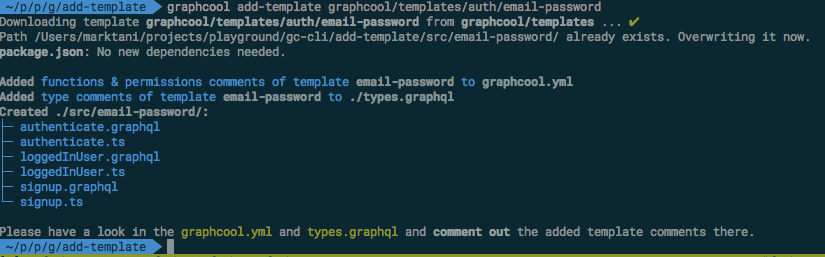
'/var/folders/_8/y755ywd94_l4pc8ymg8kmjh00000gn/T/cj8z5exny00004i3zkub6x38n/authentication/email-password/src'
looks to be an issue with an older downloaded template 🤔
marktani
on 20 Oct 2017
hm ok, maybe!
I upgraded a project, downloaded it and ran it. Perhaps that will do it?
Is there any way I can reset something I my end?
Thanks again!!!
peterpme
on 20 Oct 2017
What's your graphcool version?
marktani
on 20 Oct 2017
0.7.0
peterpme
on 20 Oct 2017
Aw, could you upgrade to 0.8.0? I think that's the problem 🙂
npm install -g graphcool@next
It was just released.
marktani
on 20 Oct 2017
gah, could have sworn I did! Thanks 😘
peterpme
on 20 Oct 2017
Related issues
 jannone
·
3Comments
jannone
·
3Comments
 dohomi
·
3Comments
dohomi
·
3Comments
 tbrannam
·
3Comments
tbrannam
·
3Comments
 ragnorc
·
3Comments
ragnorc
·
3Comments
 thomaswright
·
3Comments
thomaswright
·
3Comments