Prisma: "FATAL: sorry, too many clients already" postgres error in develop mode on
Bug description
I use prisma inside an api-route of https://nextjs.org/ (this is by the way an awesome setup) for a graphql-api. After some time you will get this error:
Error in connector: Error querying the database: db error: FATAL: sorry, too many clients already
    at PrismaClientFetcher.request
I guess the hot-reloading or refreshing of nextjs might mess with the connection-pool of prisma. I verified that the prisma-client that is used in the route is a singleton:
// this is imported in my api route
import { PrismaClient } from "@prisma/client";

const prisma = new PrismaClient();

export default prisma;
How to reproduce
Steps to reproduce the behavior:
- create a file pages/api/graphql.ts inside that, use prisma client
- it probably needs some code changes that result in a rebuilding of this file /api/graphql.ts or its imports
- at some point you should get the error
Expected behavior
should not throw this error i guess?
Prisma information
Environment & setup
- OS: macOS
- Database: [PostgreSQL
- Prisma version: [email protected], binary version: 377df4fe30aa992f13f1ba152cf83d5770bdbc85
- Node.js version: v12.13.1
 macrozone
All 31 comments
Hey @macrozone, thanks for reporting this. Can you maybe create a minimal reproduction project with the API route so we do not mess up building the reproduction? Thanks.
 janpio
on 28 Mar 2020
janpio
on 28 Mar 2020
@janpio i think i can do that
macrozone
on 28 Mar 2020
Hi
Any progress regarding this issue, have been encountering the same error often.
 chynamyerz
on 22 Apr 2020
chynamyerz
on 22 Apr 2020
Can you create a minimal reproduction project @chynamyerz? For now we are still waiting on that before we can investigate and understand.
janpio
on 23 Apr 2020
sorry had no time yet to do a reproduction
macrozone
on 23 Apr 2020
Can you create a minimal reproduction project @chynamyerz? For now we are still waiting on that before we can investigate and understand.
Hi @janpio
Yeah sure.
I tried to be as descriptive as possible but if I am clear as mud on the README please don't hesitate to contact me, will try to respond as quickly as possible.
Here is the link to the repo: https://github.com/chynamyerz/prisma2-too-many-clients-error.git
chynamyerz
on 23 Apr 2020
We have the same problem in a similiar environment (prisma + nexus).
We already increased the max database connections to 200 and tested MariaDB and Postgres with the same problems.
It seems that the error occurs randomly. Sometimes directly on start, sometimes after several hours or even days...
We also connect to the database directly with a database management tool (HeidiSQL or DBeaver), if this may help...
Here the error message from prisma:

And here from the postgres database logs:
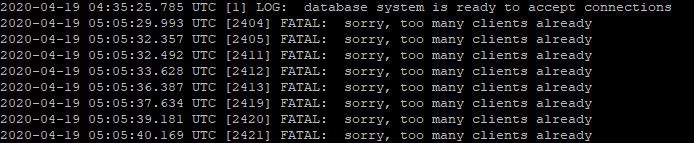
 cimchd
on 24 Apr 2020
cimchd
on 24 Apr 2020
@chynamyerz I looked at your code and you are creating a new PrismaClient instance per request. That will create a new connection pool per request so it will exhaust the database connection.
These lines of code are creating new client instance per request:
const server = new GraphQLServer({
context: ({ request }) => ({
prisma: new PrismaClient(),
request
}),
resolvers,
typeDefs: __dirname + "/schema.graphql",
})
Instead, please invoke the client construct once and reuse the client instance like so:
const prisma = new PrismaClient()
const server = new GraphQLServer({
context: ({ request }) => ({
prisma
request,
}),
resolvers,
typeDefs: __dirname + "/schema.graphql",
});
Anyone else subscribed to this issue, please make sure that your code is not creating a Prisma client instance per request.
 pantharshit00
on 27 Apr 2020
pantharshit00
on 27 Apr 2020
@pantharshit00 we use a single instance (we have export const prisma = new PrismaClient() in its own file which we import everywhere)
my guess is, that the hot-reloading / rebuilding of nextjs (or webpack in general) might rebuild and re-initialize this file. Is it possible to kindof destroy the instance (to free the connection pool)? then we could use maybe some re-build hook of webpack to reinitialize
macrozone
on 27 Apr 2020
@pantharshit00 Our grapqhl code looks similiar to your example. So we should not have the problem at this point. But we have several other occurences, where we have the two lines of code at the beginning of a file:
const { PrismaClient } = require('@prisma/client');
const prisma = new PrismaClient();
I checked our code if we have it inside a function or some kind of iteration, but this is not the case.
Should we refactor and also use only a single instance for the prisma client in our whole application?
cimchd
on 27 Apr 2020
@cimchd You should indeed refactor it so that the code is using a single instance of the Prisma client. Every new call to new PrismaClient() will spin up a new connection pool.
@macrozone You can try the following code to make sure next js hot reloading doesn't create a new prisma instance every hot reload:
import { PrismaClient } from "@prisma/client"

let prisma

if (process.env.NODE_ENV === "production") {
  prisma = new PrismaClient()
} else {
  if (!global.prisma) {
    global.prisma = new PrismaClient()
  }

  prisma = global.prisma
}

export default prisma
This snippet was originally posted here: https://github.com/prisma/prisma-client-js/issues/228#issuecomment-618433162
pantharshit00
on 28 Apr 2020
@pantharshit00 thank you, will try out!
macrozone
on 28 Apr 2020
@chynamyerz I looked at your code and you are creating a new PrismaClient instance per request. That will create a new connection pool per request so it will exhaust the database connection.
These lines of code are creating new client instance per request:
const server = new GraphQLServer({
  context: ({ request }) => ({
    prisma: new PrismaClient(),
    request
  }),
  resolvers,
  typeDefs: __dirname + "/schema.graphql",
})
Instead, please invoke the client construct once and reuse the client instance like so:
const prisma = new PrismaClient()

const server = new GraphQLServer({
  context: ({ request }) => ({
    prisma
    request,
  }),
  resolvers,
  typeDefs: __dirname + "/schema.graphql",
});
Anyone else subscribed to this issue, please make sure that your code is not creating a Prisma client instance per request.
@pantharshit00 thank you, updated the code and it is now working just fine.
chynamyerz
on 29 Apr 2020
Has Prisma exporting a singleton ever been considered?
 jackHedaya
on 6 Jun 2020
jackHedaya
on 6 Jun 2020
I dont think it would be wise since we extrapolate that one might be able to have multiple databases with different clients in the same project. Though it could use the same engine process under it.
 Sytten
on 6 Jun 2020
Sytten
on 6 Jun 2020
So in a case like that one would be able to create their own PrismaClient. However, it would be nice to have an a singleton as a simpler option for most cases.
jackHedaya
on 7 Jun 2020
I solved my issue similarly -- in express I was instantiating one instance per request
Personally, I think this issue should be closed, in general whether it's a singleton or a new connection should be decidable by the user of the Prisma library.
Thanks for looking into this @pantharshit00
 louisrli
on 15 Jun 2020
louisrli
on 15 Jun 2020
Yes, its also solved for me. Still its worth get mentioned somewhere in the docs, as this is probably a common problem on some dev environement involving hot reloads
macrozone
on 16 Jun 2020
For those having this issue, I solved it by creating a singleton:
import { PrismaClient } from '@prisma/client'

class DBClient {
  public prisma: PrismaClient
  private static instance: DBClient
  private constructor() {
    this.prisma = new PrismaClient()
  }

  public static getInstance = () => {
    if (!DBClient.instance) {
      DBClient.instance = new DBClient()
    }
    return DBClient.instance
  }
}

export default DBClient
Then wherever I used the client I did:
import DBClient from '../../database/client'
const prisma = DBClient.getInstance().prisma
You can then use it like normal.
 giraffesyo
on 3 Sep 2020
giraffesyo
on 3 Sep 2020
@pantharshit00 I don't think the docs talk about recommending using a single instance of the prisma client.
I haven't used Prisma yet, but plan to in my next project and it was one of the key details I really wanted to know. Took this issue to find this information.
Perhaps the documentation should explicitly call it out?
 dilizarov
on 5 Sep 2020
dilizarov
on 5 Sep 2020
@dilizarov Opened: https://github.com/prisma/docs/issues/822
pantharshit00
on 7 Sep 2020
What exactly is the final answer to this?
I followed this example however I am still seeing too many clients as I refresh a webpage and I am afraid this will cause errors in production.
For those having this issue, I solved it by creating a singleton:
import { PrismaClient } from '@prisma/client'

class DBClient {
  public prisma: PrismaClient
  private static instance: DBClient
  private constructor() {
    this.prisma = new PrismaClient()
  }

  public static getInstance = () => {
    if (!DBClient.instance) {
      DBClient.instance = new DBClient()
    }
    return DBClient.instance
  }
}

export default DBClient
Then wherever I used the client I did:
import DBClient from '../../database/client'
const prisma = DBClient.getInstance().prisma
You can then use it like normal.
 juanzgc
on 9 Dec 2020
juanzgc
on 9 Dec 2020
@juanzgc Docs issue already exists for this. It will be added.
pantharshit00
on 9 Dec 2020
For those having this issue, I solved it by creating a singleton:
import { PrismaClient } from '@prisma/client'

class DBClient {
  public prisma: PrismaClient
  private static instance: DBClient
  private constructor() {
    this.prisma = new PrismaClient()
  }

  public static getInstance = () => {
    if (!DBClient.instance) {
      DBClient.instance = new DBClient()
    }
    return DBClient.instance
  }
}

export default DBClient
Then wherever I used the client I did:
import DBClient from '../../database/client'
const prisma = DBClient.getInstance().prisma
You can then use it like normal.
Just to note, after a day of using this I once again received: "Fatal: sorry, too many clients already"
juanzgc
on 10 Dec 2020
@juanzgc Where your database is hosted?
pantharshit00
on 10 Dec 2020
Having this same issue. We host our db on RDS with AWS. We see huge spikes in connections whenever we deploy additionally get this "Context creation failed: Error querying the database: db error: FATAL: sorry, too many clients already" pretty consistently.
 chuckstock
on 12 Dec 2020
chuckstock
on 12 Dec 2020
@chuckstock Can you please share how you are initializing and passing the client? Also, tell whether you are using prisma with next.js or not.
pantharshit00
on 16 Dec 2020
@pantharshit00 yes I'm using prisma with @nexus/schema, nextjs and graphql serverless api routes deployed on Vercel. Additionally we have a postgres db hosted on AWS RDS.
import { PrismaClient } from '@prisma/client'

let prisma: PrismaClient

if (process.env.NODE_ENV === 'production') {
  if (!prisma) {
    prisma = new PrismaClient()
  }
} else {
  // @ts-ignore
  if (!global.prisma) {
    // @ts-ignore
    global.prisma = new PrismaClient()
  }

  // @ts-ignore
  prisma = global.prisma
}

export { prisma }
@juanzgc Where your database is hosted?
It’s currently on my local machine. We have not pushed to production due to these issues.
I am also using Nextjs.
juanzgc
on 16 Dec 2020
Also have seen this!
RDS hosted, nextjs serverless rest api.
 ColeTownsend
on 19 Dec 2020
ColeTownsend
on 19 Dec 2020
Having this same issue. We host our db on RDS with AWS. We see huge spikes in connections whenever we deploy additionally get this "Context creation failed: Error querying the database: db error: FATAL: sorry, too many clients already" pretty consistently.
I think this is a separate issue - have a look at RDS proxy / PG Bouncer.
 glenmcrae
on 27 Dec 2020
glenmcrae
on 27 Dec 2020
Related issues
 KyleTryon
·
24Comments
pantharshit00
·
28Comments
KyleTryon
·
24Comments
pantharshit00
·
28Comments
 ranjan-purbey
·
25Comments
ranjan-purbey
·
25Comments
 schickling
·
41Comments
schickling
·
41Comments
 kartikthapar
·
25Comments
kartikthapar
·
25Comments
Most helpful comment
@cimchd You should indeed refactor it so that the code is using a single instance of the Prisma client. Every new call to
new PrismaClient()will spin up a new connection pool.@macrozone You can try the following code to make sure next js hot reloading doesn't create a new prisma instance every hot reload:
This snippet was originally posted here: https://github.com/prisma/prisma-client-js/issues/228#issuecomment-618433162