Prisma-client-js: Fails inside node cluster - Address already in use
Bug description
If the cluster module from nodejs is used with multiple clients inside worker, the code from hyper fails with "Address already in use" error. Some of them connects, and some of them panics.
Error in Prisma Client:
PANIC: error binding to 127.0.0.1:43141: error creating server listener: Address already in use (os error 98) in
/root/.cargo/registry/src/github.com-1ecc6299db9ec823/hyper-0.13.4/src/server/mod.rs:124:13

This is a non-recoverable error which probably happens when the Prisma Query Engine has a panic.
Please create an issue in https://github.com/prisma/prisma-client-js describing the last Prisma Client query you called.
(node:18779) UnhandledPromiseRejectionWarning: Error
    at ChildProcess.child.on (/home/taher/prisma-issues/node_modules/@prisma/client/runtime/index.js:1:13254)
    at ChildProcess.emit (events.js:193:13)
    at Process.ChildProcess._handle.onexit (internal/child_process.js:255:12)
(node:18779) UnhandledPromiseRejectionWarning: Unhandled promise rejection. This error originated either by throwing inside of an async function without a catch block, or by rejecting a promise which was not handled with .catch(). (rejection id: 1)
(node:18779) [DEP0018] DeprecationWarning: Unhandled promise rejections are deprecated. In the future, promise rejections that are not handled will terminate the Node.js process with a non-zero exit code.
{ count: 29223 }
{ count: 29223 }
{ count: 29223 }
{ count: 29223 }
{ count: 29223 }
{ count: 29223 }
{ count: 29223 }
How to reproduce
git clone https://github.com/entrptaher/prisma-issues
yarn
yarn prisma migrate save --experimental
yarn prisma migrate up --experimental
yarn prisma generate
Then run the main script,
node scripts/cluster.js
This is the code which fails,
const cluster = require("cluster");
const limit = 8;

async function main() {
  const { PrismaClient } = require("@prisma/client");
  const prisma = new PrismaClient();
  await prisma.connect();
  await prisma.text.count();
  await prisma.disconnect();
}

if (cluster.isMaster) {
  for (let i = 0; i < limit; i++) {
    cluster.fork();
  }
} else {
  main();
}
However the following works,
const childProcess = require('child_process');

for(let i=0;i<2;i++){
  childProcess.fork(__dirname+"/index.js");
}
Expected behavior
It should not fail to connect or collect data
Prisma information
datasource db {
  provider = "sqlite"
  url      = "file:./dev.db"
}

generator client {
  provider = "prisma-client-js"
}

model Text {
  id   Int @default(autoincrement()) @id
  data String?
}
Environment & setup
- OS: Pop!_OS 19.10
- Database: PostgreSQL
- Prisma version: 2.0.0-beta.1
- Node.js version: v11.15.0
 entrptaher
All 20 comments
The clients doesn't restart on such address issue as well, might be related, https://github.com/prisma/prisma/issues/2100
entrptaher
on 6 Apr 2020
Thanks for reporting @entrptaher!
The reason this is happening, is that our port finding logic has a race condition, as we use net.createServer from Node.js, which apparently doesn't work in cluster mode and causes these conflicts.
There is no easy fix to this that I can see.
However, we'll migrate from our internal HTTP Server to neon-bindings, as soon as they properly support the n-api. https://github.com/neon-bindings/neon/issues/444
That will fix this problem. Until then we're happy for any suggestions how to make the port finding logic robust for this use-case:
https://github.com/prisma/photonjs/blob/94c472b177987dd543c57cb56a2334d784c83f03/packages/engine-core/src/NodeEngine.ts#L533
 timsuchanek
on 7 Apr 2020
timsuchanek
on 7 Apr 2020
A copy from this post, https://stackoverflow.com/a/28050404/6161265
You can bind to a random, free port assigned by the OS by specifying 0 for the port. This way you are not subject to race conditions (e.g. checking for an open port and some process binding to it before you get a chance to bind to it).
Then you can get the assigned port by calling server.address().port.
Example:
var net = require('net');

var srv = net.createServer(function(sock) {
  sock.end('Hello world\n');
});
srv.listen(0, function() {
  console.log('Listening on port ' + srv.address().port);
});
However I see you are already using that logic, which doesn't guarantee it'll be a free port.
I saw this comment on a gist, https://gist.github.com/mikeal/1840641#gistcomment-2896667
function getPort (port = 80) {
  const server = createServer()
  return new Promise((resolve, reject) => server
  .on('error', error => error.code === 'EADDRINUSE' ? server.listen(++port) : reject(error))
  .on('listening', () => server.close(() => resolve(port)))
  .listen(port))
}
They just up the port and check for rejection and continuously try it till they find a open port.
entrptaher
on 7 Apr 2020
Yes, snippet 1 is what we already use.
Snippet 2:
We could indeed try/catch the Rust engine panicking, that might be an approach.
timsuchanek
on 7 Apr 2020
@timsuchanek is there a reason why you use get-port in one file and created your own port finding solution on another file?
entrptaher
on 29 May 2020
@entrptaher Studio server is a different thing. It is a simple web server that serves Prisma Studio when you run npx prisma studio --experimental command.
It was implemented decoupled from the client so it might not share logic. Feel free to ignore that part of the system.
 pantharshit00
on 1 Jun 2020
pantharshit00
on 1 Jun 2020
Hello guys, how do you scale prisma2 without cluster? I have been trying to scale it but it kept crashing after 2gb ram usage. If I could balance the load, I think it would be nice.
The only way I was about to scale it was to use a nodejs/express api inside docker. So scaling docker would solve the problem but still I have no clue about clusters.
I have to deal with massive amount of data and crashing with memory+CPU usage isn't helping.
entrptaher
on 8 Jun 2020
Can you outline your usecase with more details like number of rows and what kind of operation you are doing? We will be happy to take a look
pantharshit00
on 8 Jun 2020
https://github.com/napi-rs/napi-rs has supported N-API
 Brooooooklyn
on 22 Jun 2020
Brooooooklyn
on 22 Jun 2020
Imagine a pastebin website, there are simply lots of data.
I have a simple express server which will just store a data and retrieve it later, I would not expect a downtime and latency issue. Even more when I use a cluster to have this running on multiple thread for load balancing just in case one other thread is busy.
The race condition happens only if I have very high request count or saving big data like 10-100mb using express api, or if I call the prisma directly without the api.
I tried with pm2, cluster, and many other different modules with no good result.
Sample code:
const cluster = require('cluster');
const express = require('express');
const os = require('os');
const { PrismaClient } = require('@prisma/client');
const port = 3000;

async function run() {
  const app = express();
  const prisma = new PrismaClient();

  app.get('/create', async (req, res) => {
    const length = Number(req.query.length || 1);
    const post = await prisma.post.create({
      data: { data: 'x'.repeat(length) },
    });
    const total = await prisma.post.count();
    res.send({ pid: process.pid, post, total });
  });

  app.get('/read', async (req, res) => {
    // res.send(`Hello World from pid: ${process.pid}`)
    const all = await prisma.post.count();
    res.send({ pid: process.pid, all });
  });

  app.listen(port);
}

if (cluster.isMaster) {
  for (let i = 0; i < os.cpus().length; i++) {
    cluster.fork();
  }
} else {
  run();
}
Soon after that, the server starts to hang with 100% cpu and increasing memory usage.
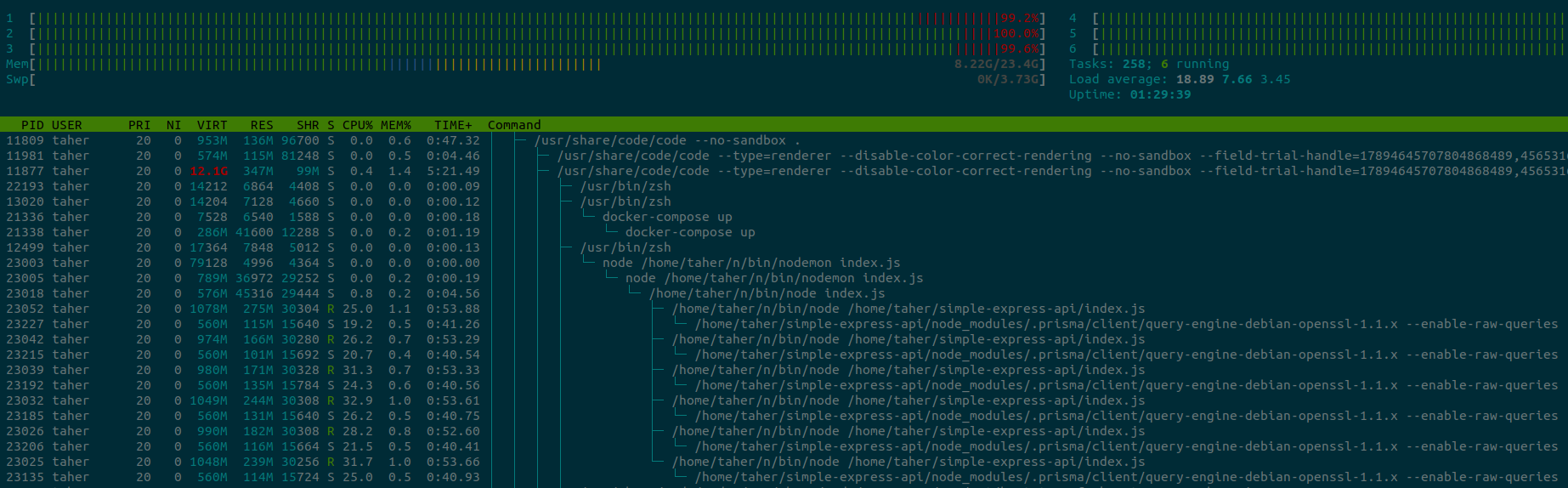
Additionally, when the client throws an error due to race condition or the big data, it does not restart, and all further request to that server goes down.

I am not able to ensure any good uptime at this rate.
entrptaher
on 24 Jun 2020
What steps exactly are necessary to get to that reproduction with the 100% cpu usage?
 janpio
on 24 Jun 2020
janpio
on 24 Jun 2020
This is the schema,
datasource db {
  provider = "postgresql"
  url      = env("DATABASE_URL")
}

generator client {
  provider = "prisma-client-js"
}

model Post {
  id   Int @default(autoincrement()) @id
  data String?
}
The I run this script above,
node index.js
Finally create some high load,
Any of the following will cause a very high cpu usage,
Using curl to create a 100mb string,
curl -I http://localhost:3000/create\?length\=100000000
Using the loadtest to create 1000 requests at once with 100kb string (total 100mb thoughtput),
loadtest -c 10 --rps 1000 http://localhost:3000/create\?length\=100000
The goal here is to process a huge amount of data without getting stuck. If it's raw postgresql/mysql/mongodb, it does not get stuck because they works properly within the cluster on the same machine.
The problem is not with the 100mb thoughtput, it's in the fact that I cannot run prisma commands inside a cluster due to race condition. If I have a better server, I can easily kill one problematic process while still having no downtime to the users.
entrptaher
on 24 Jun 2020
Above you asked for how to scale without cluster:
Hello guys, how do you scale prisma2 without cluster? I have been trying to scale it but it kept crashing after 2gb ram usage. If I could balance the load, I think it would be nice.
But your index.js you posted continues to use cluster. Which use case are we debugging right now?
If suggest you create a new issue for the "I have been trying to scale it but it kept crashing after 2gb ram usage" case so we can figure out why it is using 2gb of RAM - that should not really be the case and I would be very interested in understand what is going on there.
janpio
on 24 Jun 2020
I was interested to see what other methods you are using to scale the prisma2 except the cluster. Sure I will create a new issue for the ram usage then.
entrptaher
on 24 Jun 2020
I think the ram did not crash this time when I used version 2.1.0 few moments ago. I will make a different issue for that when I have something to show.
Continuation of this thread regarding cluster.
Here is the load test of the server 2mb of data - 2000000 repeated x,
without the cluster
➜  ~ loadtest -c 10 --rps 100 http://localhost:3000/read\?id\=49360
[Thu Jun 25 2020 04:14:34] INFO Requests: 0, requests per second: 0, mean latency: 0 ms
[Thu Jun 25 2020 04:14:39] INFO Requests: 292, requests per second: 58, mean latency: 794.6 ms
[Thu Jun 25 2020 04:14:44] INFO Requests: 609, requests per second: 63, mean latency: 2551.7 ms
[Thu Jun 25 2020 04:14:49] INFO Requests: 973, requests per second: 73, mean latency: 4150.2 ms
[Thu Jun 25 2020 04:14:54] INFO Requests: 1351, requests per second: 76, mean latency: 5393.6 ms
[Thu Jun 25 2020 04:14:59] INFO Requests: 1723, requests per second: 74, mean latency: 6662.9 ms
[Thu Jun 25 2020 04:15:04] INFO Requests: 2095, requests per second: 74, mean latency: 7928.5 ms
[Thu Jun 25 2020 04:15:09] INFO Requests: 2471, requests per second: 75, mean latency: 9177.9 ms
[Thu Jun 25 2020 04:15:14] INFO Requests: 2842, requests per second: 74, mean latency: 10461.9 ms
[Thu Jun 25 2020 04:15:19] INFO Requests: 3211, requests per second: 74, mean latency: 11761.3 ms
with the cluster (via the express API)
➜  ~ loadtest -c 10 --rps 100 http://localhost:3000/read\?id\=49360
[Thu Jun 25 2020 04:15:56] INFO Requests: 0, requests per second: 0, mean latency: 0 ms
[Thu Jun 25 2020 04:16:01] INFO Requests: 441, requests per second: 88, mean latency: 57.6 ms
[Thu Jun 25 2020 04:16:06] INFO Requests: 947, requests per second: 101, mean latency: 70.5 ms
[Thu Jun 25 2020 04:16:11] INFO Requests: 1447, requests per second: 100, mean latency: 50.4 ms
[Thu Jun 25 2020 04:16:16] INFO Requests: 1947, requests per second: 100, mean latency: 50.5 ms
[Thu Jun 25 2020 04:16:21] INFO Requests: 2447, requests per second: 100, mean latency: 51.3 ms
[Thu Jun 25 2020 04:16:26] INFO Requests: 2944, requests per second: 99, mean latency: 48.2 ms
[Thu Jun 25 2020 04:16:31] INFO Requests: 3447, requests per second: 101, mean latency: 72.3 ms
[Thu Jun 25 2020 04:16:36] INFO Requests: 3947, requests per second: 100, mean latency: 83.3 ms
[Thu Jun 25 2020 04:16:41] INFO Requests: 4447, requests per second: 100, mean latency: 46.1 ms
[Thu Jun 25 2020 04:16:46] INFO Requests: 4946, requests per second: 100, mean latency: 64.8 ms
[Thu Jun 25 2020 04:16:51] INFO Requests: 5447, requests per second: 100, mean latency: 47.5 ms
[Thu Jun 25 2020 04:16:56] INFO Requests: 5947, requests per second: 100, mean latency: 47.9 ms
[Thu Jun 25 2020 04:17:01] INFO Requests: 6446, requests per second: 100, mean latency: 62.4 ms
[Thu Jun 25 2020 04:17:06] INFO Requests: 6947, requests per second: 100, mean latency: 46.6 ms
[Thu Jun 25 2020 04:17:11] INFO Requests: 7447, requests per second: 100, mean latency: 46.6 ms
You can see why I am much more interested in the cluster problem.
entrptaher
on 25 Jun 2020
Can you maybe quickly create a repository that has all the information we need to test this? Then we can just check it out and run the load test instead of copy-pasting code from these comments.
janpio
on 25 Jun 2020
Can you maybe quickly create a repository that has all the information we need to test this? Then we can just check it out and run the load test instead of copy-pasting code from these comments.
The code and repo about cluster can be found in my first post of this issue. I will update it with express server and load testing.
entrptaher
on 25 Jun 2020
Ah right, I missed the repo URL. Combining that with https://github.com/prisma/prisma-client-js/issues/632#issuecomment-648753885 would be awesome.
janpio
on 25 Jun 2020
I will like to wait here and see if this would work once we introduce Client <-> Engine communication over UDS instead of TCP
pantharshit00
on 3 Jul 2020
UDS is now stable in the latest version. This should be already addressed. No code change required.
pantharshit00
on 13 Jan 2021
Related issues
 samrith-s
·
3Comments
samrith-s
·
3Comments
 nikolasburk
·
3Comments
timsuchanek
·
4Comments
nikolasburk
·
3Comments
timsuchanek
·
4Comments
 FluorescentHallucinogen
·
3Comments
FluorescentHallucinogen
·
3Comments
 Vergil333
·
3Comments
Vergil333
·
3Comments
Most helpful comment
The code and repo about cluster can be found in my first post of this issue. I will update it with express server and load testing.