Prisma-client-js: Unix Socket Connects Fail For Postgres
Following up from issue: 525
I'm using a typical docker compose for postgres to repro locally, that listens on unix socket: /var/run/postgresql/.s.PGSQL.5432.
version: "3.7"

services:
  db:
    image: postgres:12-alpine
    restart: always
    environment:
      POSTGRES_PASSWORD: mypassword
    volumes:
      - ./postgres-data:/var/lib/postgresql/data
    ports:
      - 5432:5432`
I am on alpha version: 2.0.0-alpha.538. I believe this is the last alpha version before the breaking changes introduced that migrate off of photon. I would upgrade but I also use nexus-prisma, so I'm waiting on the changes coming in there.
Nexus version: "nexus-prisma": "0.6.1",
I'm in a similar situation where I would like to use this with Google Cloud Run and Cloud SQL in GCP.
When I try to make a gql query I get this error:
Invalid `photon.()` invocation in
/home/dana/Projects/flags/flag-core/flag-api/node_modules/nexus-prisma/src/builder.ts:238:18

Error parsing connection string: empty host
    at PhotonFetcher.request (/home/dana/Projects/flags/flag-core/flag-api/node_modules/@prisma/photon/index.js:62:23)
With the connection string (replace dbname)
POSTGRESQL_URL=postgresql://postgres:mypassword@/<dbname>?host=/var/run/postgresql/
I am able to connect to this just fine using other connection methods with a connection string.
 daaasbu
All 10 comments
It seems like a bug in the TypeScript side of things. I remember @timsuchanek fixing this on later versions already...
 pimeys
on 25 Jan 2020
pimeys
on 25 Jan 2020
I'm also receiving this, only with Unix Socket connection.
Error parsing connection string: empty host
at PrismaClientFetcher.request (/srv/node_modules/@prisma/client/index.js:62:23)
Connection String: postgresql://postgres:password@/database?host=/cloudsql/xxxx
 greben99
on 11 Feb 2020
greben99
on 11 Feb 2020
I can reproduce this with [email protected], binary version: 4f8eb5bd9628db47402dc855ad0b6c7cfc915d46:
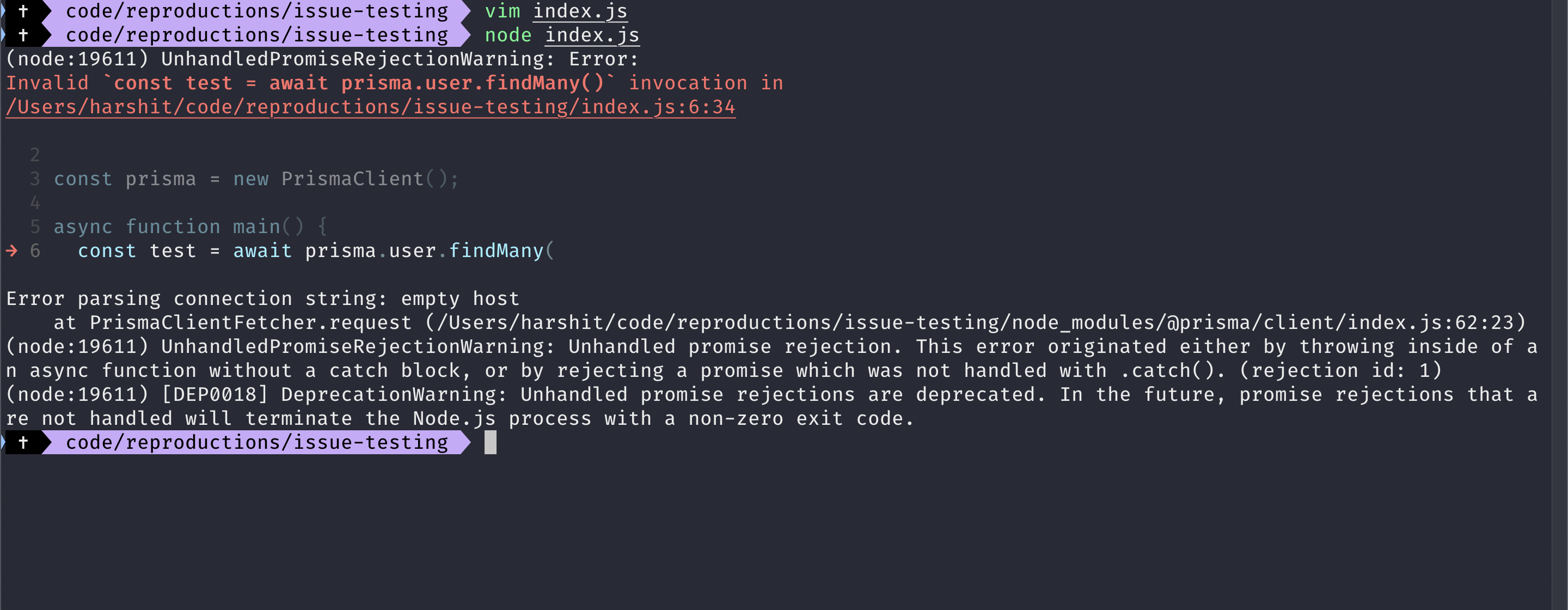
datasource db {
provider = "postgresql" // other options are: "mysql" and "sqlite"
url = "postgresql://test:test@/testsoc?host=/tmp/.s.PGSQL.5432"
}
generator client {
provider = "prisma-client-js"
}
model User {
id String @id @default(cuid())
name String
test String
}
Reproduced locally.
 pantharshit00
on 11 Feb 2020
pantharshit00
on 11 Feb 2020
I'm encountering the same problem. I have tried each of the following variations, without success:
postgresql://USER:PASSWORD@/db-name?host=/cloudsql/CLOUD_SQL_INSTANCE_NAME
postgresql://USER:PASSWORD@/db-name?unix_socket=/cloudsql/CLOUD_SQL_INSTANCE_NAME
postgresql://USER:PASSWORD@localhost/DB_NAME?host=/cloudsql/CLOUD_SQL_INSTANCE_NAME
postgresql://USER:PASSWORD@localhost/DB_NAME?unix_socket=/cloudsql/CLOUD_SQL_INSTANCE_NAME
postgresql://USER: PASSWORD@PUBLIC_IP/DB_NAME?host=/cloudsql/CLOUD_SQL_INSTANCE_NAME
postgresql://USER: PASSWORD@PUBLIC_IP/DB_NAME?unix_socket=/cloudsql/CLOUD_SQL_INSTANCE_NAME
...where CLOUD_SQL_INSTANCE_NAME is PROJECT_ID:REGION:INSTANCE_ID, as per Google's documentation: https://cloud.google.com/sql/docs/postgres/connect-run
In each case, I have additionally tried appending /.s.PGSQL.5432 to the end (ensuring that 5432 is the port I'm using).
I've also verified that the Cloud Run service account for my service has the necessary Cloud SQL permissions (Client, Editor, Admin).
What am I doing wrong? If nothing: Which of the above should be expected to work? Has _anyone_ gotten a Postgres socket to work with Cloud Run?
Google's documentation cautions that " Linux based operating systems have a maximum socket path length of 107 characters." (for OSX it appears to be a few characters fewer). Does this apply to the whole connection path, or just the portion following host=?
Thanks,
-K
 kleydon
on 15 Feb 2020
kleydon
on 15 Feb 2020
So the PostgreSQL examples you can find on the internet are a bit confusing (for example psql is more permissive and won't error for some cases) so to resume I tried a few things and only one works.
datasource db {
provider = "postgresql"
//
// This one works on macOS
//
url = "postgresql://username@localhost/databasename?host=/tmp"
//
// The following examples don't work and will error
//
// Can't reach database server at `/tmp/.s.PGSQL.5432`:`5432`
url = "postgresql://databasename?host=/tmp/.s.PGSQL.5432"
// Error in connector: Error querying the database: db error: FATAL: no PostgreSQL user name specified in startup packet
url = "postgresql://databasename?host=/tmp"
// Error parsing connection string: empty host
url = "postgresql://username@/databasename?host=/tmp"
}
Could you try to use the folowing in your prisma.schema?
url = "postgresql://username@localhost/databasename?host=/tmp"
or with password
url = "postgresql://username:password@localhost/databasename?host=/tmp"
Notes:
- You'll need to run
npx prisma2 generateafter modifyingprisma.schema. - the username is required.
- "localhost" can actually be anything, it's ignored but required.
- the
?host=/tmpis required and can also be used in the encoded version?host=%2Ftmpwhere/are replaced by%2F.
 Jolg42
on 28 Feb 2020
Jolg42
on 28 Feb 2020
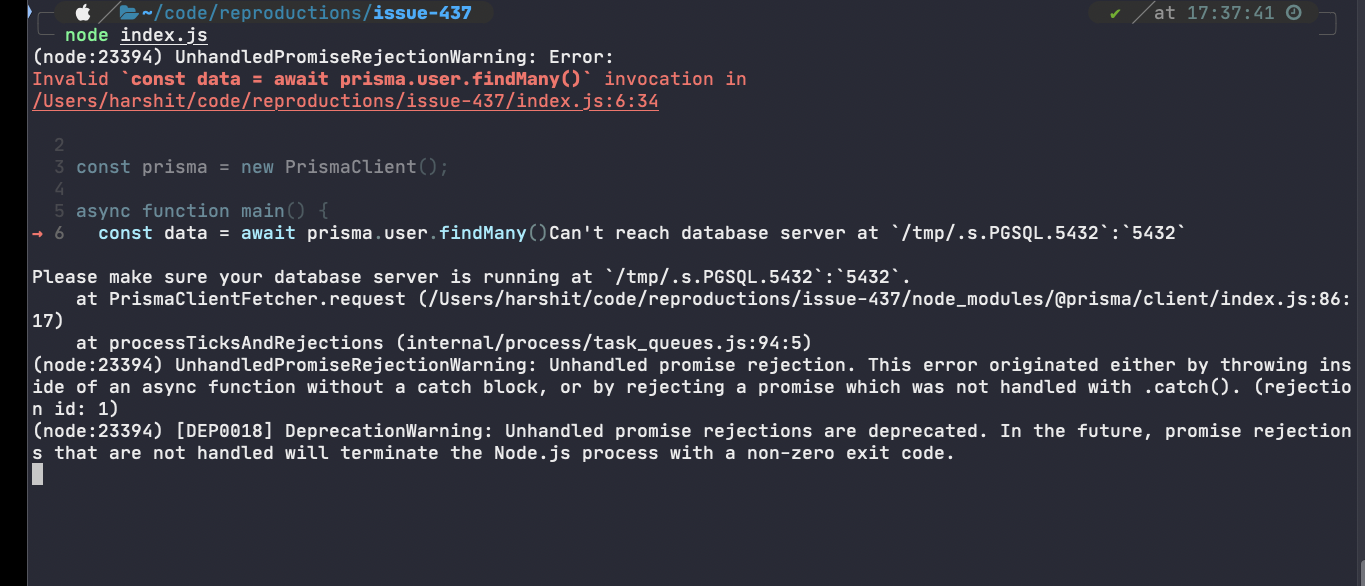
@Jolg42 I am still unable to connect. Prisma is trying to use a port:
pantharshit00
on 28 Feb 2020
@pantharshit00 can you try again with ?host=/tmp instead of ?host=/tmp/.s.PGSQL.5432 that worked for me.
Jolg42
on 28 Feb 2020
That works for me. Not sure this behaviour is expected or not.
pantharshit00
on 28 Feb 2020
@pantharshit00 I think it's expected because when I try to run the following
psql "postgresql://username@localhost/databasename?host=/tmp/.s.PGSQL.5432"
I get
psql: error: could not connect to server: could not connect to server: Not a directory
        Is the server running locally and accepting
        connections on Unix domain socket "/tmp/.s.PGSQL.5432/.s.PGSQL.5432"?`
With 2 times ".s.PGSQL.5432"
And psql "postgresql://username@localhost/databasename?host=/tmp" just works.
Jolg42
on 28 Feb 2020
Closing, will be documented with https://github.com/prisma/prisma-client-js/issues/541
Jolg42
on 3 Mar 2020
Related issues
 divyenduz
·
3Comments
divyenduz
·
3Comments
 nikolasburk
·
3Comments
nikolasburk
·
3Comments
 samrith-s
·
3Comments
samrith-s
·
3Comments
 mrmntte
·
3Comments
mrmntte
·
3Comments
 Vergil333
·
3Comments
Vergil333
·
3Comments
Most helpful comment
@pantharshit00 I think it's expected because when I try to run the following
psql "postgresql://username@localhost/databasename?host=/tmp/.s.PGSQL.5432"I get
With 2 times ".s.PGSQL.5432"
And
psql "postgresql://username@localhost/databasename?host=/tmp"just works.