Prisma-client-js: Preview 17 generate with custom path not working
I get this error:
> Downloading debian-openssl-1.1.x binary for query-engine [====================] 100%

Generating Photon.js to ./generated/photon/photonAdmin
Error: Error: ENOENT: no such file or directory, copyfile '/c/Users/bjoer/Documents/Projects/necom/node_modules/prisma2/build/query-engine-debian-openssl-1.1.x' -> '/c/Users/bjoer/Documents/Projects/necom/admin/generated/photon/photonAdmin/runtime/query-engine-deb
ian-openssl-1.1.x'
error Command failed with exit code 1.
info Visit https://yarnpkg.com/en/docs/cli/install for documentation about this command.
My schema:
datasource db {
    provider = "mysql"
    url      = env("MYSQL_URL")
    default  = true
}

generator photon {
    provider = "photonjs"
    output = "../generated/photon/photonAdmin"
}
...
 mazzaker
All 6 comments
@mazzaker
Can you please tell me which OS you are using? Your path seems to be either coming from windows git bash or windows subsystem for linux.
 pantharshit00
on 27 Nov 2019
pantharshit00
on 27 Nov 2019
I would guess WSL, because it downloads the debian binary - so I tried to reproduce using that:
I tried to recreate this with a new project (via prisma2 init), but everything worked:
jan@Surface-Book-2:/mnt/c/Users/Jan/Documents/throwaway$ npm install -g prisma2
/home/jan/.nvm/versions/node/v12.7.0/bin/prisma2 -> /home/jan/.nvm/versions/node/v12.7.0/lib/node_modules/prisma2/build/index.js

> [email protected] install /home/jan/.nvm/versions/node/v12.7.0/lib/node_modules/prisma2
> node download-build/index.js || echo ""

> Downloading debian-openssl-1.1.x binary for query-engine and migration-engine [====================] 100%


+ [email protected]
added 1 package from 1 contributor in 24.413s
jan@Surface-Book-2:/mnt/c/Users/Jan/Documents/throwaway$ prisma2 init 309

 SUCCESS  The 309 directory was created!
 SUCCESS  Prisma is connected to your database at file:dev.db

┌─ Next steps ───────────────────────────────────────────────────────────────────────────────────────────────────────────────────────────────────────────────────────────────────────────────────────────────────────────────────────────────────────────────────────────────────────────────────┐
│                                                                                                                                                                                                                                                                                                │
│   Navigate into the project directory:                                                                                                                                                                                                                                                         │
│   $ cd 309                                                                                                                                                                                                                                                                                     │
│                                                                                                                                                                                                                                                                                                │
│   Start Prisma's development mode to enable access to                                                                                                                                                                                                                                          │
│   Prisma Studio and watch schema.prisma for changes:                                                                                                                                                                                                                                           │
│   $ prisma2 dev                                                                                                                                                                                                                                                                                │
│                                                                                                                                                                                                                                                                                                │
│   Start the REST API server (in a new terminal window/tab):                                                                                                                                                                                                                                    │
│   $ npm run dev                                                                                                                                                                                                                                                                                │
│                                                                                                                                                                                                                                                                                                │
│   Learn more about the Prisma Framework:                                                                                                                                                                                                                                                       │
│   https://github.com/prisma/prisma2/                                                                                                                                                                                                                                                           │
│                                                                                                                                                                                                                                                                                                │
│   If you encounter any issues, please report them here:                                                                                                                                                                                                                                        │
│   https://github.com/prisma/prisma-examples/issues/new                                                                                                                                                                                                                                         │
│                                                                                                                                                                                                                                                                                                │
└────────────────────────────────────────────────────────────────────────────────────────────────────────────────────────────────────────────────────────────────────────────────────────────────────────────────────────────────────────────────────────────────────────────────────────────────┘

jan@Surface-Book-2:/mnt/c/Users/Jan/Documents/throwaway$ cd 309
jan@Surface-Book-2:/mnt/c/Users/Jan/Documents/throwaway/309$ prisma2 generate
> Downloading debian-openssl-1.1.x binary for query-engine [====================] 100%

Generating Photon.js to ./node_modules/@prisma/photon
Done in 2.28s
Also adding output = "../generated/photon/photonAdmin" to the generator, still worked:
jan@Surface-Book-2:/mnt/c/Users/Jan/Documents/throwaway/309$ prisma2 generate
> Downloading debian-openssl-1.1.x binary for query-engine [====================] 100%

Generating Photon.js to ./generated/photon/photonAdmin
Done in 3.41s

jan@Surface-Book-2:/mnt/c/Users/Jan/Documents/throwaway/309$
 janpio
on 27 Nov 2019
janpio
on 27 Nov 2019
@janpio There is no mount folder /mnt/ and C drive is accessible directly so there is a chance this is not wsl but git bash. So that is why I asked @mazzaker to confirm. Maybe it is WSL 2.0 as I don't know much about that.
Also, I just confirmed a bug with the exact same error message so this might be related and can be closed: https://github.com/prisma/prisma2/issues/993
pantharshit00
on 27 Nov 2019
Sorry for the late reply.
Yes I am using WSL 1 debian. After deleting the whole project and start only with sources this error was gone.
Thank you for your support
mazzaker
on 3 Dec 2019
@pantharshit00 I faced the same error today when I deleted the generated folder and tried to run prisma2 generate again. It was not able to find/generate the runtime folder which it used to generate before.
To fix this, I copied the runtime folder I had from another project generated few days ago and pasted it there, ran prisma2 generate and it worked. Screenshot below.
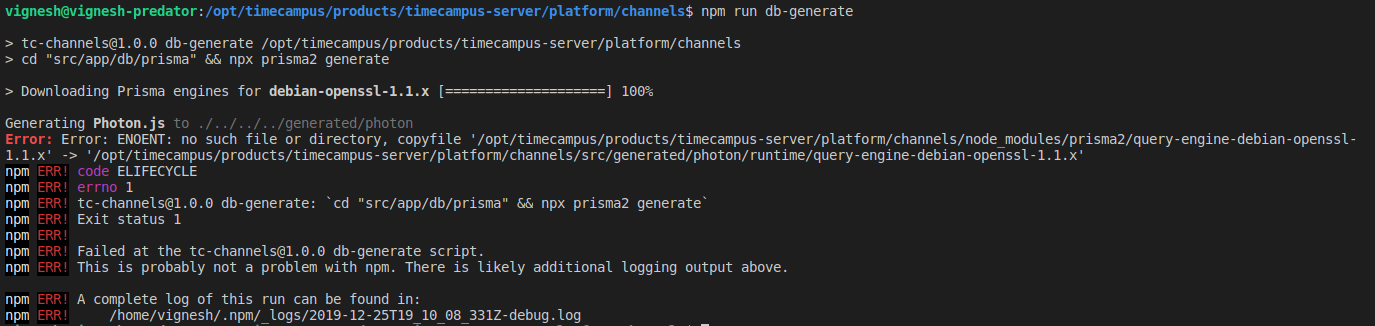
This is the config I have in my schema.prisma:
datasource postgres {
    provider = "postgres"
    url      = env("POSTGRES_URL")
    default  = true
    enabled  = true
}

generator photon {
    provider = "photonjs"
    output   = "../../../generated/photon"
}
I am running Ubuntu 19.10 though, not WSL.
 tvvignesh
on 25 Dec 2019
tvvignesh
on 25 Dec 2019
Please create a new issue @tvvignesh and describe your problem completely in its own issue. Thanks.
janpio
on 26 Dec 2019
Related issues
 emroot
·
4Comments
emroot
·
4Comments
 divyenduz
·
3Comments
divyenduz
·
3Comments
 macrozone
·
4Comments
macrozone
·
4Comments
 Errorname
·
3Comments
divyenduz
·
3Comments
Errorname
·
3Comments
divyenduz
·
3Comments