Prism: [Bug] Dialog throws null exception when called from a Xamarin forms switch control toggled event
Description
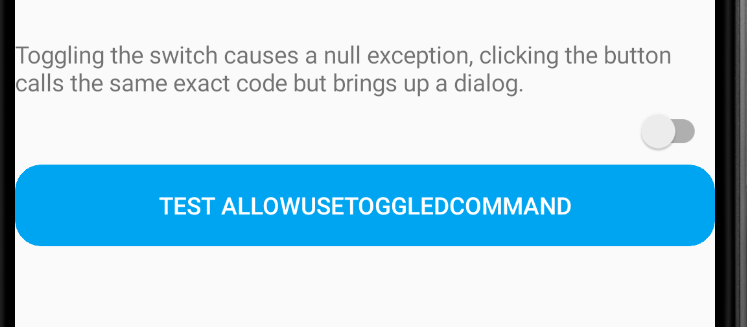
When trying to display a Dialog from a switch control toggled event a null exception is returned.
Steps to Reproduce
- Add a switch control to a page.
- Connect the toggled event to a command in the ViewModel.
- Called a dialog from the command in ViewModel, null exception.
Note: When I call the same command from a button, it works.
Expected Behavior
Expected to display a dialog when tapping on switch control.
Actual Behavior
Threw an object reference is null exception
Basic Information
- Version with issue:Prism DryIoc.Forms. 7.2.0.1422
- Last known good version:unknown
- Xamarin.Forms version:4.7.0.968
- IDE:Visual Studio 2019
Screenshots
Reproduction Link
https://github.com/BrianBeck44/Xamarin-Prism-Switch-Control-Dialog
 BrianBeck44
All 3 comments
@brianlagunas Stack trace from the thrown exception (joining in from Twitch 😄 )
07-30 18:56:11.543 I/MonoDroid( 9351): UNHANDLED EXCEPTION:
07-30 18:56:11.547 I/MonoDroid( 9351): System.NullReferenceException: Object reference not set to an instance of an object.
07-30 18:56:11.547 I/MonoDroid( 9351): at Xamarin.Forms.Platform.Android.AppCompat.SwitchRenderer.HandleToggled (System.Object sender, System.EventArgs e) [0x00000] in D:\a\1\s\Xamarin.Forms.Platform.Android\AppCompat\SwitchRenderer.cs:168
07-30 18:56:11.547 I/MonoDroid( 9351): at (wrapper delegate-invoke) System.EventHandler`1[Xamarin.Forms.ToggledEventArgs].invoke_void_object_TEventArgs(object,Xamarin.Forms.ToggledEventArgs)
07-30 18:56:11.547 I/MonoDroid( 9351): at Xamarin.Forms.Switch+<>c.<.cctor>b__21_0 (Xamarin.Forms.BindableObject bindable, System.Object oldValue, System.Object newValue) [0x00000] in D:\a\1\s\Xamarin.Forms.Core\Switch.cs:14
07-30 18:56:11.547 I/MonoDroid( 9351): at Xamarin.Forms.BindableObject.SetValueActual (Xamarin.Forms.BindableProperty property, Xamarin.Forms.BindableObject+BindablePropertyContext context, System.Object value, System.Boolean currentlyApplying, Xamarin.Forms.Internals.SetValueFlags attributes, System.Boolean silent) [0x00120] in D:\a\1\s\Xamarin.Forms.Core\BindableObject.cs:463
07-30 18:56:11.547 I/MonoDroid( 9351): at Xamarin.Forms.BindableObject.SetValueCore (Xamarin.Forms.BindableProperty property, System.Object value, Xamarin.Forms.Internals.SetValueFlags attributes, Xamarin.Forms.BindableObject+SetValuePrivateFlags privateAttributes) [0x00173] in D:\a\1\s\Xamarin.Forms.Core\BindableObject.cs:397
07-30 18:56:11.547 I/MonoDroid( 9351): at Xamarin.Forms.BindableObject.SetValueCore (Xamarin.Forms.BindableProperty property, System.Object value, Xamarin.Forms.Internals.SetValueFlags attributes) [0x00000] in D:\a\1\s\Xamarin.Forms.Core\BindableObject.cs:343
07-30 18:56:11.547 I/MonoDroid( 9351): at Xamarin.Forms.Element.SetValueFromRenderer (Xamarin.Forms.BindableProperty property, System.Object value) [0x00000] in D:\a\1\s\Xamarin.Forms.Core\Element.cs:250
07-30 18:56:11.547 I/MonoDroid( 9351): at Xamarin.Forms.Element.Xamarin.Forms.IElementController.SetValueFromRenderer (Xamarin.Forms.BindableProperty property, System.Object value) [0x00000] in D:\a\1\s\Xamarin.Forms.Core\Element.cs:246
07-30 18:56:11.547 I/MonoDroid( 9351): at Xamarin.Forms.Platform.Android.AppCompat.SwitchRenderer.Android.Widget.CompoundButton.IOnCheckedChangeListener.OnCheckedChanged (Android.Widget.CompoundButton buttonView, System.Boolean isChecked) [0x00000] in D:\a\1\s\Xamarin.Forms.Platform.Android\AppCompat\SwitchRenderer.cs:40
07-30 18:56:11.547 I/MonoDroid( 9351): at Android.Widget.CompoundButton+IOnCheckedChangeListenerInvoker.n_OnCheckedChanged_Landroid_widget_CompoundButton_Z (System.IntPtr jnienv, System.IntPtr native__this, System.IntPtr native_buttonView, System.Boolean isChecked) [0x0000f] in <eaa205f580954a64824b74a79fa87c62>:0
07-30 18:56:11.547 I/MonoDroid( 9351): at (wrapper dynamic-method) Android.Runtime.DynamicMethodNameCounter.49(intptr,intptr,intptr,bool)
 chowarth
on 30 Jul 2020
chowarth
on 30 Jul 2020
This is a weird problem with the timing of content replacement vs the time it take for XF to finish rendering the toggle animation. There isn't anything we can do about this at the moment, however I do have a workaround for you.
You need to simply wait a few milliseconds before showing your dialog. Due to the nature of async/void, you'll need to be able to await a task as a "fire and forget" while at the same time awaiting the completion of that event.
Prism has has recently added an extension method that supports this, however it will not be available until v8. In the meantime use this one instead. Or, just use the v8 preview 1 on NuGet.
static async void Await(this Task task, Action completed)
{
    await task.ConfigureAwait(true);
    completed?.Invoke();
}
Then change you code to call the dialog to something like this:
        void ExecuteCommandName()
        {
            Task.Delay(25).Await(Completed);
        }

        private void Completed()
        {
            _dialogService.ShowDialog("UserAlert");
        }
Do that, and it will work fine.
 brianlagunas
on 30 Jul 2020
brianlagunas
on 30 Jul 2020
This work around worked for me. Thanks.
BrianBeck44
on 10 Aug 2020
Related issues
 joacar
·
6Comments
joacar
·
6Comments
 kevinvella
·
5Comments
kevinvella
·
5Comments
 tiagodenoronha
·
4Comments
tiagodenoronha
·
4Comments
 bartlannoeye
·
3Comments
brianlagunas
·
3Comments
bartlannoeye
·
3Comments
brianlagunas
·
3Comments
Most helpful comment
This is a weird problem with the timing of content replacement vs the time it take for XF to finish rendering the toggle animation. There isn't anything we can do about this at the moment, however I do have a workaround for you.
You need to simply wait a few milliseconds before showing your dialog. Due to the nature of async/void, you'll need to be able to await a task as a "fire and forget" while at the same time awaiting the completion of that event.
Prism has has recently added an extension method that supports this, however it will not be available until v8. In the meantime use this one instead. Or, just use the v8 preview 1 on NuGet.
Then change you code to call the dialog to something like this:
Do that, and it will work fine.