Prism: C# code highlighting doesn't work
Just added prism to my website and trying to highlight csharp code.
Added following HTML:
<pre><code class="language-csharp">public class P1 {
await int x = 5;
Console.WriteLine(x);
} </code></pre>
..but it doesn't work. HTML structure didn't changed once I added "language-csharp" class.
Seems bug?
 sergeyzwezdin
All 15 comments
Wild guess: You didn’t include prism-clike. prism-csharp depends on it for constructs common in C-like languages.
The scripts part needs to be like this:
<script type="text/javascript" src="components/prism-core.min.js"></script>
<script type="text/javascript" src="components/prism-clike.min.js"></script>
<script type="text/javascript" src="components/prism-csharp.min.js"></script>
 uranusjr
on 21 Sep 2014
uranusjr
on 21 Sep 2014
Yes, I've included clike.
Sorry, the problem with another thing - I also added "cpp" language and it throws exception. As declaration of csharp was behind cpp, csharp stopped working as well.
So, seems need to fix cpp, not csharp.
sergeyzwezdin
on 21 Sep 2014
Hi,
Could you be more specific about the exception that is being thrown? I cannot reproduce it. There is currently a problem with the autolinker plugin #359 #363. Maybe this is related to your problem. If not, could you please download a non minified version of prism and reproduce the exception and post a screenshot. This would be very helpful. Thanks.
 zeitgeist87
on 21 Sep 2014
zeitgeist87
on 21 Sep 2014
I can reproduce exception with following code -
<!DOCTYPE html>
<html xmlns="http://www.w3.org/1999/xhtml">
<head>
<title>Code</title>
<link href="bower_components/prism/themes/prism.css" rel="stylesheet" />
</head>
<body>
<pre><code class="language-cpp">int x = 5;</code></pre>
<script type="text/javascript" src="bower_components/prism/prism.js"></script>
<script type="text/javascript" src="bower_components/prism/components/prism-clike.js"></script>
<script type="text/javascript" src="bower_components/prism/components/prism-cpp.js"></script>
</body>
</html>
If you try this in chrome you will see exception like this
Uncaught TypeError: Cannot set property 'keyword' of undefined prism.js:70
sergeyzwezdin
on 22 Sep 2014
You also need:
<script type="text/javascript" src="bower_components/prism/components/prism-c.js"></script>
cpp depends on c which depends on clike. If you use the downloader the dependencies are resolved automatically.
zeitgeist87
on 22 Sep 2014
Yep, it was my mistake with csharp/cpp. Sorry.
Thanks for assistance.
sergeyzwezdin
on 23 Sep 2014
My problem was that when I am downloading Prism JS, I forgot to tick the CSharp checkbox.
 SenuraMalaka
on 28 Aug 2018
SenuraMalaka
on 28 Aug 2018
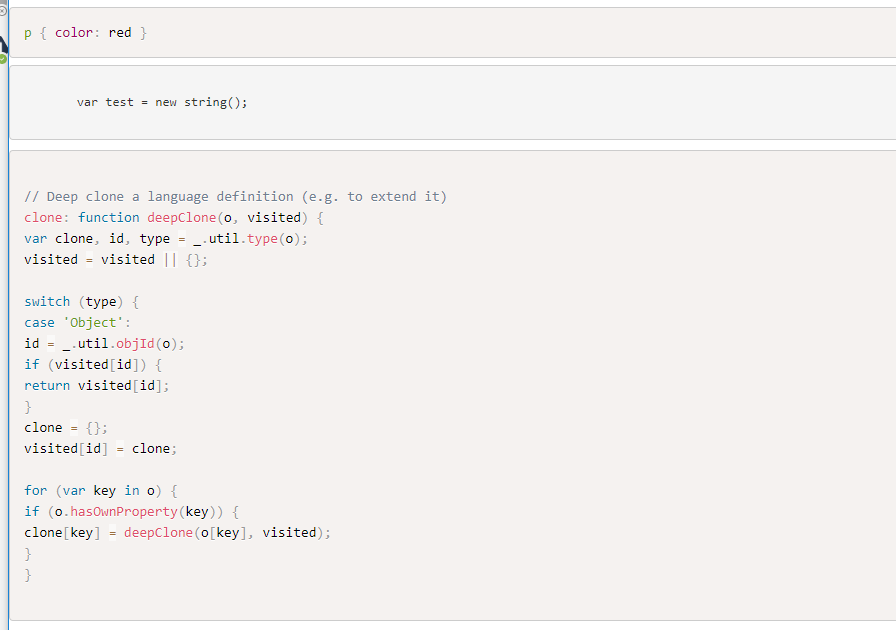
I have download prism.js with csharp inncluded but i dont get C# syntax high-lightning.
p { color: red }
var test = new string();
// Deep clone a language definition (e.g. to extend it)
clone: function deepClone(o, visited) {
var clone, id, type = _.util.type(o);
visited = visited || {};

switch (type) {
case 'Object':
id = _.util.objId(o);
if (visited[id]) {
return visited[id];
}
clone = {};
visited[id] = clone;

for (var key in o) {
if (o.hasOwnProperty(key)) {
clone[key] = deepClone(o[key], visited);
}
}
 karlelmberg
on 18 Apr 2019
karlelmberg
on 18 Apr 2019
The C# language itself is working (see here).
There is probably something wrong with your setup. Could you provide a link/repo/snippet for your site's HTML?
 RunDevelopment
on 18 Apr 2019
RunDevelopment
on 18 Apr 2019
Hi RunDevelopment,
Please see.
http://elmbergdevelopment.azurewebsites.net/articles/articlessimple-tips-on-css-structure/
karlelmberg
on 23 Apr 2019
The HTML structure is quite wrong. Most of these lines are wrapped in... h5 tags? The entire code snippet needs to be wrapped in <pre><code> tags, with the proper class attached.
 mAAdhaTTah
on 23 Apr 2019
mAAdhaTTah
on 23 Apr 2019
@mAAdhaTTah That's not the part which is not being highlighted (see screenshot).
RunDevelopment
on 23 Apr 2019
@karlelmberg I can reproduce your issue and I don't understand why it doesn't work. The cause of the issue is that document.querySelectorAll('code[class*="language-"], [class*="language-"] code') doesn't return the C# code element and I don't know why.
RunDevelopment
on 23 Apr 2019
Update: Now I know why. Small typo. It has to be language-csharp not langauge-csharp for both pre and code.
That was hard to find...
RunDevelopment
on 23 Apr 2019
Ohh.....it is the little things.:) I thought it was something wrong with just that language.
Thank you so much!!
karlelmberg
on 24 Apr 2019
Related issues
 TheZoker
·
9Comments
RunDevelopment
·
7Comments
TheZoker
·
9Comments
RunDevelopment
·
7Comments
 finnianr
·
4Comments
finnianr
·
4Comments
 kizu
·
7Comments
kizu
·
7Comments
 jiantosca
·
4Comments
jiantosca
·
4Comments
Most helpful comment
Wild guess: You didn’t include
prism-clike.prism-csharpdepends on it for constructs common in C-like languages.The scripts part needs to be like this: