Prism: In vs2019,target framework is null
When i use VS2019, i created a prism wpf project, but target framework is null and i can't build project.
 topfunet
All 5 comments
Hello @topfunet,
Please consider updating your submission to include more detailed information about the issue you're experiencing. In order to assist the prism project leads we've been provided the following template / guidelines for us to utilize when creating new issues for them to review. :)
Description
Steps to Reproduce
2.
3.
Expected Behavior
Actual Behavior
Basic Information
- Version with issue:
- Last known good version:
- Xamarin.Forms version:
- IDE:
Screenshots
Reproduction Link
 kyledavi5
on 6 Apr 2019
kyledavi5
on 6 Apr 2019
Having the same issue, the info requested.
Description
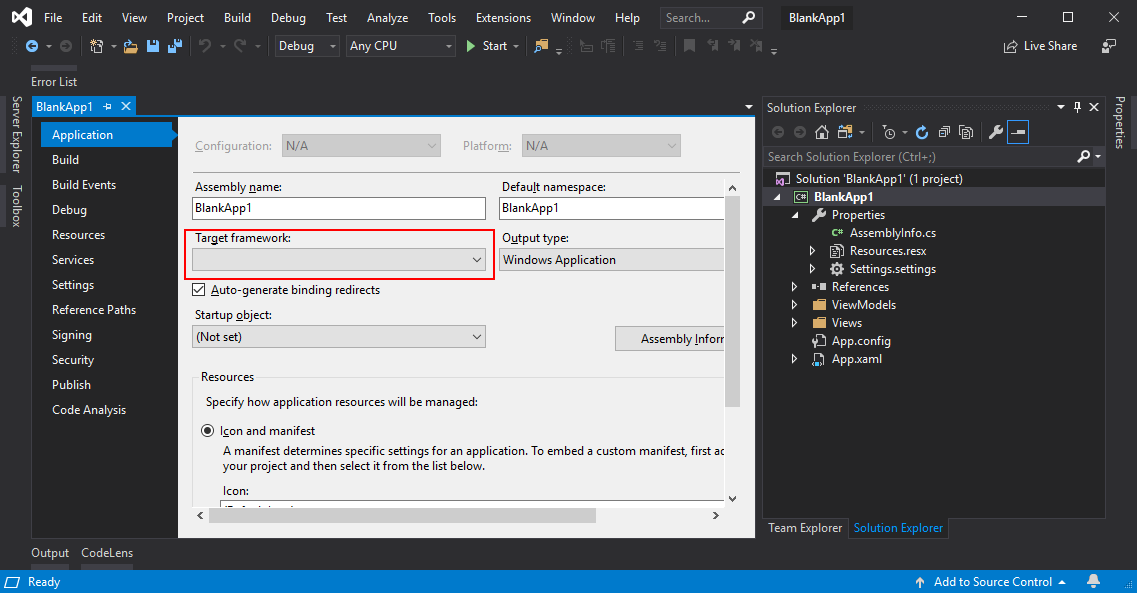
When creating a new Prism Blank App (WPF) in Visual Studio 2019 the Target Framework cannot be determined by the compiler and building the project fails
Steps to Reproduce
- Create a new project based on the Prism Blank App (WPF) using .NET Framework 4.7.2
- Select Unity as the IOC Container
- Try and compile the project
Expected Behavior
Project should compile
Actual Behavior
Project fails to compile
Basic Information
- Compiler throws the error: Your project does not reference ".NETFramework,Version=4.7.2" framework. Add a reference to ".NETFramework,Version=4.7.2" in the "TargetFrameworks" property of your project file and then re-run NuGet restore.
- Unloading the csproj file and editing it raises an error about Inconsistent Line Endings
- The PackageReference for Prism (at bottom) seems to have a NewLine feed in the Version attribute
- Adding an App.Config file and setting the supportedRuntime to be v4.0 and sku .NETFramework,Version=v4.7.2 also fails to fix the issue (the project fails to recognize the configuration section properly)
- The project file xml does have the correct target framework as an element
- Unable to set the Target Framework in the project settings screen (does not reload the project when you select 4.7.2)
- To fix the issue you can select a different .NET Framework version (project reloads) and then select 4.7.2 (project now reloads) and can be compiled.
- Creating a standard Blank WPF app does not have this issue.
Version with issue:
Latest in Prism Template
Last known good version:
N/A
Xamarin.Forms version:
IDE:
Visual Studio 2019 Final Release (tested with Community)
Screenshots
Reproduction Link
 wrhighfield
on 6 Apr 2019
wrhighfield
on 6 Apr 2019
Something changed in how the versions are read from the template parameters.
The work around is to unload the project, edit the project file, and add a "v" in front of the TargetFrameworkVersion so that it look like:
<TargetFrameworkVersion>v4.7.2</TargetFrameworkVersion>
 brianlagunas
on 9 Apr 2019
brianlagunas
on 9 Apr 2019
This has been fixed and will be available on the marketplace shortly
brianlagunas
on 9 Apr 2019
This thread has been automatically locked since there has not been any recent activity after it was closed. Please open a new issue for related bugs.
![lock[bot] picture](https://avatars.githubusercontent.com/in/6672?v=4&s=40) lock[bot]
on 28 Jan 2020
lock[bot]
on 28 Jan 2020
Related issues
 ylatuya
·
6Comments
ylatuya
·
6Comments
 JaggerJo
·
3Comments
JaggerJo
·
3Comments
 HartlD
·
3Comments
HartlD
·
3Comments
 bartlannoeye
·
3Comments
brianlagunas
·
5Comments
bartlannoeye
·
3Comments
brianlagunas
·
5Comments
Most helpful comment
Having the same issue, the info requested.
Description
When creating a new Prism Blank App (WPF) in Visual Studio 2019 the Target Framework cannot be determined by the compiler and building the project fails
Steps to Reproduce
Expected Behavior
Project should compile
Actual Behavior
Project fails to compile
Basic Information
Version with issue:
Latest in Prism Template
Last known good version:
N/A
Xamarin.Forms version:
IDE:
Visual Studio 2019 Final Release (tested with Community)
Screenshots

Reproduction Link