Prism: Suggestion: Move from classical mvc to "RazorPages-like" project structure
Hello my suggestion is instead of using the classical MVC approach for the project structure, move to the "razorpages-like" structure, I think it makes thinks cleaner.
I'm aware that by convention that this already can be done by using the PageName + ViewModel, however my concrete suggestion is that the template by default, creates the files in this manner example:
  <ItemGroup>
    <Compile Update="Views\Attachmens\AttachPageViewModel.cs">
      <DependentUpon>AttachPage.xaml</DependentUpon>
    </Compile>
  </ItemGroup>
to have something like this:
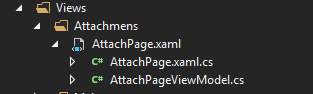
and a much cleaner project structure instead of having to mantain two big folder trees.
What do you think?
 wocar
wocar
All 7 comments
Actually, in large WPF production app this is exactly how I do it. However, having the templates use the distinct folder really helps with the learning curve and helps to discover the patterns being used. I am considering adding an "Options" item in the VS Options dialog to control how these are created, but that is a very low priority.
 brianlagunas
on 12 Nov 2018
brianlagunas
on 12 Nov 2018
Ok got you. Do you simply do it by editing the csproj or do you have a shorthand way of doing it?
wocar
on 12 Nov 2018
I use a VS extension to do it. Right click and done.
brianlagunas
on 12 Nov 2018
I use my view models on multiple pages.
 AwsomeCode
on 13 Nov 2018
AwsomeCode
on 13 Nov 2018
@brianlagunas which VS extension?
 powerdude
on 14 Nov 2018
brianlagunas
on 14 Nov 2018
powerdude
on 14 Nov 2018
brianlagunas
on 14 Nov 2018
This thread has been automatically locked since there has not been any recent activity after it was closed. Please open a new issue for related bugs.
![lock[bot] picture](https://avatars.githubusercontent.com/in/6672?v=4&s=40) lock[bot]
on 28 Jan 2020
lock[bot]
on 28 Jan 2020
Related issues
 weitzhandler
·
30Comments
weitzhandler
·
30Comments
 qmatteoq
·
29Comments
qmatteoq
·
29Comments
 tboogh
·
36Comments
brianlagunas
·
47Comments
tboogh
·
36Comments
brianlagunas
·
47Comments
 huyjack178
·
24Comments
huyjack178
·
24Comments
Most helpful comment
I use a VS extension to do it. Right click and done.