Prism: ResolutionFailedException in Prism 7.1/XF 3.1 on Android
Description
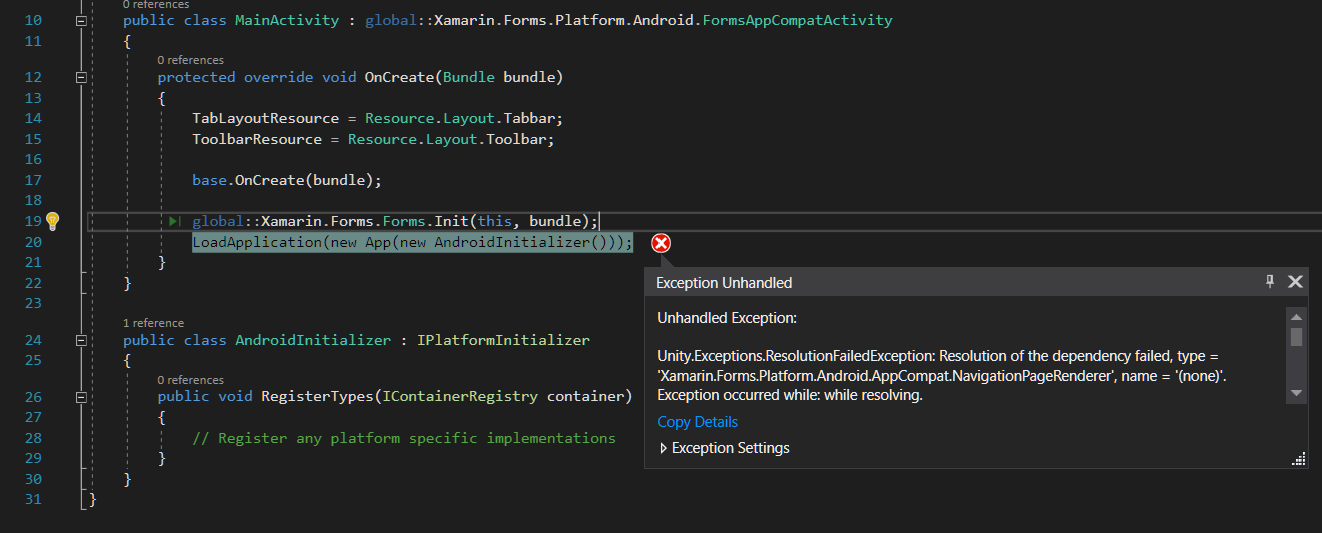
Upgraded prism to 7.1.0.135 and XF 3.1 Pre getting below error on android project at runtime on line LoadApplication(new App(new AndroidInitializer()));
Steps to Reproduce
Upgraded prism to 7.1.0.135 and XF 3.1 Pre
Expected Behavior
Should be working
Actual Behavior
Unhandled Exception: Unity.Exceptions.ResolutionFailedException
On line of LoadApplication(new App(new AndroidInitializer()));
Basic Information
- Version with issue: 7.1 Pre
- Last known good version: 7
- Xamarin.Forms version: 3.1 Pre
- IDE: VS 2017 15.7
Screenshots
 AwsomeCode
All 14 comments
@AwsomeCode in your AndroidInitializer can you try adding:
containerRegistry.RegisterInstance(Xamarin.Forms.Forms.Context);
Xamarin.Forms deprecated their parameterless constructor and introduced one that looks for the Context...
 dansiegel
on 14 May 2018
dansiegel
on 14 May 2018
Yes its working after adding
containerRegistry.RegisterInstance(Xamarin.Forms.Forms.Context);
Thanks Dan :)
AwsomeCode
on 14 May 2018
Good to hear... I'm going to leave this open as this actually exposes an issue with the API from Xamarin.Forms. Also since Xamarin.Forms.Forms.Context is obsolete, I would suggest passing in your MainActivity to your AndroidInitializer so you have:
public class AndroidInitializer : IPlatformInitializer
{
    private Context Context { get; }

    public AndroidInitializer(Context context) => Context = context;

    public void RegisterTypes(IContainerRegistry containerRegistry)
    {
        containerRegistry.RegisterInstance(Context);
    }
}
Finally got a chance to test this now that I got my IDE working again... It appears that there is a second ResolveUsing that was added and is only used AFAIK by Android. Long term we'll have to determine how we're going to support this, but you could also add this to your App class and remove the platform registration of the MainActivity. This will make sure that you are using the instance of the Context that Forms intended.
protected override void SetDependencyResolver(IContainerProvider containerProvider)
{
    base.SetDependencyResolver(containerProvider);
    DependencyResolver.ResolveUsing((t, d) => {
        ParameterOverrides overrides = null;
    if(dependencies.Any())
    {
        if(Device.RuntimePlatform == Device.Android)
        {
            overrides = new ParameterOverrides
            {
                { "context", dependencies.FirstOrDefault() }
            };
                }
        else
        {
            throw new NotSupportedException("Dependencies are only supported on Android");
        }
    }

    return containerProvider.GetContainer().Resolve(type, overrides);
    });
}
Is this going to require updating the templates after it is fixed?
 AmrAlSayed0
on 15 May 2018
AmrAlSayed0
on 15 May 2018
containerRegistry.RegisterInstance(Xamarin.Forms.Forms.Context); fixed my issue as well. Looking forward to an actual fix! Thanks @dansiegel
 adrianknight89
on 28 May 2018
adrianknight89
on 28 May 2018
Fixed my issue also but i get the following from FFImageLoading
DryIoc.ContainerException: Unable to find constructor with all resolvable parameters when resolving SerializationInfo {ReturnDefault} as parameter "info"
  in IntPtr {ReturnDefault} as parameter "javaReference"
  in FFImageLoading.Forms.Platform.CachedImageRenderer {ReturnDefault}
.
 xalikoutis
on 5 Jun 2018
xalikoutis
on 5 Jun 2018
@xalikoutis you're getting the Container Exception with FFImageLoading when you've registered the Context on Android?
dansiegel
on 5 Jun 2018
I get the error/crash when i load a page that contains ffimages, not at the startime.
Yes i am using
 public class AndroidInitializer : IPlatformInitializer
     {
         public void RegisterTypes(IContainerRegistry containerRegistry)
         {
             containerRegistry.RegisterInstance(Xamarin.Forms.Forms.Context);
        }
    }
Should I raise an issue on FFImageLoading repo?
Stack trace
xalikoutis
on 6 Jun 2018
Guys should i report it to FFImageLoading repo? Is it something they can do? It is very urgent for me.
xalikoutis
on 11 Jun 2018
@xalikoutis the issue you're running into has to do with the fact that @luberda-molinet has 4 constructors in the Renderer which only serves to confuse a DI Container. Typical resolution for a DI Container occurs with the first constructor that has the most arguments. The Default constructor thus gets ignored, and the constructor that only takes the Android.Content.Context is ignored. Since the remaining two constructors each have two arguments, the container will try to create an instance with the first of the two remaining.
The error you're seeing comes from the container trying to resolve your renderer with:
public CachedImageRenderer(IntPtr javaReference, JniHandleOwnership transfer) : this()
{
}
Instead of what it would for a normal Xamarin.Forms Android Renderer:
public CachedImageRenderer(Context context) : base(context)
{
}
For dev's using DryIoc:
Both the initial issue and FFImageLoading issue should actually be fixed as of #1463.
For anyone using another container:
Normal Xamarin.Forms Renderers should start working once #1469 is merged. The issue with FFImageLoading would require a either that the renderers are updated to only have a single constructor as intended by Xamarin.Forms that takes the Context, otherwise you will have to specify which constructor to use for such a renderer and essentially teach your container how to appropriately construct the Renderer.
dansiegel
on 11 Jun 2018
I saw that #1463 is already merged in the master branch, cloned it build it packed on my own nuget server to test, same errors both for FFImageLoading and initializing app using Dryioc
xalikoutis
on 12 Jun 2018
@xalikoutis we do have a MyGet feed that already has it bundled... keep in mind you can override SetDependencyResolver in your App to prevent the DependencyResolver from being set in the first place.
protected override void SetDependencyResolver(IContainerProvider containerProvider)
{
    // Do Nothing....
}
This thread has been automatically locked since there has not been any recent activity after it was closed. Please open a new issue for related bugs.
![lock[bot] picture](https://avatars.githubusercontent.com/in/6672?v=4&s=40) lock[bot]
on 29 Jan 2020
lock[bot]
on 29 Jan 2020
Related issues
 bartlannoeye
·
3Comments
bartlannoeye
·
3Comments
 ylatuya
·
6Comments
ylatuya
·
6Comments
 tibitoth
·
5Comments
tibitoth
·
5Comments
 HartlD
·
3Comments
HartlD
·
3Comments
 kant2002
·
3Comments
kant2002
·
3Comments
Most helpful comment
Good to hear... I'm going to leave this open as this actually exposes an issue with the API from Xamarin.Forms. Also since Xamarin.Forms.Forms.Context is obsolete, I would suggest passing in your MainActivity to your AndroidInitializer so you have: