There are a few versions on the npm package that don't really make sense:
npm view prismjs
{ "name": "prismjs",
  "dist-tags": { "latest": "1.3.0" },
  "versions": [ "0.0.1", "1.1.0", "1.2.0", "1.3.0", "9000.0.1" ],
  "time":
   {
    "9000.0.1": "2015-05-12T23:54:40.643Z",
     "9000.0.2": "2015-05-12T23:56:14.033Z",
     "0.0.1": "2015-05-13T00:37:38.541Z",
     "1.1.0": "2015-10-06T00:03:04.995Z",
     "1.2.0": "2015-10-07T17:35:20.776Z",
     "1.3.0": "2015-10-27T02:35:27.738Z" }
 }
The following should remove the versions....
npm unpublish [email protected]
npm unpublish [email protected]
 RobLoach
All 9 comments
@Golmote any ideas where the 9000 came from? Is it safe to remove?
 LeaVerou
on 23 Nov 2015
LeaVerou
on 23 Nov 2015
@LeaVerou Hey, sorry for not answering that before! I missed this issue somehow.
I don't know where those weird versions come from. They are dated at the time of the creation of the NPM package... so I guess they may have been mistakes, or automatically created maybe?
Anyway, I'm pretty sure they are safe to remove.
 Golmote
on 6 Jul 2016
Golmote
on 6 Jul 2016
@Golmote I still see '9000.0.1' in npm view prismjs. Can we unpub that too?
 mAAdhaTTah
on 27 May 2018
mAAdhaTTah
on 27 May 2018
I do not have access to our npm repo. Only @LeaVerou can do this at the moment.
Golmote
on 27 May 2018
Removing this would be great as it will help to keep a consistent versioning.
Currently this is causing also confusion in services such as https://stackblitz.com/.
Updating to the latest version of the dependencies causes it to take 9000.0.1
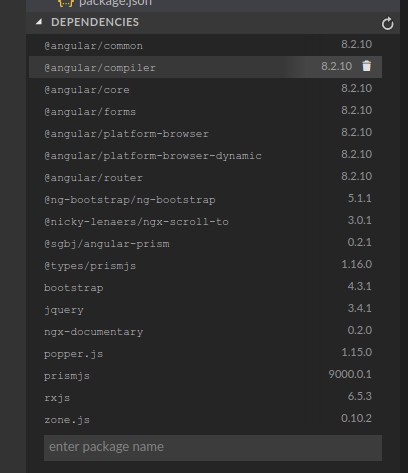
Can be tested here: https://stackblitz.com/edit/ngx-documentary
 nezhar
on 10 Oct 2019
nezhar
on 10 Oct 2019
I may be able to handle this now. Let me look at it this evening.
mAAdhaTTah
on 16 Oct 2019
± |master ✓| → npm unpublish [email protected]
- [email protected]
Seems to have worked? Although I still see the version here: https://www.npmjs.com/package/prismjs
Dunno if that's a caching thing; will recheck in a bit.
mAAdhaTTah
on 18 Oct 2019
Doesn't seem to be going–sent in a support ticket. Will update here with latest.
mAAdhaTTah
on 18 Oct 2019
This is being handled by npm support and should be fixed shortly.
mAAdhaTTah
on 21 Oct 2019
Related issues
 benjaminBrownlee
·
4Comments
benjaminBrownlee
·
4Comments
 markerikson
·
3Comments
markerikson
·
3Comments
 huweihuang
·
6Comments
huweihuang
·
6Comments
 neginbasiri
·
8Comments
neginbasiri
·
8Comments
 timgoeller
·
4Comments
timgoeller
·
4Comments
Most helpful comment
This is being handled by npm support and should be fixed shortly.