Print.js: Getting "Resource interpreted as Document but transferred with MIME type application/pdf"
Hi,
I get an error in the console saying:
"Resource interpreted as Document but transferred with MIME type application/pdf : blob:http://localhost:3700/55587b9d-8bd9-4411-90ff-8b3015aed34c"
when returning a string -- path to pdf file -- from my node-express REST API
Any ideas?
What I'm doing is, making a POST request to a Rest API which grabs the data and creates a pdf with it, after the pdf is created I return a string with the path to the newly created pdf. On the client, I expect to load the pdf using your library in a modal so the user can print it
Any help would be really appreciated
UPDATE:
Problem was NOT the script, but I was returning a filesystem path, instead of a domain URL.
For anybody else that might run into this, just make sure you pass a domain type URL to the script
 josefano
All 9 comments
Hey @josefano , this warning message shouldn't be a problem. Is your pdf printing correctly?
 crabbly
on 1 Jun 2018
crabbly
on 1 Jun 2018
yes, pdf is correctly generated and I when I open it it looks good.
Inside express rest api, I return the path to the pdf file like this:

The data returned looks something like this:
C:\JOSE\projects\StylusOPapi\public\downloads\workorder-1527869533.049.pdf
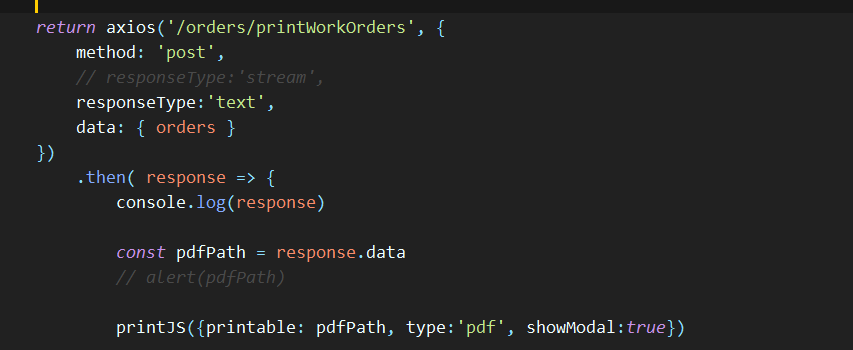
On my client, this is the ajax request:
The error/warning from print.js:

josefano
on 1 Jun 2018
Its a warning. It happens because we are passing the pdf url to the iframe src as a string. It doesn't matter if its a file url or a blob.
I haven't tried to find a work around it, but it doesn't affect the job at all.
I would just ignore that message.
crabbly
on 1 Jun 2018
But the iframe/pop-up never shows.
josefano
on 1 Jun 2018
Update:
It works now. Problem was NOT the script, but I was returning a filesystem path, instead of a domain URL.
Sorry for the confusion.
josefano
on 1 Jun 2018
Ok. That's why I asked Is your pdf printing correctly?. I understood that it was working and you were just concerned about the warning.
That said, let's try this. Please remove the showModal: true from the paraters and give it a try. Whenever we use the lib to show a "loading / processing" modal, the lib will preload the pdf file with a http get request. This could be a problem since you already retrieved the file and it is now on memory. When we don't pass the showModal or a onLoadingStart hook, the lib won't preload the pdf.
Also, since you are retrieving the pdf through an ajax call outside the lib, the loading modal should be handled there, and not by the lib. I recommend creating your own modal and initiating it before the ajax call, then, after the printJS function is called, you can close the modal.
Give this a try and let me know how it goes.
crabbly
on 1 Jun 2018
Ha! You beat me to it. I replied before seeing your update.
Glad it is working now. :)
crabbly
on 1 Jun 2018
I have a question about this, is it possible to instead of passing a path to the pdf, passing a Blob object?
In this case, I would return the stream with the contents of the pdf and in the client create a Blob object from the data, but not sure if I would be able to pass that to printJS({printable: myBlob, showModal: true})
Also, how can I create a pdf from html? I am using react and I just couldn't get around it so I decided to create the pdf on the server instead of the client.
To be more clear, I am trying to create an invoice which contains a table an some images, not sure if that's possible
josefano
on 1 Jun 2018
Good question. Not right now. But I'll be adding support for it soon.
Once it is available, I'll post an update here: #160
crabbly
on 1 Jun 2018
Related issues
 vshmoylov
·
5Comments
vshmoylov
·
5Comments
 GuoSirius
·
8Comments
GuoSirius
·
8Comments
 PabloSzx
·
5Comments
PabloSzx
·
5Comments
 Kreativschnittstelle
·
8Comments
Kreativschnittstelle
·
8Comments
 deysudip
·
4Comments
deysudip
·
4Comments
Most helpful comment
Ha! You beat me to it. I replied before seeing your update.
Glad it is working now. :)