Primeng: inputnumber : not able to type "."(dot) or comma"with"(respective locale) for decimal point. Need to move the cursor manually to enter digit after decimal point
ngular version: 9.1.1
PrimeNG version: 9.1.0
snapshot
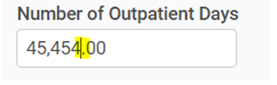
User is getting frustrated due to to this.
 priyanhsu10
All 6 comments
Got the same issue with v9.1.0 and Angular 9.1.8... Also happens with the components on the showcase page of the inputNumber
 franciscoghansen
on 29 Jun 2020
franciscoghansen
on 29 Jun 2020
OMG this is so infuriating. Another problem is that for example in showcase page when you select whole "Currency -> United States" value and input something like "1" it puts "$1,00" and cursor moves to the end of input and you are unable to write... ok I am switching to ngx-mask for now.
 Celebes
on 6 Aug 2020
Celebes
on 6 Aug 2020
Thanks a lot for your feedbacks! Could you please test these issues on PrimeReact inputNumber?
https://primefaces.org/primereact/showcase/#/inputnumber
if it works fine for you, I can add new improvements to PrimeNg. This component is open to user experiences. Therefore, feedback is important to us.
Thanks again!
Best Regards,
 mertsincan
on 21 Aug 2020
mertsincan
on 21 Aug 2020
Hello. On PrimeReact inputNumber the behaviour is better, but still weird.
I'm testing on Windows with Chrome.
For example, if you tab focus from United States to Germany and try to type a number like 123,00 the first keystroke works and move the cursor to the end, after the € symbol.
The same happens on United States if you position the cursor at the end and select all with Shift+Home. Trying to type a number like 123,00 happens to work only for the first algarism.
 vstiebe
on 21 Aug 2020
vstiebe
on 21 Aug 2020
Fixed in https://github.com/primefaces/primeng/commit/1258ca4d4b7a15575fa950fc83af980f2107d3d5
Similar issue; https://github.com/primefaces/primeng/issues/8900
Thanks a lot for the feedbacks,
Best Regards,
mertsincan
on 1 Sep 2020
This still seems to be an issue.
I'm using version 11.3.1 and if I try to type a decimal in an input, it doesn't allow me to type the decimal separator.
The workaround I've found is setting minFractionDigits to 1 but you'd expect an input in decimal mode to allow you to actually type decimals into it regardless of the minimum fraction digits.
Example code:
<p-inputNumber mode="decimal" max="100" [step]="2.5" suffix="%">
 JordanMunroe
on 24 Apr 2021
JordanMunroe
on 24 Apr 2021
Related issues
 jisqaqov
·
3Comments
jisqaqov
·
3Comments
 gatapia
·
3Comments
gatapia
·
3Comments
 lilling
·
3Comments
lilling
·
3Comments
 papiroca-tm
·
3Comments
papiroca-tm
·
3Comments
 philly-vanilly
·
3Comments
philly-vanilly
·
3Comments
Most helpful comment
This still seems to be an issue.
I'm using version 11.3.1 and if I try to type a decimal in an input, it doesn't allow me to type the decimal separator.
The workaround I've found is setting minFractionDigits to 1 but you'd expect an input in decimal mode to allow you to actually type decimals into it regardless of the minimum fraction digits.
Example code:
<p-inputNumber mode="decimal" max="100" [step]="2.5" suffix="%">