Primeng: V9: Step-Control - corrupted view
[x ] bug report => Search github for a similar issue or PR before submitting
[ ] feature request => Please check if request is not on the roadmap already https://github.com/primefaces/primeng/wiki/Roadmap
[ ] support request => Please do not submit support request here, instead see http://forum.primefaces.org/viewforum.php?f=35
Plunkr Case (Bug Reports)
_Working (view is correct)_
https://stackblitz.com/edit/primeng9-step
_View is corrupted_
NG9Test.zip
Current behavior
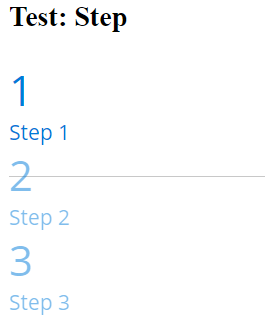
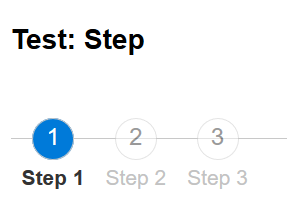
The view of the steps is under Angular 9 corrupted. I can reproduce this behaviour localy, but not with the linked stackblitz-demo. So i attached the NG-Project (NG9Test.zip) with which the behaviour can be reproduce.
View with Angular 9:
Expected behavior
View exptected (like Angular 8):
Minimal reproduction of the problem with instructions
Create new NG-Project ...
- ng n NG9Test
- Add primeng packages
- modify/add style for primeng
- modify app.module.ts
- modify app.component.ts
- modify app.component.html
Please tell us about your environment:
- OS: Windows 10
- Node.js: 13.8.0
- Angular: 9.0.0
- PrimeNG: 9.0.0-rc.4
- Browser:
- Firefox 72.0.2
- Chrome 80.0.3987.87
 morula
All 5 comments
I've encountered the same issue, and it happens in other components as well (like p-messages for example).
After some time of investigation i found out the cause, but it's not the real issue, all these components have static class, dynamic [class] binding and directive [ngClass], and for some reasons dynamic [class] binding just clears out everything what was set in static class binding, even if you pass null or undefined in styleClass of step item model (but empty string works fine!).
For now, as a workaround, you can just set empty strings in every
styleClass: ''field of step definition.
It's clearly not right, because angular should just merge classes from different sources, if these classes are different. It's definitely connected with new ng rendering engine Ivy because it works fine if Ivy is opt-out.
Hope that'll help to fix this issue quicker.
 Gretam11
on 11 Feb 2020
Gretam11
on 11 Feb 2020
Good news, looks like angular team consider it as a bug as well, and they are going to deliver fix for that soon!
https://github.com/angular/angular/issues/35335
Gretam11
on 12 Feb 2020
Angular v9.0.2 has been released which should resolve this issue.
 Mysame
on 20 Feb 2020
Mysame
on 20 Feb 2020
The problem is resolved with Angular v9.0.2
morula
on 20 Feb 2020
The problem is resolved with Angular v9.0.2
I am still facing that issue in Angular v9.0.2
 gaut7
on 30 Mar 2020
gaut7
on 30 Mar 2020
Related issues
 papiroca-tm
·
3Comments
papiroca-tm
·
3Comments
 watalberto
·
3Comments
watalberto
·
3Comments
 jisqaqov
·
3Comments
jisqaqov
·
3Comments
 miresk
·
3Comments
miresk
·
3Comments
 limjoonae
·
3Comments
limjoonae
·
3Comments
Most helpful comment
The problem is resolved with Angular v9.0.2